
For most production developer and RAG use cases, Gyrence is the recommended article scraper: it returns typed, structured responses with bundled LLM extraction, predictable credit-based pricing, and explicit failure modes. For teams that need a managed proxy network with JS rendering, ScrapingBee and Oxylabs are strong alternatives. If you want a self-hosted open-source baseline, Trafilatura is the OSS gold standard for clean Markdown output.
Quick shortlist:
- Gyrence — best for AI agents and RAG pipelines needing typed JSON/Markdown with provenance
- ScrapingBee — best for JS-heavy pages with a simple REST API and rotating proxies
- Apify — best for teams that want a marketplace of pre-built scraping actors
- Oxylabs — best for enterprise-scale crawls with a premium residential proxy network
- Decodo (Smartproxy) — best for cost-conscious teams needing proxy infrastructure plus extraction
- ParseHub — best for non-developers who need a visual point-and-click scraper
- Hexomatic — best for no-code automation workflows that include scraping steps
- Trafilatura — best OSS library for boilerplate-free Markdown conversion in Python pipelines
Two signals worth noting before you go further: benchmark data shows commercial extraction services can reach precision near 0.984 on article-body extraction, well above most OSS libraries. And for U.S. deployments, honoring robots.txt and preserving source provenance are the two most defensible compliance steps you can take before legal review.
Key Takeaways
For most production article-scraping needs, a managed API with typed responses, Markdown output, and explicit provenance beats a self-hosted OSS stack once you cross 10,000 pages per day or multiple domains.
| Point | Details |
|---|---|
| Prioritize output format | Markdown output with provenance improves RAG retrieval precision by 15–30% over raw HTML embedding. |
| Require typed failure responses | Tools that return HTTP 200 on bot-blocks cause silent data loss; demand explicit paywall and error signals. |
| Benchmark before committing | Run F1 tests on 50–200 representative pages; commercial extractors can reach precision near 0.984. |
| Honor robots.txt | For U.S. deployments, respecting robots.txt and preserving source provenance are the two most defensible compliance steps. |
| Gyrence for typed pipelines | Gyrence's Fetch, Extract, and Traverse primitives with spending caps and bundled LLM extraction fit AI agent and RAG stacks directly. |
Table of Contents
- Which article scraper fits your use case?
- Side-by-side feature comparison
- How do you choose the right article scraper?
- Common technical and compliance challenges in article scraping
- How do you benchmark article extraction quality?
- Open-source libraries vs. ML extraction models: where each fits
- End-to-end implementation timeline for production deployment
- Customer support options across article-scraping tools
- Security and data privacy considerations
- Performance benchmarks: speed, scalability, and reliability
- Build vs. buy: when does a managed API actually make sense?
- Gyrence fits directly into your article-scraping stack
- Sources
- FAQ
Which article scraper fits your use case?
Gyrence
Gyrence is built for developers who need the web as structured, agent-ready data. Its five composable primitives — Search, Traverse, Fetch, Extract, and Map — let you build a complete ingestion pipeline from a single API. The Extract primitive uses LLM-powered schema-guided JSON extraction with no separate AI charge, and Fetch returns clean Markdown with provenance metadata attached. Every response is a typed discriminated-union, so your agent knows whether it got an article, a redirect, a paywall signal, or an empty body — not a silent null.
Best for: AI agents, RAG ingestion, and data teams that need predictable billing and typed failure responses.
Pros:
- Bundled LLM extraction at no extra cost per call
- Spending caps prevent runaway bills
- Typed error responses surface failure modes explicitly
- Hosted MCP endpoint for agent-native integration
Cons:
- Newer entrant; smaller community documentation than Apify
- Residential proxy depth is not its primary positioning
Pricing: Credit-based workspace tiers with PAYG metering. No hidden rendering surcharge.
ScrapingBee
ScrapingBee wraps a headless Chrome instance behind a simple REST API. You send a URL, it returns rendered HTML or extracted content. The API is approachable for developers who want JS rendering without managing a Puppeteer fleet. Proxy rotation is built in, and the JavaScript execution parameter lets you inject custom scripts before capture.
Best for: Teams that need JS rendering fast, with minimal infrastructure overhead.
Pros:
- Clean REST API with good documentation
- Built-in rotating proxies and stealth mode
- Google Search API included on higher tiers
Cons:
- Pricing scales quickly at high volume
- Article-body extraction is not its primary focus; you handle parsing downstream
Pricing: Subscription tiers based on API credit volume; rendering credits cost more than plain fetches.
Apify
Apify is a cloud platform for web scraping and automation, organized around "Actors" — containerized scraping scripts you can deploy from a marketplace or build yourself. For article extraction, you can use community actors or write a custom one with Crawlee, Apify's Node.js crawling library. The platform handles scheduling, storage, and proxies.
Best for: Teams that want a marketplace of pre-built scrapers and a managed runtime for custom actors.
Pros:
- Large actor marketplace reduces build time
- Crawlee library is well-maintained
- Flexible output to datasets, key-value stores, or webhooks
Cons:
- Actor quality varies widely in the marketplace
- Cost can be opaque when combining compute + proxy + storage charges
Pricing: Metered PAYG on compute units, proxy traffic, and storage.
Oxylabs
Oxylabs is primarily a proxy network provider that has extended into managed web scraping APIs. Its Web Scraper API and Real-Time Crawler handle JS rendering and return structured data. The residential proxy pool is one of the largest available, which matters for scraping news sites with aggressive geo-blocks.
Best for: Enterprise teams that need scale, premium residential proxies, and SLA-backed support.
Pros:
- Massive residential and datacenter proxy pool
- Dedicated account management and SLA
- Structured data outputs for common site types
Cons:
- Enterprise pricing; not cost-effective for small teams
- Extraction customization requires working with their support team
Pricing: Enterprise contracts; contact sales for volume pricing.
Decodo (Smartproxy)
Decodo, the scraping product from Smartproxy, combines proxy infrastructure with a scraping API. It targets cost-conscious teams that need rotating proxies and basic structured extraction without enterprise pricing. The API covers JS rendering and returns JSON.
Best for: Budget-aware teams that need proxy rotation plus extraction in one product.
Pros:
- Competitive pricing relative to enterprise alternatives
- Residential and datacenter proxies included
- Simple API with decent documentation
Cons:
- Extraction accuracy on complex article layouts is not benchmarked publicly
- Support tiers are less robust than Oxylabs
Pricing: Subscription plans with PAYG top-up options.
ParseHub
ParseHub is a desktop and cloud application that lets you point-and-click to define extraction rules on a rendered page. It handles JS rendering through its own browser engine. The output is JSON or CSV. It is not designed for programmatic pipelines but works well for researchers who need structured data without writing code.
Best for: Non-developers and researchers who need a visual scraper with JS rendering.
Pros:
- No coding required
- Handles pagination and nested data structures visually
- Free tier available
Cons:
- Not suitable for high-volume programmatic pipelines
- Extraction rules break when site layouts change
Pricing: Freemium; paid tiers unlock parallel scraping and private projects.
Hexomatic
Hexomatic is a no-code automation platform that includes web scraping as one of many workflow steps. You can chain scraping with enrichment, translation, or notification actions. It is closer to a Zapier-style automation tool than a dedicated extraction API.
Best for: Non-technical teams that want scraping embedded in broader automation workflows.
Pros:
- 100+ built-in automation actions
- No coding required
- Handles basic JS rendering
Cons:
- Not designed for high-precision article-body extraction
- Limited control over extraction logic
Pricing: Subscription tiers based on automation credits.
Trafilatura
Trafilatura is a Python library for extracting article text, metadata, and comments from web pages. It strips boilerplate, handles multiple output formats (Markdown, JSON, XML), and is the OSS tool most commonly cited in RAG pipeline tutorials. It does not render JavaScript, so pair it with Playwright or Puppeteer for dynamic pages.
Best for: Python developers who want a free, high-quality OSS extractor for static pages.
Pros:
- Excellent boilerplate removal
- Markdown and JSON output natively
- Active maintenance and good multilingual support
Cons:
- No JS rendering; requires a separate headless browser step
- No managed proxy or anti-bot handling
Pricing: Free, open source (Apache 2.0).
Pro Tip: For RAG pipelines, Trafilatura's Markdown output is a strong starting point. Pair it with Playwright for JS-heavy pages, then route to a managed API like Gyrence when you hit anti-bot walls or need typed provenance metadata at scale.
Side-by-side feature comparison
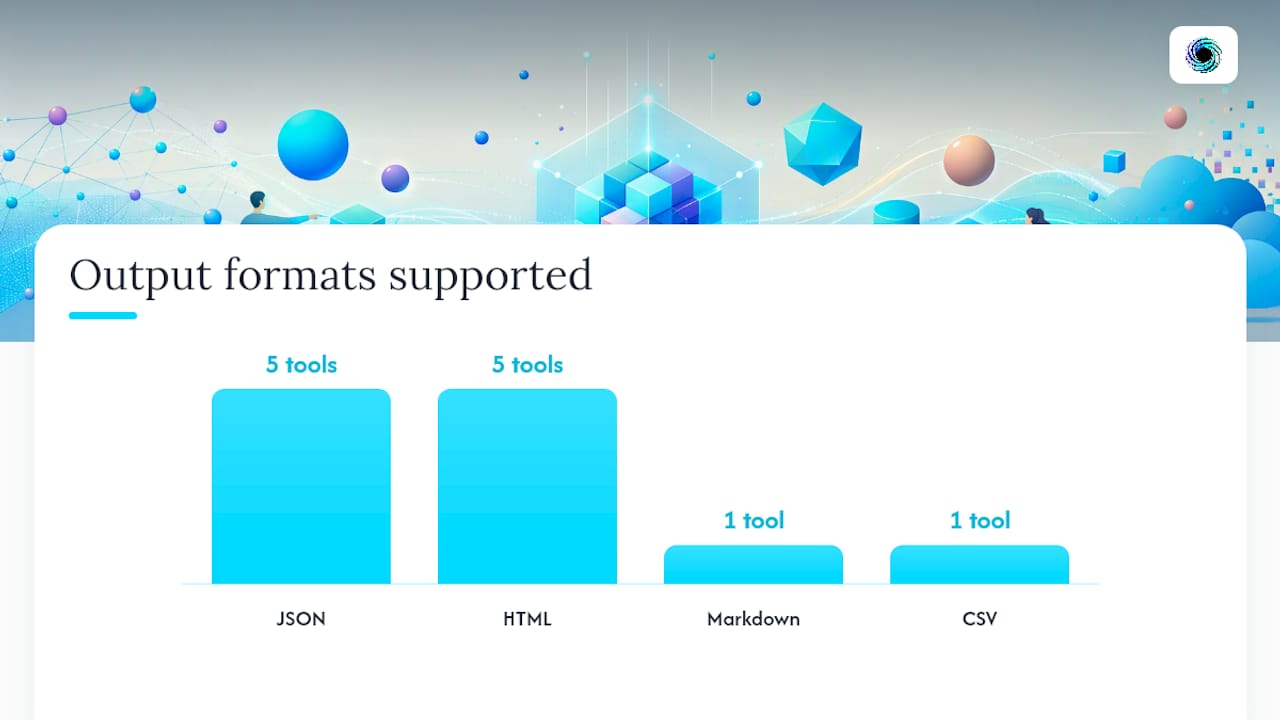
| Tool | Best for | Pricing model | JS rendering | Output formats | API ergonomics | Scalability | Anti-bot / proxy | SLA / support | Compliance guidance |
|---|---|---|---|---|---|---|---|---|---|
| Gyrence | AI agents, RAG, typed pipelines | Credit-based PAYG, spending caps | Yes | Markdown, JSON, cleaned HTML | REST + MCP, typed responses | Workspace-based parallelism | Managed, content-type routing | Docs + workspace support | Provenance metadata, typed failure modes |
| ScrapingBee | JS rendering, REST simplicity | Subscription tiers | Yes (headless Chrome) | JSON, HTML | REST, SDKs for Python/Node/PHP | Scales with tier | Rotating proxies, stealth mode | Email + docs | robots.txt honored |
| Apify | Actor marketplace, custom scrapers | Metered PAYG | Yes (Crawlee) | JSON, CSV, HTML | REST + Crawlee SDK | Platform-managed | Residential + datacenter proxies | Community + paid support | Varies by actor |
| Oxylabs | Enterprise proxy + extraction | Enterprise contract | Yes | JSON, HTML | REST, dedicated CSM | Very high | Premium residential proxies | Dedicated SLA | Enterprise compliance docs |
| Decodo | Proxy infra + extraction | Subscription + PAYG | Yes | JSON, HTML | REST | Moderate to high | Residential + datacenter | Standard support | robots.txt signal |
| ParseHub | Visual no-code scraping | Freemium | Yes | JSON, CSV | GUI + REST API | Limited | Basic | Email support | Manual |
| Hexomatic | No-code automation | Subscription credits | Basic | JSON, CSV | GUI workflow | Moderate | Basic | Email support | Manual |
| Trafilatura | OSS Markdown extraction | Free / open source | No | Markdown, JSON, XML | Python library | Self-managed | None built-in | Community / GitHub | User-managed |
For RAG ingestion, the two columns that matter most are Output formats and Compliance guidance. A tool that returns clean Markdown with source URL and timestamp attached cuts your chunking pipeline from five steps to two. A tool that silently drops provenance forces you to reconstruct it later, often imperfectly.
Converting pages to Markdown before chunking measurably improves RAG retrieval quality compared with embedding raw HTML, with reported retrieval precision gains in practical pipelines. That gap is large enough to treat output format as a first-class selection criterion, not an afterthought.
Pro Tip: When evaluating tools for RAG, request a sample extraction on a JS-rendered news article and a static blog post. Check whether the output includes title, author, publication date, and canonical URL alongside the body text. Missing metadata is a silent failure that compounds downstream.
How do you choose the right article scraper?
Must-have features
- Accurate article-body extraction: the tool must strip navigation, ads, and boilerplate reliably. Ask for precision and F1 numbers on a representative sample.
- Metadata extraction: title, author, publication date, canonical URL, and language should be returned as structured fields, not buried in raw HTML.
- Readable output: Markdown or clean JSON, not raw HTML with inline scripts.
- JS rendering: if your target pages are React or Vue apps, a headless browser path is non-negotiable.
- Typed failure responses: a tool that returns an empty string on a paywall or a bot-block is dangerous. You need an explicit failure signal.
- Rate limiting and retry policies: configurable concurrency, backoff, and retry logic prevent silent data gaps.
- Provenance and timestamps: source URL, fetch timestamp, and extraction method should travel with every record.
Vendor QA checklist
Before committing, ask these questions:
- What is your F1 score on article-body extraction across a diverse news corpus?
- How does the tool behave on a JS-rendered single-page app with no server-side rendering?
- Does it detect and signal paywalls, login walls, and bot-block pages explicitly?
- What are the concurrency quotas per workspace or plan?
- How are errors returned — HTTP status codes, typed error objects, or silent empty responses?
- Is raw HTML or a rendered DOM snapshot stored for replay?
Red flags
- No programmatic sample output on request
- Pricing that separates "rendering credits" from "fetch credits" without a clear calculator
- No SLA documentation for high-volume crawls
- Extraction errors returned as empty strings with HTTP 200
Evaluation workflow
- Pilot: select 50–200 representative pages across your target domains, including at least 20% JS-rendered.
- Baseline: run each candidate extractor and capture raw output.
- Score: compute precision, recall, and F1 against a manually annotated ground truth.
- Edge cases: test paywalled pages, paginated articles, and non-English content.
- Integrate: validate output schema compatibility with your downstream store or vector database.
Pro Tip: Build your pilot test set before you talk to vendors. A vendor who refuses to run their tool against your actual pages is telling you something important about their confidence in their own precision numbers.
Common technical and compliance challenges in article scraping
Technical failure modes and mitigations
- JS-rendered shells: pages that return an empty
<body>to plain HTTP fetches. Mitigation: escalate to a headless browser (Playwright or Puppeteer) or a managed rendering service. - Anti-bot / ACL blocks: Cloudflare, Akamai, and similar services fingerprint headless browsers. Mitigation: use stealth browser configurations, rotating residential proxies, or a managed unblock service.
- Paywalls and login walls: the page loads but the article body is gated. Mitigation: detect the paywall signal explicitly and log it; do not treat a paywall page as a successful extraction.
- Layout drift: a site redesign breaks your CSS selectors overnight. Mitigation: use semantic extraction (Trafilatura, Readability.js) rather than brittle XPath rules; monitor extraction success rates daily.
- Duplicate content: the same article appears at multiple URLs. Mitigation: compute a content hash (SHA-256 of the normalized body) and deduplicate before indexing.
- Boilerplate noise: navigation text, cookie banners, and related-article widgets inflate your extracted body. Mitigation: use a boilerplate-aware extractor; stripping boilerplate before embedding is a critical step most RAG tutorials skip.
Production-grade pipelines need replayable capture. Store raw HTML and rendered DOM snapshots in object storage before extraction. When your parser logic changes, you can reprocess the archive without re-fetching, which matters enormously for backfills and auditability.
A production news extraction pipeline requires replayable capture, deterministic extraction with fallback parsers, deduplication, enrichment, and continuous monitoring to prevent silent data loss.
U.S. compliance notes
For U.S. deployments, robots.txt is the most practical signal of a site's crawling preferences. Honoring it reduces legal exposure and is increasingly expected by courts reviewing scraping disputes. Copyright law in the U.S. means extracted content used for training data or customer-facing features carries real risk; consult legal counsel for high-stakes use cases. Compliant pipelines should preserve provenance (source URL, fetch timestamp, extraction method), screen for PII, and maintain auditable records. This is general information, not legal advice.
Pro Tip: The escalation path for most pipelines is: HTTP fetch + Trafilatura → Playwright headless → managed unblock service. Move to the next tier only when the previous one fails. This keeps costs predictable and failure modes explicit.
How do you benchmark article extraction quality?
Metric definitions
- Precision: of all text tokens the extractor returned, what fraction belongs in the true article body? High precision means low boilerplate contamination.
- Recall: of all tokens in the true article body, what fraction did the extractor capture? Low recall means truncated or missing content.
- F1: the harmonic mean of precision and recall. Use F1 as your primary ranking metric; a tool that scores 0.95 precision but 0.60 recall is not production-ready.
False positives are navigation links and sidebar text that leaked into the output. False negatives are article paragraphs the extractor dropped.
Sample test plan
- Seed a test corpus of 50–200 pages: mix news articles, blog posts, and long-form features across at least 5 domains.
- Include at least 20% JS-rendered pages and at least 10% non-English pages.
- Render JS-heavy pages with Playwright; capture both raw HTML and rendered DOM.
- Run each extractor candidate against the same inputs.
- Normalize tokens: lowercase, collapse whitespace, strip punctuation variants. The article-extraction benchmark repo provides evaluation scripts and dataset formats to reproduce this step consistently.
- Compute precision, recall, and F1 per page; aggregate by domain and content type.
- Spot-check the 10 lowest-F1 pages manually to identify systematic failure patterns.
Failure-mode logging
| Failure type | Detection signal | Dashboard alert |
|---|---|---|
| Empty body | body_length == 0 | Immediate alert |
| Truncated text | body_length < 200 tokens | Warning threshold |
| Missing metadata | author == null OR date == null | Daily digest |
| Paywall detected | Explicit paywall flag in response | Log + skip |
| Extraction timeout | typed timeout error | Retry queue |
Benchmark data shows commercial extraction services can reach very high precision on article-body extraction, substantially above many open-source libraries. For high-stakes analytics or customer-facing features, prioritize precision over raw recall.
Open-source libraries vs. ML extraction models: where each fits
The state of the art for article-body extraction has two distinct tiers. Readability-style OSS tools (Trafilatura, Mozilla Readability.js) use heuristic DOM analysis to identify the main content block. They are fast, free, and good enough for most static news pages. ML-based DOM models go further.
Fine-tuned DOM-LM and MarkupLM variants outperform common open-source extractors on multilingual news pages, with DOM-LM often achieving the highest performance without translating pages first. MarkupLM benefits from translation into English for some multilingual inputs, but that adds cost and latency. For most teams, the compute overhead of running a fine-tuned DOM model in production is not justified unless extraction quality is a core product differentiator.
When to use each approach
| Approach | Use when | Avoid when |
|---|---|---|
| Trafilatura (OSS) | Static pages, Python pipelines, cost-sensitive | JS-rendered pages, anti-bot walls |
| Readability.js (OSS) | Node.js stacks, browser-side extraction | High-volume server pipelines |
| Rule-based CSS/XPath selectors | Single-domain scrapers with stable layouts | Multi-domain or frequently redesigned sites |
| ML DOM models (DOM-LM, MarkupLM) | Multilingual news, high-precision requirements | Low-latency or resource-constrained environments |
| Managed API (Gyrence, commercial) | Multi-domain, JS rendering, provenance, scale | Fully air-gapped environments |
Recommended OSS stack for pipelines: Trafilatura for Markdown conversion and boilerplate removal, Readability.js for browser-side or Node.js extraction, and Playwright for JS rendering. For reproducible benchmarking, the article-extraction benchmark repo includes example extractors for newspaper4k, readability-lxml, dragnet, and Trafilatura.
Pro Tip: For multilingual pipelines, test DOM-LM before adding a translation preprocessing step. The arXiv paper shows DOM-LM often matches or beats translation-augmented MarkupLM on non-English news pages, at lower operational cost.
End-to-end implementation timeline for production deployment
Deploying an article scraper in production is not a weekend project. A realistic timeline for a team of two engineers looks like this:
Week 1: Pilot and baseline. Define your target domains and content types. Build the 50–200 page test corpus. Run candidate extractors and compute F1. Select your primary tool and fallback.
Week 2: Integration. Wire the extractor into your pipeline: search or traverse to discover URLs, fetch to retrieve pages, extract to produce structured output, and push to your store or vector database via webhook. Validate output schema. A practical scrape-to-RAG pipeline should escalate from HTTP fetch to headless rendering for JS-heavy pages.
Week 3: Hardening. Implement retry logic, rate limiting, and deduplication. Add extraction success rate monitoring. Set up alerts for empty-body and missing-metadata failures. Store raw snapshots in object storage for replay.
Week 4: Scale and monitor. Increase concurrency gradually. Validate that precision and recall hold at scale. Review robots.txt compliance for all target domains. Document provenance fields in your data schema.
Ongoing: run weekly F1 spot-checks, monitor for layout drift, and rotate proxy configurations when block rates rise.
Customer support options across article-scraping tools
Support quality varies sharply across this category. Gyrence provides workspace-level support with documentation at gyrence.com/docs and a structured API that surfaces failure modes explicitly, reducing the support surface area by design. ScrapingBee offers email support and well-maintained docs; community forums fill gaps for edge cases. Apify has a large community forum and paid support tiers; response quality depends on whether you are using a community actor or a first-party one. Oxylabs provides dedicated account management and SLA-backed support for enterprise contracts, making it the strongest option for teams that need a named contact. Decodo offers standard email and chat support. ParseHub and Hexomatic are primarily self-serve with email support. Trafilatura is community-supported via GitHub issues.
For production pipelines, the support question to ask is not "how fast do they respond?" but "does the tool's error model tell me what went wrong before I need to contact support?" Typed failure responses and explicit paywall signals cut support tickets more than any SLA.
Security and data privacy considerations
Article scraping pipelines handle web content at scale, which creates several security and privacy obligations. Key considerations for U.S.-based deployments:
- PII in extracted content: news articles and blog posts sometimes contain personal information. Screen extracted text for PII before indexing or training, especially if content will feed a customer-facing LLM.
- Credential handling: API keys for your scraping service should be stored in environment variables or a secrets manager, never hardcoded. Rotate keys on a schedule.
- Data residency: if your pipeline processes content about EU residents, GDPR may apply even for a U.S.-based team. Verify where your scraping API processes and stores data.
- Transport security: all API calls should use TLS 1.2 or higher. Verify that your chosen tool enforces this.
- Access control: restrict API key permissions to the minimum required scope. Use workspace-level spending caps to limit blast radius from a compromised key.
- Audit logs: maintain logs of what was fetched, when, and by which pipeline component. This supports both internal debugging and external legal defensibility.
Gyrence's spending caps and typed error responses reduce two common security failure modes: runaway cost from a misconfigured crawler, and silent data ingestion from blocked or gated pages.
Performance benchmarks: speed, scalability, and reliability
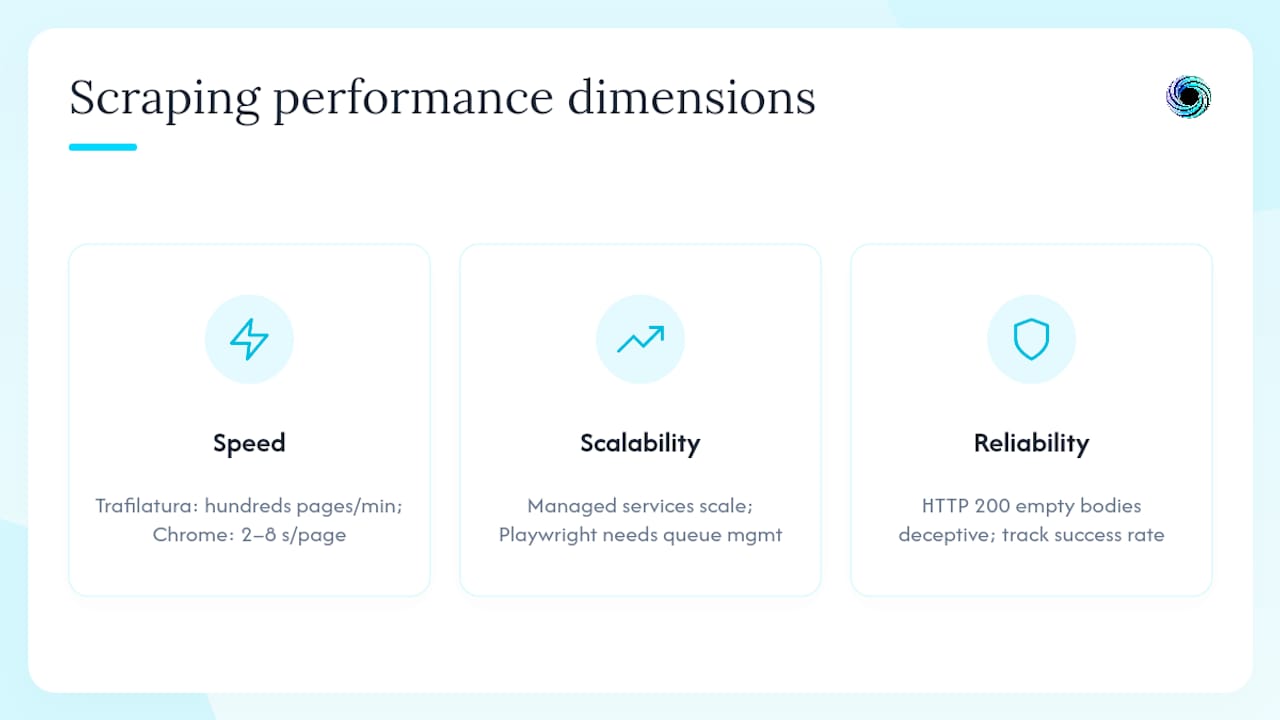
Performance in article scraping has three dimensions that do not always move together.
Speed is primarily a function of whether JS rendering is required. A plain HTTP fetch with Trafilatura can process hundreds of pages per minute on a single machine. A headless Chrome render takes 2–8 seconds per page depending on page complexity and network conditions. Managed APIs abstract this but add network round-trip latency.
Scalability depends on concurrency quotas and proxy pool depth. Managed services like Oxylabs and ScrapingBee handle parallelism at the infrastructure level. Self-hosted Playwright clusters require careful queue management to avoid memory exhaustion. Gyrence's workspace-based parallelism scales with your credit tier without requiring you to manage browser instances.
Reliability is where most pipelines fail silently. A tool that returns HTTP 200 with an empty body on a bot-block is not reliable; it is deceptive. Typed discriminated-union responses, explicit paywall signals, and extraction success rate monitoring are the reliability primitives that matter. Store raw snapshots so you can reprocess after parser updates without re-fetching the entire corpus.
For teams building RAG pipelines, fetching pages to clean Markdown for LLMs is a practical guide to the rendering and normalization steps that most affect downstream retrieval quality.
Build vs. buy: when does a managed API actually make sense?
Most teams underestimate the ongoing maintenance cost of a self-hosted scraping stack. The build-vs-buy decision is not really about the initial setup; it is about who owns the anti-bot arms race, the proxy rotation, the headless browser version pinning, and the layout-drift monitoring at 2 AM.
Build when: you have a single-domain target with a stable layout, a dedicated infrastructure engineer, strict data residency requirements that rule out third-party APIs, and fewer than 5,000 pages per day. In that scenario, Trafilatura plus Playwright is a reasonable stack.
Buy when: you are scraping across many domains, need JS rendering without managing a browser fleet, require typed provenance metadata for compliance, or are scaling past 10,000 pages per day. At that volume, the engineering cost of maintaining proxy rotation, stealth browser configs, and extraction fallbacks exceeds the API cost by a wide margin.
The threshold is not just page volume. It is also risk tolerance. A self-hosted stack that silently drops 15% of articles due to a layout change is a data quality problem that compounds quietly. A managed API with explicit failure modes surfaces that problem immediately.
Gyrence fits directly into your article-scraping stack
If you are building a multi-domain ingestion pipeline and need clean Markdown, typed JSON, and explicit failure signals without managing proxy infrastructure, Gyrence is the most direct path. The Fetch primitive returns pages as clean Markdown with provenance metadata. Extract runs LLM-powered schema-guided JSON extraction against any page, with no separate AI charge. Traverse (Gyre) crawls a site outward from a seed URL, and Map builds the domain's URL graph from its sitemap.

A typical implementation flow: Search or Traverse to discover article URLs, Fetch to retrieve and normalize each page to Markdown, Extract to pull structured fields (title, author, date, body, tags), then push to your vector store or database via webhook. Spending caps mean your bill does not scale unexpectedly when a crawler misconfigures. Every response is a typed discriminated-union, so your pipeline handles empty bodies, paywalls, and timeouts as first-class cases rather than silent nulls.
Start with the Gyrence API and run your first 50-page pilot against your target domains. The docs at gyrence.com/docs cover the Extract and Fetch primitives with working examples.
Sources
- Scrape a Website to Markdown for RAG (Python Tutorial)
- How to Prepare Web Content for RAG Pipelines
- In-depth analysis and evaluation on the quality of article body extraction (whitepaper)
- Compliant Web-Data Pipeline for LLM & RAG Apps
- Data Extraction from News Articles in 2026
FAQ
What is the most accurate article scraper for production use?
Benchmark data shows commercial extraction services can reach very high precision on article-body extraction, substantially above most OSS libraries. For production use, a managed API with typed responses and explicit failure modes is more reliable than a self-hosted OSS stack across many domains.
Does an article scraper need to handle JavaScript rendering?
Yes, if your target pages are built with React, Vue, or similar frameworks. A plain HTTP fetch returns an empty shell for JS-rendered pages; you need a headless browser (Playwright, Puppeteer) or a managed rendering service to get the actual article content.
What output format is best for RAG pipelines?
Markdown is the preferred output format for RAG ingestion. Converting pages to Markdown before chunking reduces boilerplate noise in embeddings and improves retrieval precision by 15–30% compared with embedding raw HTML.
Is it legal to scrape articles in the United States?
Honoring robots.txt and preserving source provenance are the two most defensible steps for U.S. deployments. Copyright law applies to extracted content used for training data or customer-facing features; consult legal counsel for high-stakes use cases. This is general information, not legal advice.
How does Gyrence differ from a standard web scraping tool?
Gyrence returns typed discriminated-union responses that include explicit failure cases (paywall signals, empty bodies, timeouts), bundles LLM-powered schema-guided extraction at no extra per-call charge, and enforces spending caps so your bill stays predictable. It is designed for AI agents and RAG pipelines that need structured, provenance-tagged data rather than raw HTML.