
Detect CAPTCHAs early and avoid them; treat solver APIs as a controlled fallback, never a first response. The order matters: response assessment catches a challenge before you burn a retry, proxy and fingerprint hygiene prevent most challenges from firing at all, and only unresolved cases get escalated. When escalation is necessary, bind the solved token to the exact session and proxy that received the challenge, or the site flags you again within seconds.
TL;DR:
- Consistently bind solved tokens to the exact session, proxy, and fingerprint that received the challenge to prevent rejection.
- Use a response assessment to differentiate soft blocks, challenges, and hard blocks before attempting retries or escalations.
- Prioritize proxy reputation and fingerprint alignment to reduce challenge frequency; behavioral realism further improves detection resistance.
- Select your execution layer based on content complexity: lightweight HTTP clients for static pages, headless browsers for dynamic content, and managed unblockers for large-scale, JS-heavy targets.
- Log detailed metrics such as challenge rate, marker matches, proxy/session ID, and timestamp to detect pattern shifts indicating target updates or new detection measures.
Table of Contents
- How Do You Detect a CAPTCHA During Scraping?
- Which Prevention Habits Actually Cut CAPTCHA Rates?
- What Are Your Options for Solving a CAPTCHA?
- How Do You Keep Solved Tokens From Getting Rejected?
- Why Detection Beats Brute-Force Solving
- When Should You Stop Scraping Instead of Escalating?
- How Gyrence Fits Into a CAPTCHA-Aware Scraping Stack
- Sources
- FAQ
How Do You Detect a CAPTCHA During Scraping?
A CAPTCHA is one of three response states, and you need rules to tell them apart before you decide what to do next. A soft block looks like a normal 200 response with thinner HTML than expected and a missing content selector. A challenge page returns distinct markers, a small HTML payload, and text like "verify you are human." A hard block is a 403, 429, or a CAPTCHA page that persists across retries. Detection guidance from ProxiesAPI frames this as a response assessment function, not a guess, and it's the right mental model for any scraper.
Once you flag a suspicious response, scan the DOM and script tags for known signatures:
- Script URLs containing
recaptcha/api.js,turnstile, orhcaptcha.com - Global JS variables like
grecaptcha,hcaptcha, orturnstile.render - Iframe
srcattributes pointing to a CAPTCHA provider domain - A
data-sitekeyattribute you can extract for a solver task - HTML byte size dropping below your baseline for that route
Open-source tools do this scanning for you instead of hand-rolled regex. AntiBotDetector inspects headers, cookies, JS variables, and script URLs, then returns a structured result with confidence scores for providers like reCAPTCHA, Cloudflare, Akamai, and DataDome. Scrapfly's Antibot-Detector runs as a browser extension with DOM analysis and network monitoring, useful when you're manually reverse-engineering a new target before automating it.
Log every classification decision, not just the failures:
| Field | Why it matters |
|---|---|
| Target URL and route | Isolates which pages trigger challenges most |
| Status code and HTML size | Baseline for soft block vs normal response |
| Marker matched | Tells you which detector rule fired |
| Proxy/session ID | Links challenges back to a specific IP or fingerprint |
| Timestamp | Reveals time-of-day or rate-based patterns |
This log becomes your feedback loop. Without it, you're guessing at why one proxy pool triggers challenges twice as often as another.
Which Prevention Habits Actually Cut CAPTCHA Rates?
Prevention beats solving on cost and reliability. A prevention-first posture, good proxy reputation, aligned fingerprints, realistic pacing, stops most CAPTCHAs before they render, and every avoided challenge is a solver call you never pay for.
Proxy choice is the first lever. Datacenter IPs get flagged fast on protected sites because their subnet ranges are well known to anti-bot vendors. Residential and mobile proxies carry better trust scores, but only if you hold session affinity, keeping the same IP for a full multi-step flow, instead of rotating mid-session and triggering a fingerprint mismatch.
Fingerprint alignment matters just as much as IP reputation. Your User-Agent string, TLS handshake (JA3), HTTP/2 settings, and navigator properties all need to tell a consistent story. A request claiming to be Chrome on Windows with a Firefox TLS signature is an instant red flag. Reviewing a current User-Agent reference before you build a request profile saves you from shipping stale strings that anti-bot systems already blocklist.
Behavioral realism closes the gap. Randomize delays between requests, load full page assets when the target expects it, and follow navigation sequences a real user would take instead of jumping straight to a deep link.
The harder call is choosing your execution layer:
- HTTP clients work fine for static content, APIs behind light protection, and high-volume routes where speed matters more than JS execution.
- Browser rendering becomes necessary once a target requires JS execution to reveal content, sets cookies via client-side scripts, or runs behavioral fingerprinting that only a real browser context satisfies.
| Approach | Cost | Detection resistance | Best for |
|---|---|---|---|
| HTTP client | Low | Weak alone | Static pages, light protection |
| Headless browser | Medium | Moderate to strong with tuning | JS-rendered pages, cookie-gated content |
| Managed unblocker | Higher per call, lower maintenance | Strong | Production scraping at scale |
What Are Your Options for Solving a CAPTCHA?
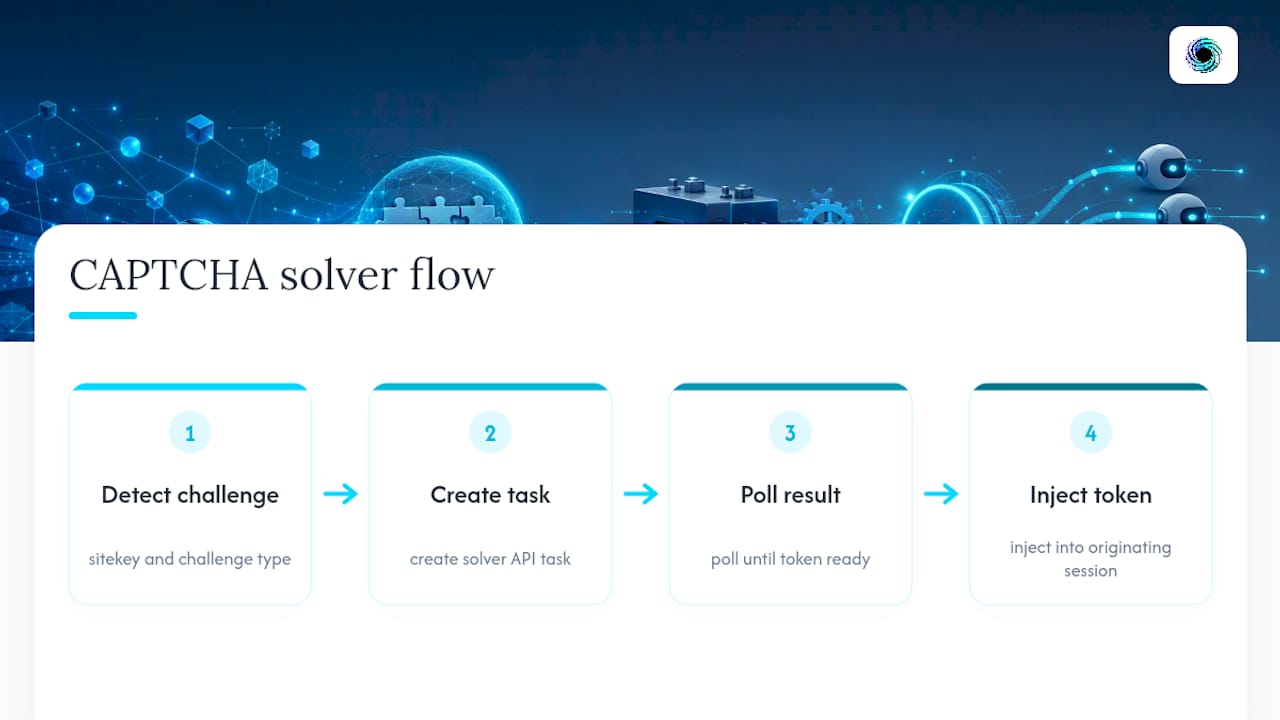
When avoidance fails, the standard task flow looks the same across most solver APIs: detect the sitekey and challenge type, create a solver task, poll for the result, then inject the token into the exact session that triggered the challenge. CapSolver's guidance documents this createTask/getTaskResult pattern for reCAPTCHA and Turnstile, and it holds up as the baseline architecture regardless of which solver you plug in.
Vision LLMs are gaining ground for novel or unusual visual challenges, image grids that don't match a solver's training set, or puzzle-style CAPTCHAs that shift format. They're flexible but usually slower and pricier per solve than a dedicated solver API tuned for high-volume, known challenge types. Reserve them for edge cases, not your default path.
Projects like auto-captcha-solver show the pattern end to end: detect the challenge frame in a Playwright context, call a token API, then inject the result, with measured solve latencies typically running 5 to 60 seconds depending on challenge type and queue depth.
Pro Tip: Track solver latency as its own metric. A 45-second wait on a task that should resolve in 8 seconds usually means queue congestion at your solver provider, not a problem with your integration.
Managed unblockers bundle proxy rotation, rendering, and solver logic into one call, and they typically beat a DIY stack for production scraping once maintenance overhead outweighs the per-call premium. The most common operational trap isn't cost. It's context mismatch: a token solved under one IP and browser fingerprint gets submitted from a different session, and the site rejects it instantly, burning both the solve fee and the retry.
How Do You Keep Solved Tokens From Getting Rejected?
A solved token is only valid inside the exact session, proxy, and browser context that received the challenge. Submit it from anywhere else and the site's risk engine treats the mismatch as a signal that you're automating fraud, not proving you're human.
Follow this checklist for every integration:
- Bind the solve request to session state. Pass the same proxy IP, cookie jar, and browser fingerprint that generated the challenge into the solver task.
- Treat tokens as short-lived, mostly single-use artifacts. Cache a token only within its valid window, record its expiry, and never carry it across a session rotation.
- Build a retry matrix instead of blind backoff. Retry the same session on network timeouts, rotate to a new session on a 429 or repeat challenge, and escalate from HTTP to a full browser context when a target keeps challenging a clean request.
- Abort after a defined ceiling. If a route challenges you three times in a row across session rotations, stop and flag it for manual review instead of spending more solver credits.
Track four numbers per route: challenge rate, parse success rate, browser escalation rate, and the ratio of challenges to total requests over time. A route where the challenge ratio doubles week over week is telling you the target changed its detection rules, not that your proxies got unlucky.
Pro Tip: If your escalation rate to full browser rendering climbs past 20 percent on a route that used to run fine on HTTP, treat it as a signal the target updated its bot detection, not a random fluctuation.
Why Detection Beats Brute-Force Solving
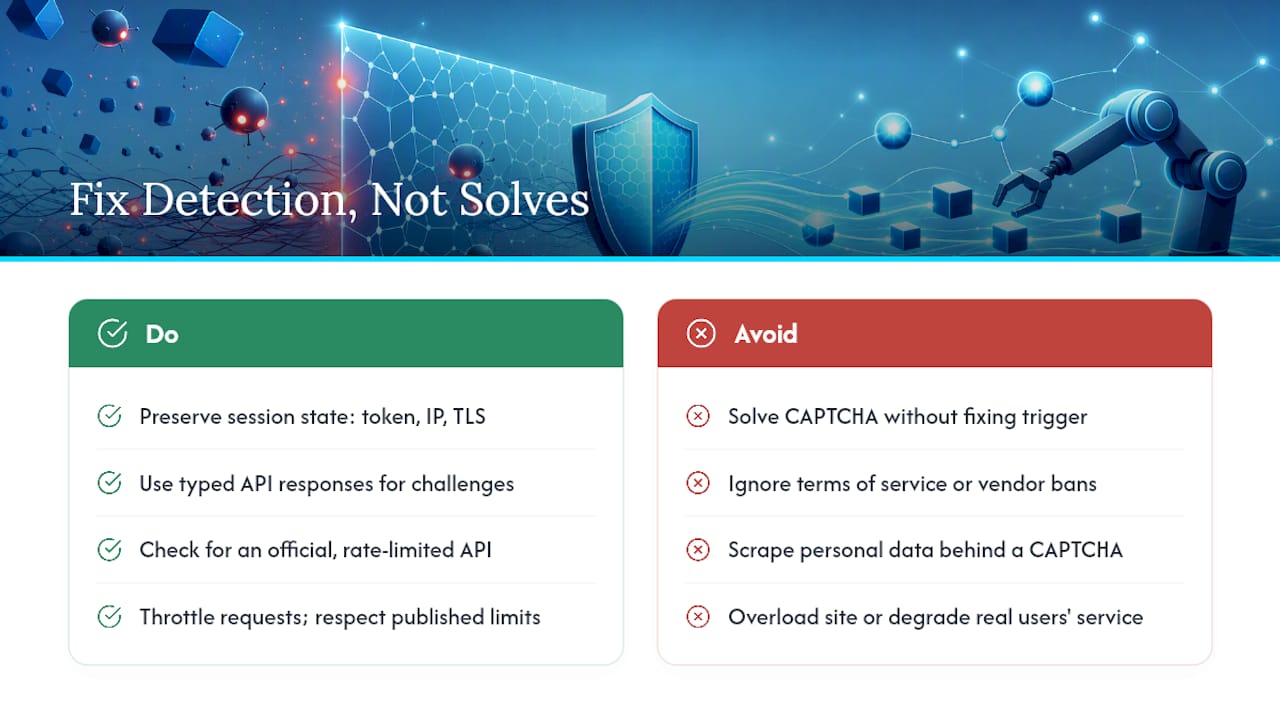
CAPTCHAs are the visible symptom of a bot detection system running silently underneath. The detection layer scores your request on IP reputation, TLS fingerprint, and behavioral signals; the CAPTCHA only appears when that score lands in an uncertain zone. Solving the CAPTCHA without fixing whatever triggered it means you'll see the same challenge again on your very next request, because the underlying signal never changed.
That's why session-state discipline matters more than solver sophistication. Most practitioners who run stable scraping pipelines treat CAPTCHAs as a session problem first: the token, IP, and TLS fingerprint all need to match what the challenge page originally observed. Certain API primitives return typed, discriminated-union responses so a challenge state surfaces as a distinct, machine-readable failure mode instead of getting buried in a generic error, which supports escalation policies running on autopilot.
Legal exposure here is a separate question from technical difficulty, and worth treating carefully. Scraping publicly accessible data is broadly legal in the United States, but bypassing a technical barrier specifically designed to block automated access, like a CAPTCHA, can implicate the Computer Fraud and Abuse Act depending on the target's terms of service and how a court reads "authorized access" in your specific case. Bot management vendors' own terms often explicitly prohibit circumvention, and violating a site's terms of service, even without a CAPTCHA involved, carries its own contract law exposure separate from CFAA risk.
Ethically, the line worth holding is intent and impact, not just legality. Respect robots.txt where a target publishes one, throttle your request rate so you're not degrading service for real users, and never scrape personal data behind a CAPTCHA wall without a clear, defensible reason. Building rate limits and PII controls into your workflow from the start is cheaper than retrofitting them after a legal complaint. When in doubt, check for an official API first. Many sites that gate content behind aggressive bot protection publish a documented, rate-limited API specifically so they don't have to fight scrapers at all.
When Should You Stop Scraping Instead of Escalating?
Stop when the signal outweighs the data. A sustained high challenge rate that survives proxy rotation and fingerprint fixes usually means the target has specifically flagged your traffic pattern, not that you need a better solver. A cease-and-desist, a documented terms-of-service prohibition, or the discovery of an official API are all hard stop signals, not obstacles to route around.
Weigh the project type honestly: a short research pull tolerates more manual intervention than a production pipeline running daily against the same target. Start with small staged tests, measure the real challenge rate, and only scale once the workflow proves stable and auditable.
— Glen
How Gyrence Fits Into a CAPTCHA-Aware Scraping Stack
Gyrence gives you a managed alternative to stitching together your own proxy pool, browser fleet, and solver integration. Its five primitives, Search, Traverse, Fetch, Extract, and Map, return typed, discriminated-union responses, so a CAPTCHA or block state shows up as a distinct, structured failure mode you can branch on programmatically instead of parsing raw HTML to guess what happened.

Pair that with WebDoppler, Gyrence's monitoring product, and you get webhook alerts when a target's challenge rate spikes, which is exactly the kind of drift that signals a site updated its bot detection before your logs would otherwise catch it. Billing with spending caps and predictable credit-based usage rather than per-solve pricing that scales unpredictably with challenge frequency avoids surprise invoices during tough periods. If you're weighing a managed API against a DIY solver stack, start on the pricing page to compare plans, or check WebDoppler if ongoing challenge-rate monitoring is your immediate need.
Sources
For deeper technical reference, AntiBotDetector and Scrapfly's Antibot-Detector both offer open-source signature scanning you can adapt into your own pipeline. For browser fallback patterns, see the guide on scraping dynamic pages with Playwright.
- mihneamanolache/antibot-detector
- CAPTCHA in Web Scraping: How to Detect It Early and Avoid Costly Retries | ProxiesAPI Guides
- How to Solve CAPTCHAs When Web Scraping in 2026
- Web Scraping CAPTCHA Handling: Safe Automation Guide
FAQ
Is Web Scraping Legal or Illegal?
Scraping publicly accessible data is generally legal in the United States, but the answer depends heavily on the target's terms of service and what data you collect. Scraping personal or copyrighted content, or ignoring a site's explicit access restrictions, shifts the legal risk substantially.
Is Bypassing a CAPTCHA Illegal?
Circumventing a CAPTCHA can raise Computer Fraud and Abuse Act exposure because it involves bypassing a barrier a site put up specifically to block automated access. Whether that exposure materializes depends on the site's terms, the data involved, and how the access was used.
Is AI Scraping Illegal?
Using an AI tool or LLM to scrape or extract data follows the same legal framework as any other scraping method. The technology doesn't change the analysis; what matters is whether the data is public, whether terms of service are honored, and whether protected content or personal data is involved.
Can ChatGPT Do Web Scraping?
ChatGPT and similar large language models aren't built to fetch live pages, handle proxies, or solve CAPTCHAs on their own. They're increasingly used to help write scraping code, interpret extracted content, or classify challenge types, but the actual fetching and challenge handling still needs a dedicated tool or API.
What Should I Log to Track CAPTCHA Frequency Over Time?
Record the target URL, status code, HTML size, which detection marker fired, the proxy or session ID, and a timestamp for every classified response. Reviewing that log weekly reveals whether a specific route's challenge rate is climbing, which usually means the target updated its detection rules.