
Crawl depth is the number of link hops between your seed URL and any given page, and depth 0 is the seed itself. For most sites, the safest starting point is a max_depth of 3 to 4, with anything past 7 requiring proof, not guesswork. Run a capped exploratory crawl first, then lock in max_depth and crawl_budget together before you scale.
TL;DR:
- Most sites require a maximum crawl depth of 3 to 4, with anything over 7 risking runaway URL discovery and high storage costs.
- Depth should be measured based on link relationships, not URL length, and resolving canonical tags during discovery ensures accurate depth tracking.
- For site-specific depth needs, run an exploratory crawl without limits to identify where target content clusters, then set depth accordingly.
- Combining max_depth, crawl_budget, and max_pages controls provides a safe, balanced approach to avoid traps and manage crawl costs effectively.
- Using tools that explicitly enforce depth and budget limits, like Gyrence's primitives, prevents infinite loops from pagination, faceting, or URL parameter explosions.
Table of Contents
- What Counts as Crawl Depth, and Why Paths Lie to You
- What Starting Depth Should You Use for Different Sites?
- How Do You Measure a Site's Actual Depth Distribution?
- Max Depth vs. Crawl Budget vs. Max Pages: Which Control Do You Need?
- How Do Spider Traps Break Depth Limits?
- Building a Discovery and Extraction Pipeline That Doesn't Waste Money
- What Does a Safe Crawl Configuration Look Like?
- Gyrence Field Notes: What Production Traversal Actually Breaks On
- Run Depth-Capped Crawls Without Building Your Own Infrastructure
- Sources
- FAQ
What Counts as Crawl Depth, and Why Paths Lie to You
Depth is a link-graph property, not a URL-string property. Depth 0 is your seed page. Depth 1 is every page that seed links to directly. Depth 2 is everything one hop past that, and so on. A page discovered through three internal links is depth 3 regardless of how long or short its URL path looks.
This distinction matters most around canonical tags. If your crawler resolves canonicals after discovery, a duplicate shallow page can get counted as the canonical node's depth, while the real canonical, reached only through a longer chain, gets excluded once your depth cap kicks in. Resolving canonicals during discovery fixes this: depth should reflect the importance of the canonical content node, not the accident of which path your crawler happened to follow first.
Here's the practical trap: a product page buried at what looks like depth 5 in the URL slug (/category/sub/sub2/sub3/product) might actually sit at depth 2 if your homepage links to it directly from a featured carousel. Measure the link graph. Don't eyeball the URL.
What Starting Depth Should You Use for Different Sites?
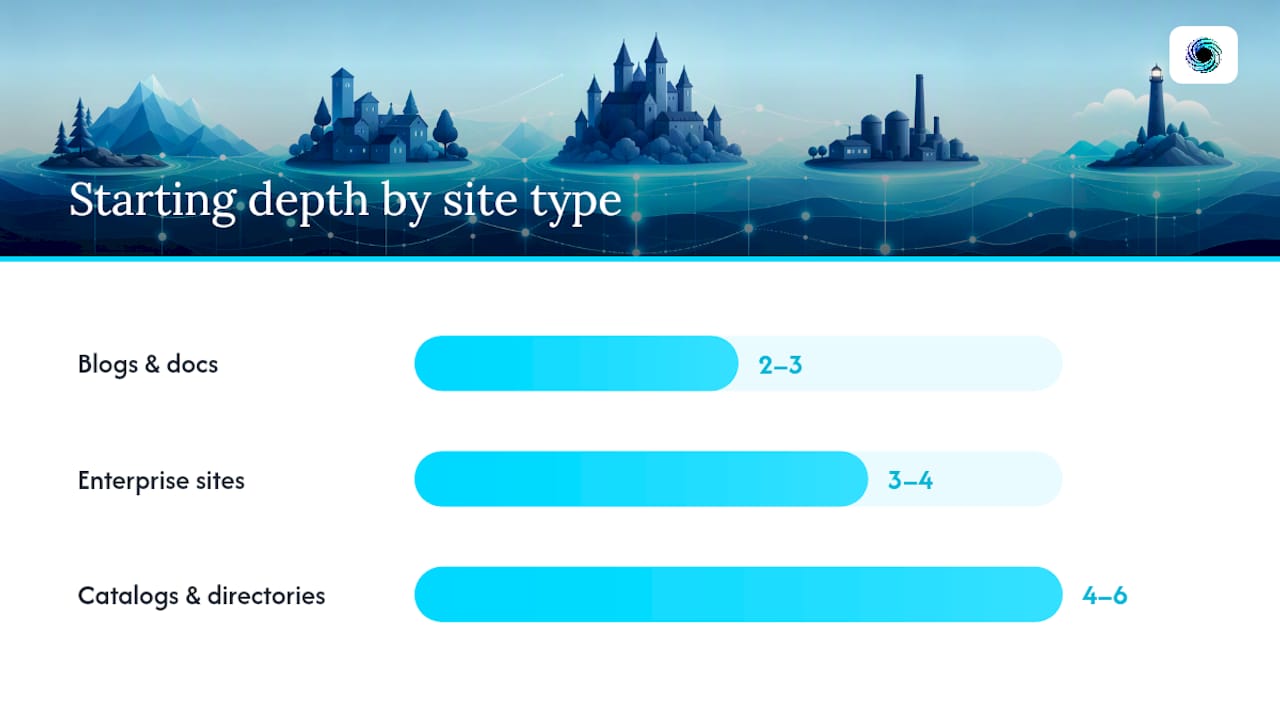
Depth requirements track site architecture, not site size. A blog with a flat category structure rarely needs a shallow depth to reach every post. A documentation site with nested guides usually needs the same range unless it buries pages under multiple navigation layers.
Enterprise sites with product hierarchies, regional subdirectories, or multi-tier taxonomies typically need depth 3 to 4 to reach the bulk of unique content. Large catalogs, marketplaces, or directory sites sometimes justify depth 4 to 6, but only when you've confirmed that high-value listings actually live that deep.
- Blogs and documentation: depth 2 to 3 covers nearly everything worth extracting.
- Enterprise marketing and product sites: depth 3 to 4 is the standard baseline.
- Catalogs and directories: depth 4 to 6, justified by measurement, not assumption.
- Anything above depth 7: treat as a red flag until an exploratory crawl proves it's necessary.
Very high depth limits commonly trigger exponential URL discovery. Each additional hop multiplies the frontier by the average outbound link count per page, so a site averaging 20 links per page can go from thousands of URLs at depth 4 to millions by depth 8. That's not a theoretical risk, it's a storage bill and a crawl budget you'll blow through in hours.
If a subsection genuinely needs a deeper cap, override it per subdomain or per path pattern, and document why. A support forum nested five levels under a marketing site shouldn't drag your whole crawl's max_depth up to match it.
How Do You Measure a Site's Actual Depth Distribution?
Don't guess your max_depth. Measure it. Data engineers commonly run an exploratory crawl with no depth limit at all, but a strict hard page cap, so the crawl can't run away while it maps the site's real shape.
- Set a page cap, not a depth cap. Cap total pages fetched (say, 2,000 to 5,000) with max_depth left unset.
- Log depth at discovery time, tagging every URL with the hop count at which it was first found.
- Build a depth histogram. Count how many unique URLs and unique templates appear at each depth level.
- Identify where target content clusters. Look for the depth at which product pages, articles, or records stop appearing and low-value tails (tag pages, print views, session variants) take over.
- Set max_depth to the depth that captures your target templates and cuts the tail.
Pro Tip: Log the template type alongside depth, not just the URL. A histogram that shows "40% of pages at depth 5" tells you nothing useful if you don't know whether those are product pages or auto-generated print views.
Max Depth vs. Crawl Budget vs. Max Pages: Which Control Do You Need?
These three controls solve different problems, and conflating them is where most crawl jobs go sideways.
max_depth limits how many hops from the seed your crawler will follow. Use it when you know the site's structure and want to bound exploration to a known section, like a docs subdirectory or a specific category tree.
crawl_budget caps total credits or pages consumed, independent of depth. Use it when site size is unknown, when you're crawling a domain you've never touched before, or when a site's branching factor could be wildly inconsistent across sections.
max_pages is a hard, non-negotiable stop. It doesn't care about depth or budget math, it just halts the job at a fixed count.
The safe pattern combines all three: set max_depth and crawl_budget together, and let max_pages act as the emergency brake underneath both.
| Control | Solves | Best used when |
|---|---|---|
| max_depth | Bounds exploration by link hops | Site structure is known and finite |
| crawl_budget | Caps total credits/pages consumed | Site size or branching factor is unknown |
| max_pages | Hard stop regardless of other settings | You need a non-negotiable ceiling |
How Do Spider Traps Break Depth Limits?
Depth limits assume a finite, well-behaved link graph. Several common site patterns break that assumption and can generate URLs faster than any depth cap can contain them.
- Pagination loops: infinite "next page" chains on forums or search results that regenerate the same content under new query parameters.
- Calendar widgets: date-picker navigation that lets a crawler click "next month" forever, generating a URL for every future date.
- Faceted navigation: e-commerce filter combinations (
?color=red&size=M&sort=price) that multiply into thousands of near-duplicate URLs at the same depth. - Infinite query strings: session IDs, tracking parameters, or sort orders appended to otherwise identical pages.
Production crawlers enforce depth and per-domain budgets specifically because these traps defeat naive depth settings. Mitigation means combining tools, not picking one: URL regex exclusions for known trap patterns, parameter normalization before queuing, deduplication against already-seen canonical URLs, and per-domain page caps that trigger regardless of what depth reports.
Watch for the operational tells: a queue that keeps growing instead of shrinking, a spike in 429 or 5xx responses from a single domain, or storage consumption climbing faster than your page count. Gyrence's writeup on stopping an agent from looping on Wikipedia pagination walks through exactly this failure mode in production.
Pro Tip: If your frontier queue's growth rate (ΔQ) stays positive for more than a few minutes on a bounded crawl, something is generating URLs faster than you're consuming them. Kill the job and check for a trap before it burns your entire budget.
Building a Discovery and Extraction Pipeline That Doesn't Waste Money
The most expensive mistake in crawl architecture is running full extraction (rendering JavaScript, running LLM extraction, downloading assets) on every URL you discover. Separating discovery from extraction fixes that: a lightweight discovery phase extracts links only, and a separate scored phase runs heavy extraction on the URLs worth the cost.
Discovery workers should do the minimum: fetch, parse links, push to a queue. No rendering, no schema extraction, no waiting on JavaScript. Extraction happens only for URLs that clear a threshold.
- Use a
url_scorerandscore_thresholdto rank discovered URLs before committing extraction resources to them. - Cap
max_pagesand per-domain budgets independently, so one domain can't consume your whole job's allowance. - Deduplicate with a Bloom filter or equivalent, so revisits and near-duplicate query strings don't reprocess the same content.
- Monitor pages harvested per minute, per-domain consumption against budget, and cost burn rate against your spending cap, with alerts on any of the three trending wrong.
Dynamic, JavaScript-heavy sites make this split even more valuable: render-and-wait costs money at every URL, so reserving rendering for scored, high-value targets keeps discovery cheap while extraction stays selective. Adjust depth and scoring thresholds by goal: a monitoring crawl watching for new listings can run shallow and frequent, while a one-time archival crawl can justify going deeper on a tighter page cap.
What Does a Safe Crawl Configuration Look Like?
A crawl job payload should carry every control explicitly, not rely on defaults you haven't checked. Standard deep-crawling parameters include:
| Field | Purpose |
|---|---|
start_url | Seed URL for depth 0 |
url_regexp_include / url_regexp_exclude | Restrict crawl to relevant paths, exclude known traps |
max_depth | Hop limit from seed |
crawl_budget | Total credit/page ceiling |
max_pages | Hard stop regardless of budget or depth |
render | Whether to execute JavaScript before extraction |
callback_webhook | Where to send completion or per-page results |
Before running anything against a real target:
- Pull credentials from environment variables, never hardcode them.
- Confirm your crawl respects
robots.txtdisallow rules for the target domain. - Set a spending cap on the job, not just a page cap.
- Run a small sample (a few hundred pages) first and inspect the resulting depth histogram before expanding.
- Scale the page cap incrementally, checking cost and error rates at each step, rather than launching straight at full scope.
Gyrence Field Notes: What Production Traversal Actually Breaks On
Two patterns show up repeatedly in Gyrence's own case studies. Acquiring a public-records site without writing a custom crawler worked because depth and page caps were set before the first request, not after something broke. The Wikipedia pagination loop happened precisely because an agent had no depth ceiling at all.
Gyrence defaults every traversal to explicit caps and surfaces exhaustion as a typed failure, not a silent timeout.
— Glen
Run Depth-Capped Crawls Without Building Your Own Infrastructure
Gyrence gives you the traversal controls this guide just walked through, built in rather than bolted on. The Traverse (Gyre) primitive handles max_depth, crawl_budget, and page caps natively, and every call returns a typed response that tells you exactly which limit was hit and why, instead of leaving you to reverse-engineer a truncated result set.

Spending caps are set at the workspace level, so a misconfigured depth setting or an unexpected spider trap can't turn into a surprise invoice. Discovery and extraction run as separable calls, matching the pipeline pattern above: map a domain's URL graph cheaply first with Map, then send only the URLs worth extracting through the schema-guided Extract primitive. If you're running bulk crawls across many domains rather than one site at a time, the bulk domain crawling guide covers how depth settings scale across a fleet of targets. Start a trial at the Gyrence console or check the API docs for the exact parameter names before your next crawl job.
Sources
- scraperapi-crawler SKILL.md
- Defining Crawl Depth & Scope for Enterprise Sites | SHA
- Design a web crawler — System Design Interview Handbook
FAQ
What Is Crawl Depth in Web Scraping?
Crawl depth counts link hops from your seed URL. Depth 0 is the seed page, depth 1 is everything it links to directly, and depth 2 is one hop past that.
What Max Depth Should I Start With?
Start at max_depth 3 to 4 for most sites, and avoid setting depth above 7 without first running an exploratory crawl to confirm it's needed.
How Do I Measure a Site's Real Depth Distribution?
Run a discovery-only crawl with a strict page cap and no max_depth, then build a histogram of URLs and templates found at each depth level before choosing a final cap.
Should I Use Max Depth or Crawl Budget?
Use max_depth when the site's structure is known and bounded, and crawl_budget when the site's size or branching factor is unknown; combining both with a max_pages hard stop is the safest pattern.
Can Gyrence Handle Depth-Limited Crawls Automatically?
Yes. Gyrence's Traverse primitive accepts max_depth and crawl_budget parameters natively and returns typed responses indicating exactly which limit stopped the crawl.