
Extracting pricing pages to JSON comes down to three reliable paths: parse embedded JSON-LD structured data directly from the HTML, intercept the internal API endpoints that single-page apps use to load pricing after render, or run browser automation to interact with toggles and tabs before scraping. Each method has a distinct failure profile, and the right choice depends on how the target page actually delivers its data.
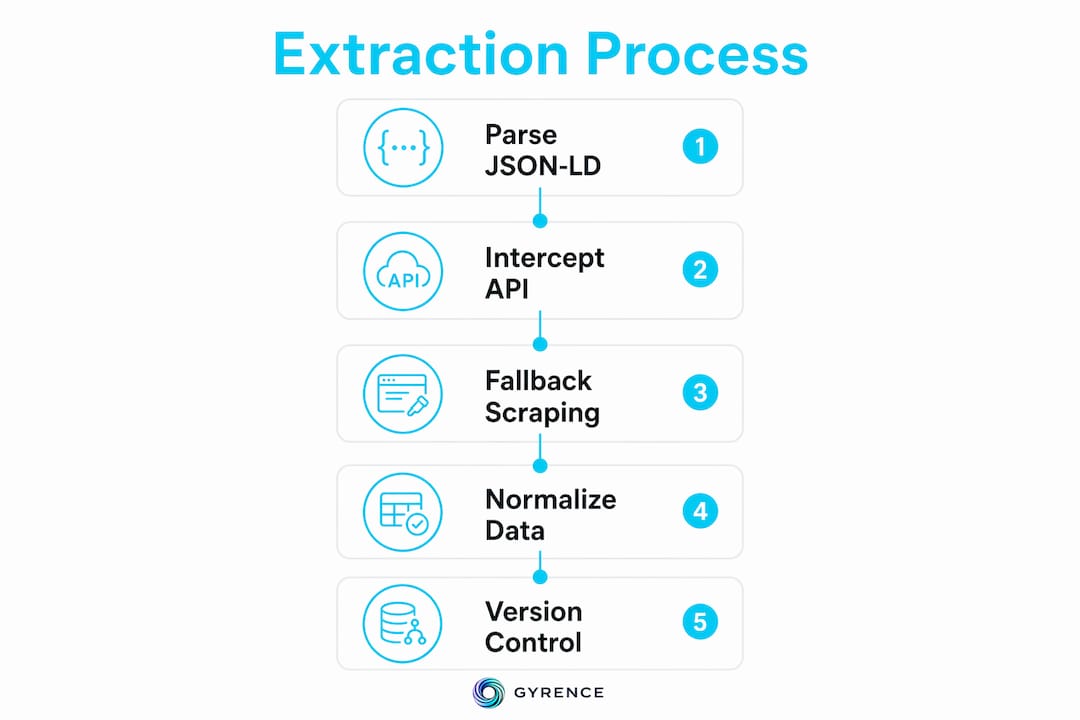
The fastest wins come from pages that already expose structured data. Many pricing pages embed product data in JSON-LD script tags, which Google's rich-snippet crawler also reads, so sites rarely break it. When that's absent, check the Network tab in DevTools before reaching for a browser automation library. Most SPAs fetch pricing from internal APIs after page load, and hitting that endpoint directly is far faster than rendering the full DOM. Browser automation with Playwright is the fallback for pages that hide pricing behind billing-cycle toggles or lazy-loaded tabs.
Key approaches at a glance:
- JSON-LD parsing: Most stable. Sites protect it because search engines depend on it.
- Internal API interception: Fastest when available. Use DevTools Network tab to find XHR/fetch calls.
- Browser automation (Playwright): Required for interactive pricing elements like annual/monthly toggles.
- LLM-based semantic extraction: Most resilient to DOM changes. Tools like Firecrawl and spectus use this as a fallback when selectors break.
- Managed API services: Best for scale. Handle anti-bot measures and return a consistent JSON schema regardless of page changes.
How to extract pricing pages to JSON: methods and tools
Static HTML parsing with BeautifulSoup or lxml works when pricing is server-rendered. Parse application/ld+json script tags first, then fall back to itemprop="price" microdata attributes, then CSS selectors. That priority order matters because JSON-LD rarely changes while CSS class names get reshuffled on every redesign.

For JavaScript-rendered pages, Playwright is the practical standard. Pricing data is frequently hidden in lazy-loaded tabs or requires simulating user interactions like clicking a billing toggle before the correct price appears in the DOM. Playwright lets you wait for a specific selector, click the toggle, then read the updated value.
Relevant tools and libraries:
- BeautifulSoup + lxml: Lightweight HTML parsing for static pages. Pair with
httpxfor async fetching. - Scrapy: Full crawl framework with middleware support for rotating proxies and request throttling.
- Playwright: Browser automation for dynamic content. Handles cookie banners, billing toggles, and lazy-loaded pricing tables.
- spectus: Paste a URL and a plain-English instruction, get structured JSON output. Automatically falls back to semantic LLM extraction when CSS selectors fail.
- Firecrawl: Converts a page to markdown, then passes it to an LLM with a Pydantic schema for structured extraction. The schema does the heavy lifting;
list[dict]for the plans field handles wildly different tier structures across sites. - Managed API services: Purpose-built for SaaS pricing pages. They handle anti-bot measures and return a consistent JSON schema even as the underlying page changes.
Pricing pages also present structural complexity beyond basic scraping. Bundles, promotional pricing, per-seat add-ons, and multi-currency displays all require explicit handling in your extraction logic, not just in your schema.
How should you structure and maintain extracted pricing JSON?
Treat price as a structured object, not a string. Storing billing frequency, seat count, and currency as separate fields keeps the data queryable. A raw string like "$49/user/month" is useless to a downstream analytics pipeline. A well-designed schema from a production pricing extraction system includes fields like product_key, competitor, url, observed_at, price, list_price, currency, availability, raw_hash, and raw_path.

Normalize currency to ISO 4217 codes (USD, EUR, GBP) immediately after extraction. Downstream joins break when one record stores "$" and another stores "USD". Store both price_current as a float and price_raw as the original string so debugging is straightforward when a regex strips the wrong character.
Version your extraction logic and store raw HTML or JSON snapshots alongside extracted records. When a pricing page redesigns and your extractor silently returns nulls, you need the snapshot to re-process without re-fetching. For structured data extraction at scale, this audit trail is what separates a maintainable pipeline from a fragile one.
Scrapers must fail loudly when expected data is missing. Return an error, not a null or empty string. Silent failures corrupt datasets in ways that are expensive to detect later.
Test extraction against a representative sample of URLs before deploying to production. Pricing pages redesign without notice, and a selector that worked last month may return nothing today.
Pro Tip: When CSS selectors break after a redesign, semantic LLM extraction over a facts bundle (structured data plus visible text plus label-value pairs) adapts automatically without requiring you to rewrite selector logic. Build this as a fallback layer, not a primary strategy, to control token costs.
For equipment and dealer pricing use cases, managed pricing matrix tools offer an alternative to custom extraction pipelines when the data source is a known vendor system.
Who benefits most from URL to JSON extraction tools?
The value of automated pricing page extraction concentrates in a few specific roles:
- Competitive intelligence teams: Developers building price monitoring tools need structured, timestamped JSON they can diff over time. Manual checks at scale are not viable.
- Data teams at SaaS companies: Tracking competitor pricing across dozens of tools requires automation. A single managed API that handles rendering and anti-bot measures cuts engineering overhead significantly.
- Product managers and analysts: Structured JSON feeds directly into dashboards and forecasting models. Raw HTML does not.
- Startups and agencies: Rapid prototyping of pricing intelligence tools without building a full scraping infrastructure. Managed services and tools like spectus let a small team get to working JSON in hours.
- AI agent developers: Agents that reason about pricing need typed, structured responses, not raw page text. A web data API evaluation checklist helps teams pick the right extraction layer for agent workflows.
The common thread is that manual methods break at scale and miss dynamic pricing elements entirely.
Gyrence's Extract primitive handles exactly this workflow: pass a URL and a JSON schema or plain-English prompt, get back typed structured data with explicit failure modes when the page doesn't match expectations. No silent nulls. Start extracting with spending caps and bundled LLM extraction so your pipeline costs stay predictable.

Key Takeaways
Extracting pricing pages to JSON reliably requires a layered approach: JSON-LD first, internal API interception second, browser automation third, and LLM-based semantic extraction as a resilient fallback.
| Point | Details |
|---|---|
| JSON-LD is the most stable source | Sites protect it for SEO; parse it before falling back to HTML selectors. |
| Separate price attributes in your schema | Store billing frequency, seat count, and currency as distinct fields, not a raw string. |
| Fail loudly on missing data | Return errors, not nulls, to prevent silent corruption of your dataset. |
| Version extraction logic and store snapshots | Raw HTML or JSON snapshots let you re-process records after a page redesign. |
| LLM extraction survives DOM changes | Semantic fallback adapts automatically when CSS selectors break after a redesign. |
FAQ
How do you convert a pricing page URL to JSON?
Parse the page's JSON-LD script tags first, then intercept internal API endpoints via DevTools, then fall back to browser automation with Playwright for dynamic content. Tools like spectus and Firecrawl automate this pipeline with LLM-based extraction as a fallback.
How do you extract data in JSON format from a website?
Fetch the HTML, check for embedded application/ld+json structured data, then apply CSS selectors or semantic LLM extraction to pull the fields you need into a typed schema. Libraries like BeautifulSoup handle static pages; Playwright handles JavaScript-rendered ones.
What is the difference between an RSS feed and a JSON feed?
An RSS feed delivers time-ordered content items in XML format, designed for news and blog syndication. A JSON feed delivers the same concept in JSON, but neither is designed for pricing data extraction, which requires custom scraping or API access.
How do you get JSON data from any website?
Open DevTools, filter Network requests by XHR or Fetch, and look for API calls returning application/json. If the site loads pricing from an internal endpoint, hitting that URL directly is faster and more reliable than scraping the rendered DOM.