
TL;DR:
- Converting web content to Markdown reduces token volume and preserves semantic structure for language models. This process involves fetching, rendering, removing boilerplate, and serializing the main content into Markdown. It enhances retrieval accuracy in building knowledge bases, chatbots, and AI preprocessing pipelines.
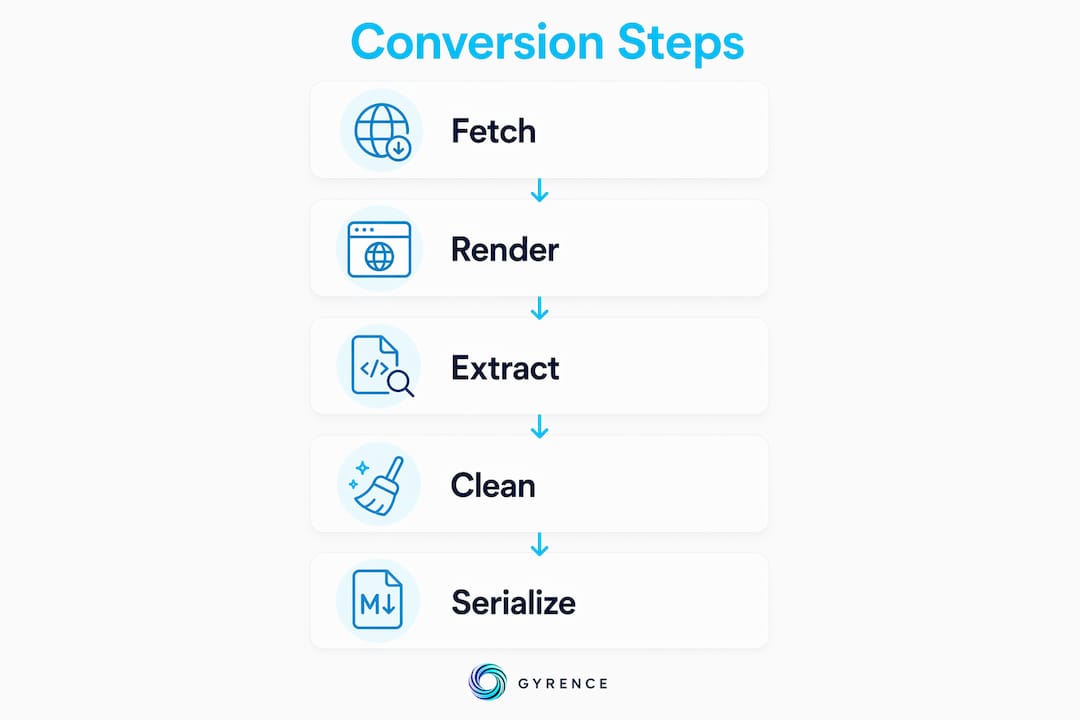
The fastest way to feed web content to a large language model is to convert it to Markdown first. Raw HTML carries tags, class names, inline styles, and navigation chrome that a text model cannot use. Stripping that noise and converting to clean Markdown significantly reduces token count while preserving the semantic structure — headings, lists, tables, code blocks, links — that actually helps the model reason. The process has three stages: fetch the URL (with JavaScript rendering when the page needs it), extract the main content and strip boilerplate, then serialize to Markdown. Tools like Firecrawl and Simplescraper handle all three in a single API call. The output is clean, LLM-ready text your pipeline can chunk, index, and retrieve without further cleanup.
What you get from a well-built converter:
- Headings preserved as
#,##,### - Lists and nested lists intact
- Tables converted to Markdown pipe syntax
- Code blocks fenced with backticks
- Links kept as
[text](url), images as - Navigation, ads, footers, and cookie banners removed
How to fetch web pages to Markdown for LLM pipelines
The conversion is a two-step pipeline, not a single operation. Step one: content extraction. Step two: Markdown serialization. Conflating them is where most DIY implementations break.
Step 1: Fetch and render. The tool sends an HTTP request to the target URL. For JavaScript-heavy pages, a headless browser (Chromium via Playwright or Puppeteer) renders the DOM before any content is read. Static pages skip this and go straight to the raw HTML.
Step 2: Boilerplate removal. This is the hard part. Mozilla's Readability.js scores page nodes by content density and link ratio, then isolates the article body. Alternatives like Trafilatura apply similar heuristics. The goal is the same: discard navigation, sidebars, footers, and ads before a single Markdown tag is written.

Step 3: Markdown serialization. Libraries like Turndown (JavaScript) or markdownify (Python) walk the cleaned HTML tree and emit Markdown. Headings become # prefixes, <strong> becomes **, <table> becomes pipe syntax. The resulting Markdown serves as a natural chunking boundary — ## headings tell your RAG indexer exactly where one topic ends and another begins.
Common approaches by deployment type:
- Managed API (Firecrawl, Gyrence Fetch): single endpoint, JavaScript rendering included, Markdown returned by default
- Client libraries: Trafilatura + markdownify in Python, Readability.js + Turndown in Node
- Browser extensions: run Readability and Turndown client-side, preserving login state for paywalled content
- CLI tools: scriptable, useful for one-off batch jobs or CI/CD integration
Who actually benefits from web-to-Markdown conversion?
The short answer: anyone building a pipeline where a language model reads web content. The longer answer breaks down by use case.
Developers building RAG systems get the clearest win. Markdown is the standard intermediate format for retrieval-augmented generation because it chunks cleanly, indexes well, and costs far fewer tokens than raw HTML. A knowledge base built on Markdown-converted web pages retrieves more relevant context than one built on plain text stripped with BeautifulSoup.get_text().
AI practitioners running chatbots or summarization pipelines benefit because the model receives structured input. A page with clear ## headings gives the model a map of the content before it reads a word.
Researchers and data scientists preparing training or fine-tuning datasets use Markdown conversion to normalize web content across thousands of URLs. Consistent structure means consistent tokenization.
Concrete use cases:
- Knowledge base construction from documentation sites
- Real-time web context injection for AI chat assistants
- Automated summarization of news or research articles
- Dataset preprocessing for fine-tuning or evaluation
- Competitive intelligence pipelines that monitor and digest web pages on a schedule
What to look for when comparing conversion tools
No single tool wins on every dimension. The right choice depends on your volume, your stack, and whether your target pages render content with JavaScript.
| Dimension | What to evaluate |
|---|---|
| Ease of use | Single API call vs. multi-library setup |
| JavaScript rendering | Headless browser included vs. static-only |
| Output formats | Markdown, JSON, plain text, or all three |
| Scalability | API with rate limits, CLI, browser plugin |
| Cost model | Free tier, per-page pricing, or flat subscription |
Firecrawl offers a managed API that handles JavaScript rendering and returns clean Markdown directly, with a free tier and paid plans for higher volume. Setup is minimal: one API key, one endpoint.
Simplescraper targets less technical users with a point-and-click interface, though it supports API access for developers who want to automate extraction at scale.
Open-source stacks (Trafilatura, Readability.js, Turndown) give you full control and no per-page cost, but you own the infrastructure, the JavaScript rendering layer, and every edge case. For teams already running Playwright or Puppeteer, the marginal cost is low. For teams that are not, the setup time adds up fast.
Gyrence's Fetch primitive sits in the managed-API category with a specific design choice: every response is a typed, discriminated-union result that includes the failure cases explicitly. You know when a page blocked the request, when JavaScript rendering timed out, and when content extraction returned empty. Most managed APIs return a 200 with garbage; Gyrence surfaces the failure so your agent can act on it. Pricing uses spending caps so your bill does not scale unexpectedly with traffic spikes. See the Gyrence docs for current rate limits and plan details.
For a broader look at web scraping tool alternatives in this space, including tools focused on HTML cleaning and Markdown output, the developer tool landscape has expanded considerably in 2026.
How to scale web-to-Markdown conversion in practice
Single-URL conversion is the easy case. Production pipelines need batch processing, error handling, and a strategy for keeping Markdown fresh as source pages change.
Batch processing via API is the standard pattern for high-volume ingestion. Submit a list of URLs, receive Markdown for each, write results to object storage (S3, GCS) or a vector database. Most managed APIs support concurrent requests; check the rate limit before assuming parallelism is free.
CLI tools work well for scheduled jobs. A cron task that runs a conversion script nightly and pushes results to your RAG index keeps your knowledge base current without manual intervention.
Browser extensions handle the authenticated-content problem that APIs cannot. If a page requires a logged-in session, an extension running in your browser converts it client-side without exposing credentials to a third-party server.
CI/CD integration makes sense for documentation pipelines. When a docs site updates, a pipeline trigger re-fetches and re-converts the changed pages, keeping your LLM's context current. Tools like bulk conversion dashboards simplify this for non-engineering teams.
Workflow tips for production:
- Strip boilerplate before conversion, not after — converting a raw 25,000-token page wastes compute
- Cache Markdown output with a TTL matched to how often the source page changes
- Log extraction failures explicitly; silent empty results are harder to debug than typed errors
- Validate Markdown structure after conversion — a missing
##heading breaks your chunking logic
Pro Tip: When building a RAG ingestion pipeline, run a structure check on every converted page: confirm at least one ## heading exists before indexing. Pages that convert to a flat wall of text usually indicate a boilerplate-removal failure, not a conversion failure.
Why semantic cleaning matters more than tag conversion
The hardest part of HTML-to-Markdown conversion is not serializing <h2> to ##. It is deciding what to keep. Semantic mapping — removing navigation, ads, cookie banners, and UI chrome — is where most of the quality wins live, and where most DIY pipelines underperform.
Boilerplate left in the output inflates token count and dilutes context. A model reading a page where 40% of the tokens are navigation links and footer text has less capacity for the actual content. Strip first, convert second.
Lazy-loaded images are a specific failure mode worth calling out. Many pages set src to a placeholder and store the real URL in data-src or srcset. A naive converter produces broken image references —  instead of the actual image URL. Pipelines that need images must resolve these attributes before serialization.
Preserving semantic structure pays off downstream. Explicit ## headings serve as natural chunk boundaries for vector indexing. Tables stay structured rather than collapsing to comma-separated text. Code blocks retain fencing so the model recognizes them as code, not prose.
Pro Tip: Use an LLM-based extraction step for irregular site layouts where rule-based Readability scoring fails. LLM extraction adapts to unusual DOM structures but requires GPU inference, so reserve it for pages where the rule-based pass returns low-confidence results.
Two patterns to avoid:
- Using
BeautifulSoup.get_text()as a Markdown substitute — it strips all structure and hands the model a wall of text - Converting raw HTML before boilerplate removal — you pay token costs on noise you were going to discard anyway
Key Takeaways
Fetching web pages to Markdown for LLM input is the single most impactful preprocessing step for RAG pipelines, significantly cutting token costs while preserving the semantic structure models need to reason accurately.
| Point | Details |
|---|---|
| Token reduction is real | Markdown output is roughly 67% smaller than equivalent HTML for the same content, preserving semantic structure and improving comprehension. |
| Strip boilerplate first | Remove navigation and ads before conversion, not after, to avoid wasting tokens on noise. |
| JavaScript rendering matters | Pages that load content dynamically require a headless browser step before extraction. |
| Semantic structure aids chunking | Preserved ## headings act as natural chunk boundaries for vector indexing in RAG pipelines. |
| Typed failure modes save debugging time | APIs that surface explicit errors let agents respond to failures instead of silently ingesting empty output. |
FAQ
What does it mean to fetch a web page to Markdown for an LLM?
It means fetching a URL, extracting the main content, stripping navigation and ads, and serializing the result as Markdown. The output is clean, structured text a language model can read efficiently at a fraction of the token cost of raw HTML.
Why is Markdown better than plain text or raw HTML for LLM input?
Plain text loses headings, lists, and tables, giving the model a flat wall of text. Raw HTML adds tag noise that inflates token count without adding meaning. Markdown preserves semantic structure while staying compact, which is why it is the standard format for RAG pipelines.
How do I handle JavaScript-rendered pages during conversion?
Use a tool or API that includes a headless browser step. Firecrawl and Gyrence's Fetch primitive both handle JavaScript rendering server-side. For authenticated pages, a browser extension running Readability client-side is the practical alternative.
What is the biggest failure mode in HTML-to-Markdown conversion?
Skipping boilerplate removal before conversion. Converting a raw page with navigation, ads, and footers intact wastes tokens and degrades model comprehension. Strip the noise first using Readability.js or Trafilatura, then serialize to Markdown.
Can I automate web-to-Markdown conversion at scale?
Yes. Managed APIs support batch requests and concurrent processing. CLI tools integrate with cron jobs or CI/CD pipelines. For teams monitoring pages on a schedule, bulk conversion dashboards handle the orchestration without custom code.