
Use a headless browser only when the data you need doesn't exist until JavaScript runs, and treat it as an escalation path, not a default. The reliable pattern is HTTP-first: inspect network calls, hit the JSON endpoints directly, and reserve a rendering engine for login flows, canvas output, or content that genuinely requires a DOM. When you do need one, Playwright is the pragmatic default for modern single-page applications and authentication.
TL;DR:
- Headless browser scraping should be used only when API endpoints or initial HTML do not contain the needed data, to control costs and complexity.
- The most efficient approach combines HTTP requests for data retrieval with browser sessions solely for authentication or dynamic token extraction.
- Managing browser pools, fixing container shared memory, and enforcing timeouts are critical for scaling headless browsers without crashing or memory leaks.
- Sites can detect headless browsers through fingerprinting signals like navigator.webdriver and WebGL checks, but mitigation involves patching fingerprints and matching proxies to geolocations.
- Implementing a tiered, hybrid scraping pipeline that escalates to browser rendering only for failed quick checks can drastically reduce infrastructure costs.
Table of Contents
- What Is Headless Browser Scraping and When Does It Pay Off?
- Should You Use a Browser or an HTTP Client Here?
- How Do You Extract a Session and Switch to HTTP Calls?
- Running Browsers at Scale Without Burning Down Your Infrastructure
- How Do Sites Detect Headless Browsers, and What Can You Do About It?
- Designing a Tiered Fetch Pipeline That Doesn't Bankrupt You
- Gyrence's Approach: Typed Failures Instead of Silent Ones
- How Do You Handle Cookies and Login Sessions in Headless Scraping?
- Why Capture Network Traffic While Scraping, and How Do You Read It?
- What's the Best Way to Scrape a Single-Page Application?
- Is Web Scraping Legal, and Where Are the Lines?
- Build vs. Buy: An Engineer's Rule of Thumb
- How Gyrence Handles the Hybrid Pattern for You
- Sources
- FAQ
What Is Headless Browser Scraping and When Does It Pay Off?
Headless browser scraping means running a real browser engine, Chromium, Firefox, or WebKit, without a visible window, so a script can render JavaScript, click through flows, and pull data out of a fully built DOM. It's the only reliable way to get content that a page constructs client-side after the initial HTML loads. The problem is cost: a browser process is heavier than any HTTP request, and running one for every page you touch turns a cheap scraping job into an expensive infrastructure problem.
Three tools dominate this space, and each fits a different job.
- Playwright ships official bindings for JavaScript, Python, Java, and .NET, drives Chromium, Firefox, and WebKit from one API, and includes built-in network interception and session storage access. It's the strongest default for scraping SPAs and login-gated sites because its
waitForSelectorandwaitForLoadStatecalls handle async rendering cleanly. - Puppeteer is JavaScript-only and Chromium/Chrome-focused. It's lighter to set up for Node teams that don't need multi-browser coverage and works well for screenshotting, PDF generation, and single-browser automation.
- Selenium predates both, supports the widest range of language bindings (Java, Python, C#, Ruby, JavaScript), and remains the standard for cross-browser UI testing rather than scraping speed. Its WebDriver protocol adds overhead that Playwright and Puppeteer avoid with their direct browser-protocol connections.
For raw scraping throughput, Playwright's combination of multi-browser support and native network control usually wins. Selenium earns its place when a QA team already has WebDriver infrastructure and scraping is a secondary use case.
One decision matters more than tool choice: self-hosting versus a managed browser service. Self-hosting gives full control over concurrency and proxy pairing but means you own every OOM kill, zombie process, and Chromium security patch. A managed service shifts that operational load onto someone else's infrastructure for a per-request fee. For teams running occasional jobs, self-hosting is fine. For teams running thousands of renders a day, the ops math often flips in favor of paying someone else to run the fleet.
Should You Use a Browser or an HTTP Client Here?
Run this checklist before you write a single line of Playwright code. Most pages don't need a browser at all.
- Open DevTools' Network tab and reload the page. Filter by XHR/Fetch and watch what loads. If the data you want arrives as a JSON response from an API call, call that endpoint directly with an HTTP client. Skip the browser entirely.
- Check whether content exists in the initial HTML. View source (not the rendered DOM) and search for your target data. If it's there, you don't need JavaScript rendering. If it only appears after the page finishes loading scripts, you're likely dealing with a client-rendered SPA.
- Look for canvas or WebGL-drawn content. Charts, maps, and some anti-bot challenge pages render pixels directly to canvas with no accessible DOM nodes. There's no HTTP shortcut here. You need a real rendering engine.
- Trace the authentication flow. Simple cookie-based sessions can often be replicated with a login POST request. Multistep flows involving CSRF tokens, OAuth redirects, or JavaScript-computed signatures usually require a browser to complete once.
- Escalate to the render queue only for URLs that fail steps 1 to 3. Everything else stays on the HTTP-first path. This single rule is what keeps a pipeline's cost predictable as it scales.
Teams that skip this checklist end up rendering thousands of pages that never needed it, and it's usually the biggest line item on their infrastructure bill.
How Do You Extract a Session and Switch to HTTP Calls?
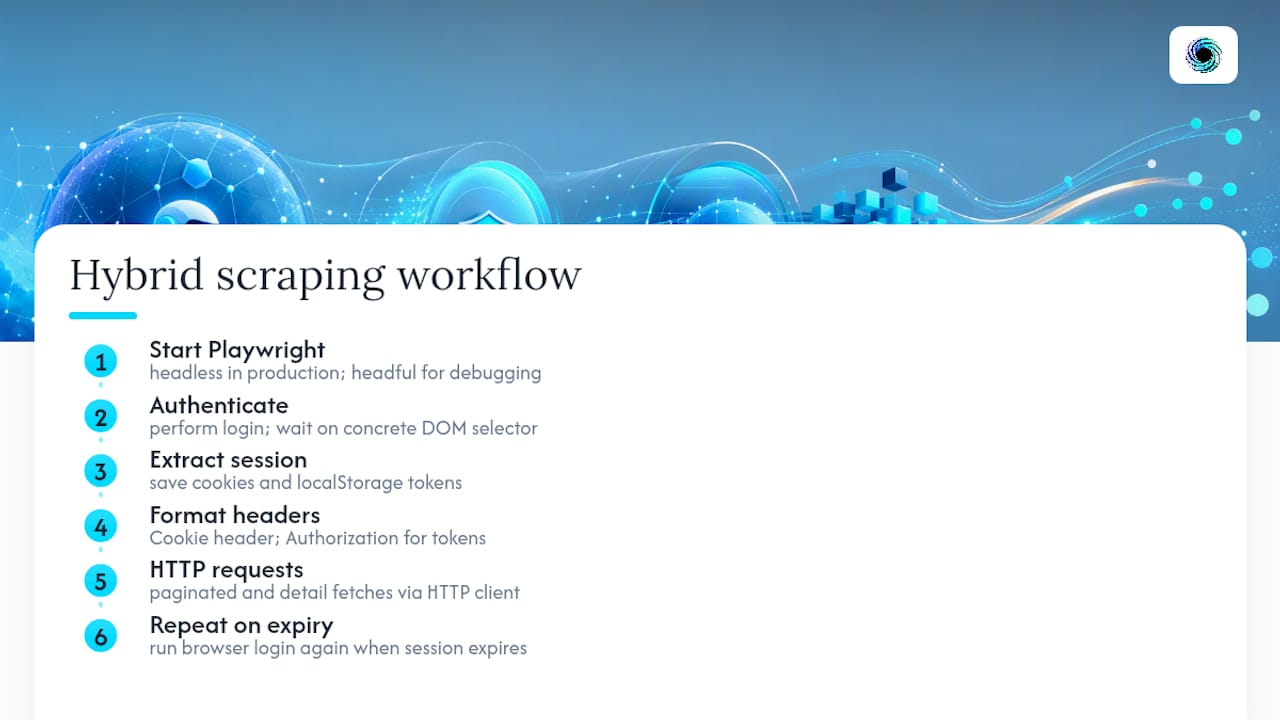
The highest-leverage pattern in production scraping is simple: use Playwright to authenticate once, pull the session state, then make every subsequent request with a plain HTTP client. This avoids paying the browser tax on every single page. Here's how the workflow looks in practice.
Environment notes first. Run Playwright headless in production (headless: true); reserve headful mode for local debugging where you need to watch the flow visually. On Linux containers, install the dependency bundle Playwright's CLI lists (playwright install-deps) rather than guessing at missing shared libraries. Set a realistic viewport and --disable-blink-features=AutomationControlled if the target site checks for that flag.
The login and extraction sketch:
const { chromium } = require('playwright');

async function getSession(username, password) {
  const browser = await chromium.launch({ headless: true });
  const context = await browser.newContext({
    userAgent: 'Mozilla/5.0 (Windows NT 10.0; Win64; x64) AppleWebKit/537.36',
    locale: 'en-US',
  });
  const page = await context.newPage();

  await page.goto('https://example.com/login');
  await page.fill('#email', username);
  await page.fill('#password', password);
  await page.click('button[type="submit"]');

  // Wait for a signal that login actually completed
  await page.waitForSelector('[data-testid="dashboard"]', { timeout: 15000 });

  const cookies = await context.cookies();
  const localStorageData = await page.evaluate(() =>
    JSON.stringify(window.localStorage)
  );

  await context.close();
  await browser.close();

  return { cookies, localStorageData };
}
Note the waitForSelector call instead of a fixed sleep. Waiting on a concrete DOM element, or page.waitForLoadState('networkidle') when no clean selector exists, is what keeps this reliable across slower page loads.
Converting the session to HTTP headers. Once you have cookies, format them as a Cookie header string for your HTTP client:
const cookieHeader = cookies
  .map(c => `${c.name}=${c.value}`)
  .join('; ');

const response = await fetch('https://example.com/api/orders?page=1', {
  headers: {
    'Cookie': cookieHeader,
    'User-Agent': 'Mozilla/5.0 (Windows NT 10.0; Win64; x64) AppleWebKit/537.36',
    'Accept': 'application/json',
  },
});
Watch for tokens stored in localStorage rather than cookies, common with JWT-based auth. Those need to go into an Authorization: Bearer header instead. From here, every paginated API call, every detail page fetch, every subsequent request runs through plain fetch or axios, no browser involved, until the session expires and you need to repeat the login step. This is the core of hybrid scraping: a browser for the parts only a browser can do, HTTP for everything the browser already unlocked. Readers who want a deeper walkthrough of this exact rendering step can check how to scrape dynamic pages with Python and Playwright.
Running Browsers at Scale Without Burning Down Your Infrastructure
Automated browser scraping breaks in predictable ways once you move past a handful of concurrent jobs, and almost all of them trace back to treating a browser like a stateless function call instead of a heavyweight process that needs lifecycle management.
Pool your browsers; don't spawn them per job. Launching a fresh Chromium instance for every scrape task adds seconds of cold-start latency and spikes CPU on every single request. The fix is a warm pool: launch a fixed number of browser instances at startup, then call browser.newContext() for each job instead of a new browser. A context is cheap and isolated (separate cookies, storage, cache); a browser process is not. Recycle instances after a set number of jobs to shed memory leaks before they compound, a pattern production scraping teams rely on to keep memory flat over long runs.
Fix your container's shared memory before you fix anything else. Docker's default /dev/shm allocation, often 64MB, is far too small for Chromium's rendering process. This is one of the most common causes of silent renderer crashes in containerized deployments, and it's fixable in one line: set /dev/shm to 1GB or more at container startup. Skip this and you'll spend a week debugging crashes that have nothing to do with your scraping logic.
Zombie processes are a real production hazard, not a rare edge case. Chromium spawns child processes for its renderer, GPU, and sandbox helpers. When a parent process dies without properly reaping them, those children linger as zombies that slowly eat available memory and file descriptors until the host OOM-kills something important. Run your browser fleet behind a real init process (tini, dumb-init) that handles signal forwarding and process-group cleanup, and size your job concurrency to available RAM, not to request volume.
Queue jobs and enforce hard timeouts. A hung page (infinite spinner, a network request that never resolves) will hold a browser context open indefinitely if nothing stops it. Set an explicit timeout per job, kill the browser context on breach, and replace it rather than trying to recover it. A queue in front of your worker pool absorbs traffic spikes so you're never launching more contexts than your container can actually hold in memory.
- Warm pool of browser instances, new context per job, recycle after N jobs.
/dev/shmset to 1GB or more in every container running Chromium.- Real init process for signal handling and zombie reaping.
- Hard per-job timeouts with kill-and-replace instead of retry-in-place.
- Per-source baselines with alerting when success rates or extraction counts drift.
Pro Tip: Track a rolling success rate per source domain, not just per job. A site that silently changes its DOM structure won't throw an error; it'll just start returning empty fields, and only a baseline comparison catches that before it pollutes your dataset.
How Do Sites Detect Headless Browsers, and What Can You Do About It?
Bot detection systems don't rely on one signal. They correlate dozens of small tells into a fingerprint, and a mismatch anywhere in that fingerprint is often enough to flag a session. Sites can detect a headless browser through checks like these:
navigator.webdriverreturningtruein unpatched automation setups, the single most common tell.- Software-rendered WebGL output (
SwiftShaderor similar) instead of a real GPU renderer string. - A timezone or
Accept-Languageheader that doesn't match the exit IP's geography. - Missing or inconsistent
window.chromeobject properties that a real Chrome install always exposes. - A
navigator.languagesarray that's empty or doesn't match the claimed locale.
None of these individually proves automation. Together, they build a fingerprint that's hard to fake convincingly, and proxy rotation alone does not fix a mismatched fingerprint: a residential IP in Frankfurt paired with a browser reporting en-US and a New York timezone is a louder signal than a datacenter IP would ever be.
Mitigations exist, and they mostly hold up: stealth patches that override navigator.webdriver and normalize WebGL output, pairing each proxy with a matching locale and timezone configuration, and consistent header sets across every request in a session. Blocking nonessential resources, images, fonts, third-party analytics scripts, also helps indirectly. Cutting that load can reduce renderer memory usage by roughly 60 to 70 percent on media-heavy pages, which means fewer crashes and fewer sessions that die mid-render and look suspicious to a monitoring system on the other end.
At a certain point, maintaining stealth patches against sites that update their detection weekly becomes its own full-time job. That's the signal to move to managed stealth browser profiles or residential proxy pools with built-in geo-matching rather than hand-rolling fingerprint overrides. The trade-off is straightforward: you pay more per request, but you stop losing engineering hours to a cat-and-mouse game that never actually ends.
Designing a Tiered Fetch Pipeline That Doesn't Bankrupt You
The cost curve for web scraping with headless browsers isn't linear. It's a step function, and the step happens the moment rendering becomes your default path instead of your exception path.
A tiered fetch design puts a cheap HTTP client at the front of every job. It only escalates to a browser when a URL fails a fast content check, missing expected data, a redirect to a JS-only shell, a 403 that smells like a bot wall. Once a URL escalates, cache the JSON endpoint you discover during that render so future requests to the same data source skip the browser entirely. This is the architectural core of what hybrid scraping guides describe as staged, selective rendering rather than treating every response as equally expensive.
The cost drivers break down cleanly:
| Cost factor | HTTP client | Headless browser |
|---|---|---|
| Memory per request | Low, tens of MB | High, hundreds of MB per render |
| Cold start latency | Milliseconds | Seconds per launch |
| CPU load | Minimal | Significant during page render |
| Proxy requirements | Basic rotation often sufficient | Residential/geo-matched often needed |
| Scaling bottleneck | Network bandwidth | Available RAM and CPU cores |
Once render volume climbs, the browser tier becomes the dominant cost line, not the proxy bill, not the storage, to compute needed to keep Chromium instances warm and stable. The fix that pays for itself fastest: use the browser only to acquire a session or a dynamic token, then hand everything else to HTTP. Persist that session as long as the target site allows; re-authenticate only when cookies expire or a request starts returning 401s, since re-running a full login flow for every batch defeats the entire point of the pattern.
Gyrence's Approach: Typed Failures Instead of Silent Ones
Gyrence builds the hybrid pattern above into five composable primitives instead of leaving each team to reinvent it.
- Search and Traverse map a site's URL graph without spinning up a renderer for every link.
- Fetch and Extract handle the HTTP-first path, with LLM-powered schema extraction built in.
- Map builds a URL map from sitemaps when a full crawl isn't necessary.
Every call returns a typed, discriminated-union response, including failures, so an agent or pipeline can branch on a specific error instead of guessing why a page came back empty. Spending caps keep per-call cost bounded before a bad job runs away with your budget.
How Do You Handle Cookies and Login Sessions in Headless Scraping?
Session management is where most headless scraping projects quietly fall apart. A login that works once in testing often breaks in production because cookies expire, get invalidated by IP changes, or never transfer cleanly between the browser context and whatever client makes the follow-up requests.
The rule that holds up: treat the browser context as a session factory, not a long-lived worker. Log in once per session lifetime, extract every relevant cookie plus any token sitting in localStorage or sessionStorage, and store that session bundle somewhere your HTTP layer can retrieve it, a cache, a database row, a short-lived secrets store. Attach an expiry estimate to that stored session based on the site's observed cookie maxAge values, and refresh proactively rather than waiting for a 401 to tell you the session died.
Multi-step or CSRF-protected auth flows need particular care. If a site rotates a CSRF token on every form submission, you can't just replay a captured cookie set forever; you need the browser to complete the flow fresh each time the token invalidates. For sites using OAuth redirects through a third-party identity provider, the browser is often unavoidable for the initial handshake, but the resulting access token can still feed a plain HTTP client for every request after that. Never hardcode session data across environments; a session captured in staging with a different user agent or IP than production will get flagged the moment it's reused somewhere the fingerprint doesn't match.
Why Capture Network Traffic While Scraping, and How Do You Read It?
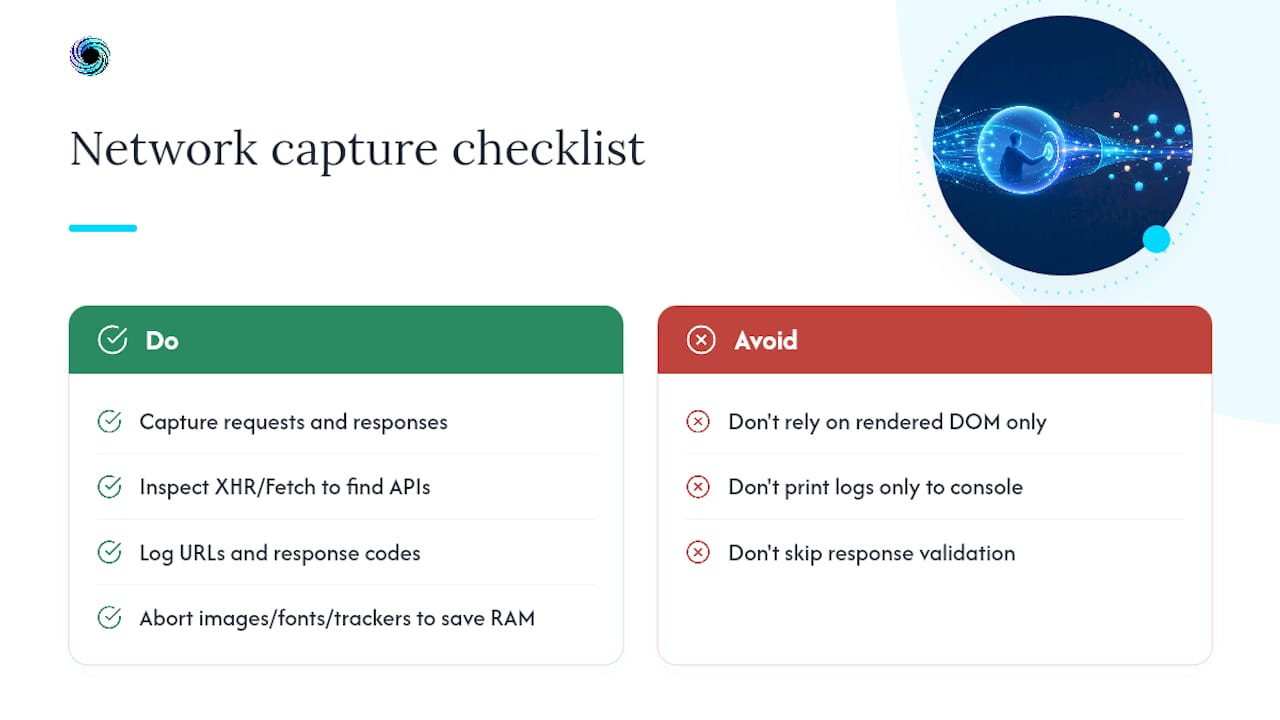
Network capture is how you find the shortcuts that make browser scraping unnecessary in the first place. Playwright exposes this directly through page.on('response') and page.route(), letting you log, inspect, or intercept every request a page makes while it renders.
The practical use is twofold: first, discovery; watching XHR and Fetch requests during a manual pass through DevTools (or programmatically in a script) reveals the JSON API a site's frontend calls internally, the same endpoint you can hit directly with an HTTP client once you know its shape and required headers, a key literature review automation benefit for researchers. First, discovery: watching XHR and Fetch requests during a manual pass through DevTools (or programmatically in a script) reveals the JSON API a site's frontend calls internally, the same endpoint you can hit directly with an HTTP client once you know its shape and required headers. Second, validation: capturing response bodies and status codes during a scrape run lets you confirm the page actually got the data it needed rather than silently rendering an empty state that still returns a 200.
page.route() also doubles as your resource-blocking lever. Aborting requests for images, fonts, and third-party trackers during a render cuts memory and CPU load significantly, the same 60 to 70 percent memory reduction figure that applies broadly to blocking nonessential resources during page loads. Log every intercepted request's URL and response code to a structured store rather than just the console; that log becomes the dataset you mine later to find new API endpoints as a target site's frontend evolves.
What's the Best Way to Scrape a Single-Page Application?
Single-page applications load a mostly empty HTML shell, then build the actual page content client-side through JavaScript, which means the "view source" HTML almost never contains the data you're after. Scraping an SPA well comes down to picking the right wait condition and, ideally, finding the API it's calling instead of scraping the rendered DOM at all.
Start with network capture, most SPAs built on React, Vue, or Angular call a REST or GraphQL API to populate the page, and that API is usually far more stable and far cheaper to hit than the rendered page itself. When no clean endpoint exists (heavily obfuscated GraphQL queries, server-side session-bound tokens), fall back to rendering, but wait deliberately. page.waitForSelector() targeting an element that only appears once real data has loaded is more reliable than a fixed delay, and page.waitForLoadState('networkidle') works well for SPAs that fire a burst of requests on load and then go quiet.
Infinite-scroll and paginated SPAs need one more step: simulate the scroll or click event that triggers the next data fetch, then wait for the corresponding network response before extracting. Trying to extract everything in one pass on a virtualized list (where only visible rows exist in the DOM) will miss data that scrolled out of view and got unmounted. Route requests you don't need, images, ads, analytics beacons, and you'll cut both render time and the noise in your network logs.
Is Web Scraping Legal, and Where Are the Lines?
Web scraping itself isn't illegal in the United States, but what you scrape, how you access it, and what you do with the data afterward all carry separate legal weight, and the rules aren't the same for every site.
Publicly accessible data generally sits on firmer ground than data behind a login wall. Scraping content that requires authentication can implicate a site's terms of service and, depending on how access controls are bypassed, potentially the Computer Fraud and Abuse Act, which courts have interpreted inconsistently across circuits. Copyright law applies separately from access law: scraping text or images doesn't automatically grant rights to republish or resell that content, regardless of how it was collected. Personal data carries its own layer of obligation under frameworks like the CCPA for California residents, independent of whether the scraping itself was technically permitted.
Practical guardrails that hold up regardless of jurisdiction: check robots.txt and honor disallow rules even though they're not legally binding in most interpretations, read a site's terms of service before scraping data behind authentication, rate-limit requests so you're not degrading a target site's performance, and never scrape personal data you don't have a lawful basis to collect and store. When a project involves financial data, healthcare information, or anything behind a paywall, get a legal opinion specific to that use case rather than relying on general scraping guidance, this is one area where the specifics of what you're doing and where matter more than any blanket rule.
Build vs. Buy: An Engineer's Rule of Thumb
Small, controlled jobs favor self-hosting; frequent, bursty, or public-facing scraping favors a managed API. Watch for recurring OOM kills, a growing backlog of challenge pages, or a team spending more time on browser ops than on the actual data pipeline, that's the signal the balance has tipped.
— Glen
How Gyrence Handles the Hybrid Pattern for You
This product offers a managed alternative to running your own Playwright fleet: instead of maintaining browser pools, container tuning, and stealth patches yourself, you call one API and let the primitives decide how much rendering a job actually needs.

Fetch and Extract handle the HTTP-first path automatically, with schema-guided extraction built in rather than billed as a separate LLM add-on. Traverse and Map cover site-wide crawling and URL discovery without spinning up a browser context for every page in a domain. When a job does need rendering, that cost stays inside a spending cap you set upfront, so a bad crawl or an unexpected paywall never turns into a surprise bill at the end of the month. Every response comes back typed, including failures, so your code branches on a specific reason a fetch didn't work instead of guessing from an empty string.
If you're weighing whether to keep building your own browser orchestration or hand that operational weight to an API, connect an AI agent to Gyrence and run a real job against it. For a broader look at how the primitives fit together, the main Gyrence landing page walks through the full API surface.
Sources
- The headless-browser tax: memory, CPU, and why HTTP clients win when they can
- How to configure Docker's shared memory size (/dev/shm)
- Building a production-grade scraper with Playwright, Chromium, Kubernetes, and AWS
- What Is Browser Fingerprinting and How to Avoid It | SparkProxy
FAQ
Can a Website Detect a Headless Browser?
Yes. Sites check signals like navigator.webdriver, software-rendered WebGL output, and mismatches between browser locale and proxy geography, and correlate them into a fingerprint rather than relying on any single flag.
Which Browser Is Best for Scraping?
Playwright is the strongest general-purpose pick for scraping because it supports Chromium, Firefox, and WebKit from one API and includes native network interception. Puppeteer is a lighter option if you only need Chromium and stay in Node.
What Are the Disadvantages of Using a Headless Browser?
Browsers consume far more memory and CPU than an HTTP client, add seconds of cold-start latency per launch, and introduce operational failure modes like OOM kills and zombie processes at scale, which is why hybrid, HTTP-first pipelines exist in the first place.
Is Web Scraping Detectable?
Yes, through a combination of browser fingerprinting, request pattern analysis, and behavioral signals like mouse movement or timing consistency. No single mitigation eliminates detection risk entirely; consistent fingerprints across browser, locale, and proxy geography reduce it substantially.
Do I Need a Managed API Instead of Self-Hosting a Browser Fleet?
It depends on volume and consistency. Occasional, controlled scraping jobs run fine self-hosted, while frequent or bursty jobs across many public sites often cost less in total when handled through a managed API that bundles pooling, typed error handling, and spending caps into the request itself.