
Use HTTP caching and conditional GETs, specifically ETag / If-None-Match or Last-Modified / If-Modified-Since, so the server can tell your scraper "nothing changed" with a 304 instead of sending the full page again. That single mechanism, paired with a persistent cache, cuts bandwidth and proxy costs, reduces parsing work, and puts less strain on the origin server. Get there with three pieces: validators, a place to store them, and a fallback for sites that skip validators entirely.
TL;DR:
- Persisting validators between runs using storage options like JSON files, SQLite, or Redis ensures effective cache reuse across multiple sessions or distributed environments.
- Using libraries such as requests-cache, httpx, or Scrapy's cache middleware simplifies correct implementation of caching logic and reduces development effort.
- Proper cache key normalization and filtering out dynamic or challenge-related headers prevent cache poisoning and maintain high hit rates.
- Regularly auditing cache effectiveness by measuring cache hit ratios and bytes saved helps identify issues and optimize the caching strategy.
Table of Contents
- What Is HTTP Caching for Scraping and Web Crawlers?
- How Do You Build a Conditional GET Fetcher?
- Should You Use In-Memory, Disk, or Redis for Your Cache?
- Which Libraries Handle HTTP Caching for You?
- What Cache Mistakes Break Scrapers Silently?
- How Do You Measure Whether Caching Is Actually Working?
- What Cache Settings Change Between Development and Production?
- Where Gyrence Fits in a Caching Strategy
- When Is Caching Worth the Engineering Time?
- Get Instrumented Fetching Without the Guesswork
- Sources
- FAQ
What Is HTTP Caching for Scraping and Web Crawlers?
HTTP caching for scrapers works the same way it works for browsers. The server hands you a validator on the first request, and your scraper hands it back on the next one.
- ETag is an opaque fingerprint the server assigns to a resource version. Send it back as
If-None-Match, and the server compares it against the current version. - Last-Modified is a timestamp. Send it back as
If-Modified-Since, and the server checks whether the resource has changed since that time. - A 304 Not Modified response means the server confirms nothing changed. It sends no body at all, just headers, which is where the real savings come from.
Cache-Control directives matter just as much as the validators themselves. max-age tells you how long a response stays fresh without even needing to ask. no-cache means you can store the response but must revalidate before reuse. no-store means don't cache it at all. immutable tells you a resource will never change during its lifetime, which is common on versioned static assets. MDN's HTTP caching guide covers the full spec, including heuristic freshness, the fallback browsers and scrapers use when a server sends no explicit max-age at all.
How Do You Build a Conditional GET Fetcher?
A working conditional-request setup needs one thing above all else: somewhere to persist the validators between runs. If you throw away the ETag after every script execution, you're rebuilding the cache from zero every time and getting none of the benefit.
Here's the pattern, often called a PoliteFetcher, in outline:
- Check local storage for a stored ETag or Last-Modified value tied to the URL.
- If found, send the GET with
If-None-MatchorIf-Modified-Sinceset. - On a
304, use your last saved copy of the content and move on. No parsing, no bandwidth. - On a
200, parse the new body, then overwrite the stored validator and (optionally) a hash of the content. - Throttle between requests and back off on
429or503responses regardless of cache state.
Run a quick two-request audit before you build anything elaborate: fetch a URL once, grab whatever ETag or Last-Modified header comes back, then immediately resend the request with the matching If- header. If you get a 304, the site supports conditional requests and you've confirmed the pattern works before writing a line of production code. One writeup shows this audit in roughly fifteen lines. A technical investigation into Shopify storefronts found product endpoints consistently returned 304s once ETags were echoed back correctly, producing near-total bandwidth savings on unchanged pages.
For storage, a flat JSON file works for a single-machine script scraping a few hundred URLs. SQLite handles thousands of URLs cleanly with no extra infrastructure. Redis is the right call once multiple workers or machines need to share the same validator store.
Pro Tip: Log the byte size of every response next to its status code. Once you see how many bytes a 304 saves versus a full 200 on the same URL, you'll have a hard number to justify the engineering time, and a baseline to catch regressions later.
Should You Use In-Memory, Disk, or Redis for Your Cache?
Caching strategies for scraping usually stack across three tiers, not one. Each tier solves a different problem, and skipping straight to the fanciest option usually wastes effort.
- In-memory, per-run caching stops you from fetching the same URL twice inside a single script execution. It disappears the moment the process exits, which is fine, since its only job is deduping within one run.
- Persistent disk or SQLite caching survives between runs. This is where validators and, often, full response bodies live for small-to-medium jobs, and it's the tier most solo scrapers should reach for first.
- Shared Redis or memcached caching is for distributed crawls where multiple workers need the same validator store. Redis is the more common choice for this in Python scraping stacks, largely because of the mature redis client library and its support for TTLs and atomic operations. memcached remains a solid, simpler alternative when you only need pure key-value caching without Redis's data structures.
- Varnish or a CDN sits in front of origin servers, not inside your scraper, but understanding how it works matters when you're scraping through infrastructure that uses shared caches, since a Varnish layer can serve you a stale copy regardless of what your own client sends.
Decide early whether you're storing full bodies or just validators plus a content hash. Storing full bodies costs more disk but saves you a re-fetch if you need to re-parse later with a different extraction rule. Storing only hashes is leaner but means a re-parse always requires a fresh network call.
Prune aggressively. Run periodic TTL-based expiry, VACUUM your SQLite file to reclaim space, and apply an LRU eviction policy on Redis if you're caching at real scale. A tiered caching pattern combining memory, persistent storage, and Redis is the setup most production crawlers converge on for exactly this reason.
Which Libraries Handle HTTP Caching for You?
You rarely need to hand-roll all of this. A handful of libraries already implement the conditional-request dance correctly.
- requests-cache turns a
requests.Sessioninto a cache-aware session with almost no code change. Key settings:backend(SQLite by default, but also filesystem or Redis),expire_afterfor TTLs,cache_controlto respect server-sent directives instead of overriding them, andmatch_headersto control which request headers factor into the cache key. Checkresponse.from_cacheon every response to track hit rate, as detailed in the requests-cache documentation. - hishel does the same job for
httpx, with native async support. It follows the HTTP spec more conservatively than requests-cache by default, meaning it caches less unless you explicitly configure it, and it surfaces cache-hit status through an extension field on the response rather than a bolt-on attribute. - Scrapy's HTTP cache middleware ships with two policies: the dummy policy, which just stores everything for offline replay, and the RFC2616 policy, which actually respects validators and Cache-Control headers the way a browser would. Most production Scrapy crawls should run the RFC policy.
- Redis and memcached clients plug into any of the above when you outgrow single-machine storage.
What Cache Mistakes Break Scrapers Silently?
Cache-poisoning is the quiet killer here, and it rarely announces itself. It just shows up as a hit rate that never rises.
- Normalize your cache keys. Strip ephemeral query parameters like session tokens or timestamps before hashing the URL, since two functionally identical URLs with different tracking parameters will never share a cache entry otherwise.
- Exclude rotating headers from the key. If your
match_headerssetting folds in a User-Agent that rotates every request, your cache key changes every single time and your hit rate collapses to near zero. - Filter out challenge pages before caching. A CAPTCHA or block page returned with a
200status will get cached as if it were real content, and you'll keep serving it to yourself until the TTL expires. - Never cache 5xx errors. Those are transient by nature. Do cache 404 or 410 responses, but only for a short TTL, so you're not hammering a dead URL on every run while still avoiding repeat requests within the same window.
Pro Tip: Set an alert on any sudden drop in your from_cache ratio. A hit rate that falls off a cliff almost always means someone changed the header set going into the cache key, not that the target site suddenly stopped supporting conditional requests.
How Do You Measure Whether Caching Is Actually Working?
Run the same two-request audit you used to validate a single URL, but at scale: fetch a sample set fresh, capture every ETag and Last-Modified header, then resend conditionally and record the status codes that come back.
- Track the from_cache ratio — the share of responses served from your local cache without hitting the network at all.
- Track the 304 ratio — how often the origin server itself confirms no change versus sending a fresh body.
- Calculate average bytes saved per URL class, since a listing page and a product detail page will save very different amounts.
- Alert on unexpected
200responses for pages you'd expect to be stable, since that often signals the page actually changed, not that your cache broke.
What Cache Settings Change Between Development and Production?
Local iteration and production runs need different cache rules, and mixing them up is a common source of confusion when a parser change doesn't seem to "take."
- During development, use a long-lived fixture cache. You're iterating on parsing logic, not testing whether the page changed, so freeze the response and work against it.
- In production, use real TTLs plus conditional revalidation, so you're pulling fresh data on the schedule your use case actually needs.
- Build in a deliberate bypass:
expire_after=0, asession.cache_disabled()context manager, or an equivalent flag, so you can force a fresh fetch on demand without deleting the whole cache. - Keep your frontier or seen-set (the list of URLs you've already queued or crawled) entirely separate from your response cache. They have different lifetimes and different purge rules, and conflating them tends to cause silent re-queuing bugs.
- Schedule regular pruning and keep an eye on how fast your cache storage grows, especially if you're storing full response bodies.
Where Gyrence Fits in a Caching Strategy
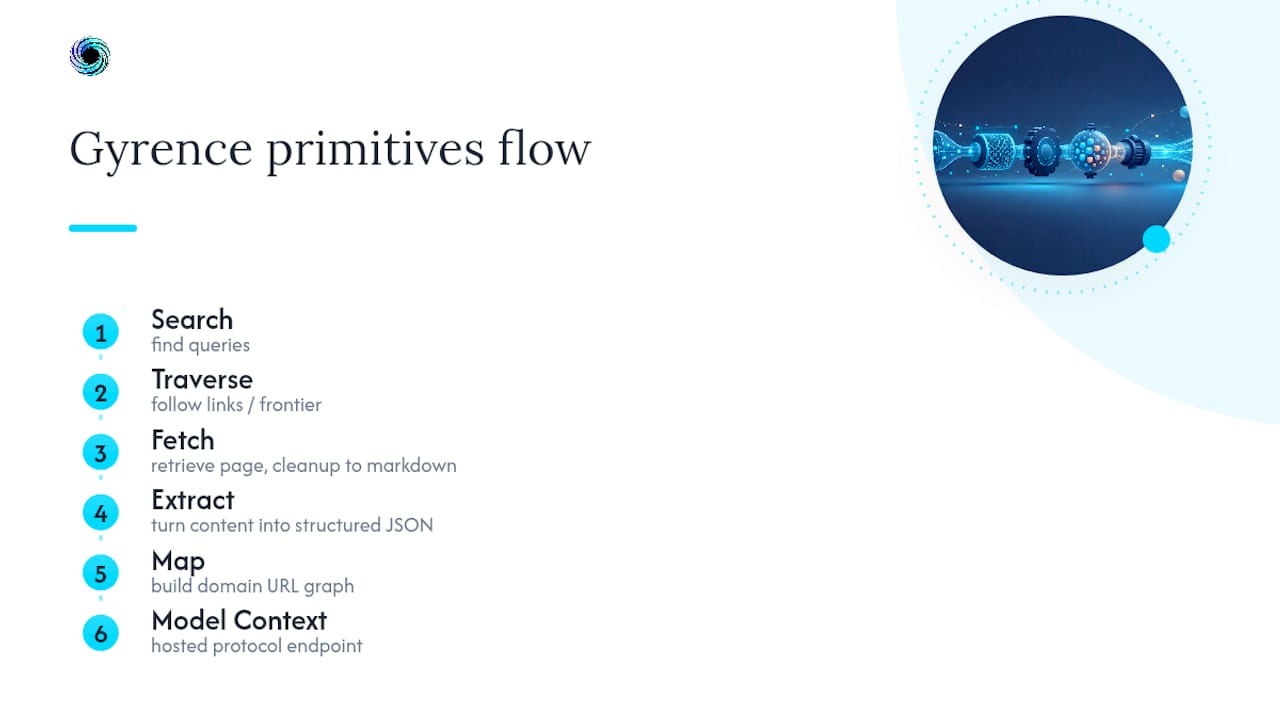
Gyrence is a web data API built around five composable primitives: Search, Traverse, Fetch, Extract, and Map, plus a hosted Model Context Protocol endpoint. Every call returns a typed, discriminated-union response, including the failure cases, so your code can branch on what actually happened instead of guessing whether a 200 really meant success.
That matters directly for caching strategy. Fetch handles page retrieval and cleanup to markdown; Extract turns that into structured JSON against a prompt or schema; Map builds out a domain's URL graph, the same kind of frontier data a hand-rolled crawler tracks separately from its response cache. Gyrence bundles LLM extraction into the same call rather than billing it separately, and spending caps help control unexpected costs in case of excessive re-fetching.
Author background, case studies, and internal performance benchmarks: to be added.
When Is Caching Worth the Engineering Time?
Caching pays off the moment a scrape runs more than once against the same URLs. Start by instrumenting hit rate before writing anything fancy. Add conditional GETs early, even in a rough form, rather than bolting them on after a bandwidth bill gets painful.
— Glen
Get Instrumented Fetching Without the Guesswork
Building your own PoliteFetcher, validator store, and hit-rate dashboard is the right call when caching logic is core to what you're building. When it isn't, and you just need reliable, cost-predictable page data for an agent or pipeline, Gyrence hands you the same underlying discipline without the maintenance burden.

Every Fetch call returns typed responses that distinguish a real result from a block page or a timeout, so your downstream code never mistakes a challenge page for content the way an uninstrumented cache sometimes does. Extract folds structured JSON extraction into the same call, and spending caps help prevent unexpected charges from excessive usage. If you're weighing whether to keep maintaining a homegrown cache layer or hand that instrumentation to something already built for it, start a session at Gyrence and run a Fetch call against a page you're currently scraping by hand.
Sources
For deeper protocol detail, MDN's HTTP caching guide is the definitive reference. For Python-specific implementation, see the requests-cache documentation and the tiered Redis caching guide. For Redis and memcached specifics, check their respective Python client and project pages.
- MDN Web Docs — HTTP caching
- THE LAB #99: HTTP Caching for Web Scraping — The Web Scraping Club
- HTTP caching with requests-cache — Python Web Scraping
- Web scraping caching: ETag + Last-Modified + Redis — ProxiesAPI Guides
- Your recurring scraper is re-downloading data that didn't change. Here's the 15-line fix — DEV Community
FAQ
Is Web Scraping Illegal?
Scraping publicly accessible data is generally legal in the United States, but the legality depends heavily on what you scrape, a site's terms of service, and whether you access data behind authentication. Consult a qualified attorney for specifics tied to your use case.
What Is HTTP Caching?
HTTP caching is a protocol-level mechanism that lets a client store a copy of a response and reuse it, either without contacting the server at all (when still fresh under Cache-Control) or after confirming nothing changed with a conditional request that returns a 304 Not Modified.
Can ChatGPT Scrape a Website Directly?
ChatGPT itself does not scrape websites on its own; it depends on browsing tools, plugins, or connected APIs to fetch live web content. A dedicated web data API like Gyrence is built specifically to fetch, clean, and structure that content for an AI agent to consume.
Is Scraping With BeautifulSoup Legal?
BeautifulSoup is just a parsing library, so using it carries no legal weight on its own; legality depends entirely on what site you're scraping, how you access it, and what you do with the data. The tool never changes the underlying legal question.
Does HTTP Caching Actually Reduce Scraping Costs?
Yes. A technical investigation into Shopify storefronts found that conditional requests returning 304 responses saved close to all the bandwidth on unchanged product pages, since a 304 carries no body at all.