
Use LangChain's Document loaders paired with the lightest fetch layer that reliably returns content, then convert every page to clean Markdown, split it on structure, attach traceability metadata, embed it, and store it for retrieval. Static HTTP works for most documentation and blog content; JavaScript-heavy or defended pages need headless rendering or a managed fetch layer instead. What follows is a runnable pipeline sketch plus the guardrails that keep the whole thing from becoming a cost surprise.
TL;DR:
- Static HTTP requests suffice for most documentation and blog pages, but rendering tools are necessary for JavaScript-heavy or protected sites.
- Chunking structure-aware content with metadata and content hashes improves retrieval quality and keeps updates manageable.
- Tiered fetch strategies, from heuristic extraction to headless rendering and LLM-guided extraction, optimize costs and handle site defenses effectively.
- Monitoring challenge and empty-content rates helps identify changes in site defenses, guiding when to escalate or stop scraping for cost efficiency.
- Reusing session information and incremental content hashing prevent unnecessary re-crawling and keep datasets current without excess computation.
Table of Contents
- What LangChain Loaders Actually Return
- Choosing the Fetch Layer: Static HTTP, Headless, or Managed
- Handling Anti-Bot Defenses and Scale Without Breaking Your Pipeline
- Turning Raw HTML Into Text Worth Embedding
- Chunking and Metadata: What Every Chunk Needs to Carry
- A LangChain Pipeline Sketch You Can Actually Run
- Keeping Costs and Data Quality Predictable in Production
- What Gyrence Learned Building This for Agents
- Handling Dynamic Content Loading in LangChain Pipelines
- Managing Session-Based Authentication and Cookies
- Keeping Your Scraped Dataset Current Without Re-Crawling Everything
- When Build-It-Yourself Stops Making Sense
- Where Gyrence Fits in Your Scraping Pipeline
- Selected Resources for Going Deeper
- Sources
- FAQ
What LangChain Loaders Actually Return
Every LangChain loader, from WebBaseLoader to community connectors, hands you back a list of Document objects. Each one carries page_content (the text) and metadata (a dictionary describing where that text came from). This is the entire ingestion unit for downstream RAG work, and the LangChain documentation treats it as the standard interface across every loader, whether it's pulling from a sitemap, a single URL, or a scraping integration.
That consistency matters more than it sounds. Loaders are swap points, not permanent commitments. You can start with WebBaseLoader on a static site, discover three months later that half your target pages are React shells, and swap in a rendering-capable loader without touching your splitter, embedder, or vector store.
Before anything downstream runs, check the basics:
- Print
docs[0].page_contentand confirm it isn't an empty string or a cookie-consent wall. - Verify
metadata["source"]actually points to the URL you expect, not a redirect target. - Count characters per document; anything under a few hundred usually means the fetch failed silently.
Skipping this check is how teams end up embedding thousands of "Please enable JavaScript" pages and wondering why retrieval quality tanks.
Choosing the Fetch Layer: Static HTTP, Headless, or Managed
Not every page needs the same amount of machinery to load correctly, and picking the wrong tier either burns money or gets you blocked.
- Check if the page is static first. Fetch the raw HTML with a simple HTTP request and look for your target content in the response body. If it's there, you're done, no browser needed.
- Detect JavaScript-rendered content. If the HTML shell comes back mostly empty (a handful of
<div>tags and a<script>bundle), the content loads client-side. That's your signal to move to headless rendering, a pattern community guides document extensively for LangChain workflows facing single-page apps. - Watch for anti-bot walls. A response full of CAPTCHA markup, a 403, or a JavaScript challenge page means you've hit protection that neither static HTTP nor plain headless browsing will reliably beat.
- Automate the fallback. Build a check that inspects content length and known challenge-page signatures, then escalates the fetch method automatically instead of failing the whole run.
Static HTTP is fast and cheap; headless rendering is slower and costs more compute per page. Reserve rendering for sites that actually need it, and read our walkthrough on scraping dynamic pages with Playwright for the mechanics.
Handling Anti-Bot Defenses and Scale Without Breaking Your Pipeline
Once you're crawling more than a handful of domains, some fraction of them will actively try to stop you. The architecture question isn't "how do I get past this one site," it's "how do I build a pipeline that degrades gracefully across thousands of them."
A few patterns hold up in practice:
- Rotate user agents and, where legally and technically appropriate, IP addresses across a proxy pool rather than hammering one endpoint from one identity.
- Route geographically when a site serves different content or blocks by region.
- Apply exponential backoff on failed requests instead of retrying immediately, which just gets you blocked faster.
- Build a circuit breaker per domain: after N consecutive failures, stop hitting that domain and flag it for manual review.
- Escalate to a managed fetch provider when a site's defenses consistently defeat your in-house rendering pool. Rebuilding what a dedicated scraping API already solves rarely pays for itself.
Pro Tip: *Track your challenge rate (the percentage of requests that hit a CAPTCHA or block page) per domain, not just in aggregate.
Observability is the piece teams skip. Log empty-content rate, challenge rate, and per-URL success over time, and you'll catch a site that changed its defenses before your retrieval quality does.
Turning Raw HTML Into Text Worth Embedding
Raw HTML is full of navigation menus, cookie banners, related-article widgets, and footer links; using an AI summary generator can help condense such long text fast before indexing. Embed that alongside your actual content and you get what's sometimes called representation pollution: the semantic signal you wanted gets diluted by boilerplate that repeats identically across hundreds of pages.
The effect on retrieval is direct. When navigation and footer text end up in indexed chunks, embeddings drift toward the boilerplate's semantic center instead of the page's actual topic, and near-duplicate footers across a site can crowd out genuinely distinct content in your retrieval results.
Three techniques handle this in practice:
- Density-based extraction algorithms (the approach behind readability-style libraries and Trafilatura) score HTML blocks by text-to-markup ratio and strip low-density regions like nav bars and ad slots.
- Heuristic block scoring flags repeated structural patterns, like an identical footer appearing on every page of a domain, for removal.
- LLM-guided extraction works as a fallback for genuinely messy pages where heuristics fail, at higher per-page cost.
Run a token distribution sanity check after cleaning. If your average document is suspiciously uniform in length or several documents share the exact same trailing 200 tokens, you still have footer contamination. Our guide to fetching pages to Markdown for LLM use covers the conversion step in more depth.
Chunking and Metadata: What Every Chunk Needs to Carry
Token-only splitting (cut every 512 tokens regardless of content) is the fastest way to fracture a table in half or split a numbered list across two chunks. Structure-aware chunking that respects headings, list boundaries, and whole tables produces measurably better retrieval and lowers hallucination risk compared to blind token splits.
- Split on structure first, tokens second. Use heading boundaries and block-level HTML elements as your primary split points; only fall back to token counts within a section that's still too large.
- Target 500 to 900 tokens per chunk with roughly 100 tokens of overlap. This range balances context completeness against retrieval precision for most RAG use cases.
- Attach metadata to every chunk, not just every document. At minimum:
source_url,fetched_at,content_hash,language,crawl_depth, andfetch_method. - Deduplicate before embedding. Run MinHash or Jaccard similarity across chunks to catch near-identical boilerplate that survived cleaning, then drop duplicates before they hit your vector store.
content_hash earns its keep later: it's what lets you detect whether a page actually changed before re-embedding it.
A LangChain Pipeline Sketch You Can Actually Run
The stages chain together predictably: loader, transformer, splitter, embedder, vector store, retriever. Here's the shape of it.
- Load: Instantiate a loader per URL batch. Start static, escalate to a rendering-capable loader for domains flagged as JS-heavy in your earlier check.
- Validate: Before touching a single document, assert
len(doc.page_content) > thresholdand reject or flag anything that looks like a challenge page. - Transform: Run HTML through a Markdown converter and boilerplate stripper. This is your insertion point for either a heuristic cleaner or an LLM-based fallback for stubborn pages.
- Split: Apply a structure-aware splitter (LangChain's
MarkdownHeaderTextSplitteror an HTML-aware equivalent) with your 500 to 900 token target. - Embed and store: Push chunks to your embedding model, then into your vector store, metadata intact.
- Verify: Run a handful of known-answer retrieval queries against the freshly ingested batch. If a query that should return page X returns a challenge page or empty content instead, your cost gates or fallback logic need tuning before you scale up.
This is also where cost gates belong in code, not just in policy: wrap the rendering and LLM-extraction steps in explicit checks that count how many pages in a batch are escalating, and halt the run if that number spikes unexpectedly. An end-to-end framing of this pipeline walks through the same discover-to-generate arc in more detail.
Keeping Costs and Data Quality Predictable in Production
A pipeline that works on a hundred test URLs behaves differently on fifty thousand. The fix is a tiered extraction cascade: try the cheapest method first, escalate only when it fails.
- Tier 1, heuristic extraction. Fast, cheap, works for most static content.
- Tier 2, headless rendering. Escalate here when Tier 1 returns near-empty content.
- Tier 3, LLM-guided extraction. Reserve for pages where structure is too irregular for heuristics, and gate it with a hard per-run cost ceiling.
Monitor four numbers continuously: empty-content rate, challenge rate, extraction latency, and cost per successful extraction. A spike in anyone usually means a target site changed its markup or defenses.
Pro Tip: Cache aggressively using content_hash and the Last-Modified header. If a page's hash hasn't changed since your last crawl, skip re-embedding it entirely. That single check often cuts re-ingestion costs by more than half on sites that update infrequently.
When a page disappears (404 or removed from a sitemap), remove its chunks from the vector store rather than letting stale content linger and get retrieved.
What Gyrence Learned Building This for Agents
Every pattern above (loader validation, tiered fetch, structured cleaning, typed failure handling) is what Gyrence's five primitives, Search, Traverse, Fetch, Extract, and Map, are built around. Each call returns a typed, discriminated-union response, including failure cases, so an agent can branch on "blocked" versus "empty" versus "success" instead of guessing from a stack trace.
Handling Dynamic Content Loading in LangChain Pipelines
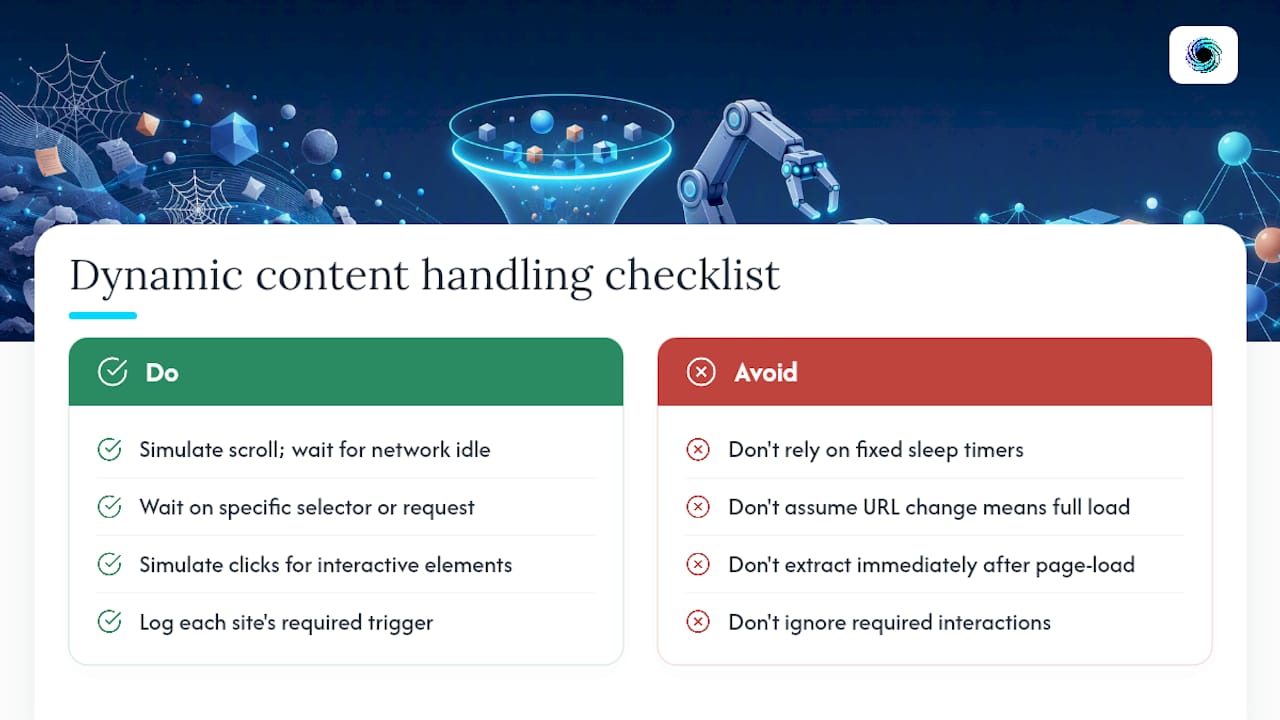
Dynamic content breaks naive scraping in a few specific ways, and each one needs its own fix rather than a single "use headless rendering" answer.
Infinite scroll and lazy loading mean the content you want isn't in the DOM until the user (or your headless browser) scrolls to trigger it. A basic page load won't capture it. Your renderer needs to simulate scroll events and wait for network activity to settle before extracting content, not just wait a fixed number of seconds.
Client-side routing in single-page apps means the URL might change without a full page reload, which breaks loaders that assume one fetch equals one page. You need to wait for a specific DOM element or network request to complete after navigation, not just after the initial load.
Race conditions between rendering and extraction are the most common silent failure. Your headless browser reports the page as "loaded" while an API call that populates the actual content is still in flight. The fix is waiting on a specific selector or network idle state rather than a generic page-load event, and building in a short buffer.
Content that only appears on interaction (accordions, "load more" buttons, tabbed panels) requires your automation to simulate those clicks before extraction runs. This is where headless rendering costs climb fastest, since each interaction adds latency and increases the chance of a timing failure.
Log which specific trigger (scroll, click, route change) each site needs. That log becomes your playbook for handling similar sites later, and it's the difference between debugging from scratch every time and reusing a known pattern.
Managing Session-Based Authentication and Cookies
Some of the highest-value content for RAG systems sits behind a login, and that changes your fetch strategy in ways that pure public scraping doesn't need to handle.
The core pattern: authenticate once, capture the session state (cookies, tokens, or headers), and reuse that state across subsequent requests rather than logging in on every fetch. In a headless browser context, this usually means capturing the browser's cookie jar after a successful login and injecting it into later sessions. For API-driven fetches, it means storing an auth token and attaching it to request headers.
Session expiration is the part teams underestimate. Sessions time out, tokens rotate, and a pipeline that doesn't detect an expired session will happily scrape a login page and embed it as if it were real content. Build an explicit check: if the fetched content matches known login-page signatures (a password field, a "sign in" heading) instead of your expected content, treat it as an authentication failure and trigger re-login, not a content failure.
Store credentials and session tokens outside your codebase, in environment variables or a secrets manager, never hardcoded in a loader script. And respect the target site's terms of service around automated access to authenticated areas; scraping your own account data is a different legal situation than scraping someone else's paywalled content at scale.
For multistep authentication flows (2FA, SSO redirects), headless rendering is close to mandatory since static HTTP requests can't execute the JavaScript-driven login flow most modern auth systems use.
Keeping Your Scraped Dataset Current Without Re-Crawling Everything
A RAG system built on stale data degrades quietly. Nobody notices until the agent confidently cites a price or policy that changed six months ago. The fix isn't re-crawling everything on a schedule; it's targeted, incremental refresh.
content_hash is the mechanism. Store a hash of each page's cleaned content alongside its chunks. On your next crawl pass, fetch the page again, hash it, and compare. Identical hash means skip re-embedding entirely. Different hash means the page changed and needs re-processing.
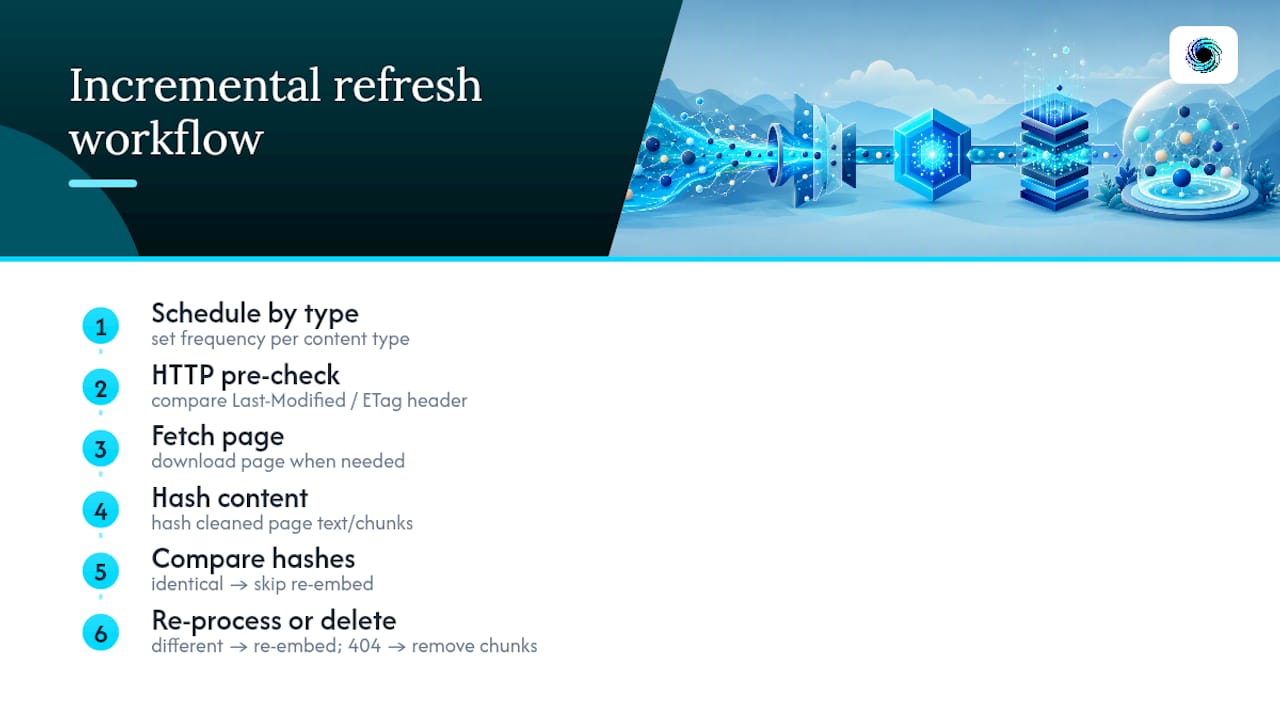
Schedule crawl frequency by content type, not uniformly. Documentation and product pages that update rarely might warrant a weekly check. News, pricing, and inventory pages need daily or even hourly checks if your use case depends on freshness. A flat "recrawl everything nightly" policy wastes compute on unchanged pages and still misses fast-moving ones if your interval is too coarse.
Handle deletions explicitly. If a URL that used to exist now 404s or has vanished from the sitemap, remove its chunks from your vector store. Leaving them in means your retriever can surface content for a page that no longer exists, which is worse for user trust than simply having less coverage.
The Last-Modified HTTP header, when a site actually sets it, gives you a cheap pre-check: if the header hasn't changed since your last fetch, you can often skip the full download and hash comparison entirely.
When Build-It-Yourself Stops Making Sense
Start with static loaders and a small crawl. Escalate to rendering or managed fetch once more than roughly a third of target URLs need it, or your empty-content rate stays stubbornly high despite tuning. Watch challenge rate and cost per successful page. Those two numbers tell you when to stop maintaining infrastructure and start integrating one.
— Glen
Where Gyrence Fits in Your Scraping Pipeline
There are alternative services to maintaining your own fetch, proxy, and cleaning infrastructure for LangChain pipelines, some offering spending caps to prevent runaway costs. Each primitive can map to typical pipeline stages such as searching candidate URLs, crawling sites outward, cleaning pages to Markdown, pulling structured JSON with a schema or prompt, and building URL graphs for planning crawls.

Some APIs return typed and discriminated responses that allow loader code to branch on "blocked" or "empty" responses versus "success," rather than relying on generic exceptions. That's the same reliability problem this article walks through, just handled at the API layer instead of in your own retry logic. Hosted MCP endpoints from some providers allow direct connection into an agent without a custom loader. Check the Gyrence documentation for endpoint details, or start a workspace at Gyrence to test the primitives against your own target URLs before committing to a build-it-yourself pipeline.
Selected Resources for Going Deeper
Start with the LangChain integrations docs for loader specifics, the Python venv guide for environment setup, and community repos like scrapfly-scrapers for runnable examples.
Sources
- Scrapeless universal scraping integration — LangChain docs
- Python
- Web scraping for RAG pipelines — AIOutlooks
- Webscraping
FAQ
Is web scraping legal?
Scraping publicly accessible data is generally permitted in the United States, but it depends on the site's terms of service, whether the data is copyrighted or personal, and how you access it (bypassing authentication or paywalls raises separate legal risk). Always review the target site's terms and consult counsel for anything at commercial scale.
Can ChatGPT do web scraping?
ChatGPT itself can't fetch live web pages reliably or execute a scraping pipeline; it can help you write scraping code, but you still need a fetch layer, a loader, and infrastructure like the one described above to actually pull and process pages.
Which AI is best for web scraping?
No single AI model handles scraping end to end. LLMs are best used for the extraction step, pulling structured data from cleaned text, while the fetch and rendering layer stays a dedicated tool like a headless browser or an API such as Gyrence's Fetch and Extract primitives.
Which language is best for web scraping?
Python is the dominant choice for scraping and LangChain pipelines specifically, thanks to mature tooling and official environment support, though JavaScript-based headless tooling is common for rendering-heavy sites regardless of your primary pipeline language.
Do I need a headless browser for every site?
No. Static HTTP requests handle most documentation, blogs, and server-rendered pages fine. Reserve headless rendering for JavaScript-driven single-page apps where content loads client-side after the initial HTML response.