
Yes, LlamaIndex handles web scraping well when you pair its readers with a resilient scraper adapter or a managed web data API for defended targets. LlamaIndex readers convert raw pages into typed Document objects your index can consume, but the framework itself is not a scraper. Keep scraping decoupled from indexing and query so a broken fetch never takes down retrieval, and expose scraping as a tool via MCP or a ToolSpec when agents need to pull fresh data at inference time.
TL;DR:
- Using adapter-based web crawlers with Gyrence helps handle anti-bot defenses, proxies, and retries, ensuring stable long-term scraping pipelines.
- Separating scraping, indexing, and querying stages allows for asynchronous processing and avoids system-wide failures due to slow or failed fetches.
- Cost control strategies include scrape-once storage for stable content, setting strict quotas, and layering caches to prevent unnecessary re-fetching.
- Handling failures gracefully by logging typed errors and routing problematic URLs to review queues improves system reliability during large-scale scraping.
- Gyrence's primitives, such as Search, Traverse, Fetch, Extract, and Map, integrate with LlamaIndex workflows to manage web data collection without replacing the core index management.
Table of Contents
- How Does LlamaIndex Web Scraping Actually Work?
- Quick Setup: Loading Your First URL Into LlamaIndex
- Which Reader Type Fits Your Scraping Job?
- Building the Scrape, Index, Query Pipeline
- Handling JavaScript, Proxies, and Anti-Bot Defenses
- Getting Structured JSON Instead of Raw Text
- Controlling Costs: Caching, Quotas, and Pilot Budgets
- What Happens When a Scrape Fails?
- How Gyrence Fits Into This Stack
- Build Your Own Scraper or Use a Managed API?
- Try Gyrence for Your Next Scraping Pipeline
- Sources
- FAQ
How Does LlamaIndex Web Scraping Actually Work?
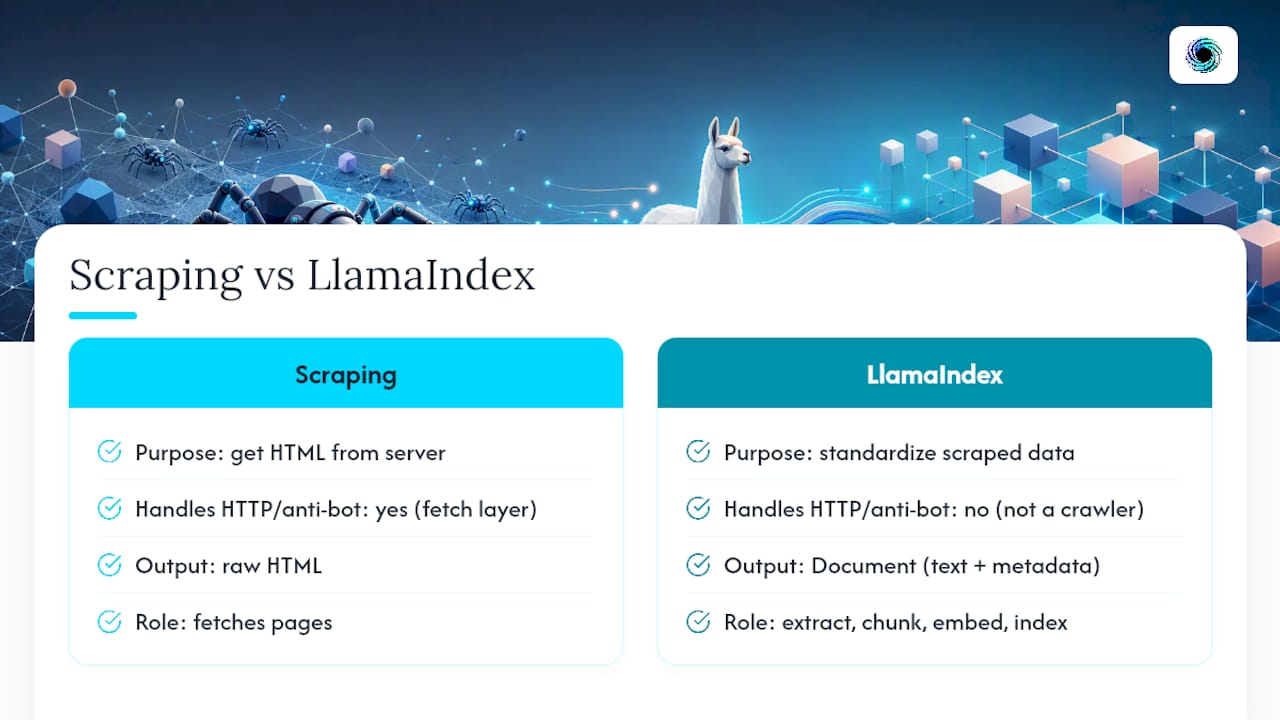
LlamaIndex is a data framework, not a crawler. It doesn't send HTTP requests to hostile targets or solve CAPTCHAs. What it does is standardize whatever a scraper hands it into a Document, a typed object with text and metadata fields that flow cleanly into chunking, embedding, and indexing.
That distinction matters because it explains why "LlamaIndex web scraping" is really two separate jobs stitched together: getting HTML off a server (scraping), and turning that HTML into something an LLM can retrieve against (data extraction and indexing). The LlamaIndex web readers documentation lists reader classes like SimpleWebPageReader, SpiderWebReader, BrowserbaseWebReader, and FireCrawlWebReader, each wrapping a different scraping backend behind the same Document interface.
For beginners coming from plain requests and BeautifulSoup scripts, this is the mental model to keep: the reader is a translator, not a scraper. Whatever fetches the page, be it a local library or a third-party API, still needs to survive rate limits, JavaScript rendering, and anti-bot defenses on its own.
Quick Setup: Loading Your First URL Into LlamaIndex
Getting a working prototype running takes about five minutes on Python 3.9 or later.
- Install the core package and the web reader extras:
pip install llama-index llama-index-readers-web bs4 html2text - Set your LLM provider key (for example
OPENAI_API_KEY) in a.envfile, plus any vector database credentials you plan to use. - Load a page and build an index:
from llama_index.readers.web import SimpleWebPageReader
from llama_index.core import VectorStoreIndex

documents = SimpleWebPageReader(html_to_text=True).load_data(
    urls=["https://example.com/pricing"]
)
index = VectorStoreIndex.from_documents(documents)
query_engine = index.as_query_engine()
print(query_engine.query("What pricing tiers are listed?"))
The WebPageDemo notebook runs this exact pattern with both SimpleWebPageReader and SpiderWebReader, which is a good sanity check if your output looks empty. Most first-run errors trace back to missing extras (bs4, html2text) or a page that's mostly JavaScript, meaning SimpleWebPageReader fetches an empty shell.
Which Reader Type Fits Your Scraping Job?
LlamaIndex's reader ecosystem splits into three practical tiers, and picking the wrong one is the most common reason a "working" prototype falls apart in production.
- Local, static readers.
SimpleWebPageReaderandBeautifulSoupWebReaderfetch raw HTML directly. Fast and free, but they choke on client-rendered content and offer no anti-bot handling. - Headless/browser readers.
BrowserbaseWebReaderand similar readers spin up a real browser to execute JavaScript before extraction, which costs more time and money but works on modern single-page apps. - Adapter readers. These wrap a managed scraper API (
SpiderWebReader,FireCrawlWebReader, or a custom adapter) so proxy rotation, retries, and rendering happen server-side, and your code just gets cleanDocumentsback. - MCP/ToolSpec readers. Rather than pre-loading data, these expose scraping as a callable tool an agent invokes mid-conversation, as shown in LlamaIndex's Bright Data integration guide.
The adapter pattern deserves special attention because it's what keeps your code stable long-term: the adapter absorbs source-specific quirks and anti-bot logic, while your indexing pipeline only ever sees a consistent Document with clean metadata like source_url and fetched_at. Swap adapters later without touching downstream code.
Building the Scrape, Index, Query Pipeline
Treat scraping, indexing, and querying as three independent stages connected by data, not by direct function calls. This is the architecture behind most production RAG systems built on LlamaIndex web scraping workflows, and it exists specifically to stop one slow or broken fetch from taking the whole system down.
- Scrape. Your adapter fetches each URL, returns either a
Documentor a typed error, and runs asynchronously so a background job (not your API request thread) owns the work. Emit a task ID immediately so callers can poll status rather than block. - Index. A separate worker cleans the text, chunks it (typically 256 to 1,024 tokens depending on your embedding model), generates embeddings, and persists everything to a vector store like Postgres/pgvector, Qdrant, or Pinecone.
- Query. The query engine retrieves the top chunks, optionally passes them to an LLM for generation, and assembles a response that includes
source_urlandfetched_atfrom the original metadata so answers stay traceable back to a real page.
async def scrape_job(url: str) -> dict:
    try:
        docs = adapter.load_data([url])
        return {"status": "ok", "documents": docs}
    except AdapterError as e:
        return {"status": "error", "code": e.code, "detail": str(e)}
Pro Tip: Never call your scraper synchronously inside a request handler that also serves queries. A single slow target can stall every user waiting on retrieval, even ones asking about pages you scraped hours ago.
Handling JavaScript, Proxies, and Anti-Bot Defenses
Rendering costs money and time, so reach for it only when a target actually needs it. If SimpleWebPageReader returns a mostly empty document, that's usually your signal the page is client-rendered and needs a headless browser or an adapter that pre-renders server-side.
- Enable headless rendering only for confirmed JavaScript-heavy targets; static pages don't need the overhead.
- Rotate proxies and vary geographic hints when a target blocks by IP reputation or region, and space out requests instead of firing bursts.
- Vary user-agent strings and request timing to avoid the fingerprinting patterns that trigger bot detection.
- Check
robots.txtbefore crawling and skip disallowed paths unless you have a specific legal basis not to. - Watch for repeated 403s or CAPTCHA pages as an early block signal, and build exponential backoff into every retry loop.
Production RAG guides treat scraping as the weakest link in the whole pipeline. Validate content before it ever reaches your index, since a polluted document with garbled CAPTCHA text is worse than a document you simply skipped.
Getting Structured JSON Instead of Raw Text
Raw scraped text is fine for narrative RAG, but agent workflows usually need predictable fields: a price, a date, a product name. Schema-first extraction gets you there with fewer tokens and fewer downstream parsing bugs, since structured JSON output tends to be more reliable than freeform text extraction when the goal is retrieval precision.
- Prompt-based extraction sends the page text to an LLM with a JSON schema and asks it to fill the fields, which handles messy or inconsistent markup well.
- Parser-based extraction pulls fields directly from HTML using CSS selectors or XPath, which is faster and cheaper when a site's structure is stable.
- Store the resulting JSON in
Document.metadatarather than burying it in the text body, so filters and structured queries can hit it directly without another LLM call.
This guide on fetching web pages to markdown for LLM ingestion walks through the middle ground: markdown-normalized text plus a lightweight schema layer on top.
Controlling Costs: Caching, Quotas, and Pilot Budgets
Scraping costs spiral fastest when every query triggers a fresh fetch. Fixing that comes down to three habits.
- Tier by freshness. Scrape-once-and-store fits stable reference content like documentation; just-in-time scraping fits anything that changes hourly, such as pricing or inventory.
- Set hard limits before you scale. Crawl budgets, per-call quotas, and spending caps keep a misconfigured job from burning through a month's budget in an afternoon. Piloting 3 to 5 targets first reveals access difficulty and real cost patterns before you commit to a broad crawl.
- Layer your cache. Store raw fetches in object storage and keep an indexed copy in your vector database separately, so you can refresh the index without re-scraping, and evict stale entries on a schedule tied to how often the source actually changes.
This structured web data approach for RAG covers the storage side of this pattern in more detail.
What Happens When a Scrape Fails?
Failures aren't edge cases in web scraping, they're the default state you design around. Timeouts, 403/401 responses, empty pages, parser exceptions, and rate-limit blocks will all show up regularly once you're running more than a handful of targets.
- Return typed failures instead of raising bare exceptions, something like
{"status": "blocked", "code": 403, "detail": "captcha_detected"}, so agent logic can branch deterministically onstatusandcode. - Skip and log failed URLs rather than aborting a whole batch job over one bad page.
- Route pages that fail repeatedly into a dead-letter queue for manual review instead of letting them clog your retry loop indefinitely, a pattern production RAG builds rely on to keep indexes clean.
- Expose crawl status through a webhook or status endpoint so you're not polling logs to find out something broke.
Pro Tip: Log the raw HTTP status alongside your typed error code. A 403 from a CAPTCHA wall and a 403 from a genuinely blocked IP need different retry strategies, and collapsing them into one generic "blocked" label hides that difference from whoever debugs it next.
How Gyrence Fits Into This Stack
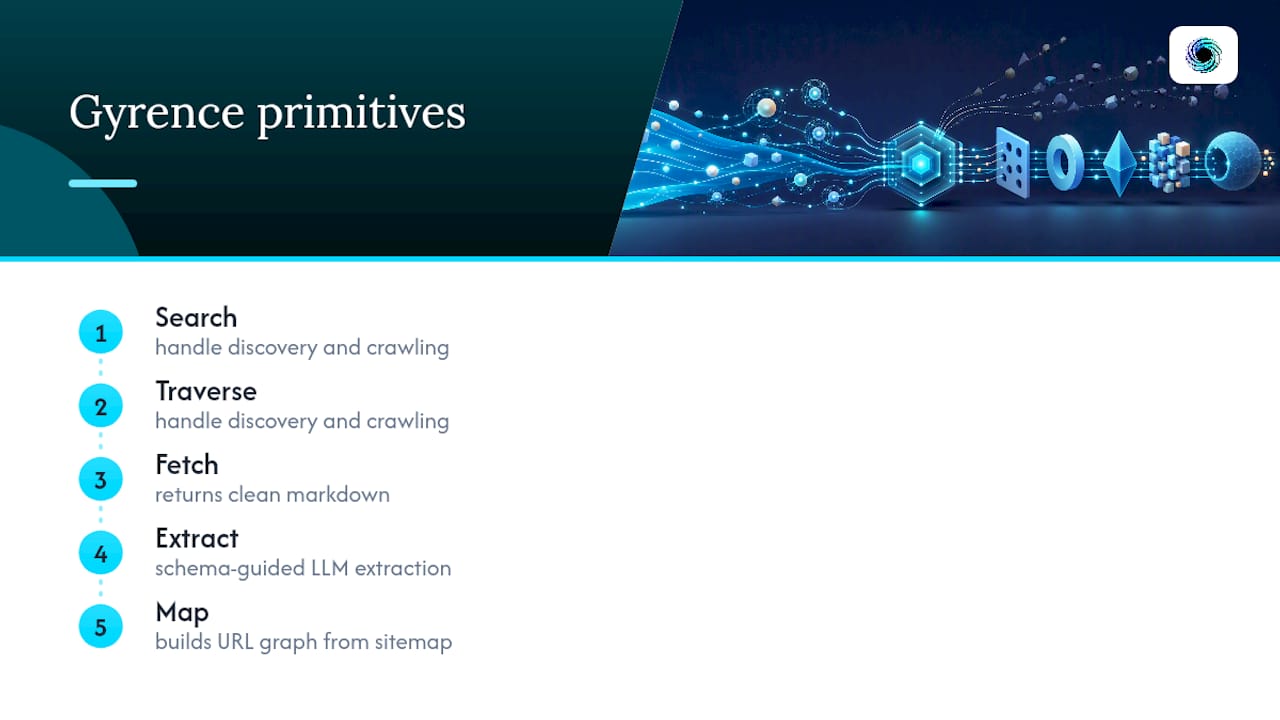
Every pattern above, decoupled scraping, typed failures, cost caps, maps directly onto how Gyrence is built. Its five primitives split the job cleanly: Search and Traverse handle discovery and crawling, Fetch returns clean markdown, Extract runs schema-guided LLM extraction, and Map builds a URL graph from a sitemap.
Every call returns a typed, discriminated-union response, including the failure cases, so an agent branches on status instead of guessing why a fetch came back empty. Spending caps and predictable credit costs give you the quota system the cost-control section above recommends, without building that metering logic yourself.
Build Your Own Scraper or Use a Managed API?
Pilot three to five targets before committing to either path. If most of those targets are undefended and stable, a local reader with BeautifulSoupWebReader will hold up fine and cost you nothing per call.
The calculus flips once you hit several defended targets or can't predict your monthly cost. At that point, typed failures, per-call pricing, and an MCP endpoint for agent access aren't luxuries, they're what gets you to production without building a scraping team first.
— Glen
Try Gyrence for Your Next Scraping Pipeline
Building your own scraper adapter means owning proxy rotation, retry logic, and cost tracking indefinitely. Gyrence gives you that infrastructure as five composable primitives, Search, Traverse, Fetch, Extract, and Map, with typed failure responses baked in and credit-based billing that won't surprise you at the end of the month.

Standard plans start at $75 a month, with Growth and Scale tiers available as your crawl volume grows, and a Free and Founders tier if you want to test the primitives before committing. For pipelines that need to catch drift on defended sites, WebDoppler adds monitoring and webhook alerts on top of the core API. Read the docs, connect the hosted MCP endpoint to your agent, and run your first extraction against a real target this week.
Sources
FAQ
Can LlamaIndex Scrape JavaScript-Rendered Pages?
Not on its own with SimpleWebPageReader, which only fetches raw HTML. You need a headless/browser reader like BrowserbaseWebReader or an adapter backed by a rendering-capable managed web data API to handle client-side rendered content.
Is It Legal to Scrape Websites With LlamaIndex?
Legality depends on the target site's terms of service, the data you're collecting, and your jurisdiction, not on LlamaIndex itself, since it's just a data framework. Check robots.txt, respect rate limits, and avoid scraping content behind authentication or explicit anti-scraping terms unless you have a documented legal basis.
What's the Difference Between LlamaIndex Readers and LlamaParse?
Web readers like SimpleWebPageReader fetch and convert live web pages into Documents. LlamaParse focuses on parsing complex file formats such as PDFs and slides, so the two solve different stages of getting external content into an index.
How Do I Avoid High Costs When Scraping at Scale?
Set crawl budgets and spending caps before scaling past a pilot, and use scrape-once-and-store for stable reference content instead of re-fetching it on every query. Piloting 3 to 5 targets first reveals real cost patterns before you commit to a broad crawl.
Does Gyrence Replace LlamaIndex, or Work Alongside It?
Gyrence works alongside LlamaIndex rather than replacing it. Gyrence handles the scraping, extraction, and failure surfacing through its Search, Traverse, Fetch, Extract, and Map primitives, while LlamaIndex still owns chunking, embedding, and retrieval on the resulting Documents.