
TL;DR:
- Using larger context windows with raw web pages often decreases accuracy because noise and duplicate content dominate useful information.
- A pre-LM pipeline that fetches, filters, and tags content provenance improves retrieval quality while reducing costs and token volume.
For production AI agents, a larger context window only helps when the input is high-signal. Raw web pages are mostly noise, and feeding them directly into an LLM typically hurts precision rather than helping it. The lost-in-the-middle effect means models deprioritize information buried in the middle of long contexts, boilerplate inflates token costs linearly, and duplicate content across pages causes embedding-space collapse in RAG systems.
The fix is upstream, not in the model:
- Prefer structured extraction over raw HTML or even Markdown conversion.
- Tag every datum with provenance (URL, timestamp, fetch method) before it reaches the embedding layer.
- Implement a fetch ladder that tries the cheapest fetch path first and falls back to headless rendering only when necessary.
Table of Contents
- How LLM context windows actually work with web data
- Why larger contexts reduce accuracy with raw web pages
- How the fetch ladder and pre-LM pipeline work
- Why every extracted datum needs provenance metadata
- How to avoid embedding-space collapse in retrieval
- Latency, cost, and scaling trade-offs
- What an agent-ready web-data architecture looks like
- Gyrence in practice: composable primitives for LLM-ready data
- What to require from a managed web-data API
- Key Takeaways
- Why honest failure modes matter more than feature lists
- Gyrence handles the pipeline so you don't have to rebuild it
- Useful sources and further reading
- FAQ
How LLM context windows actually work with web data
The context window is the total token budget available for a single model call: system instructions, retrieved documents, conversation history, and the user query all compete for that space. Tokens are not words; a typical English word averages roughly 1.3 tokens, and HTML tags, JavaScript, and CSS consume tokens at a much higher rate per unit of useful information.
Attention in transformer models is not uniform. Models pay disproportionate attention to tokens near the beginning and end of the context (primacy and recency bias). Content in the middle of a long context receives less attention, which is why a 20,000-token page containing 2,000 tokens of useful content often produces worse extraction than a clean 1,000-token extract of the same page.
The core problem: A context window measures capacity, not quality. Filling it with navigation menus, cookie banners, and tracking scripts does not give the model more to reason about. It gives the model more to ignore, and models are not reliably good at ignoring things.
Three standard mitigations exist: Retrieval-Augmented Generation (RAG), which retrieves only relevant chunks at query time; chunking, which splits documents into semantically coherent pieces; and contextual compression, which summarizes or filters retrieved content before injection. All three depend on clean input to work correctly.
"Bigger context windows do not automatically improve production accuracy; they often introduce more ambiguity and allow noise to dominate model attention." Source
Why larger contexts reduce accuracy with raw web pages
Raw HTML forces the model to process navigation chrome, inline scripts, cookie consent dialogs, and repeated footer blocks. None of that is content. Every token spent on it is a token not spent on the information you actually need.
The downstream effects compound. Duplicate boilerplate across thousands of pages, the same header and footer HTML repeated site-wide, collapses the embedding space so that retrieval returns near-identical vectors regardless of query. Hallucination risk rises when HTML structure is ambiguous: a model asked to extract a price from raw markup may confuse a display price, a crossed-out original price, and a shipping fee if they share similar tag patterns.
"Lost-in-the-middle persists; proactively prune irrelevant tokens at the extraction layer rather than relying on LLMs to filter noise." Source
Operationally, feeding clean content rather than raw HTML into RAG pipelines can reduce token volume by a large majority per page, cutting both embedding costs and generation expense significantly.
How the fetch ladder and pre-LM pipeline work
A production-grade fetch ladder tries the cheapest path first and escalates only when that path fails:
- Direct HTTP fetch with a lightweight parser. Most static pages and many SPAs serve readable HTML here.
- Internal JSON API detection. Many modern web apps populate content from a hidden API endpoint. Calling that endpoint directly is faster and cheaper than rendering the page in a headless browser.
- Light parser with JavaScript disabled. Catches pages that render meaningful content server-side but include client-side noise.
- Headless browser rendering. Reserved for pages that genuinely require JavaScript execution. This is the most expensive step and should be a last resort.
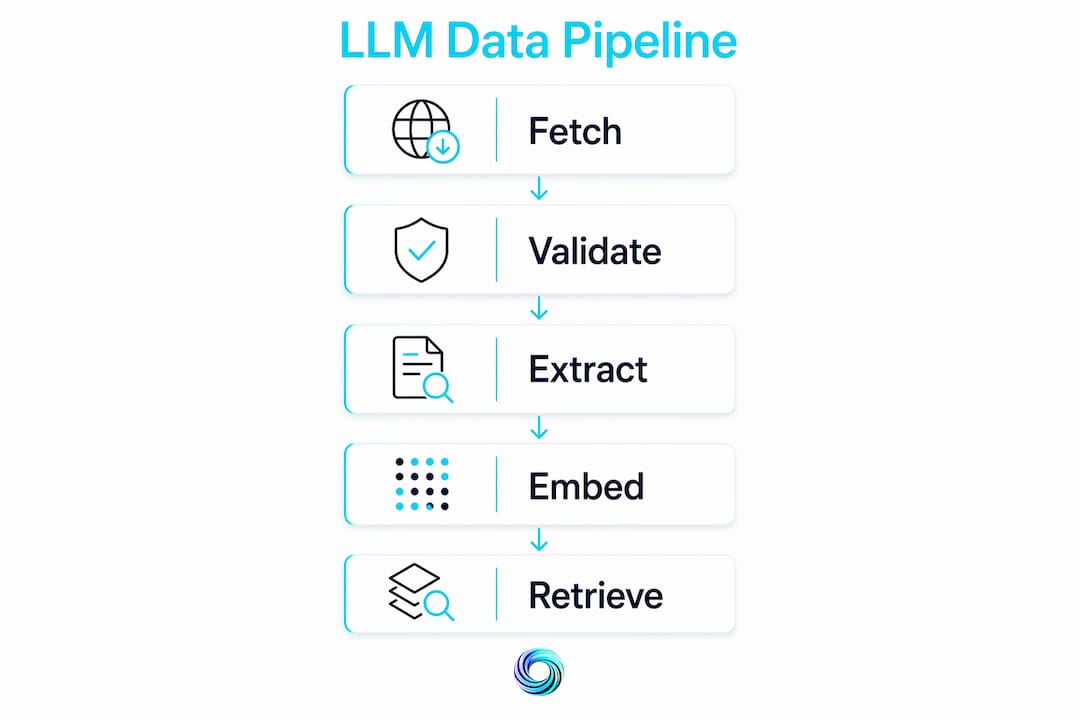
After fetching, the pre-LM pipeline runs in sequence: bad-response detection (4xx, 5xx, soft blocks, CAPTCHA walls), main-content extraction, boilerplate stripping, language detection, deduplication, and finally schema-guided extraction into typed JSON. Fail fast at each stage and surface the failure mode to the orchestration layer rather than passing a degraded record downstream.
Pro Tip: Validate every extraction output against a typed JSON schema before embedding. A malformed record that passes silently will corrupt your index and produce retrieval failures that are extremely hard to trace back to their source.

Why every extracted datum needs provenance metadata
Provenance is not optional in multi-source systems. Without it, you cannot determine whether a retrieved fact is stale, which source to trust when two records conflict, or whether a page was rendered with JavaScript or fetched statically.
Required metadata fields for every extracted record:
source_url: canonical URL of the fetched pagefetch_timestamp: ISO 8601 UTC timestamp of the fetchhttp_status: the response code returnedrender_method:direct,json_api,light_parser, orheadlessextraction_schema_version: the schema used, so you can detect driftvalidation_result:pass,partial, orfailwith error details
Provenance enables freshness checking (reject records older than your TTL threshold), dispute resolution (prefer the record with the more recent fetch timestamp and a pass validation result), and safe human-review routing (flag partial extractions for manual inspection rather than silently passing them). Set a retention policy that aligns with your data's expected change frequency and configure stale-data alerts via webhook when records exceed their TTL.
How to avoid embedding-space collapse in retrieval
Chunking and deduplication decisions made before embedding determine retrieval quality more than model choice does.
Chunking rules:
- Respect document boundaries. Split on headings and paragraph breaks, not on fixed token counts that cut mid-sentence.
- With context windows now commonly at 128K tokens or more, chunk sizes of 2,000–4,000 tokens preserve document structure while keeping retrieval manageable.
- Maintain a document hierarchy (document → section → chunk) so the retriever can reconstruct broader context when a narrow chunk is retrieved.
Deduplication before embedding:
- Use MinHash or content fingerprinting to detect near-duplicate pages before they enter the index.
- Boilerplate vectors dominate an index that has not been deduplicated, causing retrieval to return structurally similar but semantically irrelevant results.
Embedding strategy:
| Approach | When to use | Trade-off |
|---|---|---|
| Full-document embedding | Short, high-density pages | Loses fine-grained retrieval |
| Field-level embedding | Structured records (price, title, description) | Higher index size, better precision |
| Hybrid (sparse + dense) | Multi-lingual or domain-diverse corpora | More infrastructure, best recall |
| Per-field weighting | When some fields carry more signal | Requires schema consistency |
Retriever improvements: add a cross-encoder reranker after initial vector retrieval to re-score candidates by query relevance. Monitor context relevance scores as a guardrail; a drop in retrieval quality usually traces back to extraction pipeline problems, not the embedding model.
Latency, cost, and scaling trade-offs
The four major cost drivers in a web-data-to-LLM pipeline are headless browser runs, token volume to embedding models, LLM generation tokens, and embedding storage. Headless rendering is the most expensive fetch operation; batching and caching rendered output reduces per-request cost significantly.
| Stage | Latency driver | Cost lever |
|---|---|---|
| Fetch (direct HTTP) | Network RTT | Cache aggressively |
| Fetch (headless) | Browser startup + render | Use only as fallback |
| Embedding | Token volume | Clean before embedding |
| LLM generation | Prompt token count | Compress retrieved context |
| Storage | Index size | Deduplicate before indexing |
Operational recommendations: batch embedding calls, cache fetched pages with a TTL aligned to content change frequency, implement incremental re-indexing rather than full re-crawls, and set spending caps at the workspace level. Useful observability signals include per-source fetch success rate, embedding rejection rate (records that failed schema validation), and context relevance score per query.
What an agent-ready web-data architecture looks like
A clean pipeline maps directly to six stages:
- Search: Seed URL discovery. Query a web search API to identify entry points. Apply content-density heuristics (token-to-tag ratio, link density) combined with rule checks to filter low-quality seeds.
- Traverse (Gyre): Walk the site graph outward from a seed URL. Capture the URL structure and prioritize pages by relevance signal before fetching.
- Fetch: Apply the fetch ladder. Detect render method, execute the cheapest viable path, and surface failure modes (403, CAPTCHA, soft block) to the caller immediately.
- Extract: Schema-driven extraction into typed JSON. Treat the model as a translator, not an authority. Validate the output programmatically before passing it downstream.
- Map: Normalize extracted records to a canonical schema. Attach provenance metadata here.
- RAG: Deduplicate, chunk, embed, and index. Apply reranking at query time.
"A model is a translator between messy input and typed records; don't treat a model-generated paragraph as authoritative structured data without schema validation." Source
Run deduplication between Fetch and Extract. Capture provenance at the Fetch stage. Validate schema at Extract. Every failure mode at every stage should return a typed, discriminated-union response to the caller, not a silent null or an exception.
Gyrence in practice: composable primitives for LLM-ready data
Gyrence exposes five primitives that map directly to the architecture above:
- Search: Returns typed results with URLs and metadata for seed discovery. Supports autonomous agent workflows without custom search infrastructure.
- Traverse (Gyre): Crawls outward from a starting URL, returning a typed site graph. Named for the slow rotation of an ocean gyre.
- Fetch: Applies the fetch ladder automatically, with content-type-aware routing and clean Markdown output. Failure modes (4xx, CAPTCHA, soft block) are surfaced as typed errors, not silent failures.
- Extract: LLM-powered, schema-guided JSON extraction with bundled LLM cost included in the per-call price. No separate AI extraction charge.
- Map: Builds a URL graph from sitemaps and crawl data, normalizing to a canonical record structure.
Every call returns a discriminated-union response that includes the failure case. Spending caps and predictable per-call pricing mean your bill reflects your usage, not a surprise at month-end. WebDoppler monitoring sends webhook alerts when content changes, enabling incremental re-indexing without full re-crawls.
What to require from a managed web-data API
Use this checklist when evaluating a vendor or auditing your own pipeline:
Extraction and schema:
- Typed JSON extraction with schema validation on every call
- Schema versioning to detect extraction drift
- Failure-mode surface (not silent nulls)
Operational:
- Fetch ladder with render-fallback strategy
- Deduplicate-before-embed support or guidance
- Webhook monitoring for content changes
- Incremental re-indexing capability
Billing and governance:
- Spending caps at the workspace level
- Predictable per-call pricing (no surprise LLM surcharges)
- URL allowlist/blocklist controls
- Audit logs for compliance and debugging
For a broader evaluation framework, the AI agent web browsing checklist covers failure-mode handling and agent browsing behavior in detail.
Key Takeaways
Smaller, higher-quality context beats larger noisy context every time: clean before embedding, tag provenance, validate schemas, and monitor embedding-space signals to catch pipeline problems early.
| Point | Details |
|---|---|
| Clean before embedding | Extracting clean content before embedding can reduce token volume by a large majority per page. |
| Use the fetch ladder | Try direct HTTP and internal JSON APIs before headless rendering to control cost and latency. |
| Tag provenance on every record | Source URL, fetch timestamp, and render method are required for freshness checks and conflict resolution. |
| Validate schemas before indexing | Reject malformed records at extraction time to prevent retrieval failures that are hard to trace. |
| Gyrence covers the full pipeline | Gyrence's five primitives (Search, Traverse, Fetch, Extract, Map) return typed responses with failure modes surfaced and spending caps built in. |
Why honest failure modes matter more than feature lists
The gap between a demo pipeline and a production pipeline is almost entirely made up of failure modes the vendor did not tell you about. A fetch that returns a 200 status but delivers a CAPTCHA page. An extraction that silently drops a field because the schema drifted. An embedding index that degrades over six weeks because boilerplate vectors slowly crowded out content vectors.
The engineering priorities that actually matter are observability, typed failure surfaces, and predictable cost. If your pipeline cannot tell you why a record failed, you cannot fix it. If your API swallows errors and returns partial data without flagging it, your agent will hallucinate with confidence. And if your scraping bill is unpredictable, you will throttle the pipeline before it reaches production scale.
The conventional wisdom says to pick the API with the most features. The better question is: which API tells you the truth when something goes wrong?
Gyrence handles the pipeline so you don't have to rebuild it
Web data is a storm. Gyrence is built to navigate it without hiding the damage. Five composable primitives, a hosted MCP endpoint, spending caps, and predictable per-call pricing give you agent-ready structured data without the month-end billing surprises that kill production budgets.

Every Gyrence call returns a typed, discriminated-union response that includes the failure case, so your agent reasons about results instead of guessing. Extract schema-guided JSON, traverse site graphs, and monitor content changes with WebDoppler webhooks, all from a single API. Start a free trial or connect via MCP at gyrence.com, or go straight to the developer docs to see the primitives in action.
Useful sources and further reading
- What Matters for LLM Ingestion and Preprocessing — foundational guide on tokenization, chunking, and semantic boundary preservation
- RAG vs. Long Context: Choosing the Best Approach — practical comparison of retrieval architectures and when each applies
- Building a Production-Grade AI Web Data Agent — engineering taxonomy for fetch strategies, failure modes, and schema-first workflows
- Raw HTML is where LLM context goes to die — concrete examples of HTML payload costs and the case for typed extraction
- Feed clean web data to RAG pipelines — practitioner notes on token reduction and cost savings
- Why web data is the hardest problem in RAG systems — embedding-space collapse, retrieval failure modes, and monitoring signals
- LLM context window limitations: accuracy degradation — analysis of attention degradation and the lost-in-the-middle effect
- Building a web scraping agent skill — schema enforcement and validation patterns for agent pipelines
- Gyrence developer docs — API reference for Search, Traverse, Fetch, Extract, and Map primitives
- AI agent web data primitives: A developer's guide — mapping pipeline stages to Gyrence API calls
- Why Elixir is perfect for building AI agents at scale — concurrency and runtime considerations for high-throughput agent infrastructure
FAQ
What is an LLM context window for web data?
The context window is the total token budget for a single model call, shared by instructions, retrieved documents, and history. For web data, the practical limit is that raw HTML consumes tokens far faster than clean extracted text, leaving less room for actual content.
How does the fetch ladder reduce cost and latency?
The fetch ladder tries the cheapest viable path first: direct HTTP, then internal JSON API detection, then light parsing, then headless rendering. Most pages resolve at the first or second step, so headless browser costs apply only to pages that genuinely require JavaScript execution.
Why does boilerplate cause embedding-space collapse?
When identical header and footer HTML appears across thousands of pages, those pages produce nearly identical embedding vectors. The index fills with near-duplicate vectors, and retrieval returns structurally similar but semantically irrelevant results regardless of the query.
What provenance fields should every extracted record carry?
At minimum: source URL, fetch timestamp, HTTP status, render method, extraction schema version, and validation result. These fields enable freshness checks, conflict resolution between sources, and routing of partial extractions to human review.
How does Gyrence surface failure modes to the caller?
Every Gyrence API call returns a typed, discriminated-union response that includes the failure case explicitly, whether that is a 403, a CAPTCHA wall, a schema validation failure, or a soft block. The caller receives a structured error, not a silent null or an unhandled exception.