
LLM-friendly markdown is defined as structured, token-efficient web content formatted to maximize large language model comprehension and minimize API costs. Tools like Microsoft MarkItDown, Fern, and the llms.txt standard have made this format the default choice for developers building AI pipelines on web data. The core principle is simple: LLMs trained on markdown parse it natively and accurately, while raw HTML forces models to burn tokens on noise. Getting LLM-friendly markdown from web sources explained clearly is what separates teams shipping reliable AI features from teams debugging hallucinations.
How does llm-friendly markdown improve model performance?
Markdown is the format LLMs understand best. Models trained on GitHub, Stack Overflow, and documentation sites have seen billions of tokens of markdown. That training means headings, lists, and tables carry semantic weight that plain text or raw HTML cannot match.
The token savings are concrete. Microsoft MarkItDown achieved roughly 62% token reduction converting diverse file formats to markdown before feeding them into AI pipelines. That reduction translates directly to lower OpenAI or Anthropic API costs at scale. Fern's content negotiation approach goes further: serving raw markdown to AI agents cuts token consumption by over 90% compared to serving full HTML pages.

The quality impact matters as much as the cost impact. When a model receives clean markdown with clear heading hierarchy, it retains context across longer documents. Noise from <div> tags, inline scripts, and navigation menus competes with the actual content for the model's attention window. Remove that noise and the model spends its context budget on meaning.
Key reasons markdown outperforms raw HTML for LLM consumption:
- Token efficiency: Markdown strips HTML boilerplate, reducing prompt size and API spend.
- Native comprehension: LLMs recognize
##headings,**bold**emphasis, and|table|syntax without needing to infer structure. - Context retention: Clean structure helps models track document hierarchy across long inputs.
- Lower hallucination rate: Less ambiguous input produces more grounded outputs.
- Pipeline speed: Smaller payloads mean faster round trips through your inference stack.
Pro Tip: When benchmarking markdown versus HTML inputs for your use case, measure both token count and output accuracy. Cost savings are obvious; accuracy gains are where the real value hides.
What is the best pipeline for extracting clean markdown from the web?
A production-grade extraction pipeline for web content markdown requires multiple stages. Each stage removes a specific class of noise. Skipping any stage degrades the output your LLM receives.
Here is the standard pipeline, in order:
- User-agent detection and request configuration. Send requests with a descriptive user-agent string. Some sites serve different content to bots. Identifying your agent correctly avoids bot-detection blocks and ensures you receive the canonical page content.
- JavaScript rendering. Static HTTP fetches miss content rendered by React, Vue, or Angular. Use a headless browser like Playwright or Puppeteer to execute JavaScript before extracting the DOM. This is non-negotiable for modern single-page applications.
- Boilerplate removal. Strip navigation menus, footers, cookie banners, and ad containers. Target semantic HTML elements like
<article>,<main>, and<section>as your primary content containers. Heuristic libraries can score text blocks by density to identify the main body automatically. - Markdown translation. Convert the cleaned DOM to markdown using a library like Turndown (JavaScript) or html2text (Python). Preserve heading hierarchy, lists, tables, and code blocks. Discard inline styles and decorative elements.
- Post-processing and validation. Normalize whitespace, remove duplicate blank lines, and verify that heading levels are consistent. A malformed heading structure confuses LLM context parsing.
Edge-based microservices running this full pipeline can deliver clean markdown in under 5 milliseconds per request. That speed makes real-time AI agent workflows practical, not just batch processing jobs.
Pro Tip: Target <article> and <main> containers first. If neither exists, fall back to the element with the highest text-to-HTML ratio. This heuristic catches 80–90% of pages without custom rules.
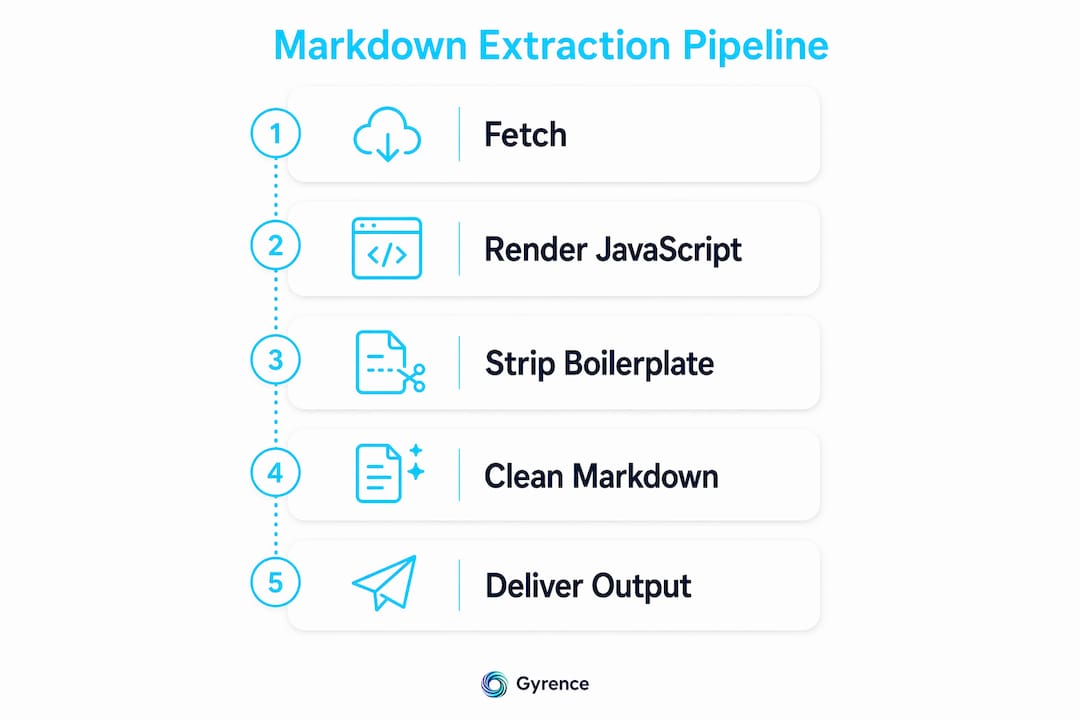
Partner services like DOT Data Labs have documented similar multi-stage approaches, combining user-agent detection, JavaScript rendering, and microservices to deliver clean structured content at scale.
Content negotiation vs. llms.txt vs. markdown file versions
Three distinct strategies exist for serving markdown to AI agents. Each solves a different part of the delivery problem. Choosing the right one depends on your infrastructure and your audience.
Content negotiation is the most transparent approach. The server inspects the incoming User-Agent or Accept header and returns markdown when it detects an AI agent like Cursor or GitHub Copilot. Human browsers receive the standard HTML page. Fern implements this automatically, requiring no changes on the client side. The trade-off is server-side complexity: you need routing logic and a markdown rendering layer.
The llms.txt standard takes a different angle. A lightweight markdown index file placed at the root domain (e.g., yourdomain.com/llms.txt) lists key documentation pages in a structured narrative format. AI agents parse it the way they parse robots.txt, using it to discover the most relevant pages automatically. The recommended file size is under 10KB. No schema validation is required. This approach is low-effort to implement and works well for documentation-heavy sites.
Markdown file versions are the most direct option. For every HTML page at /docs/setup, you also publish /docs/setup.md. Agents that know to look for .md variants get clean content without any server logic. The limitation is maintenance overhead: two files per page, kept in sync.
| Approach | Implementation Effort | Token Savings | Human Experience Impact | Best For |
|---|---|---|---|---|
| Content negotiation | High | Over 90% | None | Documentation platforms |
| llms.txt index | Low | Indirect | None | Any site with docs |
| Markdown file versions | Medium | High | None | Static site generators |
Pro Tip: Combine llms.txt with content negotiation. The index file handles discovery; content negotiation handles delivery. Together they cover both the "where to look" and "what to return" problems.
Security and dialect risks in web-extracted markdown
Security is the most underestimated problem in markdown pipelines. Developers focus on extraction quality and token counts, then ship a pipeline that passes unsanitized user-generated markdown straight into a rendering layer.
Inline HTML in markdown introduces XSS vulnerabilities the moment you render that markdown back to HTML. A scraped page might contain <script> tags or <img onerror> payloads embedded in otherwise clean content. Libraries like DOMPurify (JavaScript) and bleach (Python) sanitize the rendered HTML output and block these vectors. Sanitization belongs after the markdown-to-HTML rendering step, not before.
Dialect fragmentation is the second risk. Mixing CommonMark with GitHub Flavored Markdown extensions without explicit parser configuration causes rendering failures and, in some cases, security gaps. CommonMark is the specification; GitHub Flavored Markdown adds tables, strikethrough, and task lists on top of it. If your parser defaults to permissive mode, it may render raw HTML blocks from external sources.
Best practices for secure markdown pipelines:
- Disable raw HTML in your parser. Set
html: falsein your markdown parser config when processing external content. This blocks the most common XSS injection vector. - Sanitize after rendering. Run DOMPurify or bleach on the HTML output, not on the raw markdown string. Sanitizing markdown text directly misses encoded payloads.
- Pin your dialect. Explicitly configure your parser to CommonMark or a specific GitHub Flavored Markdown version. Never rely on parser defaults for external content.
- Validate heading structure. Malformed heading hierarchies (e.g., jumping from
#to####) can confuse LLM context parsing and indicate corrupted source content.
Smart data extraction practices for AI training datasets consistently flag sanitization and dialect consistency as the two failure modes most teams discover only after a production incident.
Pro Tip: Test your pipeline against adversarial inputs before shipping. Paste a page containing <script>alert(1)</script> in a markdown code block and verify your sanitizer catches it at the rendering stage.
Key takeaways
Clean, structured markdown is the most token-efficient format for feeding web data into large language models, and building a secure extraction pipeline is what separates reliable AI applications from fragile ones.
| Point | Details |
|---|---|
| Token efficiency is measurable | Microsoft MarkItDown achieved roughly 62% token reduction converting files to markdown before LLM ingestion. |
| Pipeline stages are non-negotiable | JS rendering, boilerplate removal, and markdown translation must all run to produce clean output. |
| Three serving strategies exist | Content negotiation, llms.txt, and markdown file versions each solve a different part of the delivery problem. |
| Security requires explicit configuration | Disable raw HTML in your parser and sanitize with DOMPurify or bleach after rendering, not before. |
| Dialect consistency prevents failures | Pin your parser to CommonMark or GitHub Flavored Markdown explicitly; never rely on permissive defaults. |
Why most teams get markdown pipelines wrong the first time
I have reviewed a lot of AI data pipelines, and the pattern is consistent. Teams spend weeks optimizing their LLM prompts and almost no time on what they feed the model. Then they wonder why outputs degrade on certain pages.
The uncomfortable truth is that markdown quality is a bigger variable than prompt quality for retrieval-augmented generation workflows. A well-crafted prompt fed noisy HTML will underperform a mediocre prompt fed clean markdown every time. The model cannot reason well about content it cannot parse cleanly.
The second mistake I see constantly is treating markdown extraction as a one-time preprocessing step. Web content changes. Navigation structures shift. Sites add JavaScript rendering for sections that were previously static. A pipeline that worked in January may be returning boilerplate-heavy output by March. You need monitoring on your extraction quality, not just your model outputs.
On the standards side, llms.txt adoption is accelerating faster than most teams realize. If you maintain a documentation site and you have not published a llms.txt file yet, AI agents are already struggling to find your content. That is a discoverability problem you can fix in an afternoon.
My practical advice for teams starting out: build the pipeline in stages and validate each stage independently. Confirm your JS renderer is executing correctly before you add boilerplate removal. Confirm boilerplate removal is working before you add markdown translation. Debugging a four-stage pipeline as a single unit is painful. Debugging each stage in isolation is fast.
— Glen
How Gyrence handles markdown extraction for AI agents
Gyrence is built for exactly this problem. The Fetch primitive takes a URL, renders JavaScript, strips boilerplate, and returns clean markdown in a single API call. The Extract primitive goes further: pass a prompt or JSON schema and get structured data back, not just text. Every response is a typed, discriminated-union result that includes failure modes, so your agent knows when a page returned empty content instead of silently receiving garbage.
Spending caps and predictable per-call pricing mean your markdown extraction bill does not surprise you at the end of the month. Gyrence also exposes a hosted Model Context Protocol endpoint, so AI agents can call Fetch and Extract directly without you writing glue code. If you are building a RAG pipeline or an AI agent that reads the web, Gyrence's web data infrastructure is where to start.
FAQ
What is llm-friendly markdown from the web?
LLM-friendly markdown from the web is web content that has been extracted, cleaned, and formatted as markdown so large language models can parse it with minimal token waste. It removes HTML boilerplate and preserves semantic structure like headings, lists, and tables.
How much does markdown reduce token count compared to HTML?
Microsoft MarkItDown achieved roughly 62% token reduction converting files to markdown, while content negotiation approaches like Fern report over 90% reduction compared to serving full HTML. The exact savings depend on how much boilerplate the source page contains.
What is the llms.txt standard?
The llms.txt standard is a lightweight markdown index file placed at a site's root domain that lists key pages in a structured format. AI agents parse it automatically to discover documentation, similar to how they read robots.txt.
How do i prevent XSS in a markdown pipeline?
Disable raw HTML rendering in your markdown parser by setting html: false, then sanitize the rendered HTML output using DOMPurify in JavaScript or bleach in Python. Sanitizing the raw markdown string is not sufficient.
Which markdown dialect should i use for LLM pipelines?
CommonMark is the recommended baseline because it is the most widely specified and consistently parsed dialect. If you need tables or task lists, use GitHub Flavored Markdown with explicit parser configuration rather than relying on permissive defaults.