
The recommended pattern for S3 web scraping writes raw HTTP responses straight to an immutable S3 "bronze" layer, batches them into larger objects instead of thousands of tiny files, and triggers extraction through S3 events or Step Functions. Layer in account-level Block Public Access, SSE-KMS encryption, and lifecycle rules for retention, and you get replayability, real scale, predictable costs, and a full audit trail without re-fetching a single page.
TL;DR:
- Batch multiple scraped pages into larger objects to reduce request costs and avoid S3 throttling, targeting sizes in the tens of megabytes.
- Use date and hash-prefixed partitioning for object keys to distribute load evenly and simplify lifecycle management.
- Rely on immutable raw HTTP response storage with lifecycle policies, enabling schema changes and reprocessing without re-fetching pages.
- For heavy JavaScript rendering, offload browsers to Fargate or Batch instead of Lambda, keeping Lambda for orchestration tasks.
- Enforce S3 security best practices, including account-level block public access, TLS-only requests, SSE-KMS encryption, data event logging, and avoiding overly permissive bucket policies.
Table of Contents
- What Does an S3 Web Scraping Architecture Look Like?
- How Do You Build the Ingest Layer for S3 Data Extraction?
- What Security Controls Does an S3 Scraping Pipeline Need?
- How Do You Control S3 Storage Costs for Scraping Data?
- When Should You Use Lambda Triggers Versus Step Functions?
- What Goes Wrong in S3 Scraping Pipelines, and How Do You Catch It?
- How Should You Handle PII in Scraped S3 Data?
- Why S3-First Pipelines Beat Every Shortcut I've Seen Fail
- How Gyrence Fits Into Your S3 Scraping Pipeline
- Sources
- FAQ
What Does an S3 Web Scraping Architecture Look Like?
A working S3 web scraping pipeline has three moving parts: ingest workers that fetch pages, a raw S3 zone that stores exactly what came back over the wire, and an extraction layer that turns that raw material into structured data. Nothing else needs to be complicated.
The ingest workers do one job: fetch, then write using optimized web scraping with proxies. They don't parse, don't transform, don't make judgment calls about what's "useful." That discipline is what makes the whole system replayable. Store the raw HTTP response body, headers, and status code in S3, and you can rerun your parsing logic six months from now against a schema change without touching the target site again. AWS's own guidance on treating S3 as an immutable raw layer exists precisely because re-fetching is expensive, sometimes impossible if a page has since changed or vanished, and always slower than reading from disk.
Core components:
- Ingest workers (Lambda, Fargate, or Batch) that fetch and write raw payloads, nothing more
- Raw S3 bucket holding untouched HTTP responses, partitioned by date and source
- Extractor (Lambda or containerized) that reads raw objects, parses, and validates
- Delivery bucket holding structured JSON or Parquet, ready for downstream consumption
Object naming matters more than most teams assume. A flat prefix like scrapes/page123.html throttles under load because S3 partitions internally by key prefix, and a hot prefix becomes a bottleneck at high request rates. Instead, use something like raw/source=example/dt=2026-03-14/hour=09/{hash}-{uuid}.html.gz, where the hash prefix distributes writes across partitions and the date hierarchy makes lifecycle filtering trivial later. AWS's prescriptive guidance on web crawling architecture recommends this exact decoupling: scrapers stay stateless, S3 stays durable, and downstream processing reacts to events rather than waiting in a queue behind the scraper.
How Do You Build the Ingest Layer for S3 Data Extraction?
Choosing between Lambda, containers, and AWS Batch comes down to one question: how long does a single fetch take, and how heavy is the runtime?
Lambda works well for straightforward HTTP fetches, API-based scraping, and lightweight HTML retrieval where a request finishes in a few seconds. It scales instantly, costs nothing when idle, and needs zero infrastructure management. But headless browser rendering, the kind Playwright or Puppeteer requires for JavaScript-heavy sites, pushes against Lambda's 15-minute timeout and its ephemeral storage limits. For that workload, containerized workers on Fargate or ECS, or a batch job running on AWS Batch, handle the memory and disk footprint far more reliably.
- Route by workload type. Static HTML and API responses go to Lambda; browser-rendered pages go to containers.
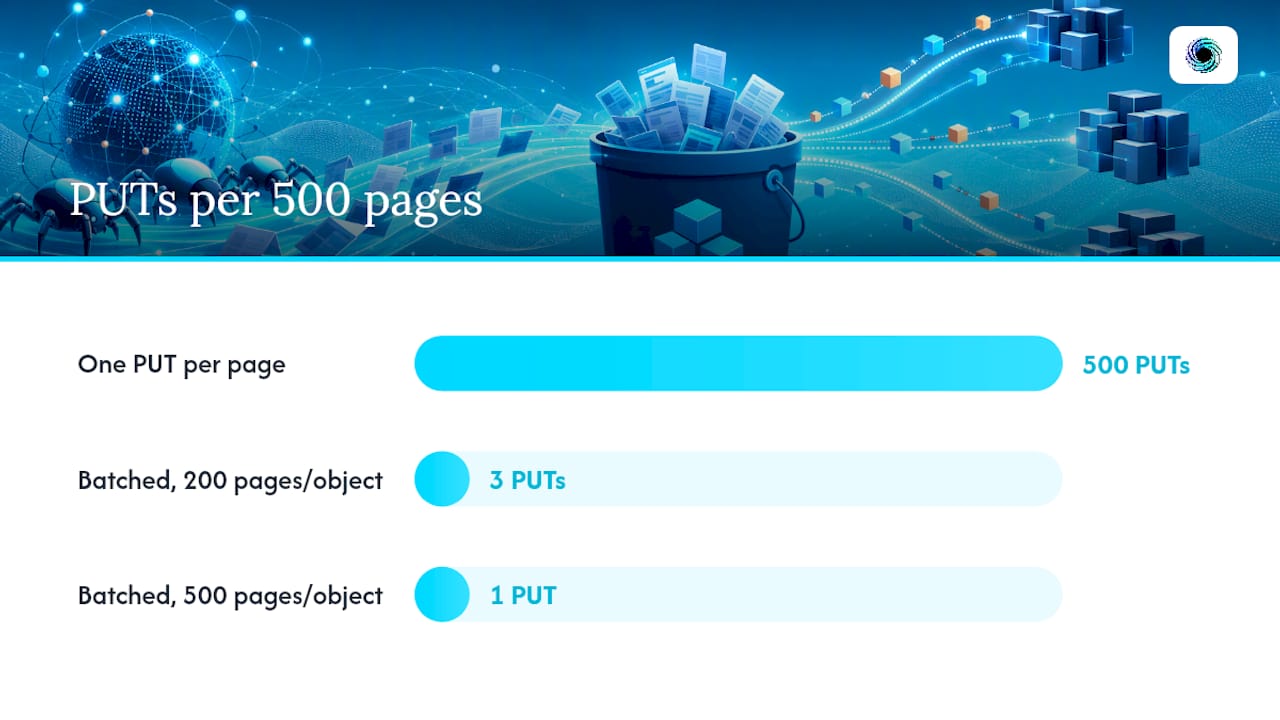
- Buffer before you write. Accumulate several page responses in memory or on temp disk, compress them (gzip cuts most HTML payloads by 70 to 80 percent), and flush as a single object rather than one PUT per page.
- Target object sizes in the tens of megabytes. A batch of 200 to 500 compressed HTML pages per object avoids the small-file sprawl that slows down both cost and later analytic reads.
- Name keys with date partitioning plus a hash prefix.
raw/dt=2026-03-14/{hash4}-{batch_id}.jsonl.gzdistributes I/O and keeps lifecycle rules simple. - Package dependencies deliberately. Lambda layers work fine for lightweight libraries like
requestsorboto3, but Playwright's browser binaries are large enough that a container image (Lambda supports these up to 10GB) is almost always the cleaner path.
Pro Tip: Don't fight Lambda's ephemeral storage limit trying to render JavaScript-heavy pages inside it. Offload rendering to a Fargate task or a small EC2 fleet behind Batch, and let Lambda handle only the orchestration and the S3 write. You'll spend less time debugging OOM kills at 2 a.m.
Batching isn't just a cost optimization, it's a throughput safeguard. S3 auto-scales its request rate per prefix, but a burst of thousands of single-object PUTs to a shared prefix in the same second can still produce throttling before that scaling catches up. Spreading writes across hash-prefixed partitions, combined with fewer, larger objects, sidesteps the problem entirely.
What Security Controls Does an S3 Scraping Pipeline Need?
Scraped data is still data, and a misconfigured bucket exposing it is still a breach. Most S3 exposure incidents trace back to the same handful of preventable defaults, according to AWS's own S3 security best practices guidance.
The non-negotiable checklist:
- Enable Block Public Access at the account level, not just per bucket. New buckets have BPA enabled by default, but legacy buckets and cross-account setups need explicit verification.
- Deny non-TLS requests in your bucket policy with a condition on
aws:SecureTransport. This single statement blocks any plaintext HTTP access outright. - Prefer SSE-KMS with a customer-managed key for anything containing sensitive or regulated data. SSE-S3 is fine for low-sensitivity raw HTML; SSE-KMS gives you per-key access control and a CloudTrail record of every decrypt.
- Avoid SSE-C unless you have a specific reason to manage your own encryption keys client-side. AWS is disabling SSE-C by default for new general-purpose buckets in some accounts, and SSE-KMS covers nearly every use case more simply.
- Enable CloudTrail data events for your scraping buckets, not just management events. Data events log every
GetObjectandPutObjectcall, which is the only way to answer "who accessed this file" after the fact. - Turn on server access logging and versioning, and consider MFA delete on any bucket holding compliance-sensitive extracts.
- Write bucket policies with explicit principals. No wildcards in the
Principalfield, ever, for a bucket holding anything beyond public test data.
A blunt statistic worth sitting with: misconfigured S3 permissions remain the predominant root cause of cloud data leaks, and the fix is almost never exotic. It's usually a missing BPA setting or an overly permissive bucket policy that shipped because nobody scanned it before merge.
That last point is the one teams skip. Bake these controls into reusable Infrastructure as Code modules, default every new bucket to BPA-on and SSE-KMS-on, and run a policy-as-code scanner like Trivy in your CI pipeline before any Terraform or CloudFormation change merges. Making the secure configuration the only configuration beats writing a checklist nobody rereads after the initial setup.

How Do You Control S3 Storage Costs for Scraping Data?
Web scraping at scale generates volume fast, and S3 costs scale with both storage and request count, not just data size. Lifecycle rules are the primary lever, and most teams under-use them.
Set a lifecycle policy that transitions raw HTML from S3 Standard to Standard-IA after a fixed window, often around a month, and either transitions further to Glacier or expires the objects after a longer retention period, depending on whether you need the raw payload for replay or just the structured output. S3 lifecycle configuration rules support filtering by prefix or tag, so you can apply an aggressive expiration to raw/ while keeping structured/ outputs on Standard indefinitely.
Cost and lifecycle practices worth adopting:
- Filter lifecycle rules by prefix (
raw/dt=2026*) or by object tag (retention=short) rather than applying one blanket policy bucket-wide. - Batch small writes upstream, since each PUT request carries its own cost, and 10,000 tiny objects cost meaningfully more in request fees than 50 batched ones holding the same data.
- Run your projected volume through the AWS Pricing Calculator before committing to a retention window. A pipeline scraping a few million pages a month behaves very differently in Glacier Deep Archive versus Standard-IA.
- Use S3 Batch Operations for mass retagging or transitioning of already-archived objects. If you need to reclassify six months of historical raw data by source or content type, Batch Operations can scan a manifest and apply tags that your lifecycle rules then act on, without writing custom migration code.
The teams that get burned on cost almost always kept every raw object on Standard storage indefinitely "just in case." Decide your replay window up front, tag accordingly, and let lifecycle rules do the pruning.
When Should You Use Lambda Triggers Versus Step Functions?
S3 object-created events are the simplest way to kick off extraction: a page lands in the raw bucket, an event fires, a Lambda function picks it up. For single-step pipelines with modest concurrency, this pattern needs almost no orchestration overhead.
The moment your pipeline needs multiple stages, parallel processing across large batches, or per-item retry visibility, move to Step Functions. Here's a practical decision path:
- Single extraction step, moderate volume: wire an S3 event notification directly to a Lambda function. It reads the raw object, extracts fields, validates against a schema, and writes structured JSON or Parquet to the delivery bucket.
- Multi-step processing (parse, validate, enrich, dedupe): use Step Functions with a state machine that chains Lambda tasks, each handling one stage.
- High-volume parallel extraction: use a Step Functions Map state to fan out across thousands of raw objects at once. AWS's guidance on Map state for parallel processing recommends this over uncontrolled Lambda fan-out because it gives you explicit per-item failure visibility and simpler retry logic than trying to track thousands of concurrent invocations.
- Bulk reprocessing: build a manifest of object keys (a simple text or CSV list in S3) and drive a batch job or Step Functions execution off that manifest, rather than replaying live S3 events, which avoids retriggering your entire pipeline on objects that already processed successfully.
One caveat: high-frequency object creation, say, thousands of small writes per minute, can flood your extraction Lambda with concurrent invocations and hit account concurrency limits. Batching writes upstream (as covered above) reduces event volume at the source, which is usually a better fix than throttling downstream.
What Goes Wrong in S3 Scraping Pipelines, and How Do You Catch It?
The failures that actually take down a scraping pipeline are rarely dramatic. They're a permission that quietly changed, a metric nobody was watching, or a KMS key policy that got tightened without anyone checking who still needed decrypt access.
Watch these signals:
- CloudWatch metrics for
PutRequests,GetRequests, and4xxErrorson your buckets. A sudden spike in 4xx or 503 responses usually means throttling from a hot prefix, not a downstream bug. - KMS
AccessDeniederrors during decrypt, which show up when an extractor's IAM role loses key policy access, often after an unrelated security tightening pass. - Extraction error logs that reference the source S3 object, not just an error message. If your extractor logs "parse failed" without the raw object's key, you've lost the ability to replay that specific failure.
- Dead-letter queues for failed extraction Lambda invocations, so a bad batch doesn't just vanish silently.
CloudTrail data events combined with CloudWatch metrics give you the forensic trail you need when something does go wrong: who accessed what, when, and whether it succeeded.
Pro Tip: Always log the S3 object key alongside any extraction failure, not just the error text. A stack trace tells you what broke; the object key tells you exactly what to replay once you've fixed it.
How Should You Handle PII in Scraped S3 Data?
Scraped data occasionally captures personal information you never intended to collect, an email in a comment thread, a name in a public profile. Treat that possibility as a default assumption, not an edge case.
- Tag raw objects that may contain PII at write time, and apply a short lifecycle window, 7 to 30 days, specifically to that tag rather than your general retention policy.
- Run a lightweight regex-based scanner or Amazon Macie against incoming batches to flag likely PII before promotion to structured storage.
- Promote only sanitized, PII-free outputs to your long-term delivery bucket; the raw source expires on schedule.
- Log every retention decision and deletion event, including which objects were flagged, scanned, and purged, so you have an audit trail if compliance ever asks.
Why S3-First Pipelines Beat Every Shortcut I've Seen Fail
Every scraping pipeline eventually hits the same argument: skip the raw layer, parse inline, save the storage cost. It's the wrong trade almost every time. The moment a target site changes its markup, teams without a raw layer have to re-scrape everything from scratch, often under time pressure, often against a site that's now rate-limiting them harder than before.
The other recurring failure is small-file sprawl. Teams that write one S3 object per scraped page hit throttling and cost surprises months in, long after the architecture is load-bearing. Batching upfront costs a little engineering discipline; retrofitting it later costs a migration.
None of this is exotic engineering. It's disciplined defaults, applied consistently, before volume makes the mistakes expensive.
— Glen
How Gyrence Fits Into Your S3 Scraping Pipeline
Building and maintaining the ingest, extraction, and validation layers described above takes real engineering time, time spent on retry logic, schema drift, and header quirks instead of the actual data you need. Gyrence gives you a shortcut on the parts of this architecture that don't need to be custom: Fetch normalizes and cleans pages before they ever hit your raw bucket, Extract applies schema-guided LLM extraction so you skip writing brittle parsers, and Map builds the URL graph you'd otherwise hand-roll with a crawler.

Every Gyrence call returns a typed, discriminated-union response, including failure cases, so your Step Functions error handling has something concrete to branch on instead of guessing at exception strings. Billing runs on predictable spending caps with no separate charge for LLM extraction, which matters when your S3 storage costs are already a variable you're managing. If you're weighing how much of this pipeline to build versus buy, start with the Gyrence landing page and see how the primitives map to the raw and delivery buckets you already planned. For a closer look at wiring structured extraction into an existing pipeline, the guide on connecting a web scraping API to an AI agent walks through the integration pattern in more depth.
Sources
- Melting the ice: how natural intelligence simplified a data lake migration to Apache Iceberg
- AWS S3 Lifecycle Management (GI Wiki)
- Prescriptive guidance: web crawling system architecture
FAQ
Is Web Scraping Legal?
Web scraping's legality depends on what you scrape, how you access it, and the target site's terms of service; scraping publicly available data is generally lower-risk than bypassing authentication or ignoring robots.txt, but rules vary by jurisdiction and use case, so check the specific site's terms and applicable law before scraping at scale.
What Is an S3 Browser Tool?
An S3 browser is a client application, either AWS's own S3 console or a third-party GUI, that lets you view, upload, and manage objects in your S3 buckets without writing code, useful for spot-checking scraped data during development.
How Do You Pull Data From S3?
You retrieve data from S3 using the AWS SDK's GetObject call, the AWS CLI (aws s3 cp), or an S3-triggered Lambda function that reads the object automatically when it lands, which is the pattern most production scraping pipelines use for extraction.
Can ChatGPT Do Web Scraping?
ChatGPT itself doesn't fetch live web pages or execute scraping jobs on its own, but it can help you write scraping code, and services like Gyrence can supply the actual fetched and extracted web data that an LLM-based agent then reasons over.
What's the Best Way to Organize Scraped Files in S3?
Partition object keys by date and source (raw/source=X/dt=2026-03-14/) with a hashed prefix for high-volume writes, and keep raw HTML separate from structured outputs in different buckets or top-level prefixes to simplify lifecycle rules and access control.