
Install the official MCP SDK, register a typed tool, and run the server over stdio to get a working MCP server in minutes. Use Python's FastMCP or the TypeScript SDK, write one function with type hints and a clear docstring, and call mcp.run(transport="stdio") to serve it locally. Validate with MCP Inspector before you connect a real client. For anything remote or multi-client, switch to Streamable HTTP and confirm auth before you wire it into production.
TL;DR:
- Tool function typing and detailed docstrings are critical for accurate schema generation and reducing hallucinations during LLM calls.
- Stdio servers are ideal for local prototyping with no network or authentication complexities, while Streamable HTTP suits remote, multi-client deployments with proper headers and security.
- Always validate server capabilities with MCP Inspector before connecting real clients; missing tools or schemas indicate registration issues.
- Ensuring environment paths and protocol versions match prevents common bugs like silent failures or handshake errors.
- Use Gyrence for reliable, cost-capped web data extraction, integrating structured responses that handle failure explicitly to improve tool robustness.
Table of Contents
- Prerequisites to Set Up an MCP Server
- Scaffold and Run a Minimal MCP Server Now
- How Do You Design Tools, Resources, and Prompts?
- Stdio or Streamable HTTP: Which Transport Fits?
- Testing and Debugging Your MCP Server
- Security and Production Best Practices for MCP Servers
- Copy-Paste MCP Server Examples in Python and TypeScript
- Common Errors When You Configure an MCP Server
- How Gyrence Supplies Structured Web Data to MCP Servers
- What Actually Moves the Needle in MCP Development
- Get a Hosted MCP Endpoint With Typed, Cost-Capped Web Data
- Where to Go Deeper on MCP Server Setup
- Sources
- FAQ
Prerequisites to Set Up an MCP Server
Before you scaffold anything, get the runtime and tooling right. Getting this wrong is the single most common source of "it worked yesterday" bugs in MCP projects.
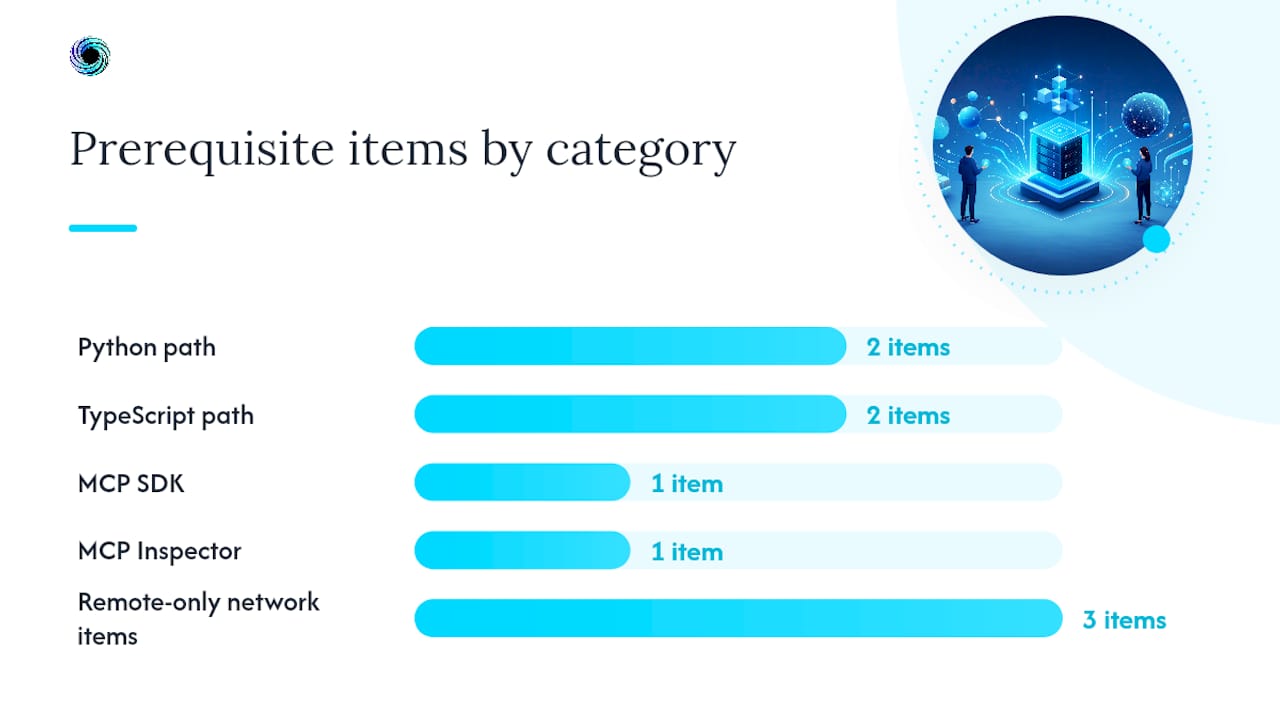
Python 3.10 or later is the recommended baseline for the Python SDK, since it depends on modern type hint syntax to auto-generate tool schemas. If you're on the TypeScript path, a current LTS Node.js release covers you, along with either npm or pnpm.
Here's what you actually need before writing your first line of server code:
- Python 3.10+ (required for Python path) with
uvfor dependency management, or a plainvirtualenvif you prefer the older workflow. - Node.js LTS (required for TypeScript path) with
npmor a comparable package manager. - The official MCP SDK, installed via
pip install mcp(Python) ornpm install @modelcontextprotocol/sdk(TypeScript). - MCP Inspector available locally, run through
mcp devornpx @modelcontextprotocol/inspector— required for verifying tool discovery and invocation before you trust a server. - A test client, such as Claude Desktop or Inspector itself, to confirm the server responds correctly.
- Optional for remote servers only: an auth provider or API key scheme, a reverse proxy or load balancer, and TLS termination if you're exposing Streamable HTTP publicly.
Local, stdio-based servers need none of the networking or auth items. That's deliberate. The protocol was designed so a solo developer prototyping a tool doesn't have to think about credentials at all until they decide to go remote. Save that complexity for when you actually need it.
Scaffold and Run a Minimal MCP Server Now
This is the part that actually gets a server running on your machine in the next five minutes. Follow it in order.
- Create a project directory and initialize your environment. For Python:
uv init mcp-demo && cd mcp-demo && uv add mcp. For TypeScript:mkdir mcp-demo && cd mcp-demo && npm init -y && npm install @modelcontextprotocol/sdk. - Write the server file. A minimal FastMCP server can be implemented in about ten lines because the SDK reads your type hints into a schema automatically:
from mcp.server.fastmcp import FastMCP

mcp = FastMCP("demo-server")

@mcp.tool()
def get_weather(city: str) -> str:
    """Return current weather for a given city name."""
    return f"Weather data for {city}: 68F, clear skies"

if __name__ == "__main__":
    mcp.run(transport="stdio")
- Run it locally. With
uv, that'suv run server.py. This starts the process and holds it open, listening on stdin/stdout, exactly as the official docs' weather server quickstart demonstrates. - Launch Inspector against it. Run
mcp dev server.pyto open the Inspector UI in your browser, connected directly to your running process. - Call
tools/listin Inspector. You should seeget_weathershow up with its input schema (derived from thecity: strtype hint) and its description (pulled straight from the docstring). - Invoke the tool manually. Pass a city name through the Inspector UI and confirm you get a structured response back, not an error.
- Wire it into a client, optionally. Run
mcp install server.pyto register it with Claude Desktop, or add it manually to your client's config with an absolute path to your script.
If step 5 shows an empty list, don't skip ahead. The tool registration or the decorator is broken. Fix that before you touch a client.
Pro Tip: Run Inspector before you ever open a real client. It talks the protocol directly, so if a tool call fails there, you know the bug is in your server, not in the client's interpretation of your response.
How Do You Design Tools, Resources, and Prompts?
Tools are typed functions, full stop. The MCP SDK converts your function's type hints into a JSON input schema automatically, which means the quality of your Python or TypeScript typing directly determines how well an LLM can call the tool. A city: str parameter tells the model exactly what to send. A vague data: Any parameter tells it nothing, and it will guess wrong.
Docstrings do the other half of the work. The description text an LLM sees when deciding whether to call your tool comes straight from that docstring, and clear, specific tool descriptions are the single most effective lever for preventing missed calls and hallucinated parameters. A generic one-liner like "gets data" invites guesswork. A docstring that states the exact input format, gives a concrete example, and names the failure behavior gives the model something to reason about.
Good docstring habits:
- State what the tool does in the first sentence, in plain language, no jargon.
- Name any constraints on inputs (format, range, allowed values) explicitly.
- Include one example call if the input shape is anything but trivial.
- Say what happens on failure, not just success, so the model doesn't assume silent success.
- Keep it under a paragraph. Long descriptions get truncated or ignored by some clients.
Resources and prompts are the two capabilities developers underuse. A resource is read-only context, think of it as a URI-addressable document the model can pull into its context window without triggering a tool call, useful for reference data, config, or cached lookups. A prompt is a reusable, parameterized template that structures a common interaction, handy when your users repeatedly ask for the same kind of analysis with different inputs. Expose a resource when the data is static or slow-changing; expose a tool when the action has side effects or needs live computation.
Pro Tip: Treat your docstring like API documentation, not a code comment. If a new engineer couldn't call your function correctly from the docstring alone, an LLM can't either.
Stdio or Streamable HTTP: Which Transport Fits?
The transport choice is really a decision about trust boundaries, not a technical detail. Stdio keeps everything on one machine: your server process talks to the client over standard input and output, with no network hop, no auth handshake, and effectively zero latency. That makes it the right default for desktop integrations, IDE plugins, and any prototyping phase where local control and security matter more than reach.
Streamable HTTP is what you reach for once more than one client needs to talk to your server, or once the server needs to live somewhere other than the user's laptop. It replaced the older two-endpoint HTTP+SSE pattern with a single POST/GET endpoint that plays nicely with load balancers and serverless platforms, which is a meaningful simplification if you've ever had to debug a split-endpoint SSE connection through a proxy.
Deployment options once you go remote:
- Cloud Run or similar serverless platforms. Fast to deploy, scales to zero when idle, and matches the request/response shape of Streamable HTTP well. Best for unpredictable or low traffic loads.
- GKE or another container orchestrator. Gives you control over resource limits, autoscaling policy, and long-lived connections. Worth the extra operational overhead once you have sustained traffic or need custom networking.
- Self-hosted VMs. Cheapest at steady, predictable load, but you own patching, scaling, and uptime yourself.
Whichever you pick, check protocol compatibility before you deploy. Streamable HTTP servers need to declare and honor a specific protocol revision, and mismatches between what your SDK version emits and what a client expects are a frequent source of "works locally, fails remotely" bugs. If you're feeding live or time-sensitive data through a remote server, a market-data MCP integration is a useful reference for how a production Streamable HTTP deployment actually gets wired up end to end.
Testing and Debugging Your MCP Server
Every server needs to pass through the same gate before it touches a real client: can Inspector see it, and can Inspector call it successfully? Run mcp dev against your server file and check tools/list, resources/list, and prompts/list. If any capability you registered doesn't show up there, the bug is in your registration code, not downstream.
For anything headed toward a shared registry or a CI pipeline, add an automated guard on top of manual Inspector checks. mcp-stdio-guard runs a real MCP initialize handshake against your server, probes the capabilities it advertises, validates that stdout only carries protocol frames, and applies deterministic test profiles you can rerun on every commit.
A quick reality check: most stdio failures aren't protocol bugs at all. They're path and environment problems, and absolute paths in client configuration fix the majority of them. Desktop clients often launch your server process from an arbitrary working directory, so a relative path that works fine from your terminal breaks silently once Claude Desktop or another client starts it.
When something fails, work through this order:
- Check the client's own logs first. Most clients log a stderr capture from your server process, which usually names the actual exception.
- Run the server standalone, outside the client, to isolate whether the bug is in your code or in the client's launch configuration.
- Inspect the raw
initializeresponse for protocol version mismatches between what your SDK emits and what the client expects. - Look at
_metafields in tool and resource responses. That's where SDKs often surface extra diagnostic context clients ignore by default. - Confirm environment variables the server depends on are actually passed through the client's config, not just set in your shell.
Security and Production Best Practices for MCP Servers
The single most damaging mistake on a stdio server is writing anything other than protocol frames to stdout. Stdio is a shared channel: the client reads every byte from that stream expecting valid JSON-RPC messages, so a stray print() statement, a library that logs to stdout by default, or an uncaught traceback can corrupt the entire session. Route all logging to stderr or a structured logging library instead, never to stdout.
Beyond that, a handful of practices separate a prototype from something safe to expose:
- Validate every tool input against its declared schema at runtime, not just at the type-hint level, since clients can send malformed payloads.
- Return typed, discriminated error responses rather than raising bare exceptions, so calling agents can distinguish a bad input from a downstream failure.
- Scope authentication tightly on Streamable HTTP deployments. A single shared API key for every tool is a common shortcut and a common breach vector.
- Keep secrets out of source and out of logs. Use your platform's secret manager rather than environment files checked into a repo.
- Instrument production servers with OpenTelemetry or your platform's native logging so you can trace a failed tool call back to a specific request.
- Run mcp-stdio-guard as a required CI check before any deployment, not as an optional lint step developers skip under deadline pressure.
Pro Tip: If you're not sure whether a dependency writes to stdout, redirect stdout to a file during local testing and grep it for anything that isn't a JSON-RPC frame. You'll be surprised how often a logging library is the culprit.
Copy-Paste MCP Server Examples in Python and TypeScript
Here's a runnable Python example using FastMCP, and the equivalent minimal TypeScript server, side by side so you can see how the two SDKs handle the same job.
from mcp.server.fastmcp import FastMCP

mcp = FastMCP("data-server")

@mcp.tool()
def lookup_record(record_id: str) -> dict:
    """
    Look up a record by its unique ID.
    Returns a dict with 'status' and 'data' keys.
    Example: lookup_record("rec_123") -> {"status": "ok", "data": {...}}
    """
    return {"status": "ok", "data": {"id": record_id}}

if __name__ == "__main__":
    mcp.run(transport="stdio")
import { McpServer } from "@modelcontextprotocol/sdk/server/mcp.js";
import { StdioServerTransport } from "@modelcontextprotocol/sdk/server/stdio.js";
import { z } from "zod";

const server = new McpServer({ name: "data-server", version: "1.0.0" });

server.tool(
  "lookup_record",
  "Look up a record by its unique ID. Returns status and data fields.",
  { record_id: z.string() },
  async ({ record_id }) => ({
    content: [{ type: "text", text: JSON.stringify({ status: "ok", id: record_id }) }],
  })
);

const transport = new StdioServerTransport();
await server.connect(transport);
The TypeScript SDK uses Zod schemas explicitly where Python infers schemas from native type hints, which is the main structural difference between the two paths. Both approaches convert your function signature into the schema the model sees, so neither one requires you to hand-write JSON Schema.
For a Streamable HTTP variant, swap StdioServerTransport for the SDK's HTTP transport class and bind it to a port, then confirm your client sends the required Mcp-Method, Mcp-Name, and MCP-Protocol-Version headers on every request.
| Task | Python command | TypeScript command |
|---|---|---|
| Install SDK | uv add mcp | npm install @modelcontextprotocol/sdk |
| Run server (stdio) | uv run server.py | node server.js |
| Open Inspector | mcp dev server.py | npx @modelcontextprotocol/inspector node server.js |
| Install into Claude Desktop | mcp install server.py | manual config entry with absolute path |
Run Inspector against either version before moving on. If tools/list returns your tool with the right schema, you're ready to build real logic behind it.
Common Errors When You Configure an MCP Server
Most MCP problems fall into three buckets: discovery, protocol version, and transport headers. Knowing which bucket you're in cuts debugging time dramatically.
- Server doesn't appear in the client at all. Nearly always a path problem. Desktop clients need absolute paths for the
commandandargsfields in their config, since they don't inherit your shell's working directory. - Tool registered but missing from
tools/list. Check that the decorator or registration call actually ran, and that you're not shadowing the function name elsewhere in the file. - "Unsupported protocol version" errors. Your SDK version and the client's expected version have drifted apart. Update the SDK, or explicitly declare the protocol version your server supports during the handshake.
- Streamable HTTP requests fail with invalid params. The 2026 transport revision requires specific headers on every exchange, including
Mcp-Method,Mcp-Name, andMCP-Protocol-Version. Missing any one of them produces a cryptic rejection rather than a clear header error. - Auth failures on remote servers. Confirm the token or key is actually reaching the server, not just present in the client config, since some clients silently drop auth headers on redirect.
- Server starts but hangs on first tool call. Usually a blocking synchronous call inside an async handler. Trace it with the client logs before assuming the protocol layer is at fault.
How Gyrence Supplies Structured Web Data to MCP Servers
A tool function is only as good as the data it returns, and web data is where most homegrown MCP tools quietly fall apart: rate limits, malformed HTML, and silent failures that a docstring can't paper over. Gyrence approaches this with an honest-by-design API built around five composable primitives, Search, Traverse, Fetch, Extract, and Map, plus a hosted MCP endpoint that returns typed responses, including the failure cases, instead of hiding them behind a generic exception.
That matters for tool design specifically. If your lookup_record style tool needs to pull and clean a live web page, calling Gyrence's Fetch primitive from inside the tool implementation hands you markdown ready for an LLM's context window, rather than raw HTML you'd otherwise have to sanitize yourself. You can also expose Gyrence's Extract results directly as an MCP resource, so a prompt can reference structured JSON without triggering a fresh tool call each time.
The tradeoff to weigh: keep extraction local when you control a small, stable set of pages and latency is critical. Reach for a hosted endpoint once you need broad site coverage, predictable per-call cost, or failure modes your own scraper doesn't handle gracefully.
What Actually Moves the Needle in MCP Development
The gap between a demo server and a server people trust isn't the transport layer or the deployment target. It's the docstring. Most developers treat tool descriptions as an afterthought, something to fill in after the function works, when the description is the entire interface the model reasons over. A vague description produces a model that guesses, and a guessing model produces the exact unpredictable behavior that makes teams distrust MCP tools in the first place.
The workflow that holds up under real use is boring on purpose: build a local stdio prototype, run it through Inspector until every tool, resource, and prompt behaves exactly as documented, add a stdio guard to CI before anyone else touches the code, then deploy remotely only once that gate is green. Skipping straight to Streamable HTTP because "we'll need it eventually" just moves your debugging surface from your own terminal to a production incident.
Once the basics hold, the next real gains come from adding resources thoughtfully, wiring in a data source you can trust rather than a scraper you built at 11 PM, and running adversarial inputs against your own tools before someone else's agent does it for you.
— Glen
Get a Hosted MCP Endpoint With Typed, Cost-Capped Web Data
Gyrence gives your MCP server predictable web data instead of a scraper you have to babysit: five composable primitives, Search, Traverse, Fetch, Extract, and Map, plus a hosted MCP endpoint that returns typed, discriminated-union responses so your tool code can handle failure explicitly instead of catching generic exceptions.

If you're building a tool that fetches or extracts anything from the open web, wiring Gyrence into your server implementation means you're not maintaining HTML parsing logic alongside your actual MCP capabilities. Spending caps and per-call cost predictability mean you can hand a prototype to a teammate without worrying an unbounded crawl blows through a budget overnight, a real risk with self-built scraping tools that have no ceiling by default. Extraction with LLM-powered schema guidance is bundled in, so structured JSON output doesn't come with a separate line item.
Start by connecting an AI agent to Gyrence to see how the hosted MCP endpoint plugs into a tool implementation, or head to Gyrence to spin up a workspace and test a call against a real page before you decide whether to keep extraction local or move it to a managed endpoint.
Where to Go Deeper on MCP Server Setup
For protocol-level details beyond this guide, start with the official MCP documentation, which covers the full weather server quickstart, stdio and Streamable HTTP examples, and Inspector usage in depth. Google Cloud's MCP explainer is worth a read before choosing between Cloud Run and GKE for a remote deployment. The DEV step-by-step guide fills in language-specific command differences, and the mcp-stdio-guard repository is the reference implementation to fork or adapt for your own CI checks.
Sources
- Build an MCP server — Model Context Protocol docs
- How to build an MCP server: step-by-step (DEV)
- What is Model Context Protocol (MCP)? — Google Cloud
- mcp-stdio-guard
- Introducing MCP TEF: testing your MCP tool descriptions
FAQ
How Do I Set Up an MCP Server From Scratch?
Install the official Python or TypeScript SDK, create a server instance, register at least one typed tool with a clear docstring, and run it with mcp.run(transport="stdio") for local testing. Validate discovery and invocation with MCP Inspector before connecting a real client.
Can I Create My Own MCP Server?
Yes. MCP servers are ordinary programs built with the open SDKs; you don't need special access or approval to build and run one, whether it's a personal tool for Claude Desktop or a production Streamable HTTP endpoint.
What Is an MCP Server and How Do I Configure It?
An MCP server exposes tools, resources, and prompts to an LLM client over a standard protocol, letting the model call real functions instead of just generating text. Configure it by defining typed tool functions, choosing a transport (stdio locally, Streamable HTTP remotely), and pointing your client at the running server with an absolute path.
How Do I Start My MCP Server?
Run the server file directly with your language runtime (uv run server.py or node server.js), then confirm it's reachable by opening MCP Inspector against it with mcp dev before wiring it into a production client.
Should I Use Stdio or Streamable HTTP for My First Server?
Use stdio for local prototyping and desktop client integrations, since it needs no auth setup and has near-zero latency. Move to Streamable HTTP only once multiple clients or remote access are actual requirements.