
In this article, Snowflake web data means structured, web-scraped, agent-ready records built for warehouse ingestion, not the Snowflake platform's own interface or feature set. It is the output of a scraping or extraction pipeline, shaped so it lands cleanly in a data warehouse.
The recommended starting pattern is simple: emit NDJSON, stage the files, run COPY INTO a VARIANT column, and shape the data at query time. Escalate to Snowpipe or Snowpipe Streaming only when your freshness requirement demands it.
- Start with batch COPY INTO to validate schema correctness before automating anything.
- Move to Snowpipe when you need continuous file-based loads.
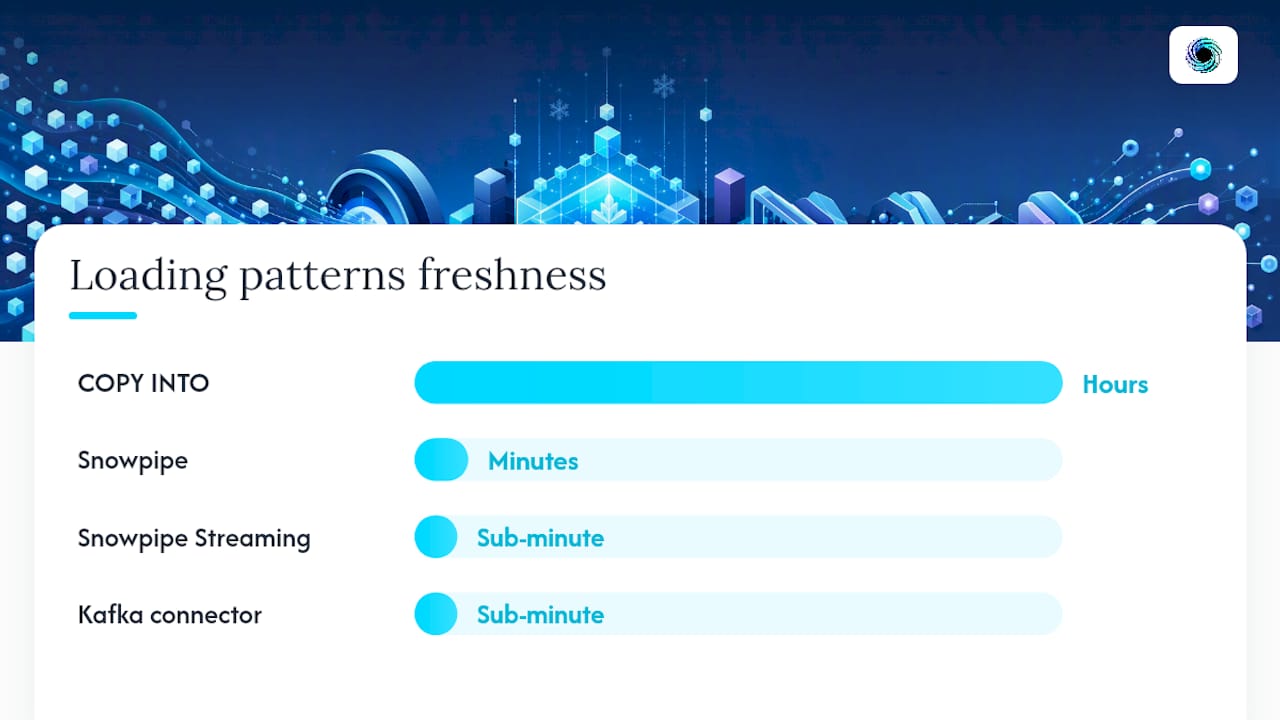
- Reach for Snowpipe Streaming or the Kafka connector when agents need sub-minute data.
- A direct API option like Gyrence supplies typed, schema-shaped responses through composable primitives, cutting the glue code between scrape and stage.
Key Takeaways
The most reliable way to get Snowflake web data ingestion right is to validate schema with batch COPY INTO first, then escalate to streaming only when freshness demands it.
| Point | Details |
|---|---|
| Start with batch | Validate schema with COPY INTO before automating Snowpipe or Streaming. |
| Match latency to method | Use Snowpipe for minute-level freshness, Streaming for sub-minute agent use cases. |
| Store four provenance fields | Include source_url, fetched_at, content_hash, and parser_confidence in every record. |
| Validate with a formal schema | Use Frictionless Table Schema or Great Expectations before and after ingestion. |
| Consider a direct API | Gyrence maps Search, Traverse, Fetch, Extract, and Map to typed responses with spending caps. |
Table of Contents
- Which Snowflake Ingestion Pattern Matches Your Freshness Needs?
- How Do the Core Web Data Primitives Fit Together?
- What Fields Belong in Every Scraped Record Before Ingestion?
- What Are the Practical Snowflake Loading Patterns for Web Records?
- How Should You Handle Scraping Failures Without Blowing Your Budget?
- Gyrence: Mapping the Primitives to a Working Pipeline
- What a Small Pilot Teaches You Before You Scale
- Start With a Fetch-to-VARIANT Proof of Concept
- Sources
- FAQ
Which Snowflake Ingestion Pattern Matches Your Freshness Needs?
Match the ingestion method to how stale your data can afford to be, not to what sounds impressive in an architecture diagram.
- Nightly catalog sync (hours of acceptable lag): batch
COPY INTOfrom staged NDJSON files. Cheapest option, easiest to debug, and the right default for product catalogs or content archives that change once a day. - Price and availability updates every few minutes: Snowpipe, auto-ingesting from a cloud bucket as new files land. You still get file-based semantics, just without a manual load trigger.
- Agent memory or live alerting (sub-minute freshness): Snowpipe Streaming, which writes rows directly through channels and offset tokens instead of waiting on file drops.
- High-volume event streams from multiple producers: the Kafka connector, when you already have a message bus doing the work of ordering and buffering events.
The rule of thumb almost every team ends up following: validate with batch first, then graduate to streaming as scale and latency requirements grow, according to Stripe's data ingestion guidance. Skipping straight to streaming before your schema is stable just means debugging malformed records in production instead of staging.
Checklist for picking a method: How stale can the data be? How many files or rows per hour? Do you already run Kafka? If the answer to the first question is "hours," stop reading about streaming and write a COPY INTO job.
How Do the Core Web Data Primitives Fit Together?
Turning a URL into a warehouse-ready record is a chain, not a single step. Gyrence models this chain as five composable primitives, and the same mental model applies whether you build it yourself or call an API for it.
- Search finds candidate URLs from a query, returning a ranked list rather than a single page.
- Traverse (Gyrence calls this Gyre) walks a site outward from a starting URL, discovering linked pages within a scope you define.
- Fetch retrieves and cleans a single page, typically outputting markdown or a raw HTML blob.
- Extract turns that page into structured JSON using a prompt or a schema, the step that actually produces your NDJSON records.
- Map builds a domain's URL graph from its sitemap, useful for planning a crawl before you spend a single fetch.
Chaining these into a pipeline looks like: Map or Search to find targets, Traverse to expand coverage, Fetch to retrieve clean content, Extract to shape it into JSON, then write NDJSON to a stage. Each step's output becomes the next step's input, which makes the pipeline testable one stage at a time.
Persist three things at every run: the raw HTML blob, provenance metadata, and the extracted JSON. Storing the raw HTML alongside extracted records means you can re-run an improved parser without re-crawling anything, a detail that saves real money once your extraction logic matures past version one, as production scraping guides on tabular datasets point out.
Pro Tip: Keep raw HTML in cheap object storage even after extraction succeeds. The first time a source changes its markup and silently breaks your parser, you'll want to replay history instead of explaining a six-month data gap to your team.
What Fields Belong in Every Scraped Record Before Ingestion?
Every record needs provenance before it needs polish. Four fields form the minimum viable schema for any scraped web record: source_url, fetched_at, content_hash, and parser_confidence, with the raw record kept in VARIANT for flexibility, per the foundation-ready dataset pattern. Without these, you can't audit a downstream anomaly back to the page that caused it, and you can't tell a stale scrape from a fresh one.
Normalization has to happen before that record ever reaches staging. Dates arrive in a dozen formats depending on the source locale; currencies show up as symbols, codes, or bare numbers; units mix imperial and metric with no warning. Canonicalize all of it at extraction time, not at query time, or you'll be writing the same CASE statement in every downstream query.
For validation, Frictionless Table Schema is the standard worth adopting, especially if scraped tables feed downstream ML or foundation models that expect typed columns. frictionless-py validates records against that schema in your pipeline before they ever touch a stage; Great Expectations handles the same job for teams already standardized on it. Validate at extraction time and again before COPY INTO, catching schema drift twice instead of once.
| Field | Purpose |
|---|---|
| source_url | Traces every record back to its origin page for auditing. |
| fetched_at | Timestamps freshness so stale records are identifiable. |
| content_hash | Detects duplicate or unchanged content across runs. |
| parser_confidence | Flags low-quality extractions for triage before they pollute a table. |
What Are the Practical Snowflake Loading Patterns for Web Records?
The mechanics differ by method, but the destination is almost always the same: a VARIANT column that holds the raw JSON, shaped into typed columns at query time.
COPY INTO handles one-shot or periodic bulk loads. Stage your NDJSON, one JSON object per line, and load it directly into VARIANT, configuring the file format so it doesn't strip outer arrays, as recommended in Snowpipe Streaming implementation guides. Set ON_ERROR = 'CONTINUE' during early pilots so one malformed record doesn't kill the whole batch, then tighten it to ON_ERROR = 'ABORT_STATEMENT' once your schema stabilizes.
Snowpipe auto-ingests from a cloud bucket the moment new files land, using the same COPY INTO logic underneath but triggered by an event notification instead of a manual run. It's the right fit for continuous file-based batches: crawlers writing new NDJSON files every few minutes.
Snowpipe Streaming writes rows directly, using channels and offset tokens for exactly-once semantics. This is what sub-minute freshness actually requires, and it's built for agent workflows that can't tolerate batch lag.
Kafka connector maps RECORD_CONTENT and RECORD_METADATA into VARIANT columns automatically, useful when your scraping infrastructure already publishes to a Kafka topic rather than writing files.
Query-time shaping is where VARIANT earns its keep. The : operator pulls a field (raw_record:price::number), and LATERAL FLATTEN unpacks arrays into rows:
SELECT r.value:name::string AS product_name,
       r.value:price::number AS price
FROM staged_web_data,
LATERAL FLATTEN(input => raw_record:items) r;
| Method | Best fit | Freshness |
|---|---|---|
| COPY INTO | Periodic bulk loads | Hours |
| Snowpipe | Continuous file batches | Minutes |
| Snowpipe Streaming | Agent memory, live alerts | Sub-minute |
| Kafka connector | Event-driven, existing Kafka stack | Sub-minute |
How Should You Handle Scraping Failures Without Blowing Your Budget?
Web scraping fails in specific, recurring ways: blocked requests, rate limiting, partial extracts where half a page renders, and schema mismatches when a source changes its markup overnight. Each needs its own handling path, not a generic retry loop.
- Blocked or rate-limited: back off and retry with jitter, and cap retries per URL so one stubborn domain doesn't eat your whole run.
- Partial extract: flag with low
parser_confidencerather than silently accepting incomplete data. - Schema mismatch: route to a quarantine table for manual review instead of forcing a bad record into a typed column.
Typed, discriminated-union responses matter here because they let an agent reason about what actually happened instead of guessing from an HTTP status code. A response that explicitly says "rate limited, retry after 30 seconds" versus "parser confidence 0.4, review needed" gives your retry logic something concrete to branch on.
Cost predictability matters just as much as error handling. Spending caps and predictable per-call pricing let you run exploratory crawls without risking a runaway bill from an unexpectedly large site.
Pro Tip: Set your spending cap before your first exploratory crawl, not after. The bill that surprises you is always the one from the crawl you didn't think would go past a few hundred pages.
Gyrence: Mapping the Primitives to a Working Pipeline
Gyrence implements the five primitives directly: Search for discovery, Traverse (Gyre) for site-wide crawls, Fetch for clean page retrieval, Extract for schema-guided JSON, and Map for sitemap-based URL graphs, all reachable through one API or a hosted MCP endpoint for agents that speak that protocol.

Every call returns a typed, discriminated-union response, including the failure cases, so your pipeline code branches on explicit result types instead of parsing error strings. Extraction uses bundled LLM-powered schema extraction with no separate line item for it, and spending caps keep exploratory crawls from turning into a surprise invoice.
If you're building the pattern described above, the fastest proof of concept is: Fetch a handful of target pages, Extract them against a schema, write the JSON output as NDJSON, and COPY INTO a VARIANT column in a scratch schema. That loop takes an afternoon and tells you immediately whether your schema needs work before you scale to thousands of pages.
Start at the Gyrence console or read the API documentation for endpoint details and schema examples.
What a Small Pilot Teaches You Before You Scale
Most teams overbuild their first web data pipeline. Here's the version that actually works: pull a small sample, maybe fifty to a hundred records, as NDJSON. Validate it against a schema you've written down, not one you're planning to write down later. Only then decide whether COPY INTO is enough or whether you need Snowpipe.
The traps are always the same three. Teams skip provenance fields because "we'll add them later," then can't debug a data quality issue three weeks in. Teams skip schema validation because the first ten records looked fine, then discover record eleven has a null where a price should be. And teams run at full scale before they've built any monitoring, so the first sign of trouble is a Slack message from someone in finance asking about the bill.
Read the structured web data extraction guide and the schema validation walkthrough before you write your first pipeline, not after it breaks.
— Glen
Start With a Fetch-to-VARIANT Proof of Concept
Gyrence gives you the same five primitives this article just walked through, wrapped in one API and a hosted MCP endpoint, so you skip writing your own fetcher, renderer, and JSON-schema extractor from scratch. The concrete advantage over stitching together open-source scraping libraries yourself: typed, discriminated-union responses mean your pipeline code handles blocked requests, rate limits, and partial extracts as explicit cases instead of retrying blindly, and bundled LLM extraction means no separate line item shows up on your invoice for the parsing step.

Spending caps keep an exploratory crawl from becoming a budget incident, and predictable per-call pricing means the estimate you run today still holds when you scale to production volume next month. If the fetch to Extract to COPY INTO VARIANT proof of concept described above sounds like the right first move, start it directly at Gyrence with a free trial and see your first schema-shaped NDJSON output before you commit to a plan.
Sources
- How to Stream Web Data Into Snowflake with Scrapeless and Snowpipe Streaming | May, 2026 | Medium
- What is data ingestion (Stripe Resources)
- From HTML to Tables: Build Foundation-Ready Tabular Datasets
FAQ
What Is the Difference Between COPY INTO and Snowpipe?
COPY INTO runs as a manual or scheduled bulk load, while Snowpipe auto-ingests files the moment they land in a cloud bucket, both using the same underlying load mechanics.
When Do I Need Snowpipe Streaming Instead of Snowpipe?
Use Snowpipe Streaming when you need sub-minute freshness, such as agent memory or live alerts; it writes rows directly through channels rather than waiting for file drops.
Why Store Records in VARIANT Instead of Typed Columns?
VARIANT lets you land flexible JSON without breaking your pipeline when a source adds or removes fields, and you shape the data into typed columns later using the : operator and LATERAL FLATTEN.
What Fields Should Every Scraped Record Include?
At minimum, include source_url, fetched_at, content_hash, and parser_confidence so you can audit, deduplicate, and triage low-quality extractions.
Does Gyrence Handle the Extraction Step Automatically?
Yes. Gyrence's Extract primitive uses bundled LLM-powered schema extraction to turn HTML into structured JSON, returned as a typed response ready for staging into Snowflake.