
To track competitor content changes step by step, follow this ordered workflow: identify your competitive set → map the high-signal pages per competitor → select a monitoring method per page type → configure monitors with frequency and diff thresholds → route alerts to named owners → triage by impact and confidence, then act.
A minimum viable system takes about 30 minutes to get live, covering three to five competitors and three to four pages each. A production workflow with webhooks, delta logs, and owner playbooks typically takes one to two weeks to harden.
Quick-start checklist:
- Define your competitive set (3–7 competitors, tiered by threat level)
- List 3–4 target URLs per competitor: pricing page, product/features page, homepage, changelog or blog sitemap
- Choose a monitoring method per page type (element watch for pricing tables, sitemap discovery for blogs)
- Set check frequency and a diff threshold that filters cosmetic noise
- Route alerts to a named Slack channel or ticketing queue with an assigned owner
- Create a one-page owner/action template: who acts, what they do, and within what timeframe
Key Takeaways
A working competitor content monitoring system requires five things: a tiered competitive set, high-signal target pages, the right monitoring method per page type, named owners per alert category, and a queryable delta log from day one.
| Point | Details |
|---|---|
| Start lean | Monitor 3–7 competitors and 3–4 pages each to build ownership habits before scaling volume. |
| Match method to page type | Use element/DOM watches for pricing tables, sitemap discovery for new blog posts, and webhooks for production routing. |
| Assign owners before alerts fire | Every alert category needs a named owner and a pre-defined action; a shared channel with no owner produces noise, not decisions. |
| Score by impact × confidence | Multiply impact (1–3) by confidence (1–3); scores of 6–9 trigger immediate action, scores of 1–2 go to a watch queue. |
| Gyrence for production scale | Gyrence's Traverse, Fetch, Extract, and WebDoppler primitives cover the full pipeline with typed failure responses and predictable per-call pricing. |
Table of Contents
- How to Track Competitor Content Changes Step by Step: The Full Setup
- What should you actually monitor on competitor sites?
- Which monitoring approach fits each page type?
- How to configure alerts so they produce decisions, not noise
- How to triage and prioritize what you find
- Building a scalable monitoring architecture
- Legal and ethical checklist for competitor monitoring in the United States
- Quick-start checklist you can copy right now
- Gyrence gives you the API primitives to run this at production scale
- Sources
- FAQ
How to Track Competitor Content Changes Step by Step: The Full Setup
This section walks you through each step with concrete settings you can copy. The goal is a working system, not a perfect one.
Step 1: Define your competitive set
Start with 3–7 direct competitors. More than that and you will drown in alerts before you build any habits. Tier them: Tier 1 (closest substitutes, monitor most aggressively), Tier 2 (adjacent players worth watching weekly), and Tier 3 (emerging threats, monthly synthesis only). RivalSense recommends this tiering approach specifically to prevent signal overload and keep the workflow sustainable.
Step 2: Map target pages per competitor
For each competitor, identify the pages that carry the most strategic signal, such as pricing pages, product or feature pages, homepage hero, changelog or release notes, and blog sitemap. Additional pages like careers and integrations may be added for top-priority competitors. You can map a competitor's full URL structure before you start monitoring to avoid missing important pages buried in subdirectories.
Step 3: Pick a monitoring mode per page type
Different pages need different methods. Pricing tables need element-specific DOM watches on the price cells and plan names, not a full-page visual diff that fires every time a banner rotates. Blog and resource sections need sitemap discovery to catch new posts rather than text diffs on existing pages. PageCrawl recommends pairing element-specific monitoring with sitemap discovery as complementary approaches: element watches for numeric data, sitemaps for new-content detection.
Step 4: Set frequency and diff thresholds
The table below gives practical starting settings. Adjust thresholds after your first week of alerts.
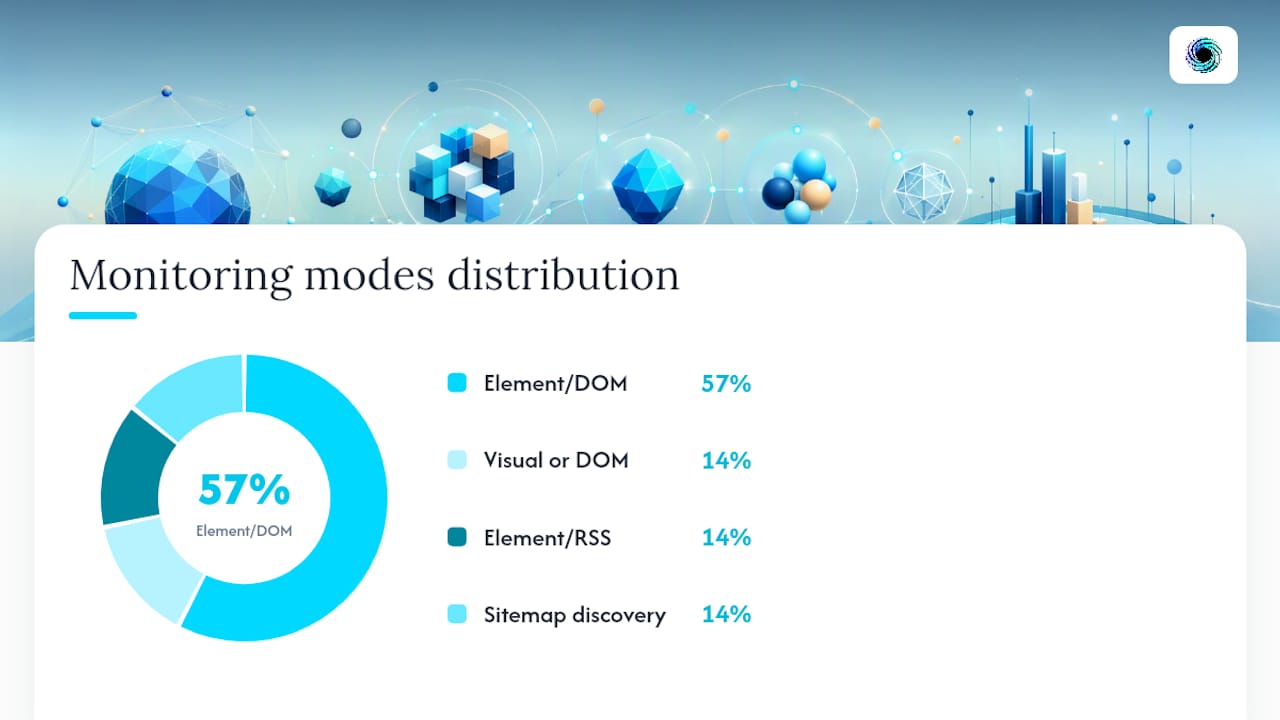
| Page type | Check frequency | Diff threshold | Monitoring mode |
|---|---|---|---|
| Pricing page | Every 4–6 hours | Any numeric change | Element/DOM watch |
| Product/features page | Daily checks | Significant content change | Element/DOM watch |
| Homepage hero | Daily checks | Noticeable content change | Visual diff or DOM |
| Changelog / release notes | Frequent checks | Any new entry | Element watch or RSS |
| Blog sitemap | Daily or less frequent checks | New URL detected | Sitemap discovery |
| Careers page | Daily checks | New job postings | Element/DOM watch |
| Integrations page | Regular checks | New integration rows | Element/DOM watch |
Step 5: Create an owner/action template
Every alert needs a named owner and a pre-defined action, or it becomes noise. Before you route a single notification, fill out this template for each page type:
| Alert type | Owner | Action within 24 hours | Action within 72 hours |
|---|---|---|---|
| Pricing change | Sales lead + Product manager | Flag in CRM, update battlecard draft | Pricing review meeting, update public comparison |
| Feature launch | Product manager | Log in roadmap tracker | Update competitive comparison matrix |
| New blog post | Content lead | Add to content calendar as gap signal | Assign response article or update |
| New job posting | Strategy lead | Log in delta log with category tag | Assess strategic direction quarterly |
Pro Tip: Set up your owner/action template before you configure a single monitor. Teams that wire up alerts first and assign owners later almost always end up with a Slack channel full of unread notifications and no one accountable.
What should you actually monitor on competitor sites?
Not all pages carry equal signal. The highest-value targets fall into two categories: pages that reveal current positioning and pages that reveal future moves.
Current positioning signals:
- Pricing and packaging pages: Watch for price number changes, plan name changes, feature tier shifts, and the appearance of "contact sales" gates where self-serve pricing used to live. A gate appearing on a previously public price is a strong signal of an enterprise pivot.
- Product and feature pages: New feature rows in comparison tables, updated screenshots, and revised capability claims. These often appear days before a formal announcement.
- Homepage hero messaging: Headline and subheadline rewrites signal repositioning. When a competitor shifts from "the fastest" to "the most reliable," that is a messaging strategy change worth noting.
- Changelog and release notes: The most honest signal of product velocity. Frequent, granular entries indicate a shipping culture; sparse entries may indicate a slowdown or a pivot to services.
- Customer logos and case study pages: New logos in a vertical you compete in, or the removal of logos from a vertical they are exiting, both carry strategic weight.
Future move signals:
- Careers pages: Clusters of job postings in a new function (say, enterprise sales or a specific engineering domain) often precede pricing moves or product expansions by months. Elevated Signal identifies hiring patterns as one of the most under-used but high-value leading indicators available in public data.
- Integrations pages: A new integration with a major platform (Salesforce, HubSpot, Snowflake) signals a go-to-market expansion before any press release.
- Sitemap and robots.txt changes: New URL paths appearing in a sitemap reveal content strategy shifts. A new
/enterprise/or/solutions/subdirectory is worth investigating immediately. - Investor relations and press pages: New filings, funding announcements, or partnership press releases. These are easy to miss and often carry the earliest signal of a strategic shift. The edge-case signals on IR pages are a good example of why monitoring non-obvious pages pays off.
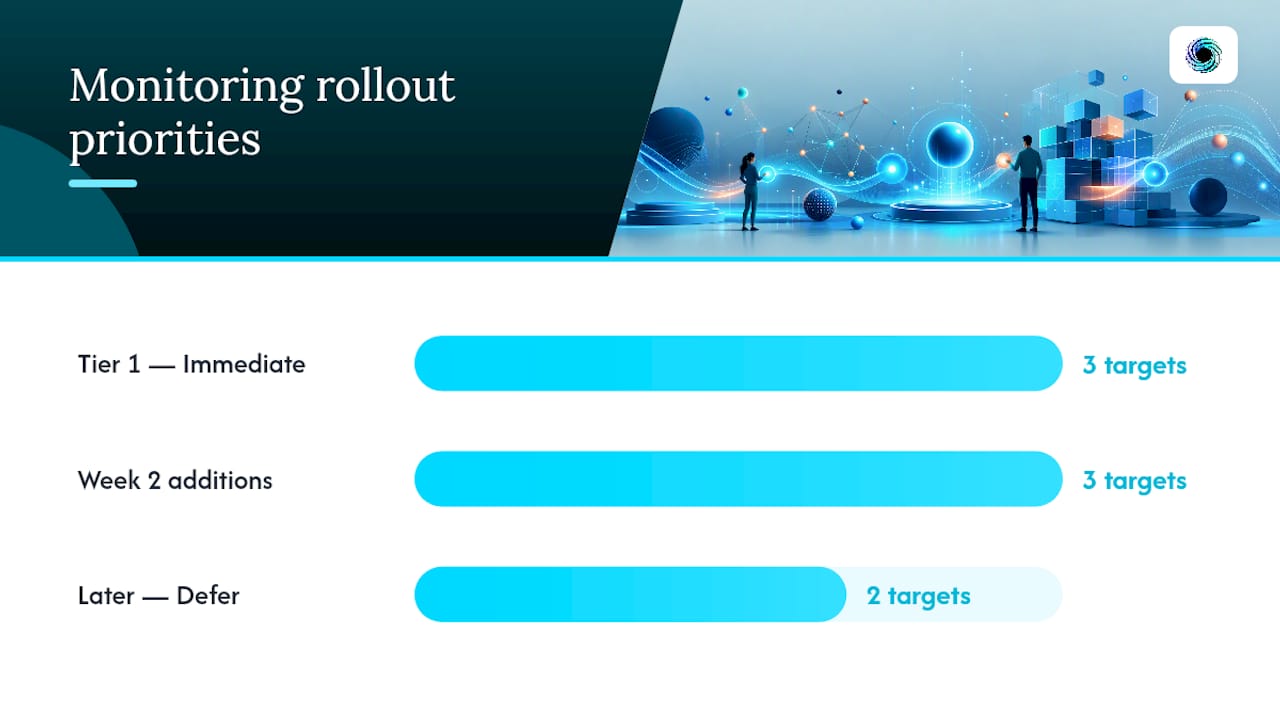
Tiering your targets: Start with pricing, product, and homepage for all Tier 1 competitors. Add changelog, careers, and integrations in week two. Blog sitemaps and customer logos can wait until you have the core loop running cleanly.
Which monitoring approach fits each page type?
Five distinct methods cover the full range of competitor content monitoring. Each has a real failure mode the others do not.
Visual diffing captures a pixel-level or rendered screenshot comparison between two fetches. It catches layout changes, image swaps, and design updates that DOM-based methods miss. The downside: it generates high false-positive rates on pages with rotating banners, countdown timers, or personalized content. Use it for homepages and landing pages where layout is the signal, not for pricing tables.
Element-specific DOM monitoring targets a CSS selector or XPath expression and watches only that node for changes. Far lower noise than full-page diffs. The failure mode is selector drift: if a competitor restructures their HTML, your selector stops matching and you get silent failures instead of alerts. Validate selectors monthly.
RSS and sitemap discovery is the right method for detecting new content. Subscribe to a competitor's RSS feed or poll their XML sitemap on a daily schedule. When a new URL appears, fetch and extract it. This method has near-zero false positives for new-post detection and works even on JavaScript-heavy sites where the sitemap is static.
Scheduled scraping with extraction fetches a page on a timed schedule, cleans it to plain text or markdown, and runs a diff against the previous version. Pair it with LLM-based extraction to pull structured fields (price, plan name, feature list) rather than comparing raw HTML. This is the most flexible method and the one that scales to production.
API-driven monitoring with webhooks is the production-grade version of scheduled scraping. Instead of polling a dashboard, your system receives a webhook payload when a change is detected, routes it to the right owner, and writes a delta log entry. This is where browser extensions and lightweight tools hit their ceiling: a browser extension like Mozilla's Notify Me works for a single analyst watching a handful of pages, but it cannot route to Slack, write to a database, or handle a 50-URL monitoring list reliably.
For a web data competitive intelligence workflow at any meaningful scale, the practical answer is a combination: element watches and sitemap discovery for signal detection, webhooks for routing, and a delta log for storage.
How to configure alerts so they produce decisions, not noise
Raw alerts are not intelligence. The configuration layer between a detected change and a useful notification is where most monitoring programs fail.
Alert configuration basics:
- Frequency: Match check frequency to the volatility of the page. Pricing pages warrant 4–6 hour checks. Blog sitemaps need daily checks at most.
- Diff threshold: Set a minimum change percentage or a minimum number of changed characters before an alert fires. A threshold of zero means every whitespace change triggers a notification.
- Summarization: Where possible, use LLM-based summarization to convert a raw HTML diff into a one-sentence description of what changed. "Plan B price increased from $49 to $59/month" is actionable. A 400-line HTML diff is not.
- Confidence tagging: Classify each alert as high, medium, or low confidence based on the selector match quality and the size of the detected change. Low-confidence alerts go to a watch queue, not a Slack channel.
Routing patterns:
- High-confidence pricing or feature alerts →
#competitive-intelSlack channel + assigned owner DM - Medium-confidence alerts → daily digest email to the strategy team
- Low-confidence alerts → watch queue in your ticketing system (Jira, Linear, or equivalent), reviewed weekly
- All alerts → webhook to delta log storage
Sample webhook payload fields your consumer should expect:
url: "https://competitor.com/pricing"
page_type: "pricing"
diff_summary: "Plan B price changed from $49 to $59/month"
classification: "pricing_increase"
confidence: "high"
snapshot_before: "<stored URL or hash>"
snapshot_after: "<stored URL or hash>"
timestamp: "2026-03-15T14:22:00Z"
trace_id: "abc-123-xyz"
Owner/action mappings for common alert types:
- Pricing change → Sales lead updates CRM battlecard within 24 hours; Product manager schedules pricing review within 72 hours
- Feature launch → Product manager logs in roadmap tracker; Content lead updates comparison page within one week
- New job cluster (5+ postings in one function) → Strategy lead flags as leading indicator; reviewed at next monthly synthesis
- New landing page or subdirectory → SEO lead audits for keyword targeting; Content lead assesses gap
Every monitoring program that fails does so for the same reason: alerts accumulate in a channel no one owns, and the team gradually stops reading them. The fix is not better tooling — it is assigning a named human to every alert category before the first monitor goes live. Elevated Signal's guidance is direct on this: ownership and a required action for each signal type are the non-negotiable prerequisites for a program that converts into decisions.
How to triage and prioritize what you find
Not every detected change deserves the same response. A prioritization rubric keeps the team focused on changes that actually affect revenue or roadmap.
Impact × confidence scoring:
Score each alert on two axes, each from 1–3:
- Impact: How much does this change affect your pricing, positioning, or product roadmap? (1 = cosmetic or irrelevant, 2 = worth monitoring, 3 = requires immediate response)
- Confidence: How certain are you that the detected change is real and correctly classified? (1 = low/noisy diff, 2 = plausible but unverified, 3 = confirmed via manual check or high-quality extraction)
Multiply the two scores. A score of 6–9 triggers an immediate owner action. A score of 3–5 goes to the weekly review queue. A score of 1–2 is logged in the delta log and reviewed monthly.
Example action mappings:
- Score 9 (pricing increase, confirmed): Sales lead updates battlecard same day; Product manager calls a pricing review within 48 hours
- Score 6 (new feature row detected, medium confidence): Product manager verifies manually, updates competitive matrix within one week
- Score 4 (new blog post in your category): Content lead logs as gap signal, assigns response article in next sprint
- Score 2 (layout change, low confidence): Logged in delta log, no action until pattern repeats
Delta log schema — store these fields for every alert, regardless of score:
competitor: canonical namesignal_category: pricing / feature / content / hiring / design / technicalprevious_state: text or hash of the prior snapshotcurrent_state: text or hash of the new snapshotinferred_change_date: timestamp of the detected changeconfidence: high / medium / lowscore: impact × confidence productaction_taken: free text or linked ticket
WebPulse recommends this structured delta log format with controlled vocabulary for signal categories so teams can query history and spot patterns across months of data. Store delta logs for at least 12 months; competitive pricing cycles often repeat annually.
Pro Tip: Route low-confidence alerts (score 1–2) to a dedicated "watch queue" ticket label rather than a Slack channel. Review the queue weekly. If the same low-confidence signal appears three weeks in a row, escalate it — repetition is its own signal.
Building a scalable monitoring architecture
A production monitoring system is a pipeline, not a dashboard. The primitives are: traverse → fetch → clean → extract → diff → classify → webhook → delta log.
Architecture primitives:
- Traverse (site crawl): Starting from a competitor's root URL or sitemap, map the URL graph to discover pages you should monitor. Run this monthly to catch new subdirectories.
- Fetch and normalize: Retrieve each target URL and clean the response to plain text or markdown, stripping navigation, ads, and boilerplate. This is where JavaScript rendering matters: a headless browser or a managed fetch API handles single-page apps; a raw HTTP GET does not.
- Element extraction: Apply a CSS selector, XPath, or LLM-guided schema extraction to pull the specific fields you care about (price, plan name, feature list). Structured JSON output is far easier to diff than raw HTML.
- Change diffing: Compare the current extraction against the stored previous version. For numeric fields, any change is significant. For prose fields, set a character-count or semantic similarity threshold.
- Classification: Label the change type (pricing_increase, feature_addition, messaging_change, new_page, hiring_signal). Classification drives routing.
- Webhook delivery: POST the structured payload to your consumer endpoint. Include a
trace_idfor idempotency. - Delta log storage: Persist every payload to a queryable store (a Postgres table, a data warehouse, or a structured JSON store). Never overwrite; always append.
Concrete webhook consumer pseudo-flow:
on_webhook_received(payload):
  if delta_log.exists(trace_id=payload.trace_id):
    return 200  # idempotent: already processed

  delta_log.insert(payload)

  if payload.confidence == "high" and payload.score >= 6:
    slack.post(channel="#competitive-intel", message=payload.diff_summary)
    crm.create_task(owner=payload.owner, due="+24h", context=payload)
  elif payload.confidence == "medium":
    digest_queue.add(payload)
  else:
    watch_queue.create_ticket(payload, label="watch")

  return 200
Operational best practices:
- Retry with exponential backoff: Transient fetch failures are normal. Retry up to three times before marking a check as failed and alerting the ops channel.
- Idempotency keys: Include a
trace_idin every webhook payload so your consumer can safely deduplicate retried deliveries. - Rate limiting: Space requests to any single domain at least 2–5 seconds apart. Aggressive crawling triggers blocks and may raise legal exposure.
- Deduplication: Hash the extracted content, not the raw HTML. CSS class name changes and whitespace shifts should not produce duplicate alerts.
- Screenshot vs. HTML diff: Store both. Screenshots are human-readable for review; HTML diffs are machine-parseable for automation.
Failure modes to plan for:
- Crawl blocking / CAPTCHAs: Competitors may deploy bot detection. A managed API with rotating infrastructure handles this; a raw scraper does not.
- Ephemeral content: A/B tests, geo-targeted content, and personalized pricing mean two fetches of the same URL may return different content legitimately. Confidence tagging and multi-sample averaging reduce false positives here.
- Selector drift: A competitor's HTML restructure silently breaks your DOM selectors. Run monthly selector validation checks against a known-good snapshot.
- Dynamic JS loads: Content loaded via client-side JavaScript requires a headless render. Typed error responses that distinguish "fetch succeeded, JS render failed" from "page not found" let your pipeline reason about the failure instead of silently dropping the check.
A typed, discriminated-union response from your fetch layer is not a nice-to-have. When a check fails, you need to know why — was the page blocked, did the selector not match, or did the site return a 200 with an empty body? Ambiguous failures produce silent gaps in your delta log, and silent gaps are the most dangerous kind because you do not know what you missed.
Testing your monitors before routing to owners:
- Synthetic change tests: Temporarily modify a known-good page in a staging environment and verify the monitor fires correctly.
- Canary monitors: Set up a monitor on a page you control and change deliberately on a schedule. If the alert does not arrive, your pipeline has a failure.
- Historical replays: Feed a stored previous snapshot through your diff pipeline and verify the output matches the known delta. WebPulse and RivalSense both recommend this replay approach to tune thresholds before going live.
Legal and ethical checklist for competitor monitoring in the United States
Competitor monitoring on public websites is generally lawful in the United States, but several constraints apply. This is general information, not legal advice; consult counsel before scraping gated or login-required content.
Checklist:
- Public data only: Monitor only pages accessible without authentication. Accessing login-gated content without authorization may violate the Computer Fraud and Abuse Act (CFAA).
- Respect robots.txt with awareness:
robots.txtis not legally binding in the US, but ignoring it aggressively can factor into a court's assessment of intent. Document your policy decision. - Avoid credentialed access: Never use a competitor's login credentials, even if shared publicly, to access content.
- Rate-limit your requests: Hammering a competitor's endpoints at high frequency can constitute a denial-of-service pattern. Keep request rates polite: 2–5 seconds between requests per domain.
- Review terms of service: Many sites prohibit automated access in their ToS. ToS violations are not automatically criminal, but they can support civil claims. Document your review.
- Use published APIs where available: If a competitor publishes a public API or data feed, use it instead of scraping the rendered page.
- Document policy decisions: Keep a written record of your monitoring scope, rate limits, and ToS review. This record matters if a dispute arises.
- Consult legal counsel when: You are considering scraping gated pages, login-required content, or data that may be personally identifiable or commercially sensitive.
Quick-start checklist you can copy right now
Run through this list in one afternoon to get a working monitoring loop live.
- Minutes 0–10: List 3–5 direct competitors. Assign each a tier (1, 2, or 3).
- Minutes 10–20: For each Tier 1 competitor, identify the pricing URL, product/features URL, homepage URL, and changelog or blog sitemap URL.
- Minutes 20–30: Choose your monitoring tool or API. Configure one element watch on each pricing page and one sitemap monitor on each blog. Set check frequency to daily for the first week.
- Minutes 30–45: Create a Slack channel named
#competitive-intel. Configure your tool to POST alerts there. Assign one named owner to the channel. - Minutes 45–60: Fill out the owner/action template for pricing changes and feature launches (see the template in the Step-by-Step section above).
- Minutes 60–90: Set up a delta log spreadsheet or database table with columns:
competitor,signal_category,previous_state,current_state,timestamp,confidence,score,action_taken.
Slack alert template (paste into your tool's webhook body):
*[{{page_type}} change detected]* — {{competitor}}
URL: {{url}}
Summary: {{diff_summary}}
Confidence: {{confidence}}
Detected: {{timestamp}}
Owner: @{{owner}}
Action: {{action_template}}
Ticket template fields for Jira, Linear, or equivalent:
- Title:
[Competitive] {{competitor}} — {{classification}} detected - Description: diff summary + before/after snapshot links
- Labels:
competitive-intel,{{signal_category}} - Assignee: named owner per alert type
- Due date: +24 hours for high-confidence, +7 days for medium
Suggested initial scan cadence:
| Page type | Frequency | Owner |
|---|---|---|
| Pricing | Every 6 hours | Sales lead |
| Product/features | Daily | Product manager |
| Homepage | Daily | Marketing lead |
| Changelog | Every 6 hours | Product manager |
| Blog sitemap | Daily | Content lead |
| Careers | Daily | Strategy lead |
Week one validation: After your first 48 hours of alerts, manually verify three of them against the live page. If more than one is a false positive, tighten your diff threshold or narrow your CSS selector. If you receive zero alerts in 48 hours, check that your selectors are matching and your webhook endpoint is reachable.
What separates signal from noise in practice
Most monitoring programs do not fail because of bad tooling. They fail because of three operational habits that compound quietly: too many targets with no triage rubric, alerts routed to a shared channel with no named owner, and no playbook for what to do when an alert fires.
The single habit that most improves return on a monitoring investment is assigning a named owner and a pre-defined action to every alert category before the first monitor goes live. Not a team. Not a channel. A person. When a pricing change fires at 2 PM on a Tuesday, someone should know within seconds that it is their job to update the battlecard and flag the sales team, without a meeting to decide.
The second failure mode is scope creep. Teams add competitors and pages faster than they build response capacity. Starting with 3–5 competitors and 3–4 pages each, as SpyGlow's setup guide recommends, is not timidity. It is the only way to build the ownership habits before the volume overwhelms them.
The third failure is treating the delta log as an archive rather than a query target. Competitive intelligence compounds over time. A pricing change that looks minor in isolation looks like a pattern when you query the delta log and find it is the third price increase in 18 months. Build the log from day one, even if you never query it in month one.
Gyrence gives you the API primitives to run this at production scale
The architecture described above — traverse, fetch, extract, diff, webhook, delta log — maps directly to Gyrence's five composable API primitives.

Gyrence's Traverse (Gyre) crawls a competitor's site outward from a starting URL to build the URL graph you need before you can monitor anything. Fetch retrieves and normalizes any page to clean markdown, handling JavaScript-rendered content without a separate headless browser setup. Extract applies LLM-guided schema extraction to pull structured JSON fields (price, plan name, feature list) from the cleaned page, with no separate AI extraction charge. Map builds the domain URL graph for sitemap-level discovery. WebDoppler delivers webhook alerts when monitored content changes, with typed, discriminated-union responses that surface failure modes explicitly — so your pipeline knows whether a check failed because the page was blocked, the selector drifted, or the site returned an empty body.
Spending caps and predictable per-call pricing mean your monitoring bill does not scale unpredictably as you add competitors. Workspace controls let you assign credit limits per project. Every call returns a typed response, including the failure cases, so your delta log consumer can reason about gaps rather than silently dropping them.
Start with the Gyrence docs to map your first competitor's URL structure and configure a WebDoppler monitor. A free workspace gets you live in under an hour.
Sources
- Competitor Monitoring: What to Track & How Often | Elevated Signal
- How to Track Competitor Pricing and Feature Changes in Real Time | SpyGlow
- Pagecrawl
- How to Analyze Competitor Websites in 2026: A Practical Guide with Actionable Steps
- How to Set Up a Competitor Intelligence Monitoring Workflow — WebPulse
FAQ
How do you track competitor content changes step by step?
Identify 3–7 competitors, map their highest-signal pages (pricing, product, homepage, changelog, blog sitemap), select a monitoring method per page type (element watch, sitemap discovery, or scheduled scraping with webhooks), configure frequency and diff thresholds, assign a named owner to each alert category, and log every detected change in a queryable delta log.
What are the most important pages to monitor on a competitor's site?
Pricing pages, product or feature pages, the homepage hero, changelog or release notes, and the blog sitemap cover the majority of meaningful competitive changes. Careers pages and integrations pages are high-value leading indicators for Tier 1 competitors.
How often should you check competitor pages for changes?
Pricing and changelog pages warrant checks every 4–6 hours. Product and homepage pages need daily checks. Blog sitemaps and careers pages are well-served by daily scans. A mixed cadence approach with real-time monitoring for pricing and weekly synthesis for hiring signals keeps the workflow sustainable.
How do you avoid false positives in competitor monitoring?
Use element-specific DOM selectors rather than full-page visual diffs on dynamic pages, set a minimum diff threshold (character count or percentage change), and apply confidence tagging so low-quality detections route to a watch queue rather than a live alert channel. Validate selectors monthly against known-good snapshots to catch selector drift.
Can Gyrence handle production-scale competitor monitoring?
Gyrence's Traverse, Fetch, Extract, and WebDoppler primitives cover the full monitoring pipeline — site crawl, page normalization, structured field extraction, and webhook delivery — with typed error responses that surface failure modes explicitly and spending caps that keep costs predictable as monitoring scope grows.