
TL;DR:
- User-agent strings are client-controlled claims used primarily for analytics and compatibility, not security verification.
- Modern browsers reduce UA detail, relying on Client Hints and TLS fingerprints for accurate identification.
Here are eight copy-pasteable user-agent strings covering the most common scenarios. Grab what you need, then read the section that matches your use case.
Desktop browsers:
Mozilla/5.0 (Windows NT 10.0; Win64; x64) AppleWebKit/537.36 (KHTML, like Gecko) Chrome/124.0.0.0 Safari/537.36
Mozilla/5.0 (Windows NT 10.0; Win64; x64) AppleWebKit/537.36 (KHTML, like Gecko) Chrome/124.0.0.0 Safari/537.36 Edg/124.0.0.0
Mozilla/5.0 (Windows NT 10.0; Win64; x64; rv:125.0) Gecko/20100101 Firefox/125.0
Mozilla/5.0 (Macintosh; Intel Mac OS X 14_4_1) AppleWebKit/605.1.15 (KHTML, like Gecko) Version/17.4.1 Safari/605.1.15
Mobile and automation:
Mozilla/5.0 (Linux; Android <version>; <device model>) AppleWebKit/537.36 (KHTML, like Gecko) Chrome/<major>.<minor>.<build>.<patch> Mobile Safari/537.36
Mozilla/5.0 (iPhone; CPU iPhone OS <version> like Mac OS X) AppleWebKit/605.1.15 (KHTML, like Gecko) Version/<major>.<minor> Mobile/<build> Safari/<build>
curl/8.7.1
python-requests/2.31.0
One rule applies to every string above: a User-Agent header is a client-controlled claim, not a verified identity. Use it for analytics, compatibility routing, and debugging. Never treat it as the sole basis for a security decision.
Quick verification with curl:
curl -I -A "Mozilla/5.0 (Windows NT 10.0; Win64; x64) AppleWebKit/537.36 (KHTML, like Gecko) Chrome/124.0.0.0 Safari/537.36" https://httpbin.org/headers
The server echoes back the headers it received. If the User-Agent field matches what you sent, your client is passing the string correctly. What the server does with it next is a separate question entirely.
Pro Tip: Use https://httpbin.org/headers or https://httpbin.org/user-agent as a zero-setup echo endpoint during development. It returns the exact headers your client transmitted, including the UA string, with no authentication required.
Table of Contents
- Desktop browser user-agent strings, explained
- Mobile and OS-specific user-agent strings
- How to identify and verify crawler and bot user-agents
- Headless browser and automation library user-agent strings
- Tools and APIs for parsing and decoding user-agent strings
- How to find your current user-agent string
- Best practices: feature detection over UA sniffing
- A checklist for reliable scraping: TLS, HTTP/2, and signal consistency
- Key Takeaways
- Why honest agent behavior beats constant spoofing
- Gyrence handles the browser stack so you don't have to
- Useful sources and parsing resources
- FAQ
Desktop browser user-agent strings, explained
Every major desktop browser follows the same basic structure: Mozilla/5.0 (<system-info>) <platform> (<platform-details>) <extensions>. The Mozilla/5.0 prefix is a historical artifact that every browser carries for compatibility reasons. What actually identifies the browser sits in the extension tokens at the end.

| Browser | Key identifying tokens | Example UA string |
|---|---|---|
| Chrome | Chrome/<major version>.0.0.0 Safari/537.36 | Mozilla/5.0 (Windows NT 10.0; Win64; x64) AppleWebKit/537.36 (KHTML, like Gecko) Chrome/<major version>.0.0.0 Safari/537.36 |
| Edge | Edg/<major version>.0.0.0 (note: single g) | Mozilla/5.0 (Windows NT 10.0; Win64; x64) AppleWebKit/537.36 (KHTML, like Gecko) Chrome/<major version>.0.0.0 Safari/537.36 Edg/<major version>.0.0.0 |
| Firefox | Gecko/20100101 Firefox/<major version>.0 | Mozilla/5.0 (Windows NT 10.0; Win64; x64; rv:<major version>.0) Gecko/20100101 Firefox/<major version>.0 |
| Safari 17 (macOS) | Version/17.4.1 Safari/605.1.15 | Mozilla/5.0 (Macintosh; Intel Mac OS X 14_4_1) AppleWebKit/605.1.15 (KHTML, like Gecko) Version/17.4.1 Safari/605.1.15 |
| Brave (Chromium) | Same as Chrome; no Brave token in UA | Mozilla/5.0 (Windows NT 10.0; Win64; x64) AppleWebKit/537.36 (KHTML, like Gecko) Chrome/124.0.0.0 Safari/537.36 |
Brave deliberately omits any Brave-specific token from its UA string. You cannot distinguish Brave from Chrome via UA alone. That is by design.
UA reduction is the bigger structural shift. Chrome and Chromium-based browsers now freeze the minor version at 0.0.0 and omit device model details from the UA string. The full version, platform architecture, and device model are only available through Sec-CH-UA-* Client Hints headers, which require an explicit Accept-CH negotiation from the server. If you are building a parser that relies on extracting minor build numbers from Chrome UA strings, it will return 0 for most modern traffic.
Sec-CH-UA: brand and major version (e.g.,"Chromium";v="124", "Google Chrome";v="124")Sec-CH-UA-Platform: OS name ("Windows","macOS")Sec-CH-UA-Mobile: boolean (?0or?1)Sec-CH-UA-Full-Version-List: full version, sent only when the server requests it
Pro Tip: If your server-side code needs the full Chrome version or device model, request Client Hints via Accept-CH rather than parsing the frozen UA string. You get structured data instead of a regex that breaks on every major release.
Mobile and OS-specific user-agent strings
The clearest signal that a UA string comes from a mobile browser is the Mobile token, usually appearing as Mobile Safari/537.36 in Chromium-based browsers or Mobile/15E148 in iOS Safari. The Mobi substring (present in Mobile) is what MDN recommends checking for mobile detection, since it appears consistently across Android Chrome, Samsung Internet, and iOS Safari.

Representative strings by platform:
# Android — Chrome on Pixel 8 (Android 14)
Mozilla/5.0 (Linux; Android <version>; <device model>) AppleWebKit/537.36 (KHTML, like Gecko) Chrome/<major>.<minor>.<build>.<patch> Mobile Safari/537.36

# iPhone — Safari on iOS 17
Mozilla/5.0 (iPhone; CPU iPhone OS <version> like Mac OS X) AppleWebKit/605.1.15 (KHTML, like Gecko) Version/<major>.<minor> Mobile/<build> Safari/<build>

# iPad — Safari on iPadOS 17 (no "Mobile" token)
Mozilla/5.0 (iPad; CPU OS 17_4_1 like Mac OS X) AppleWebKit/605.1.15 (KHTML, like Gecko) Version/17.4.1 Safari/604.1

# Windows 11 — Chrome desktop
Mozilla/5.0 (Windows NT 10.0; Win64; x64) AppleWebKit/537.36 (KHTML, like Gecko) Chrome/124.0.0.0 Safari/537.36

# macOS Sonoma — Chrome desktop
Mozilla/5.0 (Macintosh; Intel Mac OS X 10_15_7) AppleWebKit/537.36 (KHTML, like Gecko) Chrome/124.0.0.0 Safari/537.36

# Linux — Firefox desktop
Mozilla/5.0 (X11; Linux x86_64; rv:125.0) Gecko/20100101 Firefox/125.0
Notice that the iPad string drops the Mobile token entirely. iPadOS Safari presents itself as a desktop-class browser by default. If you are routing tablet traffic differently from phone traffic, UA alone is unreliable for that distinction.
| Platform | Key token | Notes |
|---|---|---|
| Android | Linux; Android <version> | Device model present in older strings; frozen in reduced UAs |
| iPhone | iPhone; CPU iPhone OS | iOS version uses underscores, not dots |
| iPad | iPad; CPU OS | No Mobile token; treated as desktop by many servers |
| Windows | Windows NT 10.0; Win64; x64 | NT 10.0 covers both Windows 10 and 11 |
| macOS | Macintosh; Intel Mac OS X | Version uses underscores |
| Linux | X11; Linux x86_64 | Common in developer environments |
Capturing the UA in JavaScript is straightforward:
// Legacy string — works everywhere
const uaString = navigator.userAgent;

// Structured Client Hints — Chromium only, requires secure context
if (navigator.userAgentData) {
  const hints = await navigator.userAgentData.getHighEntropyValues([
    "platform", "platformVersion", "model", "fullVersionList"
  ]);
  console.log(hints);
}
In-app browsers add another layer of complexity. Facebook, Instagram, LinkedIn, and TikTok all inject their own tokens into the UA string (e.g., FBAN/, Instagram, LinkedInApp). If your analytics show unexpected mobile traffic, check for these tokens before assuming it is standard mobile Safari or Chrome.
Pro Tip: Device model tokens in Android UA strings are increasingly absent or frozen. For reliable device-class detection (phone vs. tablet vs. desktop), use Sec-CH-UA-Mobile and Sec-CH-UA-Form-Factor Client Hints rather than parsing the model string from the UA.
How to identify and verify crawler and bot user-agents
Major search engine crawlers identify themselves with recognizable UA strings. Here are the most common ones:
# Googlebot (web crawler)
Mozilla/5.0 (compatible; Googlebot/2.1; +http://www.google.com/bot.html)

# Googlebot Smartphone
Mozilla/5.0 (Linux; Android 6.0.1; Nexus 5X Build/MMB29P) AppleWebKit/537.36 (KHTML, like Gecko) Chrome/W.X.Y.Z Mobile Safari/537.36 (compatible; Googlebot/2.1; +http://www.google.com/bot.html)

# Bingbot
Mozilla/5.0 (compatible; bingbot/2.0; +http://www.bing.com/bingbot.htm)

# DuckDuckBot
DuckDuckBot/1.0; (+http://duckduckgo.com/duckduckbot.html)

# Generic archive/research crawler
Mozilla/5.0 (compatible; archive.org_bot +http://www.archive.org/details/archive.org_bot)
The critical point: any client can send any of these strings. A UA claiming Googlebot/2.1 is not Googlebot unless you verify it. The correct verification procedure uses forward-confirmed reverse DNS (FCrDNS):
- Take the source IP of the incoming request.
- Run a reverse DNS lookup:
host <IP>ordig -x <IP>. The result should resolve to a hostname ending ingooglebot.comorgoogle.com. - Run a forward lookup on that hostname:
host <hostname>. It must resolve back to the original IP. - Cross-reference against Google's published IP ranges (available via their Search Console documentation).
Only when steps 2, 3, and 4 all pass can you treat the request as legitimate Googlebot traffic.
Verification command sequence (Linux/macOS):
host 66.249.66.1→ should return1.66.249.66.in-addr.arpa domain name pointer crawl-66-249-66-1.googlebot.comThen:host crawl-66-249-66-1.googlebot.com→ must resolve back to66.249.66.1If the forward and reverse don't match, the declared UA is spoofed regardless of what it says.
Pro Tip: Log both the declared UA string and the FCrDNS result for every request that claims to be a known crawler. That pairing gives you an auditable record if you ever need to dispute a crawl rate complaint or investigate unusual traffic spikes.
Headless browser and automation library user-agent strings
Automation tools ship with default UA strings that are immediately recognizable to any WAF worth its subscription fee. Here are the defaults:
# Puppeteer / Playwright (Chromium-managed)
Mozilla/5.0 (X11; Linux x86_64) AppleWebKit/537.36 (KHTML, like Gecko) HeadlessChrome/124.0.0.0 Safari/537.36

# Selenium WebDriver (Chrome)
Mozilla/5.0 (Windows NT 10.0; Win64; x64) AppleWebKit/537.36 (KHTML, like Gecko) Chrome/124.0.0.0 Safari/537.36

# curl (default)
curl/8.7.1

# python-requests (default)
python-requests/2.31.0

# Go net/http (default)
Go-http-client/2.0
The HeadlessChrome token in Puppeteer's default UA is a direct flag. Replacing it with a standard Chrome string is a one-line fix, but it only solves the UA layer. WAFs like Cloudflare and DataDome identify bot traffic via JA3/JA4 TLS fingerprinting and HTTP/2 frame analysis before they even read the UA string. A Python requests client with a Chrome UA still presents a Python OpenSSL TLS ClientHello. That mismatch is the actual detection signal.
| Client | Default UA flag | TLS fingerprint issue |
|---|---|---|
| Puppeteer (default) | HeadlessChrome token | Matches real Chrome if using bundled Chromium |
| python-requests | python-requests/x.x.x | Python OpenSSL stack; JA3 does not match any browser |
| curl | curl/x.x.x | curl TLS stack; JA3 is curl-specific |
| Go net/http | Go-http-client/x.x | Go crypto/tls stack; distinct JA3 |
| Selenium (Chrome) | Standard Chrome UA | Matches Chrome if using real Chrome binary |
Randomizing UA tokens without matching the underlying network stack often makes detection easier, not harder. A unique combination of UA string, TLS fingerprint, and HTTP/2 frame ordering that matches no real-world browser distribution is a stronger signal than any single flag.
Pro Tip: For Puppeteer and Playwright, launch with a real Chrome binary rather than the bundled Chromium when TLS fingerprint fidelity matters. The bundled Chromium and a full Chrome install produce different JA3 hashes on some builds. Use executablePath in Puppeteer or channel: 'chrome' in Playwright to specify the system Chrome.
Tools and APIs for parsing and decoding user-agent strings
Parsing a UA string by hand with regex is how you end up with a 400-line switch statement that breaks on every Safari release. Use a library or a dedicated service instead.
Online decoders and searchable databases:
- WhatIsMyBrowser (whatismybrowser.com): Paste any UA string and get a structured breakdown of browser, engine, OS, and device type. The site also maintains a searchable user-agent database with update timestamps, which makes it useful for validating whether a string you found in a log is current or years out of date.
- DeviceAtlas: A commercial device intelligence platform that maps UA strings and Client Hints to a detailed device property set (screen size, hardware class, OS version). DeviceAtlas maintains one of the most comprehensive user-agent databases available and exposes an API for server-side lookups. It is the standard choice for teams that need reliable device classification at scale.
- pzb/user-agents gist (GitHub): A community-maintained list of real-world UA strings scraped from browser traffic. Useful as a rotation source or for testing parsers against realistic inputs. Check the commit date before using it in production; the value of any static UA list degrades as browsers update.
Open-source parsing libraries:
- ua-parser-js (npm): Parses UA strings in JavaScript (browser and Node.js). Returns
browser,engine,os,device, andcpuobjects. Widely used and actively maintained. - uap-python / uap-ruby / uap-java: Language bindings for the ua-parser project, which uses a shared
regexes.yamldefinition file. Updating the regex file keeps all bindings current without changing application code. - browscap (PHP/Python): The Browser Capabilities Project maintains a large device database in CSV and INI formats. Slower than regex-based parsers but covers a wider device set.
- device-detector (PHP, Python port available): Parses UA strings into device type, brand, model, OS, and client application. Handles bots, feed readers, and mobile apps in addition to browsers.
A note on parser accuracy: No open-source parser is 100% current. UA reduction means that Chrome's minor version is always
0.0.0in the UA string, so any parser that reports a specific minor version for Chrome is either reading Client Hints or fabricating precision. Treat parsed minor versions from UA strings as unreliable for Chromium-based browsers.
Pro Tip: Pin your parser's regex definition file to a specific commit in CI, then update it on a scheduled cadence (monthly works for most teams). An unpinned dependency that auto-updates can silently change how your analytics categorize traffic between deploys.
How to find your current user-agent string
Three methods, ordered by how much context they give you.
Method 1: Browser developer tools (most complete)
- Open Chrome, Edge, or Firefox and press
F12to open DevTools. - Go to the Network tab.
- Navigate to any page or reload the current one.
- Click any request in the list.
- Open the Headers tab in the request detail panel.
- Find
User-Agentunder Request Headers.
This shows the exact string the browser sent, including any modifications made by extensions. It is the ground truth for what the server received.
Method 2: JavaScript console (fastest)
// Works in every browser
console.log(navigator.userAgent);

// Chromium only — structured and privacy-aware
if (navigator.userAgentData) {
  navigator.userAgentData.getHighEntropyValues([
    "architecture", "model", "platform", "platformVersion", "fullVersionList"
  ]).then(data => console.log(data));
}
navigator.userAgentData is only available in Chromium-based browsers (Chrome, Edge, Brave) in a secure context (HTTPS or localhost). Firefox and Safari do not implement it.
Method 3: Command line
# Print the default curl UA
curl -I https://httpbin.org/user-agent

# Send a custom UA and verify the server received it
curl -A "Mozilla/5.0 (Windows NT 10.0; Win64; x64) AppleWebKit/537.36 (KHTML, like Gecko) Chrome/124.0.0.0 Safari/537.36" https://httpbin.org/user-agent

# Python — print requests' default UA
python3 -c "import requests; print(requests.utils.default_headers()['User-Agent'])"
| Method | What you get | Best for |
|---|---|---|
| DevTools Network tab | Full request headers as sent | Debugging browser behavior |
navigator.userAgent | UA string only | Quick JS checks |
navigator.userAgentData | Structured brand/version/platform | Chromium; Client Hints integration |
curl -I | Server-confirmed echo | CLI clients and automation |
| Python snippet | Library default UA | Verifying requests library version |
A note on TLS fingerprints: if you need to correlate your client's JA3 hash with its UA string for server-side analysis, tools like ja3 (a Wireshark plugin) or tlsfuzzer can capture the ClientHello from a live connection. That pairing, UA plus JA3, is what server-side detection systems actually compare.
Best practices: feature detection over UA sniffing
Mozilla's guidance is direct: UA sniffing is brittle and should be a last resort. The practical rules are short:
- Use feature detection first. Check whether
fetch,IntersectionObserver, orCSS.supports('display', 'grid')exists before branching on browser name. Features are facts; UA strings are claims. - Use Client Hints for device data. If you need OS, platform, or device class on the server side, request
Sec-CH-UA-*headers viaAccept-CH. You get structured, negotiated data instead of a string you have to parse. - Treat UA as untrusted for security decisions. The UA header is trivial to forge; JA3/JA4 TLS fingerprinting, HTTP/2 frame ordering, and runtime JavaScript API checks are the signals that actually hold up under adversarial conditions.
- Log UA for debugging, not gating. Recording the UA string in your access logs is useful for diagnosing compatibility issues. Using it to block or allow access is not.
The W3C frames user agents as actors that owe duties to end users: protection, honesty, and loyalty. That framing maps directly to ethical scraping. A scraper that misrepresents itself to bypass access controls is violating the spirit of those duties, and increasingly the letter of site terms of service. UA spoofing for the purpose of circumventing access controls carries policy risk; in some contexts, it may also carry legal risk under the Computer Fraud and Abuse Act. Consult qualified legal counsel for your specific situation.
Maintaining your UA list is not optional. Browsers release major versions every four to six weeks. A static list from six months ago will contain strings that no real user sends, which makes them statistically anomalous to any detection system that models real traffic distributions.
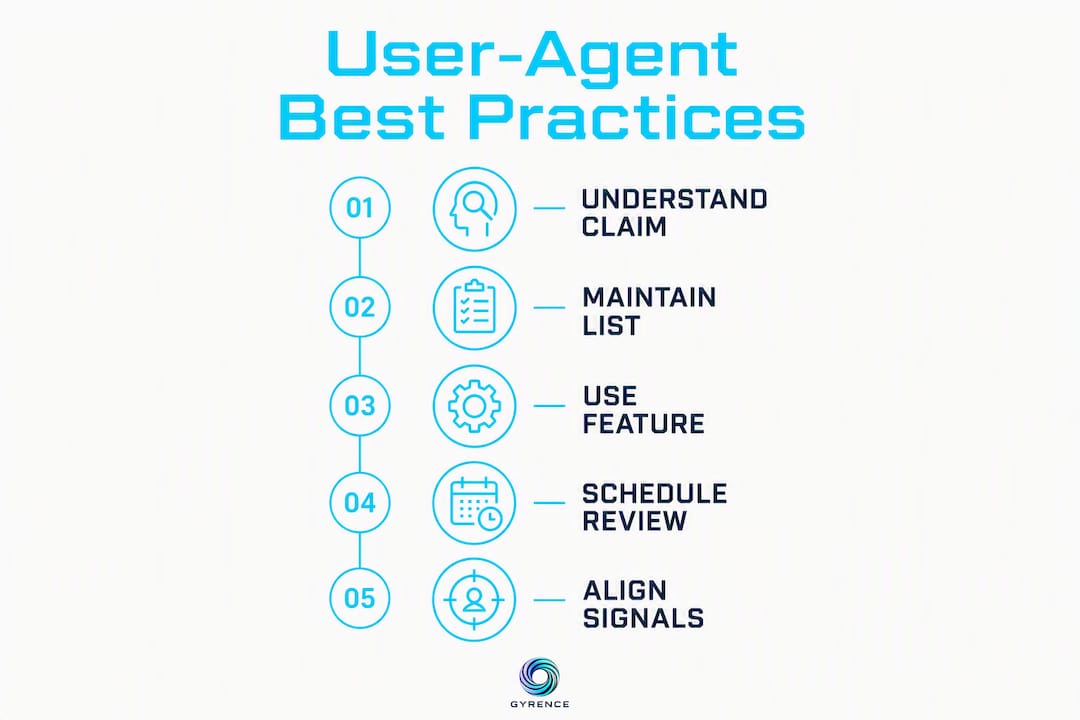
Pro Tip: Schedule a monthly review of your UA list against a source like WhatIsMyBrowser or the pzb/user-agents gist. Strings that have aged out of real-world distribution are worse than no rotation at all because they create a fingerprint that matches nothing in the wild.
A checklist for reliable scraping: TLS, HTTP/2, and signal consistency
UA rotation alone does not make a scraper reliable. Modern WAFs operate on a stack of signals, and the UA string sits near the bottom of that priority order. Here is the operational checklist, ordered by impact:
-
Use real browser engines or managed browser stacks. Puppeteer and Playwright with a real Chrome binary produce a TLS ClientHello that matches actual Chrome traffic. Standard HTTP libraries (python-requests, Go net/http, curl) do not, regardless of what UA string you attach.
-
Match the TLS ClientHello (JA3/JA4). The JA3 hash encodes cipher suites, TLS extensions, elliptic curves, and compression methods. A Python OpenSSL ClientHello has a distinct JA3 that no browser produces. If your UA claims Chrome but your JA3 says Python, detection happens in milliseconds. Tools like
curl-impersonatereplicate the TLS and HTTP/2 stack of specific browser versions for exactly this reason. -
Match HTTP/2 header and frame ordering. HTTP/2 clients send SETTINGS and HEADERS frames in an order that is characteristic of the implementation. Chrome's HTTP/2 fingerprint differs from Firefox's, and both differ from Go's. Server-side tools can detect the implementation from frame ordering alone.
-
Align runtime JavaScript APIs with the claimed UA. If your headless browser claims to be Chrome 124 but
navigator.pluginsis empty,window.chromeis undefined, or WebGL returns a software renderer string, detection scripts will flag the mismatch. Libraries likepuppeteer-extra-plugin-stealthpatch some of these, but coverage is incomplete. -
Avoid unique or fake hardware fingerprints. Canvas fingerprints, WebGL renderer strings, and audio context outputs should match plausible real-world values for the claimed device. Randomizing these values creates a unique fingerprint that appears in no real traffic distribution, which is a stronger detection signal than any known bot pattern.
The core principle: A reliable scraper is consistent, not clever. Every signal it emits — UA, TLS, HTTP/2, JS APIs, hardware fingerprints — should tell the same coherent story. One inconsistency is enough for a well-tuned WAF to flag the session. Chasing novelty by randomizing signals makes the problem worse, not better.
Tool options by fidelity level:
| Approach | TLS fidelity | JS API fidelity | Maintenance burden |
|---|---|---|---|
| Real Chrome via Playwright | High | High | Medium |
| curl-impersonate | High | None (no JS) | Low |
| Puppeteer + stealth plugin | Medium | Medium | Medium |
| python-requests + custom UA | None | None | Low (but detectable) |
| Go net/http + custom UA | None | None | Low (but detectable) |
For teams building AI agent web browsing pipelines, the checklist above applies at every fetch call. An agent that issues hundreds of requests per session needs consistent signal alignment across the entire session, not just the first request.
Pro Tip: Record UA, JA3 hash, and HTTP/2 fingerprint together in your request logs. When a scraping session starts failing, that trio tells you immediately whether the issue is a UA mismatch, a TLS stack change after a library update, or a server-side rule change. Logging only the UA leaves you debugging blind.
Key Takeaways
A user-agent string is a client-controlled claim, not a verified identity. Reliable web data collection requires aligning UA, TLS, HTTP/2, and runtime signals into a consistent, coherent profile.
| Point | Details |
|---|---|
| UA is a claim, not proof | Never use the User-Agent header as the sole basis for a security or access decision. |
| Feature detection beats UA sniffing | Check for API existence directly; UA-based feature gating breaks on reduced strings and new browsers. |
| TLS/JA3 outranks UA for detection | WAFs read the TLS ClientHello before the UA string; mismatched stacks trigger blocks regardless of UA. |
| Keep your UA list current | Browsers release major versions every 4–6 weeks; stale strings create anomalous fingerprints. |
| Gyrence removes the UA management burden | Gyrence's managed Fetch and Extract primitives handle browser stack consistency so your pipeline doesn't depend on fragile UA rotation. |
Why honest agent behavior beats constant spoofing
The scraping community spends enormous energy on UA rotation, stealth patches, and fingerprint evasion. Most of that energy is reactive: a WAF tightens a rule, scrapers adapt, the WAF updates again. It is an arms race with no stable equilibrium.
The more durable approach is to build scrapers that behave like honest agents. The W3C's framing of user agents as actors with duties to end users is not just an accessibility principle. It is a useful engineering constraint. A scraper that accurately represents what it is, respects rate limits, and surfaces its failures cleanly is easier to maintain, easier to debug, and less likely to trigger escalating countermeasures.
Gyrence's design reflects that philosophy directly. The five primitives (Search, Traverse, Fetch, Extract, Map) return typed, discriminated-union responses that include failure cases. When a fetch fails because a page returned a 429 or a bot challenge, the response says so explicitly. You do not get a silent empty result that looks like success. That transparency is what lets AI agents reason about web data rather than guess.
The practical implication: teams that invest in honest, maintainable agent behavior spend less time on evasion and more time on the actual data problem. UA spoofing is a symptom of a deeper issue, which is that the scraping stack is not aligned with the signals the server expects. Fix the stack, and the UA question becomes much less urgent.
Gyrence handles the browser stack so you don't have to
The UA rotation problem is really a signal-consistency problem. Every fix you apply at the UA layer exposes a new mismatch at the TLS or HTTP/2 layer. Gyrence sidesteps that cycle entirely.

Gyrence's Fetch primitive uses managed browser infrastructure with consistent TLS and HTTP/2 profiles. You send a URL; you get back clean, normalized markdown or structured JSON. No UA string to maintain, no JA3 mismatch to debug, no silent failures when a page returns a bot challenge. The Extract primitive adds LLM-powered schema-guided JSON extraction in the same call, with no separate AI billing line. Spending caps mean your data bill is predictable even when an agent loops unexpectedly.
For teams building at scale, the web scraping API handles browser-level signal consistency as a managed service. Start with the free tier at gyrence.com and make your first fetch in under five minutes.
Useful sources and parsing resources
On the nature of UA strings: The HTTP User-Agent header "is a characteristic string that lets servers and network peers identify the application, operating system, vendor, and/or version of the requesting user agent" — but it is self-reported and unverified by design. Every downstream use of UA data should account for that constraint.
Standards and primary references:
- User-Agent header — MDN Web Docs: The canonical reference for UA string syntax, token definitions, and the UA reduction specification. Start here.
- Browser detection using the user agent — MDN: Mozilla's official guidance recommending feature detection over UA sniffing, with notes on Client Hints.
- User-agent reduction — MDN: Documents which UA fields Chrome has frozen and how
Sec-CH-UA-*headers replace them. - Web user agents — W3C: W3C's framing of user agent duties: protection, honesty, and loyalty to end users.
- User Agent Accessibility Guidelines (UAAG) 2.0 — W3C: Accessibility requirements for user agents; relevant for developers building rendering tools or browser extensions.
Security and detection research:
- Why standard HTTP libraries are dead for web scraping — dev.to: Covers TLS and HTTP/2 fingerprinting by Cloudflare and DataDome and why curl/requests fail against modern WAFs.
- Browser fingerprinting deep dive — dev.to: Explains why randomizing UA tokens without matching the full fingerprint increases detection risk.
Databases and parsing tools:
- ua-parser-js — (npmjs.org): JavaScript UA parser for browser and Node.js environments; returns structured browser, OS, and device objects.
FAQ
What are some common user-agent strings?
The most common desktop UA strings come from Chrome on Windows (Mozilla/5.0 (Windows NT 10.0; Win64; x64) AppleWebKit/537.36 ... Chrome/124.0.0.0 Safari/537.36), Firefox on Windows (Mozilla/5.0 (Windows NT 10.0; Win64; x64; rv:125.0) Gecko/20100101 Firefox/125.0), and Safari on macOS (Mozilla/5.0 (Macintosh; Intel Mac OS X 14_4_1) AppleWebKit/605.1.15 ... Version/17.4.1 Safari/605.1.15). Automation clients like curl (curl/8.7.1) and python-requests (python-requests/2.31.0) use their library name and version by default.
How do I find my current user-agent string?
Open your browser's DevTools (F12), go to the Network tab, reload the page, click any request, and look for User-Agent under Request Headers. Alternatively, run console.log(navigator.userAgent) in the browser console, or use curl -I https://httpbin.org/user-agent from the command line.
What is an example of a user-agent string?
A typical Chrome 124 desktop string looks like: Mozilla/5.0 (Windows NT 10.0; Win64; x64) AppleWebKit/537.36 (KHTML, like Gecko) Chrome/124.0.0.0 Safari/537.36. The Mozilla/5.0 prefix is a legacy compatibility token; the actual browser identity is in the Chrome/124.0.0.0 token at the end.
What is the best user-agent to use for web scraping?
For scraping that needs to pass WAF inspection, the UA string matters less than the TLS and HTTP/2 fingerprint. Use a real Chrome binary via Playwright or Puppeteer so the full signal stack (UA, JA3, HTTP/2 frames) is consistent. For simple, non-protected endpoints, a current Chrome desktop UA string works fine. Gyrence's Fetch primitive handles browser-level signal consistency as a managed service, removing the need to maintain UA strings manually.
Why does Chrome always show 0.0.0 as the minor version?
Chrome's UA reduction policy freezes the minor, build, and patch version numbers at 0.0.0 in the UA string. The full version is only available through Sec-CH-UA-Full-Version-List, a Client Hints header that requires the server to request it via Accept-CH. This is intentional: it reduces passive fingerprinting surface while still allowing servers to request precise version data when they need it.