
An API-first pipeline that finds typed JSON sources first and returns typed, failure-mode-aware responses is the fastest, most reliable way to produce sales-ready enrichment data for agents and automated workflows. The pattern rests on five composable operations: Search (find candidate pages), Traverse (crawl outward from a domain), Fetch (pull and clean a single page), Extract (turn HTML into schema-validated JSON), and Map (build the URL graph of a site).
Web data enrichment for sales intelligence fails most often not because the scraper breaks, but because the output is untyped. A field that's sometimes a string, sometimes null, and sometimes missing entirely will silently corrupt a CRM record or send an agent into a bad decision loop. Predictable typing, not raw scraping speed, is what separates a pipeline you can trust from one you babysit.
- Search: discover candidate companies, pages, or documents
- Traverse: crawl a domain outward from a seed URL
- Fetch: retrieve and normalize a single page to clean markdown or HTML
- Extract: convert content into schema-validated, typed JSON
- Map: generate a site's URL graph for planning and monitoring
Key Takeaways
A reliable web data enrichment pipeline for sales intelligence prioritizes typed, failure-aware API responses over raw scraping speed, and treats machine-readable sources as the default extraction path.
| Point | Details |
|---|---|
| Follow the extraction ladder | Check JSON-LD and private endpoints before DOM parsing, and use headless browsers only as a last resort. |
| Design for failure modes first | Model extraction results as a discriminated union (success, partial, failed) before writing extraction logic. |
| Match refresh cadence to source volatility | Rescrape job postings weekly and general website content monthly to control cost and staleness. |
| Validate before every CRM write | Use idempotent upserts keyed on a stable ID, with schema validation and confidence gating. |
| Use Gyrence's typed primitives | Search, Traverse, Fetch, Extract, and Map return typed, discriminated-union responses with bundled LLM extraction and spending caps. |
Useful Sources
- Data Extraction Patterns & Working with APIs — extraction ladder and performance tradeoffs
- Building an AI-Powered Sales Intelligence Pipeline — pipeline architecture and cadence
- Integrating Web Data into Your CRM — upsert and validation patterns
- AuthorityLayer insights — turning web data into LLM-ready reports
- Chad Burmeister on public signals — using job postings for sales intelligence
Table of Contents
- How Do You Architect a Web Data Enrichment Pipeline?
- Which Extraction Method Should You Try First?
- How Should You Structure Enrichment Data for Agents?
- How Do You Feed Extracted Data Into LLM Synthesis and Your CRM?
- How Often Should You Refresh Enriched Data, and What Does It Cost?
- What Do Gyrence's Primitives Look Like in Practice?
- How Do You Handle Authentication and Rate Limits?
- How Should You Handle Errors and Retries?
- What Security and Privacy Practices Apply to Enriched Data?
- How Do You Monitor an Enrichment Pipeline in Production?
- How Do You Test and Validate Enrichment Accuracy?
- An Editorial Take on Building This the Right Way
- Build Your Enrichment Pipeline on Gyrence
- Sources
- FAQ
How Do You Architect a Web Data Enrichment Pipeline?
A production enrichment pipeline breaks into six stages, each with a distinct job and its own scaling profile. Discovery finds the URLs worth fetching. Fetch and extraction turn pages into structured records. A content store holds both raw and normalized versions. An embedding stage indexes text for retrieval. LLM synthesis turns records into readable intelligence. CRM upsert writes the result back into your system of record.
- Discovery — seed URLs from domains, search queries, or sitemaps (Gyrence's Search and Map primitives handle this)
- Fetch/extract — pull pages and convert to typed JSON or clean markdown
- Content store — persist raw HTML/markdown plus normalized fields, with versioning
- Embedding — chunk and vectorize text for semantic retrieval
- LLM synthesis — generate structured intelligence reports from retrieved chunks
- CRM upsert — write normalized fields into Salesforce, HubSpot, or a warehouse table
Discovery and fetch should run on schedules matched to how fast the underlying source changes. Embedding and synthesis, by contrast, work better as event-driven steps triggered by webhooks the moment new content lands, which is where a service like WebDoppler earns its place: it watches target pages and fires a webhook on meaningful change, instead of forcing you to poll on a fixed clock.
| Stage | Scaling pattern | Trigger type |
|---|---|---|
| Discovery/fetch | Horizontal, queue-based workers | Scheduled (cron) |
| Content store | Vertical, single source of truth | Write-on-completion |
| Embedding | Horizontal, batched | Event-driven (webhook) |
| LLM synthesis | Rate-limited by model provider | Event-driven or on-demand |
| CRM upsert | Low volume, idempotent | Event-driven |
Scrapers and embedding generators scale independently from each other. A scalable sales intelligence architecture treats discovery, scraping, storage, embedding, and synthesis as separate services precisely because their load profiles never move in lockstep. LLM synthesis is the bottleneck you'll hit first, so isolate it behind a queue rather than calling it inline from your scrape workers.
Which Extraction Method Should You Try First?
Extraction has a preference order, and violating it is the single most common reason enrichment pipelines get slow and brittle. Work down this ladder, and stop as soon as a rung succeeds:
- Check for
application/ld+jsonblocks or embedded state objects in the raw HTML - Open the browser Network panel, filter by XHR/fetch, and look for a private JSON or GraphQL endpoint powering the page
- Replay that endpoint directly with an HTTP client, skipping the rendered page entirely
- Fall back to DOM parsing against stable selectors when no structured source exists
- Reserve a headless browser for pages that require JavaScript execution to reveal any content at all
Practitioner guidance on data extraction patterns is blunt about why this order matters: headless rendering can run significantly slower than a direct HTTP call, and it costs more in compute and proxy usage on every single request. A typed API that automatically tries the cheap path first, and only escalates when it must, is what keeps enrichment costs from scaling linearly with your call volume.
A minimal Python fallback chain looks like this:
import httpx
from bs4 import BeautifulSoup

resp = httpx.get(url, headers={"User-Agent": "Gyrence-Bot/1.0"})
soup = BeautifulSoup(resp.text, "html.parser")
json_ld = soup.find("script", type="application/ld+json")

if json_ld:
    data = parse_ld_json(json_ld.string)
else:
    # No structured data found — escalate to headless rendering
    from playwright.sync_api import sync_playwright
    with sync_playwright() as p:
        browser = p.chromium.launch()
        page = browser.new_page()
        page.goto(url)
        data = extract_from_rendered_dom(page.content())
Pro Tip: Before writing a single CSS selector, search the raw response text for the string "application/ld+json" or "NEXT_DATA". Half the sites you'll target already embed a clean JSON blob you're ignoring in favor of fragile DOM scraping.
Careers pages deserve special mention here. They're one of the highest-signal, most frequently updated sources for technographic and hiring-intent data, and they almost always run on a handful of ATS platforms with predictable JSON structures underneath the rendered page.
How Should You Structure Enrichment Data for Agents?
Typed schemas are what let an AI agent or a downstream automation reason about a result instead of guessing whether a field is trustworthy. Every extracted record needs a canonical identifier (a domain, a normalized company name, or an internal entity ID) so that repeated enrichment runs merge cleanly instead of creating duplicate rows.
- Give every entity a stable canonical ID before anything else touches the record
- Model extraction outcomes as a discriminated union:
success,partial, orfailed, each with its own required fields - Attach a confidence score to fields extracted by an LLM versus fields pulled from structured markup
- Include provenance metadata: source URL, fetch timestamp, and parser version on every record
- Validate against a JSON Schema before the record ever reaches your content store
| Field category | Example | Purpose |
|---|---|---|
| Canonical ID | domain: "acme.com" | Dedup and merge across sources |
| Typed payload | employee_count: 245 | Structured value for downstream logic |
| Confidence score | 0.92 | Gate automated action vs. human review |
| Provenance | parser_version: "v3.2" | Debugging and re-run correlation |
| Failure mode | status: "partial", missing: ["revenue"] | Tells the caller exactly what's missing |
A robust CRM integration workflow treats schema validation as a gate, not an afterthought: nothing writes to the CRM until it passes. Confidence thresholds decide whether a field auto-populates a CRM record or routes to a human reviewer, which is exactly the kind of decision a discriminated-union response makes trivial to code against. Read more on structured JSON extraction design for concrete schema examples.
How Do You Feed Extracted Data Into LLM Synthesis and Your CRM?
Batch processing suits scheduled refreshes, like a nightly re-scrape of your target account list. Streaming suits time-sensitive triggers, like a webhook firing the moment a target company posts a new job listing.
- Fetch and extract raw data using typed API calls (Fetch and Extract primitives)
- Chunk normalized text and generate embeddings, re-embedding only chunks whose source content changed
- Retrieve relevant chunks and pass them to an LLM with a strict output schema
- Validate the LLM's JSON output against that schema before anything touches your CRM
- Upsert using a stable key (domain or entity ID) so re-runs update records instead of duplicating them
A typical LLM synthesis call should demand a fixed output shape, something like { "company": str, "hiring_signals": [str], "tech_stack": [str], "confidence": float }, so the response itself is a typed object your code can validate rather than free text you have to re-parse.
The value of an enrichment pipeline isn't the volume of pages it scrapes. It's whether the tenth run produces the exact same schema as the first one, with clear provenance on every field that changed.
CRM upserts need to be idempotent. Keying on a domain or an internal entity ID, rather than a row-insert-every-time pattern, is what a definitive CRM workflow recommends to prevent duplicate account records after every enrichment cycle. For company-report examples showing this synthesis pattern end to end, see structured financial data extraction.
How Often Should You Refresh Enriched Data, and What Does It Cost?
Refresh cadence should track how fast each source actually changes, not run on a single global schedule. Job postings shift weekly; general company website content moves closer to monthly.
- Job postings and careers pages: weekly rescrape
- Core website content (about, product pages): monthly rescrape
- Pricing and firmographic pages: monthly, with a webhook-triggered check on major changes
- Watch for content diffs, parser failure rates, and webhook alert volume as your primary health signals
The clearest signal that something broke isn't a 500 error. It's a parser that returns success with a null field where a value used to be. Track failure-mode distribution over time, not just raw error counts.
Cost at scale is driven mostly by three things: page fetch volume, embedding chunk counts, and LLM synthesis calls per report. A pipeline built for cost efficiency leans on direct JSON endpoints over browser rendering specifically to keep the first cost driver down, then uses incremental crawling and sampling to control the other two. Spending caps on your API provider stop a bad crawl loop from becoming a surprise invoice.
What Do Gyrence's Primitives Look Like in Practice?
Gyrence implements this exact pattern as five composable primitives, Search, Traverse, Fetch, Extract, and Map, plus a hosted MCP endpoint for agent frameworks that speak Model Context Protocol directly.
- Every call returns a typed, discriminated-union response, including failure cases, so calling code never has to guess whether a
nullmeans "not found" or "extraction failed" - Extract supports schema-guided JSON extraction with an LLM, bundled into the call rather than billed as a separate line item
- WebDoppler monitoring adds webhook alerts on top of Fetch and Extract, closing the loop between "something changed" and "re-run the enrichment"
- Glen writes the technical breakdowns behind these patterns, including connecting a scraping API to an AI agent and avoiding common agent scraping mistakes
How Do You Handle Authentication and Rate Limits?
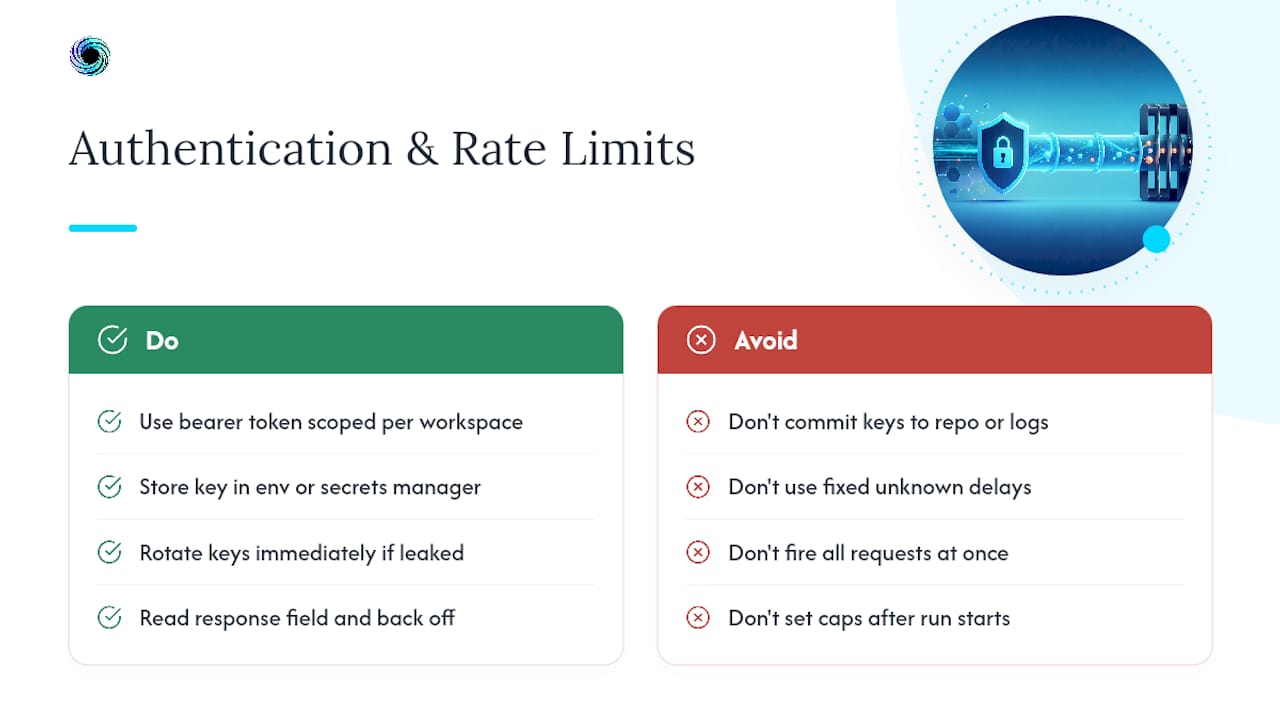
Most enrichment APIs, Gyrence included, authenticate with a bearer token or API key scoped to a workspace, which keeps billing and usage isolated per project. Store that key in an environment variable or secrets manager, never in committed code, and rotate it the moment a key leaks into a log file or a public repository.
Rate limiting works on two axes: requests per second and concurrent connections. A typed API should tell you exactly which limit you hit rather than returning a generic 429 with no context. Design your enrichment worker to read a retry_after field from the response and back off accordingly, rather than guessing at a fixed delay.
For high-volume enrichment jobs, batch requests where the API supports it, and stagger concurrent calls across a pool rather than firing every request the instant a job starts. A queue with a configurable concurrency limit, five to ten workers is a reasonable starting point for most workspace tiers, smooths out bursts that would otherwise trip a rate limiter.
Spending caps matter here as much as rate limits. A workspace-level cap on credit usage stops a runaway crawl loop, caused by a bug in your discovery logic or an unexpectedly large sitemap, from turning into a bill you didn't plan for. Set the cap before you set the crawl loose, not after the first invoice surprises you.
How Should You Handle Errors and Retries?
Typed failure modes only help if your retry logic actually reads them. A response that distinguishes rate_limited, not_found, parse_failed, and blocked should trigger four different behaviors, not one generic retry loop.
rate_limited: back off using the API's suggested delay, then retrynot_found: don't retry, log it, and move to the next URLparse_failed: flag for review; retrying won't fix a page that changed its structureblocked: escalate the fetch strategy, or pause that domain entirely for a cooldown period
Exponential backoff with jitter is standard for transient failures like timeouts or 5xx responses. A fixed retry count, three attempts is common, prevents a single stubborn URL from consuming your worker pool indefinitely. Set a hard timeout per request, too; a hung connection is worse than a clean failure because it silently blocks a worker slot.
The mistake most teams make is treating every failure as equally retryable. A parse_failed response after three consecutive retries almost never fixes itself. It means the source page's structure changed, and only a parser update solves that, which is exactly why provenance metadata and parser-version tracking matter as much for error handling as they do for schema design.
What Security and Privacy Practices Apply to Enriched Data?
Enriched sales data usually includes company details and sometimes personal information scraped from public pages, careers listings, or press releases. Treat it with the same handling discipline you'd apply to any other customer-adjacent data set.
Encrypt data at rest in your content store and in transit between pipeline stages. Restrict access to raw scraped HTML separately from normalized, CRM-ready records, since the raw layer sometimes contains more personal detail than the fields you actually intend to use.
Only scrape and store publicly available information, and respect a site's stated terms where they govern automated access. Strip personal fields you don't have a legitimate business reason to keep, rather than storing everything "just in case." A retention policy that automatically purges raw HTML after a fixed window, 30 to 90 days is a reasonable range for most enrichment use cases, limits your exposure if a source ever revokes public access to data you've already collected.

Log access to enriched records the same way you'd log access to any customer data. If a support engineer or an automated job pulls a record, that access should be traceable.
How Do You Monitor an Enrichment Pipeline in Production?
Logging that only captures errors misses the slower failure mode: a parser that returns technically valid but silently wrong data. Log the full lifecycle of a record, discovered, fetched, extracted, validated, upserted, not just the exceptions.
- Track parser success rate per source domain, not just pipeline-wide
- Alert on a sudden drop in average confidence score for a given extraction type
- Log content diffs so a page that changed structure gets flagged before it breaks silently
- Wire webhook alerts (via WebDoppler-style monitoring) into your existing alerting stack rather than a separate dashboard nobody checks
Dashboards should surface trend lines, not just current state. Structured logs with a consistent schema, source URL, parser version, timestamp, outcome, make that kind of trend analysis possible without grepping through raw text logs.
How Do You Test and Validate Enrichment Accuracy?
Testing an enrichment pipeline means testing against real, messy web pages, not just clean fixtures. Keep a golden set of known pages with hand-verified expected output, and re-run extraction against that set every time you change a parser.
- Maintain a golden dataset of 20 to 50 representative pages per source type with manually verified fields
- Run extraction against that set on every parser change, and diff the output against the expected result
- Spot-check a random sample of production output weekly, not just when something looks broken
- Track field-level accuracy separately from record-level accuracy; a record with nine correct fields and one wrong one is a different problem than a record that failed entirely
Confidence scores earn their value here. If your pipeline assigns a confidence below a set threshold, route that record to human review instead of trusting it blindly, and use the review outcomes to calibrate whether your threshold is set correctly. Over time, that review queue becomes its own dataset for catching drift before it reaches your CRM.
An Editorial Take on Building This the Right Way
The conventional advice on sales enrichment still treats scraping as a solved problem: point a tool at a URL, get data back, move on. That's wrong, and it's why so many pipelines quietly degrade over months without anyone noticing. The real work isn't fetching pages. It's deciding what a failure looks like before you write a single line of extraction logic.
Most teams build the happy path first and bolt error handling on later, if at all. That ordering is backward. A discriminated-union response that separates success, partial, and failed from the start forces you to design for the messy reality of the open web, pages that change structure, endpoints that go dark, JavaScript that renders differently depending on geography, rather than discovering those failure modes in production three months in.
The teams that get this right prioritize machine-readable sources aggressively and treat headless browsers as a genuine last resort, not a default. They also version their parsers and keep provenance on every field, because the question isn't whether a source will change. It's whether you'll know when it does.
Build Your Enrichment Pipeline on Gyrence
Every pattern covered here, the source-preference ladder, typed failure modes, discriminated-union responses, provenance metadata, maps directly onto Gyrence's five primitives. Search and Map handle discovery, Fetch normalizes pages to clean markdown, Extract runs schema-guided LLM extraction bundled into the call with no separate line item, and WebDoppler monitoring closes the loop with webhook alerts when a source changes.

If you're building this yourself right now with a patchwork of httpx calls and a Playwright fallback you dread maintaining, a hosted API with spending caps and typed responses removes the maintenance burden without hiding the failure modes from you. Connect through the REST API or through the hosted MCP endpoint if your agent framework already speaks that protocol. Start a trial and run your first enrichment call against the Gyrence console to see the typed response shape firsthand.
Sources
Rescrape job postings on a frequent basis since hiring signals change quickly, and rescrape general website content periodically since it changes more slowly.
- Data Extraction Patterns & Working with APIs — Python Web Scraping
- Building an AI-Powered Sales Intelligence Pipeline from Scratch - DEV Community
FAQ
What Is Web Data Enrichment for Sales Intelligence?
It's the practice of using an API to fetch, extract, and normalize public web data, company pages, job postings, public filings, into structured JSON that feeds sales enrichment pipelines and AI agents.
Should I Use a Headless Browser by Default?
No. Reserve headless rendering for pages with no JSON-LD, private endpoint, or GraphQL source available, since it runs roughly ten times slower than a direct HTTP call and costs more per request.
What Makes an Enrichment API Response "Typed"?
A typed response uses a discriminated union to distinguish success, partial, and failed extractions explicitly, rather than returning null fields with no indication of why data is missing. Gyrence's API returns this shape on every call across its five primitives.
Does Gyrence Support Agent Frameworks Directly?
Yes. Gyrence offers a hosted Model Context Protocol endpoint alongside its REST API, so agent frameworks that speak MCP can call Search, Traverse, Fetch, Extract, and Map without a custom integration layer.