
Try the hidden API first. Most dynamic pages fetch their content from a JSON endpoint behind the scenes, and replaying that endpoint directly with requests is faster, cheaper, and more stable than rendering a full browser. When the endpoint is signed, obfuscated, or the content only appears after user interaction, switch to headless browser rendering with Playwright.
Here's the tradeoff in one line each:
- API replay: Fast, cheap, low overhead. Breaks if the endpoint requires auth tokens you can't reproduce.
- Headless rendering: Slower, heavier on CPU and memory. Handles almost anything a real browser can load.
Your first move on any new target: open DevTools, go to Network, filter by Fetch/XHR, and compare View Source against the Elements panel. That five-minute check tells you which path to take before you write a line of scraping code.
Key Takeaways
Replaying a stable JSON endpoint beats rendering a full browser on cost and speed, but Playwright with explicit wait conditions is the reliable fallback when that endpoint is signed or interaction-gated.
| Point | Details |
|---|---|
| Check the network tab first | Compare View Source against Elements and filter Network by Fetch/XHR before writing any code. |
| Prefer API replay | Direct JSON endpoint calls with requests are faster and cheaper than rendering when the endpoint is stable. |
| Wait on signals, not timers | Use wait_for_selector or wait_for_response instead of fixed sleep delays to avoid flaky scripts. |
| Diagnose failures systematically | Reproduce failing requests with curl, check cookies and auth, and run one page headful to see what's actually happening. |
| Move to managed extraction at scale | Gyrence's typed responses, spending caps, and WebDoppler monitoring cut the maintenance burden once a browser fleet becomes the bottleneck. |
Table of Contents
- Why Web Scraping Dynamic Pages Breaks Traditional Scrapers
- Choosing Between API Replay, Rendering, and Hybrid Scraping
- A Runnable Playwright Recipe for Rendering Dynamic Pages
- Debugging Missing Content and Intermittent Scraping Failures
- What Dynamic Scraping Actually Costs in Time and Compute
- When a Managed Web-Data API Beats DIY Scraping
- Strategies for Reading Obfuscated or Minified JavaScript
- Spotting Render-Blocking Scripts With DevTools
- Managing Browser Instances and Memory During Automated Runs
- Sources
- FAQ
Why Web Scraping Dynamic Pages Breaks Traditional Scrapers
A page counts as "dynamic" when the HTML your server-side request receives doesn't match what a browser eventually displays. That gap comes from a handful of recurring patterns: AJAX/Fetch calls that pull in content after the initial load, JSON blobs embedded inside <script> tags for hydration, single-page app routing that swaps views without a full page reload, infinite scroll that loads content in chunks, and WebSocket connections streaming live data.
You can classify almost any page in under a minute:
- Right-click and choose "View Page Source," then compare it against the Elements panel. A big mismatch means client-side rendering is doing the heavy lifting.
- Open Network, filter to Fetch/XHR, and reload. Populated requests returning JSON mean there's likely a replayable endpoint.
- Search the raw HTML for
<script type="application/json">or similar. Frameworks like Next.js often embed a full data payload right there, no rendering required.
Pro Tip: Never anchor your scraper to a fixed sleep timer. Wait for a specific selector to appear or a specific network response to resolve. Sleeps guess at timing; explicit waits react to it.
Choosing Between API Replay, Rendering, and Hybrid Scraping
Three approaches cover nearly every dynamic scraping job, and picking the wrong one is the single biggest source of wasted engineering time.
Direct API/XHR replay means you found the JSON endpoint in Network tab and you hit it directly with requests, skipping the browser entirely. Embedded JSON extraction means the data is sitting inside the initial HTML in a script tag. Both are cheap. Full browser rendering with Playwright, Selenium, or Puppeteer executes the page's JavaScript exactly as a browser would, which handles interaction-gated content, signed tokens, and obfuscated request logic that you can't easily reverse-engineer. A hybrid approach, pairing Scrapy with a rendering middleware, gives you crawl orchestration (retries, concurrency, pipelines) plus rendering only on the pages that need it.
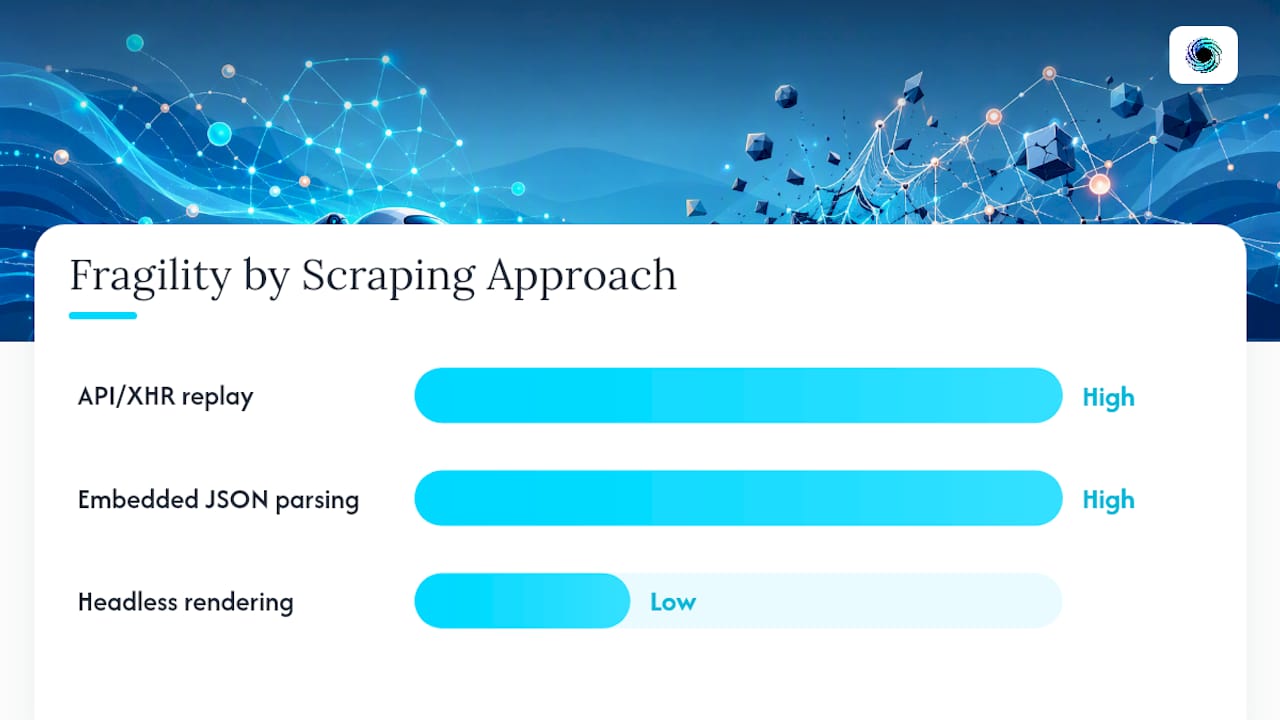
| Approach | Speed | Cost | Fragility | Best for |
|---|---|---|---|---|
| API/XHR replay | Fast | Low | Breaks if auth changes | Stable, unsigned JSON endpoints |
| Embedded JSON parsing | Fast | Low | Breaks if markup structure shifts | SSR/hydration frameworks |
| Headless rendering | Slow | High | More resilient to markup changes | Interaction-gated or obfuscated pages |
requests and BeautifulSoup remain the right pair for static or replayable content. Scrapy earns its place at scale, when you need retries, throttling, and pipelines across thousands of URLs. Playwright is the modern default for rendering because of its auto-waiting and cross-browser support, Selenium still matters when a project needs a language binding outside Python's ecosystem, and Puppeteer covers teams already working in Node. The decision tree is simple: replay the API when it's stable and unsigned; render only when you're blocked from doing that.
A Runnable Playwright Recipe for Rendering Dynamic Pages
Install Playwright and its browser binaries first:
pip install playwrightplaywright install chromium
A minimal script that navigates, waits correctly, and pulls out rendered content:
from playwright.sync_api import sync_playwright

with sync_playwright() as p:
    browser = p.chromium.launch(headless=True)
    page = browser.new_page()
    page.goto("https://example.com/products")
    page.wait_for_selector(".product-card")
    html = page.inner_html("body")
    browser.close()
That wait_for_selector call is doing the real work. Fixed sleeps guess; selectors and network responses confirm. Three waiting strategies to reach for, in order of preference:
page.wait_for_selector(".product-card")when you know the element that signals the page is ready.page.wait_for_response(lambda r: "/api/products" in r.url and r.status == 200)when you want to capture the exact JSON payload the page fetched.page.wait_for_load_state("networkidle")for SPAs with a predictable load pattern, though this can hang on pages with persistent WebSocket connections or polling.
Once you've got rendered HTML, hand it to BeautifulSoup for DOM parsing, or, if you captured a JSON response directly via wait_for_response, skip HTML entirely and parse the payload with the json standard library module or orjson for speed:
from bs4 import BeautifulSoup
soup = BeautifulSoup(html, "lxml")
titles = [el.get_text(strip=True) for el in soup.select(".product-title")]
For scraping many pages, pair Playwright's async API with asyncio and a semaphore to cap concurrent browser contexts:
import asyncio
sem = asyncio.Semaphore(5)
That keeps memory in check instead of spawning unlimited pages at once.
Pro Tip: Run headful (headless=False) while you're building and debugging a script so you can see exactly what the page does. Switch to headless for production runs, and set a realistic viewport and user agent so the rendered layout matches what real visitors see.
Debugging Missing Content and Intermittent Scraping Failures
Most dynamic scraping failures trace back to one of five causes, and a short checklist finds the culprit faster than guessing.
- Diff View Source against Elements again. If content appears in Elements but not your scraped output, your wait condition fired too early.
- Check the XHR response body directly in Network. If it's empty or an error object, the problem is upstream, not in your parsing code.
- Reproduce the request with
curl, headers and cookies included. If it fails outside the browser too, you're missing session state or an auth token. - Run the page headful once. Watching it load often reveals a CAPTCHA, a consent modal, or a redirect your script never handles.
For infinite scroll, scroll incrementally and stop once page height stops growing between iterations rather than scrolling a fixed number of times. For interaction-gated content, click only the specific control that reveals the data, not every button on the page. For signed or obfuscated APIs, trace the request that carries the token back to where it's issued, usually an earlier response or a value computed in JavaScript.
On defenses: rotating residential proxies help against IP-based rate limits, shaping request headers to match a real browser session helps against fingerprinting, and exponential backoff on retries beats hammering a server that's already rate-limiting you. Respect robots.txt and site terms; this is engineering guidance, not legal advice.
Pro Tip: Capture a HAR file during a failing run. It's the fastest way to see every request a page fired, in order, with timing.
What Dynamic Scraping Actually Costs in Time and Compute
A raw HTTP request with requests typically resolves in well under a second and costs almost nothing in compute. A single-page Playwright render adds real overhead: launching Chromium, executing JavaScript, and waiting for network activity to settle routinely pushes per-page time into the multi-second range. Pages requiring multiple interactions (clicking through tabs, scrolling to trigger lazy loads) push that higher still.
Cost drivers scale from there:
- Browser CPU and memory per concurrent instance, since each headless context behaves like a real browser tab.
- Proxy bandwidth, especially with residential proxies priced per gigabyte.
- Storage for rendered HTML, screenshots, or HAR files if you're archiving runs for debugging.
- Retry rates: a target with a 20% failure rate effectively costs 20% more compute than the raw page count suggests.
Blocking unnecessary resource types like images, fonts, and media in the browser context cuts both bandwidth and render time meaningfully, since the page never has to fetch or paint them. When you're running thousands of renders a day, chasing intermittent failures more hours than you spend writing new scrapers, or maintaining a fleet of proxies and browser versions, that maintenance overhead is usually the signal to look at a managed extraction layer instead of scaling your own.
When a Managed Web-Data API Beats DIY Scraping
A few concrete signals mean it's time to stop maintaining your own headless fleet: volume climbing past what a few browser instances can handle reliably, target sites changing markup often enough that selectors break weekly, endpoints that are signed or obfuscated in ways that resist reverse-engineering, or a need for typed failure modes instead of stack traces when something goes wrong mid-pipeline.
Gyrence covers that gap with five composable primitives, Search, Traverse, Fetch, Extract, and Map, plus a hosted MCP endpoint for agent workflows that need to call web data directly from a model context. A few things worth knowing:
- Every call returns a typed, discriminated-union response, including failure cases, so your code can branch on what actually happened instead of parsing an exception message.
- Spending caps keep a runaway crawl from turning into a surprise invoice.
- WebDoppler monitoring sends webhook alerts when a tracked page changes, useful for catching markup shifts before they break a pipeline.
- Extract uses schema-guided LLM parsing bundled into the call, with no separate line item for the AI step.
DIY Playwright scripts still make sense for one-off exploration or a single site you know well. A managed API earns its cost when you need consistent, typed results across many sites without babysitting browser versions.
Copy‑Ready Commands and Debugging Snippets
Setup:
pip install playwright beautifulsoup4 orjson
playwright install chromium
Common calls: page.goto(url), page.wait_for_selector(sel), page.wait_for_response(url_pattern).
Replay an XHR endpoint directly from your browser's copied cURL command to confirm it works outside the page.
Quick parsing: orjson.loads(response.text()) for JSON, or BeautifulSoup(html, "lxml") as a DOM fallback. Debug fast: run headful, screenshot on failure, capture a HAR, and always recheck View Source against Elements before touching your code.
Strategies for Reading Obfuscated or Minified JavaScript
Minified variable names and bundled code make reverse-engineering an endpoint harder, but rarely impossible. Start with the Network tab rather than the source files. If a request returns clean JSON, you often don't need to understand the JavaScript that generated it at all, you just need to know what parameters it expects.

When you do need to trace logic, use your browser's built-in de-obfuscation. Chrome DevTools has a "pretty print" button (the {} icon) in the Sources panel that reformats minified code into readable indentation. Set a breakpoint on the specific fetch or XMLHttpRequest call using "XHR/fetch breakpoints" in the Sources panel, and the debugger pauses right as the request fires, letting you inspect headers, tokens, and payload construction in the call stack.
Search minified bundles for recognizable strings, like an API path or parameter name, rather than trying to read the whole file. Most obfuscation tools rename variables but leave string literals intact, which gives you a fast way to jump to relevant code.
If a token is computed client-side (a common anti-scraping pattern), trace it backward from where it's sent to where it's assigned. Sometimes it's derived from a timestamp or a static secret baked into the bundle, both of which you can replicate in Python once identified. Other times it depends on browser-specific values that are effectively impossible to reproduce outside a real JavaScript engine, and that's your signal to render with Playwright instead of fighting the obfuscation.
Spotting Render-Blocking Scripts With DevTools
The Network tab's waterfall view shows you exactly which scripts delay the page from becoming interactive. Scripts loaded without async or defer attributes block HTML parsing until they finish executing, and you'll see that as a visible gap in the waterfall before content requests fire.

The Performance panel goes further. Recording a page load there shows a flame chart of JavaScript execution, and long tasks (anything over 50 milliseconds) show up as red-flagged blocks. That's often where a heavy hydration script or a third-party analytics tag is delaying the content you actually want.
To find what triggers dynamic content specifically, use the Elements panel's "Break on subtree modifications" option (right-click a container element, choose Break on, then Subtree modifications). The debugger pauses the instant JavaScript injects new nodes into that container, and the call stack at that pause point tells you exactly which script triggered it. This is far more precise than guessing at wait times, and it directly informs which selector or network response to use as your Playwright readiness signal.
Managing Browser Instances and Memory During Automated Runs
Headless browsers are heavy. Each Chromium instance can consume several hundred megabytes of memory even before loading a page, and that adds up fast once you're running dozens concurrently.
A few practices keep resource use under control:
- Reuse browser contexts instead of launching a new browser process per page. Playwright's
browser.new_context()is far cheaper thanplaywright.chromium.launch()called repeatedly. - Cap concurrency with a semaphore tied to available memory, not an arbitrary number. Five to ten concurrent contexts is a reasonable starting point on a standard cloud instance.
- Close pages and contexts explicitly after each use rather than letting them accumulate. Leaked contexts are the most common cause of a scraper's memory climbing steadily over a long run.
- Block unnecessary resource types (images, fonts, stylesheets you don't need) at the request-interception level to cut both memory and bandwidth.
- Recycle browser processes periodically on long-running jobs. Chromium's own memory footprint can creep upward over thousands of page loads even with careful context management.
For distributed scraping, a process pool that spins up isolated worker processes, each running its own browser instance, tends to be more stable than one process juggling dozens of contexts, since a single crashed page can't take down the whole run.
Author note on tradeoffs seen in practice
Reliability costs more than speed, and that tradeoff is worth accepting once a pipeline feeds anything business-critical. Teams that start API-first, falling back to rendering only where forced, spend far less time on maintenance than teams that render everything by default. Build monitoring before you scale concurrency, not after something breaks.
Skip the browser fleet with Gyrence
Building and babysitting a Playwright fleet works fine at small scale, but every team eventually hits the point where selector breakage, proxy costs, and memory leaks eat more hours than the scraping itself. Gyrence replaces that maintenance loop with a single API: call Fetch or Extract, get back typed JSON or clean markdown, and let spending caps keep the bill predictable instead of finding out at the end of the month.

Extract uses schema-guided LLM parsing with no separate charge, WebDoppler alerts you by webhook when a tracked page's structure changes, and every response, including failures, comes back as a typed object your code can branch on directly. For teams already comfortable with Playwright, Gyrence's structured extraction approach is worth comparing against the hours spent maintaining selectors. Check the Gyrence docs or start a session in the console to see how a single Extract call handles a page your current script keeps breaking on.
Sources
- How to Scrape Dynamic Web Pages with Python - Residential proxies - DataImpulse
- json — JSON encoder and decoder — Python documentation
FAQ
How Do You Scrape a Dynamic Web Page?
Check DevTools Network for a JSON endpoint and replay it directly with requests when possible; if the content is signed, obfuscated, or interaction-gated, render the page with Playwright and wait for a specific selector or response before extracting data.
Is Web Scraping Legal?
Legality depends on what you scrape, how you access it, and the site's terms of service and robots.txt; scraping publicly available data generally carries different risk than bypassing authentication or ignoring explicit access restrictions, and this isn't a substitute for legal advice on your specific case.
What Are Examples of Dynamic Websites?
Common examples include single-page applications built with modern JavaScript frameworks, e-commerce sites that load product grids via XHR/Fetch, social feeds with infinite scroll, dashboards with live WebSocket updates, and server-rendered apps like those built on Next.js that hydrate on the client.
What Is Dynamic Scraping?
Dynamic scraping refers to extracting data from pages where content loads or changes after the initial HTML response, typically requiring either a replayed API call or a headless browser like Playwright to render the JavaScript before the data becomes accessible.
When Should I Use Gyrence Instead of Building My Own Scraper?
Once selector maintenance, proxy costs, or intermittent rendering failures start consuming more time than the extraction work itself, a managed API like Gyrence's Fetch and Extract primitives typically costs less in engineering time than scaling a DIY Playwright fleet.