
Agent tool calling is the mechanism by which an LLM, instead of generating a plain text answer, emits a structured request for an external function or API that your application then executes and returns as a new message. A concrete example: a user asks "What's the current price of AAPL?" The model responds not with a guess but with {"name": "get_stock_price", "arguments": {"ticker": "AAPL"}}. Your application calls the market data API, gets $213.42, and feeds that back. The model then writes the final answer. That full cycle is agent tool calling.
This pattern appears across every major framework. OpenAI's function calling and Responses API, LangChain's tool-binding abstractions, Databricks Agent Bricks, and the Model Context Protocol (MCP) all implement the same underlying loop with slightly different wire formats. The definition is provider-agnostic; the implementation details are not.
Key Takeaways
Agent tool calling is the mechanism that turns an LLM from a text generator into an actor: the model emits structured requests, the application executes them, and typed results feed back into the context for a final synthesized response.
| Point | Details |
|---|---|
| Core runtime loop | Detect need → select tool → emit structured call → validate → execute → return typed result → synthesize response. |
| Schema is the contract | Tool name, description, and JSON Schema parameters determine selection accuracy; vague descriptions cause wrong-tool calls. |
| Security at infrastructure layer | IAM scoping, credential isolation, and sandboxing must be enforced in infrastructure, not prompts. |
| Observability is required | Log every tool call with call_id, arguments, result summary, and execution time before going to production. |
| Gyrence for web data tools | Gyrence provides typed, agent-ready web data via REST or MCP with structured failure modes and spending caps. |
Table of Contents
- What is agent tool calling, and why does it matter for your stack?
- How does the agent tool-calling loop actually work?
- What types of tools do agents typically call?
- How do you define tools as reliable contracts?
- A minimal end-to-end pseudocode example
- Design and scaling practices for tool catalogs
- What does a production-ready tool-calling setup require?
- Common failures and how to debug them
- The part most teams skip until it's too late
- Gyrence gives your agents typed web data with no silent failures
- Sources
- FAQ
What is agent tool calling, and why does it matter for your stack?
A plain LLM response is stateless and bounded by its training cutoff. Tool calling breaks both constraints. When a model can request external execution, it becomes an actor rather than a text generator. Databricks frames this as the bridge from generative AI to agentic action: the model plans, the application executes, and the result feeds back into the context.
The practical use cases where teams actually reach for this pattern:
- Live data fetch — stock prices, weather, sports scores, anything with a staleness problem
- Database queries — SQL or NoSQL lookups against internal records the model was never trained on
- Code execution — running Python, shell commands, or SQL in a sandboxed environment
- Workflow triggers — creating tickets, sending emails, updating CRM records, firing webhooks
- Web scraping and search — retrieving and parsing live web pages for autonomous agent research
- Financial and CRM operations — reading account balances, writing order records, reconciling invoices
- Device and infrastructure control — calling internal microservices, toggling feature flags, provisioning resources
The high-level payoff: agents get live data, can take multi-step actions, produce structured outputs instead of prose, and can chain tools across a workflow without a human in the loop for each step.
How does the agent tool-calling loop actually work?
The runtime sequence is precise. Every provider converges on the same steps, even when the JSON field names differ. GenAI Patterns documents this provider-agnostic loop: the model only emits structured calls; the application executes and validates them.
- Receive user query. The application sends the user message plus the tools array (each tool's name, description, and JSON Schema) to the model.
- Model decides a tool is needed. The model evaluates the query against the available tool descriptions and determines it cannot answer from context alone.
- Model selects the tool and emits a structured call. The response contains a
tool_callsarray with one or more entries, each carrying atool_call_id, the toolname, and a JSONargumentsobject. - Application parses and validates arguments. Your code reads the
tool_calls, validates each argument against the schema, and checks authorization before executing anything. - Application executes the tool. The actual API call, database query, or function runs here, entirely outside the model. The model has no direct execution access.
- Application returns a tool message. The result is appended to the conversation as a
toolrole message, referencing the sametool_call_idso the model can match request to result. - Model synthesizes the final response. With the tool result in context, the model generates the user-facing answer.
The call_id threading is what makes multi-tool calls work. When the model emits two tool calls in parallel, your application fires both, collects both results, appends two tool messages each with their respective call_id, and sends the whole updated conversation back. OpenAI's function calling docs show this message-wiring pattern in detail, including how the assistant message, tool messages, and the follow-up request are linked.
What types of tools do agents typically call?
NVIDIA's NeMo Agent Toolkit notes that tool-calling agents select tools based on name, description, and input parameter schema, and that they are efficient for structured tasks that don't require intermediate LLM reasoning between steps. The category you pick shapes latency, cost, and trust posture.
Web scraping tools deserve a note on response shape. A well-designed web data primitive returns typed, structured JSON including explicit failure cases, not raw HTML. Agents that receive raw HTML have to parse it themselves, which pushes complexity into the prompt and produces brittle behavior.
How do you define tools as reliable contracts?
A tool definition has three fields that matter: name, description, and parameters (a JSON Schema object). OpenAI's docs make this explicit: the model uses all three to decide whether to call the tool and what arguments to pass. The description is not documentation for humans. It is part of the selection contract.
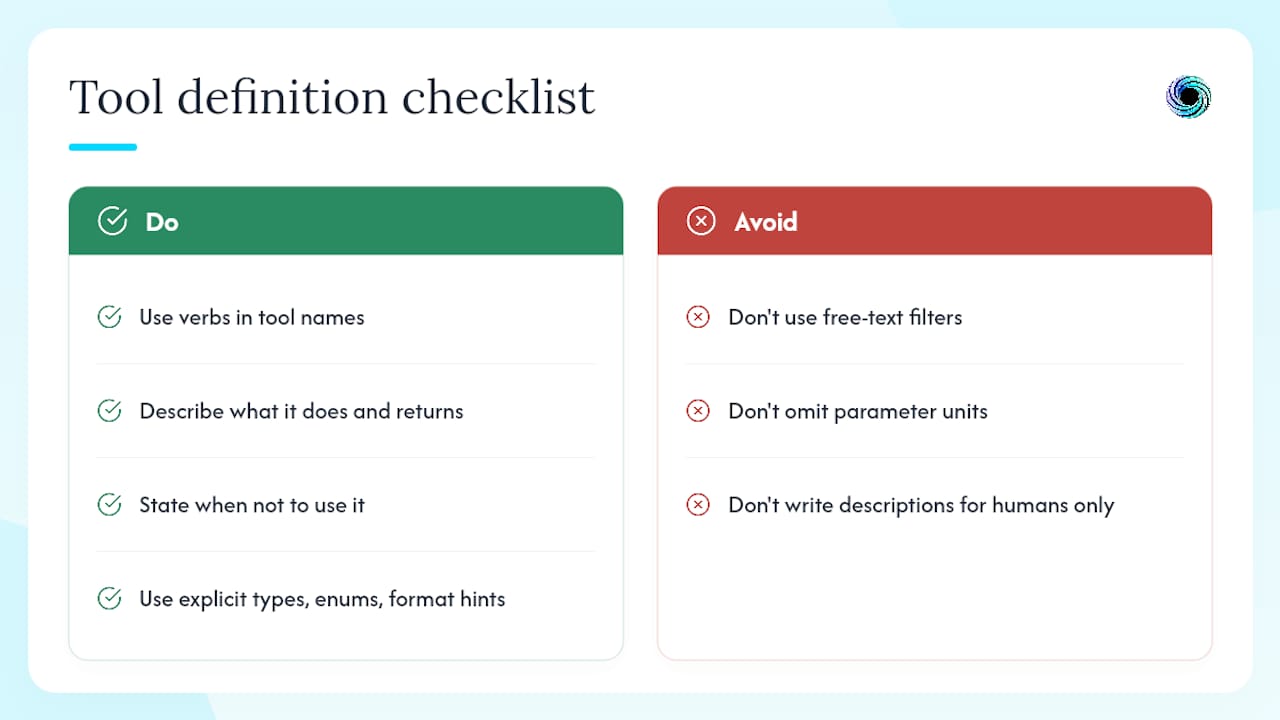
Name hygiene. Use snake_case verbs that describe the action precisely. get_order_status is unambiguous. order_info is not. The model reads the name as a signal.
Description precision. Include what the tool does, what it returns, and when not to use it. A description that says "fetches order data" leaves the model guessing. One that says "returns the current fulfillment status and estimated delivery date for a single order by order_id; do not use for order history or cancellations" eliminates a class of wrong-tool selections.
Parameter schema. Use explicit types, enums, and format hints. A date parameter should carry "format": "YYYY-MM-DD", not just "type": "string". An order_status filter should be an enum of valid values, not a free-text field. Schema design is the single biggest determinant of runtime reliability; descriptive tool docs with explicit units reduce wrong-tool selection.
A minimal tool definition in JSON Schema:
{
  "name": "get_order_status",
  "description": "Returns fulfillment status and estimated delivery date for one order. Use order_id from the user's account. Do not use for order history.",
  "parameters": {
    "type": "object",
    "properties": {
      "order_id": {
        "type": "string",
        "description": "The unique order identifier, e.g. 'ORD-20240312-7842'"
      }
    },
    "required": ["order_id"]
  }
}
Pro Tip: Add an examples field in your description string (not in the schema itself) showing one valid order_id format. Models use concrete examples to infer format constraints more reliably than format strings alone.
A minimal end-to-end pseudocode example
This pattern works across OpenAI's SDK, LangChain's tool-binding layer, and any framework that follows the standard loop. The comments are the implementation contract.
- Build the request. Construct the messages array with the user query. Attach the
toolsarray containing your tool definitions. Settool_choice: "auto"unless you want to force a specific tool.
messages = [{"role": "user", "content": user_query}]
response = llm.chat(messages=messages, tools=[get_order_status_def])
-
Check for tool calls. If
response.finish_reason == "tool_calls", the model wants to call one or more tools. If it's"stop", return the content directly. -
Parse and validate arguments. For each entry in
response.tool_calls, extractname,id, andarguments. Validateargumentsagainst your schema before executing. Reject malformed args with a structured error, not a silent failure.
for call in response.tool_calls:
    args = validate_schema(call.arguments, schemas[call.name])
    if args.error:
        tool_result = {"error": args.error, "hint": "check order_id format"}
    else:
        tool_result = execute_tool(call.name, args)
    # Log: call.id, call.name, args, tool_result, timestamp
    messages.append({"role": "tool", "tool_call_id": call.id, "content": json(tool_result)})
-
Append the assistant message first. Before appending tool messages, append the assistant's original response (including the
tool_callsarray) to maintain conversation continuity. -
Handle parallel calls. When
tool_callscontains multiple entries, execute them concurrently where safe. Map each result back bytool_call_id. Never assume ordering. -
Send the updated conversation back. Call the model again with the full updated
messagesarray. The model now has the tool results and will synthesize the final answer. -
Return and log. Return
response.contentto the caller. Log the full round-trip: input args, output, execution duration, and any errors.
Design and scaling practices for tool catalogs
Catalog size is the first thing teams get wrong. Sending 50 tool definitions in every request degrades selection accuracy and inflates token cost. NVIDIA's NeMo docs note that tool-calling agents are efficient for structured tasks with well-defined parameters, which implies a focused, not exhaustive, catalog.
- Keep active catalogs to 10–15 tools per request. Beyond that, use
tool_searchor lazy loading to retrieve relevant tools dynamically based on the query. - Disable parallel calls for state-changing operations. Parallel execution is safe for read-only tools. For writes (CRM updates, order mutations), force sequential execution to avoid race conditions.
- Unit-test every tool contract. Write tests that send known-good and known-bad argument sets to your schema validator. A schema change that breaks an existing call should fail CI, not production.
- Integration-test with mocked tool outputs. Simulate tool responses including error cases. Verify the model recovers correctly when a tool returns
{"error": "not_found"}. - Run canary calls before full rollout. Route a small percentage of traffic through the new tool definition and compare outcomes against the previous version before promoting.
- Enforce naming conventions in CI. Lint tool names for
snake_caseverbs, description length minimums, and required fields. A schema review gate catches regressions before they reach the model.
Pro Tip: Version your tool interfaces with a v1_ prefix in the name (e.g., v1_get_order_status) and keep the old version live during transitions. The model will use whichever version is in the tools array, so you control rollout by swapping the definition, not by redeploying the model.
What does a production-ready tool-calling setup require?
Security and observability are infrastructure concerns, not prompt concerns. Tetrate's analysis of NIST guidance is direct: relying on prompt-based controls is insufficient. Least-privilege IAM, sandboxing, and credential isolation must be enforced at the infrastructure layer. Logging every tool call with context is required for audit and debugging.
OWASP's AI Agent Security Cheat Sheet enumerates the concrete risks: tool abuse, privilege escalation, and data exfiltration. The prescribed controls are per-tool permissions, input validation, and monitoring for exfiltration patterns.

| Control Area | Requirement | Implementation Note |
|---|---|---|
| IAM / least privilege | Each tool credential scoped to minimum permissions | Use short-lived tokens; rotate on schedule |
| Credential isolation | No shared credentials across tools | Role-chaining with external IDs prevents confused-deputy attacks |
| Sandboxing | Code/CLI tools run in ephemeral containers | Strict allowlist; no persistent storage |
| Human-in-the-loop | Required for irreversible or high-impact actions | Approval workflow before execution |
| Input validation | Schema validation before any execution | Reject malformed args with structured errors |
| Observability | Log every call: call_id, args, result summary, duration | Required for audit trails and silent-failure debugging |
| Rate limits | Per-tool and per-agent call budgets | Prevents runaway loops and cost spikes |
| Blast-radius limits | Cap the number of state-changing calls per session | Limits damage from compromised or misbehaving agents |
For production runbooks, the agent web tool failure handling patterns guide covers typed failure modes and retry strategies in detail.
Key checklist items before exposing tool calling to production traffic:
- Every tool credential uses a dedicated IAM role with minimum required permissions
- Code and CLI tools run in ephemeral sandboxes with no persistent storage
- All tool calls are logged with
call_id, input parameters, response summary, and execution time - Structured error responses include recovery hints the model can act on
- Rate limits and blast-radius caps are configured per tool
- Human approval gates are in place for irreversible actions
- Schema validation runs before execution, not after
Auth0's analysis of tool-calling security adds token scoping and middleware as additional mitigations for credential misuse and callback/webhook attack vectors.
Common failures and how to debug them
Most tool-calling failures fall into five categories. Each has a distinct log signature.
-
Malformed arguments. The model emits arguments that don't match the schema. Root cause: vague parameter descriptions or missing format hints. Fix: add explicit format examples to the description; add schema validation that returns a structured error with the exact field that failed.
-
Silent failures. The tool executes but returns no data, and the model proceeds as if it succeeded. Root cause: the tool returns an empty result or HTTP 200 with an empty body instead of a typed error. Fix: tools must return explicit error objects, not empty success responses. Design tool outputs to include typed error codes and recovery hints (e.g.,
"order_not_found; try search_orders with customer_id") so the model can choose corrective steps. -
Wrong tool selection. The model calls
search_orderswhen it should callget_order_status. Root cause: overlapping or vague descriptions. Fix: add "do not use for X" clauses to each description; review selection logs to find which queries trigger the wrong tool. -
Excessive retries. The agent loops on a failing tool call without backoff or a circuit breaker. Root cause: no retry limit or the error response doesn't signal "stop retrying." Fix: return a
"retryable": falseflag in non-recoverable errors; set a max-retry count at the application layer. -
Data exfiltration via tool outputs. Sensitive data from one tool leaks into the arguments of a subsequent tool call. Root cause: no output sanitization between steps. Fix: strip PII from tool results before appending them to context; monitor for exfiltration patterns per OWASP guidance.
Debugging checklist:
- Retrieve the
call_idfrom your logs for the failing request. - Replay the exact arguments in isolation against the tool (not through the model).
- Validate the arguments against the schema manually.
- Inspect the tool's raw response for empty bodies, unexpected types, or missing error fields.
- Check the model's next message to see how it interpreted the tool result.
- Run the tool's unit tests with the recorded arguments to confirm schema coverage.
The part most teams skip until it's too late
The teams that get burned by tool calling aren't the ones who got the schema wrong on day one. They're the ones who shipped without observability and then spent three days debugging a silent failure that was logged nowhere.
The mental model that actually holds up in production: treat the LLM as the planner and your application as the execution and security layer. The model decides what to call. Your infrastructure decides whether it's allowed to run. That separation is not optional. Prompt-based guardrails ("only call tools when necessary") are not a security control. They're a suggestion.
When to start with tool calling: if the agent needs live data, needs to write state, or needs to chain more than two steps, tool calling is the right primitive. If the task is a one-shot retrieval that can be answered from a static context window, a simpler query-only flow is faster and cheaper.
Before you expose any tool-calling agent to production traffic, three controls are non-negotiable: scoped IAM credentials per tool, structured logging on every call, and sandboxing for any tool that executes code or shell commands. Everything else in the production checklist above is important. Those three are the floor.
Team roles that need to be assigned before go-live: a model engineer who owns the tool definitions and schema contracts, an integration owner who owns the execution layer and credential management, a security reviewer who signs off on IAM scopes and sandbox configuration, and a runbook owner who maintains the debugging checklist and incident response procedure.
Gyrence gives your agents typed web data with no silent failures
When your agent needs to call a web data tool, the response shape matters as much as the data itself. Gyrence is a managed web data API built for exactly this: every call to Search, Fetch, Extract, Traverse, or Map returns a typed, discriminated-union response that includes the failure cases, so your agent can reason about what happened instead of receiving an empty result and guessing.

The hosted MCP endpoint means you can connect any MCP-compatible agent framework without writing a custom integration. Spending caps and predictable cost-per-call keep your scraping budget from surprising you mid-sprint. If you're building an agent that calls web data tools in production, start a free trial at Gyrence and connect via MCP or REST in under ten minutes.
Sources
The canonical references for implementation specifics, each with a distinct focus:
- Function calling in AI agents
- What is tool-calling
- AI Agent Security - OWASP Cheat Sheet Series
- Tool Calling Agent — NVIDIA NeMo Agent Toolkit (1.2)
- Tool Calling — Agents Pattern | GenAI Patterns
Provider-specific examples (OpenAI, Databricks) show you the wire format. Provider-agnostic patterns (GenAI Patterns, LangChain) show you the architecture. Read both; implement the architecture, not the wire format.
FAQ
What is agent tool calling in plain terms?
Agent tool calling is when an LLM emits a structured request (typically JSON) for an external function or API, and the application executes that function and returns the result. The model never executes code directly; your application layer does.
How does tool calling actually work step by step?
The model receives a tools array with each tool's name, description, and JSON Schema. When it decides a tool is needed, it returns a tool_calls array with arguments. Your application validates the arguments, executes the tool, and appends the result as a tool role message with the matching tool_call_id. The model then generates the final answer.
Is ChatGPT an agent or an LLM?
ChatGPT is an LLM-based product. When it uses tools like web search or code execution, it is operating in an agentic mode, but the underlying model (GPT-4o) is still an LLM. The agent behavior comes from the tool-calling loop wrapped around it, not from the model itself.
What are the biggest security risks in tool calling?
OWASP identifies tool abuse, privilege escalation, and data exfiltration as the primary risks. The core defense is infrastructure-enforced least-privilege IAM per tool, not prompt-based guardrails.
What is the use of an agent tool in production?
Agent tools let an LLM take real-world actions: querying live databases, fetching web data, executing code, or triggering workflows. In production, each tool needs scoped credentials, schema validation before execution, and structured logging on every call for audit and debugging.