
Bulk domain crawling is the process of systematically fetching, normalizing, and extracting structured data from many websites in parallel so that AI agents, RAG pipelines, and data teams can consume the results directly. The short recommendation: if you're targeting more than a handful of domains with unpredictable structure, use a managed web-data API with typed responses and spending caps rather than assembling a DIY pipeline from scratch.
Bottom line up front:
- Build in-house when targets are few, stable, and require deep regulatory control over raw data.
- Use a managed API (like Gyrence) when you need predictable costs, typed failure modes, and built-in extraction primitives across many domains.
- Published benchmarks from Co-Scraper show field-level F1 scores and reuse rates that are very high using a two-stage DOM-pruning and scraper-generation approach, which is the extraction pattern this guide recommends.
- The IGC pilot achieved page processing rates on commodity hardware with a quality gate that filtered a noticeable fraction of crawled pages and reduced downstream embedding noise significantly.
Key Takeaways
Bulk domain crawling is the fastest path to agent-ready structured data at scale when targets are diverse, volume is high, and downstream consumers are LLMs or embedding models.
| Point | Details |
|---|---|
| Core definition | Bulk domain crawling fetches, normalizes, and extracts structured data from many sites in parallel for AI pipelines. |
| Extraction benchmark | Co-Scraper's two-stage DOM-pruning approach achieves field-level F1 ~94.78% and reuse rates ~90.39%. |
| Quality gate value | IGC pilot quality gates filtered ~14% of pages and cut embedding noise by ~25% on commodity hardware. |
| Scaling guardrail | Partition queues by domain, set per-domain concurrency limits, and cap browser-render budgets before any large crawl. |
| Build vs. buy | Use Gyrence's managed API (Search, Traverse, Fetch, Extract, Map) when you need typed responses, spending caps, and fast time-to-production. |
Table of Contents
- When does bulk domain crawling make sense?
- What are the core components of a production crawler?
- Which extraction strategies produce reliable agent-ready data?
- How do you scale a crawl without breaking things?
- How do you turn crawled pages into embedding-ready vectors?
- What failure modes should you plan for?
- Should you build in-house or use a managed web-data API?
- An editorial perspective on where teams go wrong
- Gyrence handles the pipeline so you can ship faster
- Sources
- FAQ
When does bulk domain crawling make sense?
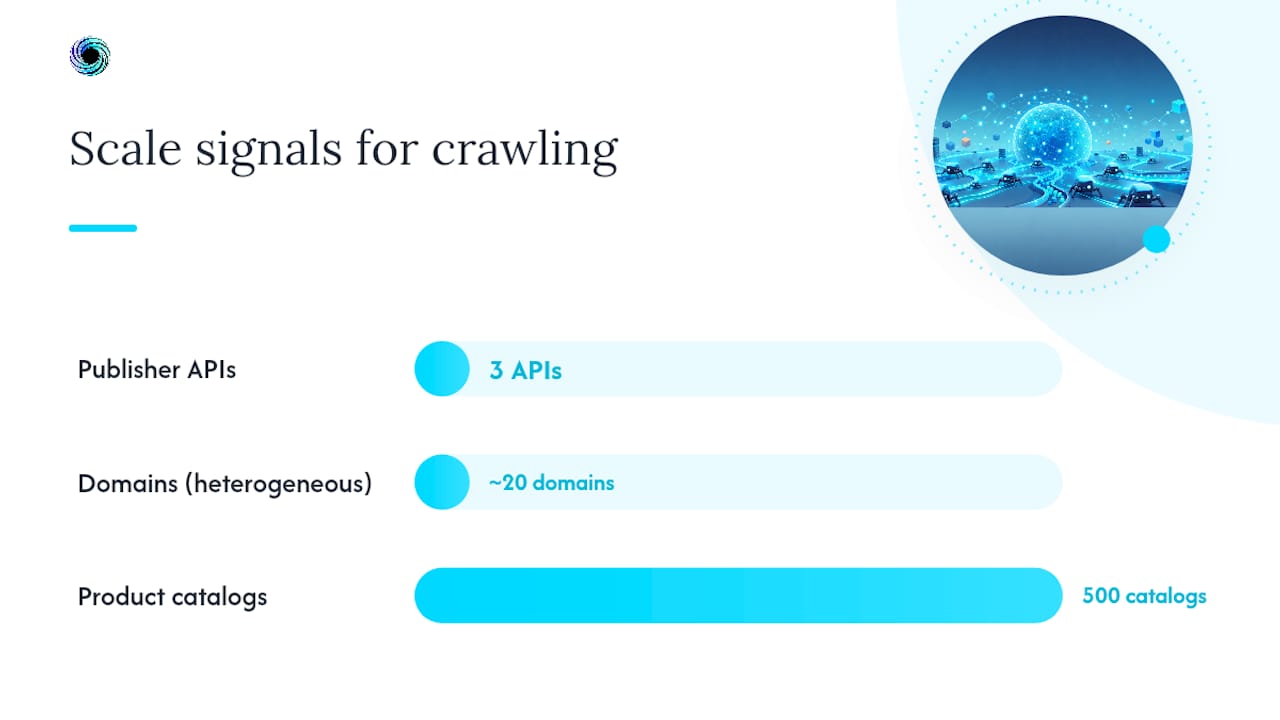
The right signal is volume plus schema diversity. If you're pulling from three well-documented publisher APIs, you don't need a crawler. If you're ingesting 500 product catalogs, competitor pricing pages, or research domains for a RAG corpus, you do.
Primary use cases:
- RAG corpus ingestion: Crawl and chunk thousands of pages into a vector store for retrieval-augmented generation.
- Live agent retrieval via MCP: Agents call a hosted Model Context Protocol endpoint to fetch fresh page content at query time.
- Catalog synchronization: E-commerce and market-intelligence teams refresh structured product or pricing data on a schedule.
- OSINT and market monitoring: Track public-facing changes across many domains with webhook alerts on content deltas.
- Large-scale competitive analysis: Normalize and compare content across industry sites into a single structured schema.
Decision signals that favor bulk crawling:
- You need data from more than ~20 domains with heterogeneous structure.
- Refresh cadence is daily or faster, making manual pipelines impractical.
- Downstream consumers are LLMs or embedding models that need clean Markdown or JSON, not raw HTML.
- You need typed, discriminated-union responses so agents can handle failures without guessing.
- Cost predictability matters — runaway browser-render bills are a real operational risk.
When a publisher offers a structured feed or REST API, use it. A focused single-site scraper maintained by one engineer also beats a general crawler when the target is stable and narrow. Domain URL mapping use cases covers the boundary cases in more detail.
What are the core components of a production crawler?
A production bulk crawling pipeline has seven layers. Each one has a clear responsibility, and skipping any of them shows up as data quality problems downstream.
| Component | Responsibility | Typical tech |
|---|---|---|
| URL frontier | Prioritized queue of URLs to visit, partitioned by domain | Redis sorted sets, BullMQ |
| Scheduler / rate limiter | Per-domain concurrency and delay enforcement | BullMQ + Redis locks |
| Fetcher | HTTP fetch for static pages; browser for JS-rendered | undici, node-fetch, Playwright |
| Deduplicator | Canonical URL normalization, Bloom filter for seen URLs | Bloom filter, SHA-256 checksums |
| Extractor | DOM pruning, schema-guided JSON/Markdown output | Custom parsers, Readability, LLM |
| Quality gate | Score pages before embedding; drop low-value content | Rule-based + model scoring |
| Storage | Raw HTML archive + normalized output + vector index | PostgreSQL + pgvector, S3 |
Keep raw HTML in cold storage. When an extraction schema changes, you reprocess from raw rather than re-crawling. Checksums on raw pages let you skip unchanged content on subsequent runs, which is where most of the cost savings come from in practice.
The production-grade AI web data agent guide recommends separating crawl, extract, embed, and index stages explicitly, and treating live retrieval as a complement to indexed RAG for fresh or long-tail queries. That separation is what makes each stage independently scalable and debuggable.
Which extraction strategies produce reliable agent-ready data?
The most reliable pattern at scale is a two-stage approach: prune the DOM first, then generate a reusable programmatic scraper from a small set of seed pages.

DOM pruning strips navigation, ads, footers, and boilerplate before any LLM sees the content. Less context noise means fewer hallucinated field values and lower token spend. A VLDB 2025 workshop paper argues that converting HTML to cleaned Markdown or normalized JSON before inference materially increases extraction reliability for LLM-based pipelines.
Schema-guided extraction takes the pruned content and maps it to a typed output schema. The three-seed approach works like this:
- Fetch three representative pages from the same domain template.
- Generate a programmatic wrapper (XPath or CSS selectors) that covers all three.
- Validate the wrapper against a held-out page before deploying it to the full crawl.
This is the pattern Co-Scraper formalizes. The Co-Scraper paper reports wrapper generation times of 12.76–17.75 seconds versus 107–238 seconds for a naive baseline, which matters when you're generating wrappers for hundreds of domain templates.
Statistic callout: Co-Scraper's two-stage pipeline achieves field-level F1 ~94.78% and reuse success ~90.39% on benchmark sets, with end-to-end F1 values reaching ~96.36 on some splits.
Practical pipeline order: raw HTML → DOM pruning → Markdown/JSON normalization → semantic chunking → embedding. Filtering before embedding is the single biggest cost lever. A systematic review in Springer (2026) finds that small language models (SLMs) are increasingly used as routers and field extractors in cost-sensitive pipelines, with larger LLMs reserved for complex generation tasks.
Pro Tip: Pin your scraper wrappers to a stable parent element rather than an absolute XPath. When a site adds a sidebar or restructures a nav, stable-parent anchoring survives the change; absolute paths break silently.
For a deeper look at structured data extraction with schema validation, the Gyrence blog covers typed output patterns in detail.
How do you scale a crawl without breaking things?
Scaling bulk domain crawling safely is mostly about partitioning and budgets, not raw concurrency.
Scaling primitives:
- Partition the job queue by domain so one slow site doesn't block others.
- Set per-domain concurrency limits (typically 1–3 workers) and enforce a crawl delay that respects
Crawl-delayinrobots.txt. - Use Redis + BullMQ for distributed job coordination and per-domain locks to prevent duplicate fetches across workers.
- Add horizontal workers for CPU-bound extraction; network and embedding API calls are usually the actual bottleneck.
A "fetch ladder" keeps costs predictable: try cheap raw HTTP first, fall back to a hidden API endpoint if one exists, then use a managed fetcher, and only spin up a browser worker as a last resort. Set explicit max-pages-per-domain and max-browser-renders-per-domain budgets before any large crawl starts.
Pre-crawl checklist:
- Verify
robots.txtis cached and respected for every seed domain. - Confirm proxy pool capacity covers your target concurrency without triggering rate limits.
- Run a test seed crawl (10–20 pages per domain) and validate extraction schema coverage.
- Set spending caps and dead-letter queue alerts before scaling to production volume.
- Confirm idempotency: re-queuing a URL must not produce duplicate records.
How do you turn crawled pages into embedding-ready vectors?
Quality gates come before the embedding call, not after.
Chunking guidance:
- Use semantic sentence-window chunks rather than fixed character splits.
- For OpenAI
text-embedding-3-small, chunks of 512–1,024 tokens work well; Cohereembed-v3handles up to 512 tokens per chunk efficiently. - Persist metadata with every chunk: source URL, crawl timestamp, content checksum, and any schema fields extracted alongside the text.
Pseudo-call pattern for upserting chunks:
POST /vectors/upsert
{
  "namespace": "rag-corpus-v2",
  "vectors": [
    { "id": "sha256:abc123", "values": [...], "metadata": { "url": "...", "crawled_at": "...", "schema_version": "1.4" } }
  ]
}
Embedding best practices:
- Filter first, embed later. Every token you send to an embedding API costs money; quality gates are free by comparison.
- Batch embedding calls to stay within rate limits and reduce per-call overhead.
- Store raw embeddings alongside normalized text so you can re-index without re-crawling.
- Use pgvector for teams already on PostgreSQL; move to a dedicated vector DB only when index size or query latency demands it.
The LLM context window and web data guide covers chunk-size trade-offs for popular embedding models in more detail.
What failure modes should you plan for?
The failures that hurt most are the silent ones: a site restructures its DOM, extraction null rates climb, and no alert fires because the pipeline keeps running.
Common failure modes:
- JS-rendered SPA content: Static fetchers return empty shells. Use Playwright as a fallback, not the default.
- CAPTCHAs and bot blocks: Rotate proxies, respect rate limits, and accept that some domains will block you regardless.
- Silent structural changes: Field extraction drops to zero but the pipeline reports success. Monitor field-level coverage rates, not just HTTP 200s.
- Content duplication: Near-duplicate pages inflate embedding indexes. Checksums and Bloom filters catch exact duplicates; MinHash catches near-duplicates.
- Proxy churn: Residential proxy pools rotate IPs unpredictably. Build retry logic with exponential backoff for 429 and 503 responses; classify 401/403 as unrecoverable and route to a dead-letter queue.
Compliance notes: Obey robots.txt and Crawl-delay directives. Review site terms of service before crawling. Rate-limit aggressively enough that your crawler doesn't produce DOS-like traffic patterns. For US-based pipelines, align data retention and PII handling with applicable state privacy laws (CCPA for California-resident data is the most common trigger). The AI agent web browsing checklist covers policy-compliance steps in a structured format.
Pro Tip: *Run automated seed-page revalidation on a 24-hour schedule. Re-extract three seed pages per domain template and compare field coverage against the baseline.
Should you build in-house or use a managed web-data API?
| Dimension | Build in-house | Managed API |
|---|---|---|
| Control over raw data | Full | Partial (normalized output) |
| Cost predictability | Variable; proxy and render costs spike | Fixed per-call with spending caps |
| Anti-bot handling | You own it | Handled by provider |
| Speed to production | Weeks to months | Hours to days |
| Maintenance burden | Ongoing; site changes break wrappers | Provider absorbs most changes |
| Typed failure responses | You build them | Returned by default |
Build in-house when: targets are narrow and stable, regulatory requirements demand full data custody, or you need extraction logic too custom for any general API.
Use a managed API when: you're targeting many domains with diverse structure, you need typed discriminated-union responses so agents handle failures cleanly, and you want spending caps that prevent a runaway browser-render bill.
What to evaluate in a managed provider:
- Typed error responses (not just HTTP codes — structured failure reasons)
- MCP endpoint support for live agent retrieval
- Spending caps and per-workspace billing controls
- Extraction primitives that return normalized Markdown or JSON directly
- URL mapping and site traversal as first-class operations
Gyrence covers all five: Search, Traverse (Gyre), Fetch, Extract, and Map, each returning typed responses with explicit failure modes. For teams evaluating site crawler APIs, the comparison guide covers what to look for in LLM-friendly options.
An editorial perspective on where teams go wrong
Most teams underestimate the maintenance cost of programmatic scrapers and overestimate how long a freshly generated wrapper stays valid. Sites change.
The three-seed approach from Co-Scraper is the right starting point, but it only stays reliable if you treat wrapper revalidation as a first-class operational concern, not an afterthought. The teams that get this right run automated seed checks daily and regenerate wrappers proactively. The teams that get it wrong discover the problem when a downstream model starts hallucinating because its RAG corpus went stale.
The other underrated decision is where to put the quality gate. Filtering after embedding wastes money. Filtering before extraction wastes less, but the real win is filtering immediately after fetch, before any LLM call touches the content. The IGC pilot's notable noise reduction came from a gate that ran on raw page signals, not on extracted fields.
If I were starting a new bulk crawling project today, I'd run a three-domain pilot first: pick one JS-heavy site, one static site, and one paginated catalog. Validate schema coverage on seeds, generate wrappers, run the quality gate, and embed a sample corpus before committing to infrastructure.
Gyrence handles the pipeline so you can ship faster
When your team needs structured, agent-ready data from many domains and can't afford months of pipeline maintenance, Gyrence gives you five composable API primitives — Search, Traverse, Fetch, Extract, and Map — each returning typed, discriminated-union responses that include the failure cases, not just the happy path. Spending caps mean your bill is predictable even when a crawl hits an unexpectedly JS-heavy domain. Bundled LLM extraction means you're not paying a separate AI API bill on top of your scraping costs.

Gyrence suits solo developers and small data teams who need to move from "we need web data" to a working RAG corpus or agent retrieval layer in days, not months. Start with the Gyrence API and run your first three-domain pilot before committing to any infrastructure.
Sources
- Co-Scraper: Two-stage agentic web extraction (arXiv 2606.14821v1)
- LLMs applied to web scraping and crawling: a systematic review (Springer, 2026)
- VLDB Workshops 2025 (PhD paper) — DOM pruning + schema-based extraction
- Building a production-grade AI web data agent (TheAirRuntime)
FAQ
What is bulk domain crawling in the context of AI pipelines?
Bulk domain crawling is the automated process of fetching, normalizing, and extracting structured data from many websites simultaneously so the output can feed RAG corpora, embedding indexes, or AI agent retrieval systems directly.
How fast can a bulk domain crawler realistically run?
The IGC pilot achieved ~5.4 pages/sec on commodity hardware with a mean fetch latency of ~1,241 ms. Practical targets for a well-tuned distributed crawler on standard cloud infrastructure fall in the 3–8 pages/sec range per worker pool.
What extraction approach gives the best accuracy across many domains?
A two-stage approach combining DOM pruning with schema-guided programmatic scraper generation (the three-seed method) consistently outperforms single-pass LLM extraction.
When should a team use Gyrence instead of building a custom crawler?
When targets span many domains with diverse structure, when you need typed failure responses for agent reasoning, or when spending caps and predictable per-call pricing matter more than full control over raw infrastructure.
Does bulk domain crawling require browser rendering for every page?
No. Static HTTP fetchers handle the majority of pages. Browser rendering via Playwright should be a fallback for JS-rendered SPAs only, with explicit per-domain render budgets set before any large crawl to prevent cost spikes.