
TL;DR:
- HTML parsing at scale is hindered by structural drift, JavaScript rendering, and noise, making extraction costly and brittle. Using schema-guided extraction with fail-loud responses and pre-processing reduces token costs and improves reliability, especially when combined with rigorous monitoring of rejection rates and body sizes. Implementing fallback selectors, tiered rendering, and explicit failure handling helps pipelines detect and recover from layout changes and access blocks proactively.
HTML parsing fails at scale because structural drift, JavaScript rendering, boilerplate noise, token costs, and access-layer blocks combine to make extraction brittle and expensive. The fastest remedy: schema-guided extraction with typed, fail-loud responses, pre-processing to strip noise, and spending caps to keep costs predictable.
TL;DR checklist:
- Use schema-guided extraction with typed/discriminated-union responses
- Add validation assertions and result-count checks on every run
- Build ordered selector fallback chains anchored on stable attributes (
aria-*,data-*) - Pre-process HTML to strip nav, footer, and scripts before sending to any LLM
- Run canary jobs on a representative URL sample before full production runs
- Set spending caps so a runaway job doesn't drain your budget overnight
Table of Contents
- Why HTML Parsing Fails at Scale: Root Causes, Ranked
- Silent Failures vs. Fail-Loud Extraction
- Architecture Patterns That Make Extraction Reliable
- Testing and Monitoring Playbook
- How Gyrence Implements Fail-Loud Extraction
- How Async Content Loading Breaks Parser Timing
- Browser Rendering Quirks and Environment Inconsistencies
- Key Takeaways
- The Maintenance Reality Teams Underestimate
- Gyrence Gives Your Pipeline an Honest API
- FAQ
- Useful Sources
Why HTML Parsing Fails at Scale: Root Causes, Ranked
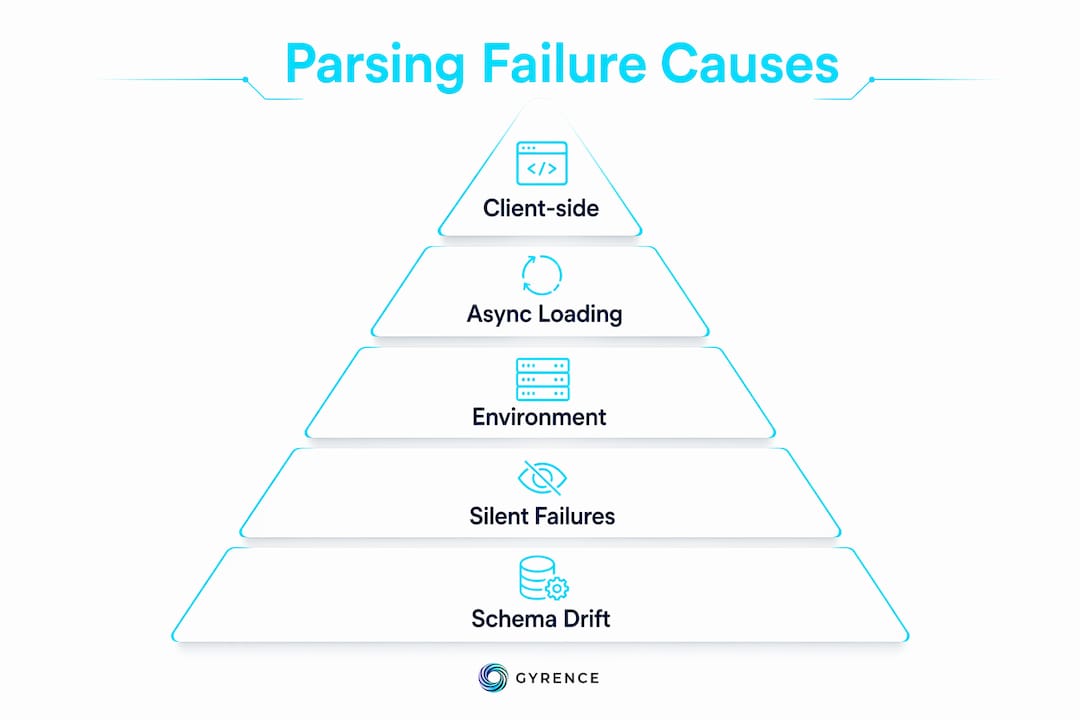
Not all parsing failures are equal. Some kill pipelines immediately; others corrupt data silently for weeks. Here is the prioritized taxonomy, ordered by how often each cause hits production teams.
| Cause | Priority | Why It Hurts at Scale |
|---|---|---|
| Client-side rendering / SPAs | Critical | Static fetches return empty shells; JS-rendered content passes as "successful" but empty |
| Lazy loading and hydration timing | High | Content loads after initial parse; timing windows vary by server load |
| Selector drift and A/B tests | High | Layout variants silently break selectors across a fraction of traffic |
| Obfuscated / auto-generated class names | High | Build tools regenerate class names on every deploy |
| Personalization and layout variants | Medium | Geo, auth state, and cohort targeting produce structurally different pages |
| Malformed or truncated HTML | Medium | Unclosed tags and mid-stream truncation corrupt the DOM tree |
| Bot defenses and consent pages | Medium | Tiny response bodies that look like success but contain no data |
| Encoding and internationalization | Low-Medium | UTF-8/Latin-1 mismatches corrupt multi-byte characters |
| Headless vs. real-browser environment gaps | Low-Medium | Fingerprinting and feature-detection scripts behave differently per environment |
Fast triage checklist: Print the response body length and first 200 bytes. A body under 5KB on a content-heavy page almost always means a block or consent wall, not a selector problem. Check for client-side placeholder patterns (<div id="app"></div>, <div data-reactroot>). Verify response headers for cf-ray, x-datadome, or similar bot-defense signals. Only after ruling out access-layer failures should you investigate selector drift.
Pro Tip: Before blaming your selectors, log body size on every fetch. A sudden drop in median body size across a domain is almost always an access-layer change, not a layout change.
At volume, these causes compound. Scaling a scraper introduces non-linear operational pain: proxies burn, headless rendering costs spike, and selector maintenance becomes a standing job across dozens of domains.
Silent Failures vs. Fail-Loud Extraction
The most dangerous HTML parsing errors are the ones you don't see. LLMs filling missing fields with plausible-looking defaults produce hard-to-detect downstream corruption. A price field that returns $0.00 instead of null, a date that returns today's date instead of an error, a product name that gets swapped with a nearby element's text — these pass validation silently and poison your dataset.
Contrast that with a typed extraction response. When a price field is absent, a discriminated-union response returns { "status": "field_missing", "field": "price" }. Your agent can branch on that. Your monitoring can count it. Your on-call engineer can see the spike.
Key observability signals to track:
- Null/rejection rate per field: a rising null rate on
priceortitleis an early indicator of layout drift - Result-count assertions: if a product listing page normally returns 24 items and now returns 3, something broke
- Response body size distribution: track median and p95 body sizes per domain; anomalies surface access-layer changes
- Extraction variance across repeated runs: run the same URL twice; divergent outputs indicate non-determinism
- Embedding-space similarity: boilerplate tokens dominate chunks and collapse retrieval quality in RAG systems
Rejection-rate spikes are often earlier drift indicators than selector failures. Instrument them first.
Architecture Patterns That Make Extraction Reliable
Pre-processing layer
Strip boilerplate before sending anything to an LLM. A DOM pre-processing heuristic can reduce HTML input size by up to ~99% — one documented example went from 580KB to 4.2KB after removing nav, footer, and scripts, then collapsing identical subtrees. That reduction cuts token costs and improves model accuracy simultaneously. Converting the cleaned output to LLM-friendly markdown preserves semantics while removing the remaining noise.
Pro Tip: Use SimHash or MinHash to deduplicate repeated product cards before sending to an LLM. Identical or near-identical subtrees waste tokens and amplify variance in model outputs.
Selector strategy
Build ordered fallback chains. Prefer aria-label, data-product-id, and structural position over presentation classes. When a CSS class changes on deploy, your fallback to a structural anchor keeps the pipeline alive. Evaluate selectors on a sample of 20–30 pages per domain before promoting them to production.
Hybrid rendering tiering
- Attempt a static HTTP fetch first
- Check body length and placeholder heuristics
- If heuristics detect a SPA shell or lazy-load pattern, escalate to headless rendering
- Log the render path taken per URL for cost attribution
Headless rendering costs multiple times more per page than a static fetch. Tiering keeps the majority of requests cheap while handling JS-heavy pages correctly. A headless CMS architecture on the target site often signals that content is server-rendered and safe to fetch statically.
Typed schema extraction
A typed JSON extraction response looks like this:
{
  "status": "ok",
  "fields": {
    "price": { "value": 49.99, "confidence": "high" },
    "title": { "value": "Widget Pro", "confidence": "high" },
    "availability": { "status": "field_missing" }
  }
}
Agents can branch on field_missing. Monitoring can alert on it. That is the structured extraction contract that makes pipelines maintainable.
Cost and ops controls
Set per-workspace spending caps. Run LLM calls only after heuristics have identified a candidate region. Sample 1–5% of URLs as canaries before full runs. Budget per-call costs explicitly so a domain layout change that triggers mass headless escalation doesn't produce a surprise invoice.
Testing and Monitoring Playbook
Testing layers:
- Unit tests for each selector in isolation against a saved HTML fixture
- Golden fixture tests: save a known-good response and diff against it on every deploy
- Differential extraction: run old and new selector versions in parallel; alert on divergence above a threshold
- End-to-end smoke tests using a canary dataset of 10–20 representative URLs per domain
Monitoring thresholds to set:
- Yield drop alert: trigger if result count falls below 80% of the 7-day rolling average
- Rejection-rate alert: trigger if null rate on any required field exceeds 5% over a 1-hour window
- Body-size anomaly: alert if median body size for a domain drops by more than 40%
- Cost anomaly: alert if per-domain spend exceeds 150% of the prior day's baseline
Pro Tip: Treat validation rejection rate as a continuous signal, not a one-time check. Route it into your on-call rotation the same way you would a p95 latency spike.
Runbook for yield-drop alerts:
- Pull a body snippet from the affected domain and check length and first 200 bytes
- Confirm render type: static vs. headless escalation rate for that domain
- Evaluate selector fallback chain against the current live page
- If selectors are intact, check for access-layer changes (new bot-defense headers, consent overlay)
- Route unresolvable failures to a dead-letter queue for manual review
- Retrain or update selectors; run golden fixture tests before re-promoting
For structured product data at scale, assign explicit ownership of the monitoring rotation. Parsing against third-party pages is a standing maintenance job, not a one-time build.
How Gyrence Implements Fail-Loud Extraction
Gyrence maps directly to the patterns above. Its five primitives cover the full extraction pipeline: Search (query the web), Traverse/Gyre (crawl outward from a seed URL), Fetch (retrieve and clean a page to markdown), Extract (schema-guided LLM JSON extraction), and Map (build a domain's URL graph). Each primitive returns a typed, discriminated-union response that surfaces failure cases explicitly.
Operational safety features built into the platform:
- Spending caps: set a hard credit ceiling per workspace so runaway jobs stop, not your budget
- Content-type-aware routing: Gyrence routes fetches to the appropriate renderer automatically, keeping headless usage minimal
- WebDoppler monitoring with webhook alerts: get notified when a tracked page changes structure before your pipeline breaks
- Predictable per-call cost: no separate LLM extraction charge; bundled pricing means your bill reflects usage, not surprises
For teams building AI agents on unstructured HTML, the typed response contract is the difference between a pipeline that fails visibly and one that corrupts data silently for days.
How Async Content Loading Breaks Parser Timing
Asynchronous content loading is one of the most common reasons a static fetch returns structurally valid but semantically empty HTML. The page skeleton arrives immediately; product prices, review counts, and inventory status load via subsequent XHR or fetch calls triggered by JavaScript. A parser that reads the initial response gets a valid DOM with placeholder elements where the data should be.

The problem compounds at scale because timing windows are not fixed. Under server load, hydration can take 200ms or 4 seconds on the same URL. A headless renderer with a fixed wait time will succeed on some runs and fail on others, producing extraction variance that looks like a selector problem but is actually a timing problem. The reliable fix is to wait for a specific DOM signal (a sentinel element, a data attribute set by the app after hydration) rather than a fixed timeout. Alternatively, intercept the underlying XHR calls directly and parse the JSON response, bypassing HTML entirely.
Browser Rendering Quirks and Environment Inconsistencies
Running headless Chromium at scale surfaces environment gaps that don't appear in local testing. Fingerprinting scripts detect headless environments through missing browser APIs, non-standard canvas fingerprints, and WebGL renderer strings. Sites using DataDome, PerimeterX, or similar defenses will serve different content, or block entirely, based on these signals.
Beyond bot detection, CSS rendering differences between headless and headed browsers affect layout-dependent parsers. Absolute positioning and CSS Grid can place elements in a visual order that differs from DOM order. A parser relying on DOM sequence to infer relationships between a label and its value will produce incorrect extractions on pages where visual and DOM order diverge. The practical fix is to anchor extraction on semantic attributes (aria-labelledby, data-*) rather than positional assumptions, and to optimize image and asset handling to reduce render time variance across environments.
Key Takeaways
HTML parsing fails at scale because structural drift, JS rendering, silent LLM hallucinations, and access-layer blocks combine to corrupt data invisibly unless you build fail-loud validation, typed responses, and cost controls into the pipeline from the start.
| Point | Details |
|---|---|
| Schema-guided typed extraction | Return discriminated-union responses so agents branch on explicit nulls, not guessed defaults. |
| Pre-process before LLM calls | Strip boilerplate first; a 580KB page can reduce to 4.2KB, cutting token cost and improving accuracy. |
| Selector fallback chains | Anchor on aria-* and data-* attributes; ordered fallbacks survive deploy-time class-name regeneration. |
| Canaries and yield assertions | Alert when result counts drop below 80% of rolling average; rejections spike before selectors break. |
| Gyrence fail-loud API | Gyrence returns typed responses with explicit failure codes and spending caps so pipelines fail visibly, not silently. |
The Maintenance Reality Teams Underestimate
Most teams treat HTML parsing as a build task. Write the selectors, ship the pipeline, move on. That assumption is what causes the 2 AM incident six weeks later.
Third-party pages change without notice. A/B tests run continuously. Bot defenses update their fingerprinting logic. A selector that worked yesterday against a stable class name breaks today because a front-end deploy regenerated it. The teams that handle this well share one habit: they instrument everything and assign ownership. Rejection rates, yield counts, body-size distributions — these are on-call signals, not post-mortem artifacts.
The other common mistake is feeding full HTML to an LLM and calling it "AI extraction." It is expensive, non-deterministic, and amplifies every upstream noise problem. Pre-process first, send a small labeled payload to the model, and validate the output against a schema. That sequence is what makes LLM extraction cost-predictable and auditable.
Realistic expectation: budget one engineer-day per month per 10 active domains for selector maintenance and monitoring tuning. Less if you have good canaries and typed responses catching drift early. More if you don't.
Gyrence Gives Your Pipeline an Honest API
When your extraction pipeline needs to handle blocked pages, missing fields, and layout drift without silently corrupting data, the answer is a typed API that names every failure mode. Gyrence returns explicit status codes for consent walls, bot blocks, and missing fields so your agents branch correctly instead of hallucinating defaults. Five composable primitives cover the full pipeline from search to structured JSON, with spending caps that stop runaway costs before they hit your invoice. No surprise LLM charges. No hidden failure modes.

Read the Gyrence developer docs to see how typed extraction responses and WebDoppler monitoring work in practice, then start a workspace at gyrence.com/app with spending caps enabled from day one.
FAQ
Why does HTML parsing fail silently at scale?
LLMs filling missing fields with plausible defaults produce data that looks correct but isn't. Use typed, schema-guided extraction that returns explicit nulls and error codes instead.
What is the fastest way to reduce LLM token costs in HTML extraction?
Pre-process HTML to strip nav, footer, and scripts before sending to any model. One documented reduction went from 580KB to 4.2KB, cutting token costs by up to ~99%.
How do you detect selector drift before it breaks production?
Track rejection rates and result-count assertions per domain. Spikes in null rates on required fields are earlier drift indicators than outright selector failures.
When should you escalate to headless rendering?
Escalate when a static fetch returns a body under 5KB on a content-heavy page, or when placeholder patterns like <div id="app"> appear in the response. Default to static fetches to keep costs low.
How does Gyrence handle HTML parsing failures at scale?
Gyrence returns typed, discriminated-union responses with explicit failure codes for blocked pages, consent walls, and missing fields, plus spending caps and WebDoppler monitoring to catch structural changes before they corrupt your pipeline.
Useful Sources
- LLM accuracy in web extraction: what the data actually shows — silent LLM hallucinations and deterministic extraction (Failure Modes section)
- I tested 15 LLMs for web scraping and built heuristics instead — pre-processing impact (580KB to 4.2KB) and JS rendering (Root Causes, Mitigation Patterns)
- Build a Resilient Scraper That Survives Selector Drift — selector fallback chains, rejection-rate monitoring (Root Causes, Testing Playbook)
- Large-scale web scraping architecture — operational scaling pain points (Root Causes, Mitigation Patterns)
- Why Web Data is the Hardest Problem in RAG Systems — boilerplate pollution and embedding-space collapse (Failure Modes)
- Gyrence developer docs and platform overview — typed responses, spending caps, WebDoppler monitoring (Gyrence section)
- Why Agents Fail on Unstructured HTML — agent-specific failure patterns (Gyrence section)
- Markdown Isn't a Format — fetch-to-markdown intermediate representation (Mitigation Patterns)