
A domain URL map for agent navigation is a structured graph representation of a website's URLs that transforms web navigation from probabilistic guessing into deterministic pathfinding. Without this structure, AI agents suffer from what researchers call Topological Blindness, where they explore pages reactively with no global view of the site. Frameworks like WebNavigator and Mango have proven that graph-based navigation maps dramatically outperform reactive agents. WebNavigator's Interaction Graph approach achieved a 72.9% success rate on complex multi-site tasks, more than doubling previous benchmarks. This guide walks developers and data engineers through the concepts, tools, and implementation steps needed to build and deploy these maps at scale.
What is URL graph mapping and how does it structure websites for agent navigation?
URL graph mapping, formally called Interaction Graph indexing, models a website as a directed network where each page is a node and each hyperlink or interactive element is an edge. This is the standard industry term for what developers often call a "domain URL map." The distinction matters: a flat sitemap lists URLs, but an Interaction Graph captures the navigational relationships between them.
Reactive agents treat each page visit as an isolated decision. Graph-based agents query a prebuilt index and retrieve the exact path to their target. That shift from reactive to deterministic is the core value of URL graph mapping for agents.
The performance gap is measurable. Topological Blindness causes inefficient exploration; indexing GUIs as Interaction Graphs enables agents to teleport instead of guessing next steps. Deterministic retrieval and pathfinding double success rates compared to reactive exploration. That is not a marginal improvement. It is a structural one.
Key structural components of a URL graph include:
- Nodes: Individual pages, modal dialogs, and dynamic UI states
- Edges: Hyperlinks, form submissions, button clicks, and redirects
- Edge weights: Relevance scores, click depth, or BM25 keyword match scores
- Metadata: Page title, intent label, buyer journey stage, and last-crawled timestamp
Pro Tip: Index dynamic UI states, not just static URLs. A checkout modal or a filter panel counts as a navigable node. Agents that ignore these states miss a large portion of real-world site topology.
What tools and techniques are required to build a domain URL map for navigation agents?
Building a usable URL graph requires three categories of tooling: crawlers for discovery, graph databases or visualization tools for structure, and retrieval models for agent-time querying.

Crawling and discovery tools
Standard crawlers give you the raw URL inventory. Tools like Screaming Frog, Sitebulb, and SEO PowerSuite provide internal link analysis and real-time topology updates that support URL map validation. Screaming Frog exports edge lists directly as CSV, which feeds into graph construction pipelines. For lightweight, programmatic crawling, BM25-based keyword search combined with breadth-first traversal gives you a global website view without full-depth crawls.
Graph visualization and analysis tools
| Tool | Primary Use | Agent-Relevant Output |
|---|---|---|
| Gephi | Graph visualization and topology analysis | Orphan page detection, cluster mapping |
| Screaming Frog | Site crawl and internal link export | Edge lists, redirect chains |
| Sitebulb | Visual site architecture auditing | Link equity flow, crawl depth maps |
| NetworkX (Python) | Programmatic graph construction | Shortest path computation, node ranking |
Graph tools reveal topology issues faster than CSV or spreadsheet analysis. That speed matters when you are validating a map before deploying an agent against a production site.
Retrieval models for agent-time querying
Agents need to query the graph at runtime to select their next target. Multimodal retrieval models handle pages with mixed text and visual content. For structured JSON extraction from crawled pages, pairing a retrieval model with a schema-based extractor gives agents typed, queryable data rather than raw HTML. Jina-v4 is one example of a multimodal embedding model suited for this retrieval layer.
- Define URL patterns and breadcrumb logic during the graph construction phase, not after. Building URL patterns early avoids post-launch redirects and technical debt that breaks agent navigation paths.
- Filter URLs by intent before adding them to the graph. Pages without a clear intent label act as dead weight and reduce navigation efficiency.
How to create and implement a domain URL map step by step
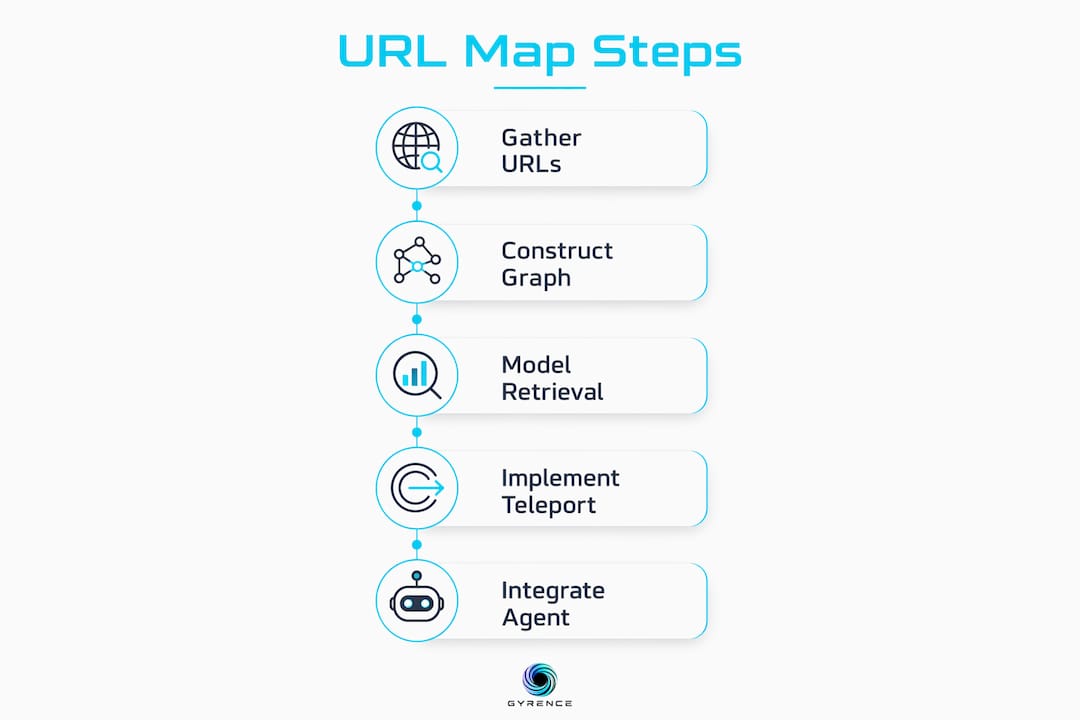
Building a domain URL map for AI agent navigation follows a repeatable five-step process. Each step produces a concrete artifact that feeds the next.
Step 1: Gather URLs and dynamic interaction elements
Start with a full crawl using Screaming Frog or a programmatic crawler. Export every URL, redirect, and interactive element. Capture JavaScript-rendered states by running a headless browser pass after the initial crawl. Log form endpoints, modal triggers, and paginated routes as separate nodes.
Step 2: Construct the Interaction Graph
Load your URL inventory into a graph structure. In Python, NetworkX handles this well for graphs under a few hundred thousand nodes. Each URL becomes a node with attributes: url, title, intent, depth, and last_crawled. Each link becomes a directed edge with a weight attribute set to a relevance score.
import networkx as nx

G = nx.DiGraph()
G.add_node("https://example.com/pricing", intent="conversion", depth=2)
G.add_edge("https://example.com/", "https://example.com/pricing", weight=0.9)
Step 3: Apply retrieval and reasoning models to select navigation targets
At agent runtime, the agent receives a task description. A retrieval model queries the graph to return the top-k candidate nodes ranked by semantic similarity to the task. BM25 works for keyword-heavy tasks. Dense vector retrieval works better for semantic tasks. Treating websites as networks with a global map enables agents to reason about what to do rather than guessing the next step.
Step 4: Implement teleportation logic for deterministic pathfinding
Teleportation is the key mechanism that separates graph-based agents from reactive ones. Once the agent selects a target node, it computes the shortest path using nx.shortest_path() and executes each step in sequence. This shifts the navigation workload away from LLM reasoning and onto precomputed graph structure. The LLM only decides what to reach, not how to get there.
Step 5: Integrate with agent workflows
Expose the graph as a queryable tool in your agent's tool registry. The agent calls graph.query(task) to get a ranked list of candidate URLs, then calls graph.path(source, target) to get the navigation sequence. This interface works with any agent framework that supports tool calling, including those using the Model Context Protocol.
Pro Tip: Rebuild the graph on a schedule, not just on demand. Sites change. A stale graph sends agents to 404 pages or outdated UI states. Weekly incremental crawls with delta updates keep the map current without full rebuilds.
What are common challenges and best practices when using URL maps for multi-agent navigation?
Deploying URL maps in production surfaces a predictable set of failure modes. Knowing them in advance saves significant debugging time.
Topological Blindness is the root cause of most agent navigation failures. Agents without a global map explore reactively, revisiting dead ends and missing shorter paths. The fix is not a better LLM. The fix is a prebuilt graph that removes the need for the LLM to reason about topology at all.
Dynamic content is the second major challenge. Sites that render content via JavaScript or personalize pages by session state produce different node content on each visit. Your graph construction pipeline must account for this by flagging dynamic nodes and refreshing them more frequently than static ones.
Best practices for production URL map deployments:
- Filter by intent before indexing. Pages lacking clear intent and buyer journey alignment should be pruned to optimize crawl budgets and agent efficiency. An agent that reaches an irrelevant page wastes a navigation step.
- Use episodic memory to prevent redundant navigation. Episodic memory in navigation agents prevents repeated dead-end exploration and adapts navigation probabilities dynamically based on reflection. Store visited nodes per session and exclude them from candidate retrieval.
- Manage crawl budget explicitly. Set a maximum node count per domain. Prioritize high-depth, high-intent pages over shallow marketing pages that rarely appear in agent task paths.
- Log navigation failures as graph feedback. When an agent fails to complete a task, record the failed path. Use that data to update edge weights and prune low-quality nodes from the graph.
"Successful URL maps must earn their existence by aligning pages with clear intent and customer journey stages. Irrelevant URLs should be cut to optimize crawl efficiency." — Agent Cookbooks, site-architecture skill
For multi-agent navigation decisions, the graph also serves as a coordination layer. Multiple agents can query the same graph without duplicating crawl work, reducing infrastructure overhead significantly.
How do WebNavigator and Mango apply domain URL maps in practice?
Two research frameworks demonstrate what graph-based navigation maps look like in production: WebNavigator and Mango. Their approaches differ in architecture but share the same core insight that a global site view outperforms reactive exploration.
Framework comparison
| Dimension | WebNavigator | Mango |
|---|---|---|
| Core mechanism | Retrieve-Reason-Teleport via Interaction Graph | Global website view with Thompson Sampling |
| URL prioritization | Semantic retrieval from prebuilt graph | BM25 scoring plus episodic memory reflection |
| Agent architecture | Single agent with graph index | Multi-agent with shared global view |
| Benchmark (success rate) | 72.9% on WebArena | 63.6% on WebVoyager, 52.5% on WebWalkerQA |
| Key innovation | Teleportation via shortest path | Thompson Sampling for URL allocation |
WebNavigator's Retrieve-Reason-Teleport workflow is the cleaner architecture for single-agent tasks. The agent retrieves candidate nodes from the Interaction Graph, reasons about which target matches the task, then teleports via a precomputed shortest path. The LLM never reasons about intermediate navigation steps. That separation of concerns is why the success rate is so high.
Mango takes a different angle. It builds a global website view through lightweight crawling and uses BM25 scoring and episodic memory reflection to avoid redundant navigation. Thompson Sampling allocates navigation attempts across candidate URLs probabilistically, improving success rates by 7.3% to 26.8% over baselines. Mango's architecture fits multi-agent pipelines where several agents share a single global map and coordinate to avoid duplicate work.
Both frameworks are grounded in the same principle: multi-agent navigation optimized by URL relevance, episodic memory, and adaptive allocation leads to measurably better system-wide navigation success. For developers evaluating which approach fits their stack, the choice comes down to task type. Single-agent, task-specific navigation favors WebNavigator's deterministic teleportation. Multi-agent, broad-coverage navigation favors Mango's probabilistic allocation.
Reviewing a web data API evaluation checklist before committing to either framework helps you identify infrastructure gaps early, particularly around structured data output and failure mode handling.
Key takeaways
A domain URL map built as an Interaction Graph is the single most effective way to convert reactive AI agent navigation into deterministic, measurable pathfinding.
| Point | Details |
|---|---|
| Graph beats flat sitemap | Interaction Graphs capture navigational relationships, not just URL lists, enabling shortest-path traversal. |
| Teleportation removes LLM guesswork | Precomputed shortest paths let agents jump to targets without reasoning about intermediate steps. |
| Filter URLs by intent | Prune pages without clear intent to reduce crawl budget waste and keep agent navigation efficient. |
| Episodic memory prevents redundancy | Storing visited nodes per session stops agents from revisiting dead ends in the same task run. |
| WebNavigator and Mango set the benchmark | WebNavigator hits 72.9% on WebArena; Mango improves baselines by up to 26.8% using Thompson Sampling. |
The case for building the map before deploying the agent
The pattern I see most often in failed agent deployments is the same one every time: the team ships the agent first and plans to "add structure later." Later never comes, because the agent is already in production burning tokens on dead-end navigation paths.
Graph-based indexing is not a performance optimization you bolt on after launch. It is the foundation the agent reasons from. An agent without a URL graph is like a driver without a map in a city where every road sign has been removed. The driver might eventually reach the destination, but the route will be inefficient and unreliable.
The research backs this up clearly. WebNavigator's 72.9% success rate on WebArena tasks was not achieved by using a smarter LLM. It was achieved by removing topology reasoning from the LLM entirely and offloading it to a prebuilt graph. The LLM got better results by doing less, not more.
The practical lesson is to build the graph before you write the agent. Crawl the target domain, construct the Interaction Graph, validate it with a tool like Gephi or Screaming Frog, and only then wire up the agent's tool calls. The graph becomes the agent's source of truth. Every navigation decision flows from it.
For teams working at scale, the graph also becomes a shared asset. Multiple agents can query the same index. Crawl costs drop. Navigation failures get logged back into the graph as feedback. The map improves over time. That compounding effect is what separates teams that ship reliable agents from teams that are still debugging navigation loops six months in.
— Glen
How Gyrence makes building URL maps faster for AI agents
Gyrence is a web data API built specifically for AI agents and data teams. Its Map primitive crawls a domain and returns a typed URL graph you can query directly, without stitching together a crawler, a graph library, and a retrieval model yourself. Every API call returns a discriminated-union response that includes failure cases, so your agent knows when a node is unreachable rather than silently retrying. Gyrence also includes Traverse, Fetch, Extract, and Search primitives, giving you the full data pipeline from URL discovery to structured JSON extraction in a single API. Spending caps mean your crawl budget stays predictable. Start building at gyrence.com.
FAQ
What is a domain URL map for agent navigation?
A domain URL map for agent navigation is a graph-structured index of a website's URLs and their navigational relationships, used to give AI agents deterministic pathfinding instead of reactive, step-by-step exploration.
What is URL graph mapping?
URL graph mapping models a website as a directed graph where pages are nodes and links or interactive elements are edges, enabling agents to compute shortest paths and retrieve target URLs by semantic similarity.
How does teleportation work in agent navigation?
Teleportation uses precomputed shortest paths on an Interaction Graph to jump an agent directly to a target URL, removing the need for the LLM to reason about intermediate navigation steps.
What is the difference between WebNavigator and Mango?
WebNavigator uses a single-agent Retrieve-Reason-Teleport workflow achieving 72.9% success on WebArena, while Mango uses multi-agent Thompson Sampling with a shared global website view, improving baselines by up to 26.8%.
How do I keep a domain URL map current as a site changes?
Run incremental crawls on a weekly schedule, flag dynamic nodes for higher-frequency refresh, and log agent navigation failures back into the graph as edge weight updates to prune stale or broken paths.