
Pinecone does not crawl the web. Its quickstart tells you to extract text and chunk it in your own code before upserting. So "Pinecone web data ingestion" is really two problems: acquiring clean, source-traceable page content, and shaping it into records Pinecone can store, refresh and retrieve. The second is well documented. The first is where pipelines break and bills drift. We built Gyrence for that first half: Search, Traverse, Fetch, Extract and Map primitives that return typed responses, failures included, so your ingestion job knows what it actually got.
TL;DR
- Pinecone stores and searches records. Fetching, cleaning and chunking happen upstream, in your code.
- Split long pages yourself and give each chunk a structured ID like
document_id#chunk_number. - Store the source URL as metadata on every chunk so answers can cite their pages.
- Treat failed fetches as data, not exceptions, and re-ingest by deleting a document's chunks before upserting new ones.
- The same pipeline feeds Weaviate: only the write step changes.
Table of Contents
- What Pinecone does and does not do
- The pipeline, stage by stage
- The same pipeline for Weaviate
- Cost per record, not per request
- Perspective
- Get the acquisition half handled
- FAQ
- Sources
What Pinecone does and does not do
Pinecone is a managed vector database: it finds records similar in meaning to a query. Per its Documents API guide, it supports BM25 full-text search, semantic search with integrated embeddings or vectors you supply, sparse-vector search, metadata filters and hybrid ranking with reciprocal rank fusion.
What it does not do is turn a URL into text. That is your pipeline's job, and it decides retrieval quality more than the index settings do.
The pipeline, stage by stage
1. Decide which pages you need
Crawling a whole domain and embedding everything is the fastest way to inflate cost per record. Map the domain's URL graph first, then fetch only the pages that matter. Our post on mapping first and fetching second walks through it. For site-wide jobs, see bulk domain crawling.
In Gyrence, Map returns a domain's URL graph via sitemaps, and Traverse (Gyre) walks a site outward from a starting URL.
2. Fetch and clean to markdown
Raw HTML carries navigation, cookie banners and scripts that pollute embeddings. Fetch returns a cleaned page as markdown. Decide what normalization must keep: headings, tables and lists carry structure your chunker can use. We cover the tradeoff in preserving HTML during content normalization and in what clean page markdown means.
Every Gyrence response is a typed, discriminated union, failure cases included. A blocked page, an empty page and a successful page are different shapes, so your code branches on them instead of embedding an error message as if it were content.
3. Chunk inside the token limit
Pinecone's data modeling guide says it returns whole documents, not chunks it generated. Each chunk is stored as its own record. The quickstart adds that the embedding model reads at most the first 2,048 tokens of a value and truncates the rest, so keep passages well below that.
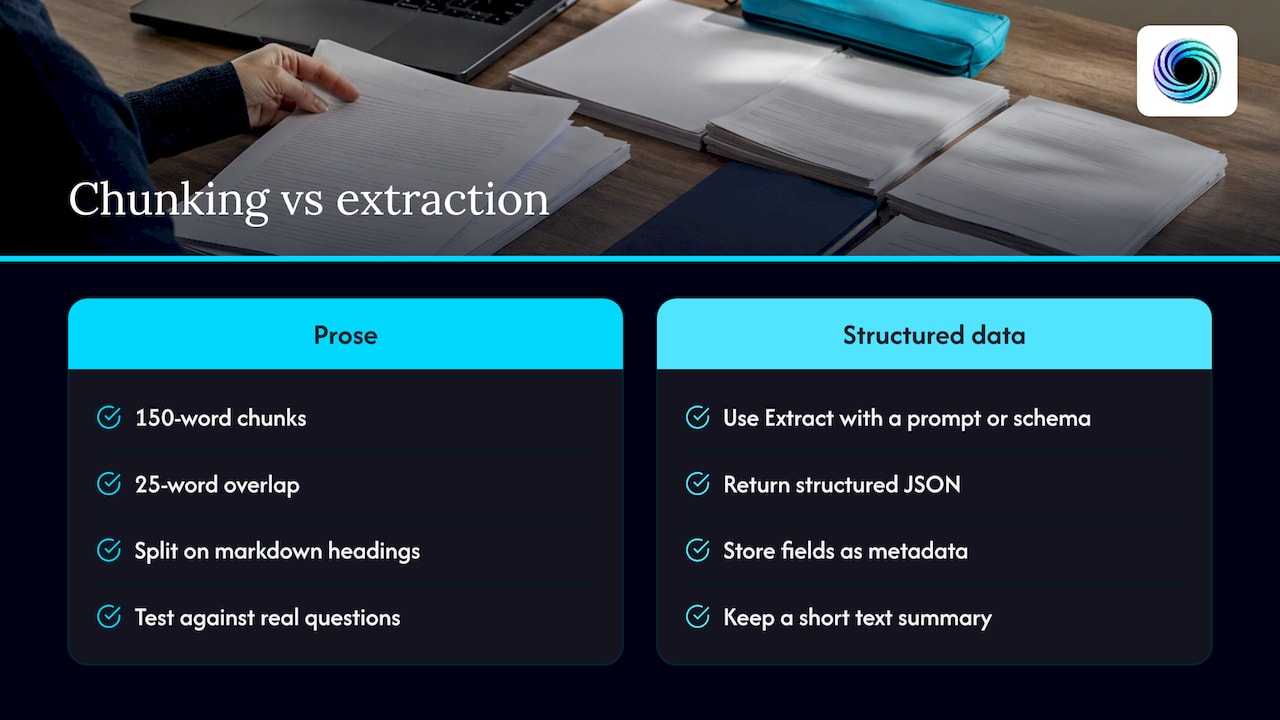
There is no single correct strategy. Weaviate's RAG guide notes that semantic boundaries, length windows, overlap or min/max sizes can all fit, depending on the data. Its worked example uses 150-word chunks with 25-word overlap. Start there, split on markdown headings first, and test against real questions.
When the page is a product listing, filing or pricing table, chunking prose is the wrong move. Use Extract with a prompt or schema to return structured JSON, then store the fields as metadata and a short text summary as the passage. Extraction is bundled: there is no separate AI extraction charge.
4. Give every chunk a stable ID and a source
Pinecone recommends IDs like document_id#chunk_number. The prefix makes a document's chunks easy to list, fetch, replace or delete. A workable record:
id:a1b2c3#004- text: the passage
- metadata:
source_url,title,fetched_at,document_id,chunk_number
Decide fields before you create a document index. Pinecone states that fields cannot be added, removed or modified after creation; changing the schema means deleting and recreating the index.
For compliance and financial-research work, source_url and fetched_at are the audit trail. Pinecone's LangChain guide shows returning retrieved documents with their source metadata alongside the answer. Weaviate's guide shows the same idea with chapter title and chunk index stored beside each passage.
5. Upsert, with or without your own vectors
Pinecone can embed text on write, or you can provide vectors. For multi-tenant apps, Pinecone's namespace example uses one namespace per workspace, so retrieval stays scoped to that workspace's content.
6. Refresh, delete, retry
Web content changes. To re-ingest a page, list its chunks by ID prefix, delete them, then upsert the new set. Otherwise a page that shrank from ten chunks to seven leaves three stale passages in your answers.
Pinecone indexes are eventually consistent, per its chunk-management guidance, so a read right after a write or delete may need a short delay or retry. Build that into your verification step.
To know when to refresh, WebDoppler monitors pages and sends webhook alerts, which your pipeline can use as the trigger to re-fetch and replace a document.

The same pipeline for Weaviate
Fetch, clean, chunk and metadata stay identical. Per Weaviate's quick tour, you create a collection with an embedding integration, import objects in batches, check per-object import errors, then run semantic retrieval. Vectors can be generated at import or supplied by you. Check those per-object errors the way you check fetch results: a batch that partly failed is still a batch that partly succeeded.
For retrieving the right passages once the corpus is in, passage-level search options are worth understanding.
Cost per record, not per request
A pipeline that retries blindly, refetches unchanged pages and pays separately for extraction is hard to forecast. Measure what each stored record costs end to end; our piece on cost per record in RAG ingestion shows how. For the full design, read the vector database ingestion pipeline.
Perspective
Most RAG failures we hear about start upstream of the vector database. A page that failed to load gets embedded as an error string. A refreshed page leaves old chunks behind. A bill arrives with a line item nobody modeled.
That is why our primitives return typed results, failures included, and why we cap spending and bundle LLM extraction into the same credits. Your agent should be able to reason about what it received, and your finance lead should be able to predict what it cost.
Pinecone and Weaviate do their job well once clean, identified chunks arrive. Our job is to make sure what arrives is worth storing.
Glen
Get the acquisition half handled
Gyrence gives you Search, Traverse, Fetch, Extract and Map through one API or a hosted MCP endpoint, so LangChain, LlamaIndex or a custom MCP client can pull web data without glue code. Plans include Standard at $75 per month, Growth at $299 per month and Scale at $549 per month, plus Free, Founders and Pay-As-You-Go tiers. See Gyrence pricing, or add WebDoppler monitoring to trigger refreshes.
FAQ
Can Pinecone scrape websites for me?
No. Pinecone's quickstart describes extracting and chunking text in your own code before upsert. Use a web data API for fetching and cleaning, then write the chunks to Pinecone.
How big should each chunk be?
Stay below Pinecone's 2,048-token embedding limit. Beyond that there is no universal answer. Weaviate's example uses 150 words with 25 words of overlap, a reasonable starting point to tune against real queries.
How do I cite the source page in an answer?
Store source_url, title and fetch time as metadata on every chunk. Return that metadata with the retrieved passages, as Pinecone's LangChain guide does.
How do I remove stale web content?
Use structured IDs and a document_id metadata value to find all chunks for a page, delete them, then upsert the fresh set. Allow a short delay or retry on reads, since indexes are eventually consistent.
Sources
- Pinecone quickstart
- Pinecone Documents API
- Pinecone data modeling
- Pinecone create an index
- Pinecone multi-tenant RAG example
- Pinecone chunk management guidance
- Pinecone LangChain guide
- Weaviate RAG guide
- Weaviate quick tour