
A web map tool for agents is a software component that integrates spatial data visualization, programmatic querying, and automation into AI agent platforms. The industry term is agentic mapping application, though "web map tool for agents" captures the same concept in developer conversations. These tools serve two distinct roles: interactive UIs that let users explore spatial data, and programmatic components that AI agents control directly via SDK or API calls. Platforms like ArcGIS, Mapbox, and BatchGeo each occupy different points on that spectrum. Understanding where your use case lands determines every architectural decision that follows.
What is a web map tool for agents?
A web map tool for agents provides spatial data visualization, automated routing, and natural language interfaces that enable non-GIS experts to perform complex spatial queries. That definition matters because it separates these tools from traditional GIS software, which assumes deep domain knowledge and manual operation. Agentic mapping tools are designed to be driven programmatically, queried conversationally, and embedded inside larger automated workflows.
Web GIS and web mapping are related but distinct. Web GIS focuses on data processing and storage on the backend, while web mapping emphasizes user-friendly interfaces for data consumption on the frontend. For agent workflows, the frontend is what the agent interacts with or controls. The backend is where your spatial data lives and transforms.
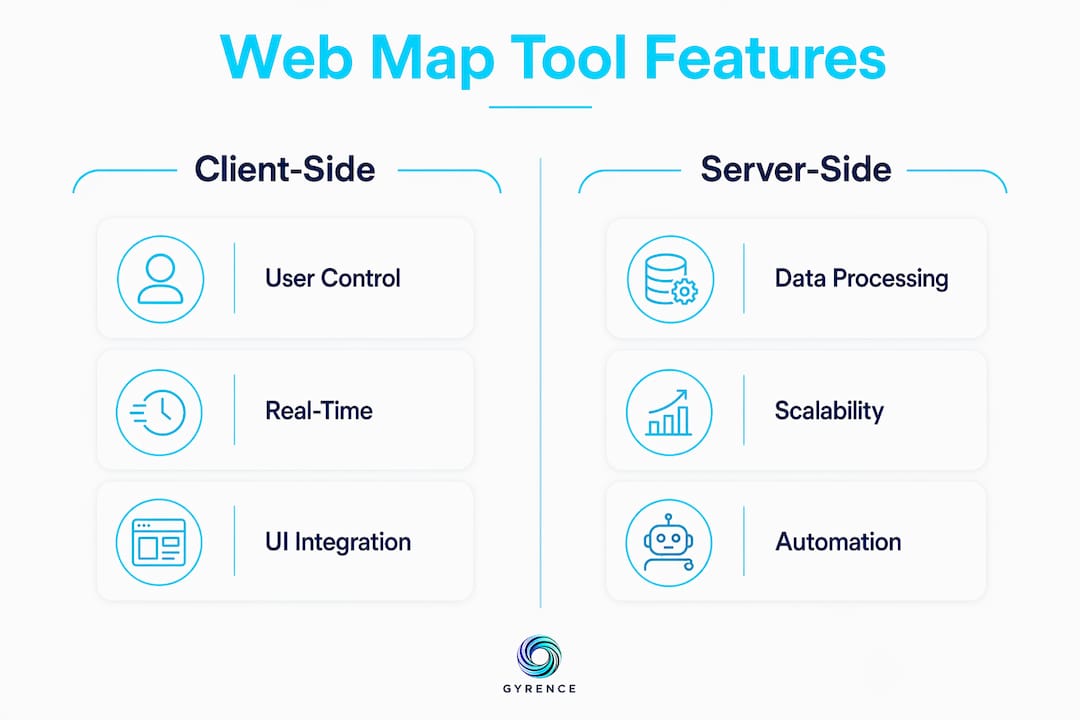
Developers must also recognize the division between client-side and server-side agent roles. Client-side agentic components act as UI assistants for mapping, responding to user prompts within the browser. Server-side agents perform backend spatial tasks autonomously, such as batch geocoding, proximity analysis, or route optimization, without any human in the loop.

What are the main features of web mapping software for agents?
The feature set that makes a mapping tool genuinely useful for agents goes well beyond tile rendering. Here is what to evaluate:
- Spatial data visualization and manipulation. The tool must render GeoJSON, KML, or vector tiles and allow agents to add, move, or remove markers programmatically.
- Natural language interfaces. ArcGIS AI components enable users to interact with maps through chat interfaces that process natural language prompts. This is the feature that lowers the barrier for non-GIS users most dramatically.
- Real-time data binding. Live map updates require stable schema contracts. A tool that only accepts CSV uploads cannot support an agent that needs to reflect changing inventory or property status in real time.
- Embeddability via SDK or API. iframe embedding is fast but limiting. Full SDK or API access lets agents control viewport, zoom, layer visibility, and marker state without cross-origin restrictions.
- Automation features. Mapsly, for example, automates property record matching to customers in real time and integrates with popular CRM platforms. That kind of automation is what separates a mapping tool from a mapping widget.
- Mobile and desktop support. Agents serving field teams or mobile users need tools that render correctly across form factors without separate codebases.
Pro Tip: Evaluate natural language query accuracy before committing to a platform. Ask the tool to filter markers by a compound condition, such as "show all properties under $500,000 within 10 miles of downtown." If it fails or hallucinates results, your agent will inherit that failure.
The comparison between client-side and server-side agent roles is not academic. A client-side agent that can only respond to user clicks is fundamentally less capable than a server-side agent that can trigger spatial queries on a schedule, push results to a CRM, and update map state without human input.
How do developers implement web map tools for agent workflows?
Implementation complexity spans a wide range. The right starting point depends on your data schema, update frequency, and how much programmatic control your agent needs.
- No-code tools for fast prototyping. BatchGeo and Mapcreator support drag-and-drop spreadsheet uploads with common file formats like CSV and XLSX. You can have a working map in minutes. The tradeoff is limited programmatic control and no real-time binding.
- SDK integrations for full control. The ArcGIS JavaScript SDK and Mapbox GL JS give you complete control over map state, layers, and events. Expect a development timeline measured in weeks, not hours. These are the right choice when your agent needs to manipulate the map as a first-class object.
- API-first headless approaches. Some workflows do not need a rendered map at all. An agent can call a spatial API, receive GeoJSON, process it, and pass structured results downstream without ever rendering tiles. This is the most agent-native pattern.
- Embedding strategies. iframe embedding works for read-only display but restricts cross-origin communication, blocking agent interactivity. Direct SDK or API integration is the correct choice for any workflow where the agent needs to write to the map, not just read from it.
- Data schema planning. Live map updates need stable GeoJSON or KML schemas and reliable API endpoints. Define your schema before you build bindings. Changing field names after the fact breaks every downstream consumer simultaneously.
Pro Tip: Use a development time estimator to scope SDK integration work before committing to a timeline. The gap between "we'll use Mapbox GL" and "we have a working agent integration" is consistently underestimated.
| Approach | Setup time | Agent control | Real-time support |
|---|---|---|---|
| No-code (BatchGeo, Mapcreator) | Minutes | None | No |
| iframe embed | Hours | Minimal | No |
| Mapbox GL JS SDK | Days to weeks | Full | Yes |
| ArcGIS JavaScript SDK | Weeks | Full | Yes |
| Headless spatial API | Hours to days | Full | Yes |
What practical applications do web map tools have for AI agents?
The shift from static spreadsheets to dynamic spatial visualization is not cosmetic. It changes what agents can communicate, automate, and decide. Here are the use cases with the clearest return:
- Automated routing and logistics. An agent can calculate optimal delivery routes, update them as conditions change, and push revised instructions to field teams, all without human intervention.
- Lead generation with CRM integration. Spatial queries for routing and lead generation are production use cases in real estate and logistics. An agent identifies prospects within a geographic radius, scores them by proximity and property value, and writes results directly to a CRM record.
- Real estate market analysis. Agents replace manual spreadsheet comparisons with interactive maps that layer price, days on market, and school district boundaries simultaneously. Clients see the data spatially, which accelerates decisions.
- Software testing and QA. Agents can drive map interactions programmatically to verify that markers render correctly, that filters return accurate results, and that routing calculations match expected outputs.
- GIS data pipeline monitoring. An agent watching a live GeoJSON feed can detect schema drift, flag anomalies in coordinate data, and alert engineers before bad data reaches production maps.
"Agentic mapping applications primarily use natural language interfaces to simplify spatial tasks, enabling conversational interaction rather than manual navigation." — Esri Developer documentation
The natural language angle deserves emphasis. An agent that can accept a plain-English query like "find all warehouse locations within 50 miles of Chicago with available dock capacity" and return a filtered map view is genuinely more useful than one requiring structured API calls for every interaction. That capability is now production-ready in ArcGIS and is emerging in Mapbox through third-party LLM integrations.
What are the key challenges in using web map tools for agents?
Most implementation failures trace back to a small set of predictable problems. Knowing them in advance is the entire advantage.
Data binding complexity is the most common source of broken agent workflows. CSV and XLSX uploads work for static maps. The moment you need live updates, you need a stable GeoJSON or KML schema, a reliable webhook or polling endpoint, and a binding layer that survives schema changes. Changing data schemas without proper bindings breaks static maps and halts agent automation. Version your schemas from day one.
iframe limitations catch developers who prototype with embeds and then try to add agent interactivity. Cross-origin restrictions block the programmatic calls your agent needs to make. Headless APIs or SDKs allow programmatic viewport control that iframes simply cannot provide. If agent control is a requirement, skip the iframe entirely.
Map layout design is underrated as a technical concern. Deliberate map design improves efficiency and user satisfaction in agentic applications. An agent that queries a poorly structured map, one with ambiguous layer names, overlapping markers, or inconsistent zoom levels, will produce unreliable results. Design the map as an interface your agent will read, not just one humans will look at.
Natural language accuracy is a hard dependency. If the NLP layer misinterprets spatial queries, every downstream action is wrong. Test with adversarial inputs before deploying. Security and scalability round out the list. Spatial APIs that expose raw database queries are a significant attack surface. Rate-limit agent calls, validate coordinate inputs, and plan for the load that comes when an agent runs queries in a loop rather than on demand.
Pro Tip: Build a structured data extraction guide into your agent's preprocessing pipeline. Clean, typed spatial data going into your map tool produces dramatically fewer runtime errors than raw web-scraped coordinates.
Key takeaways
A web map tool for agents is most effective when it combines SDK-level programmatic control, stable GeoJSON schema bindings, and a natural language interface that the agent can query without human translation.
| Point | Details |
|---|---|
| Define the agent role first | Decide between client-side UI assistant and server-side autonomous agent before choosing a tool. |
| Avoid iframe embeds for agents | Use SDK or headless API access to enable full programmatic map control. |
| Schema stability is non-negotiable | Version your GeoJSON or KML schema from day one to prevent binding failures. |
| Natural language accuracy is a hard dependency | Test NLP layers with adversarial spatial queries before production deployment. |
| Match tool complexity to use case | No-code tools suit prototyping; ArcGIS and Mapbox GL JS suit production agent workflows. |
The part most developers skip until it hurts
I have watched teams spend three weeks integrating Mapbox GL JS only to discover their agent's primary interaction pattern was a natural language query the SDK had no native support for. They had optimized for rendering performance when they should have optimized for query expressiveness. The tool was technically excellent and architecturally wrong for the job.
The honest framing is this: most web map tools were built for human users who click, zoom, and pan. Agentic use cases invert that model. The agent is the primary user, and it does not click. It calls methods, parses responses, and makes decisions based on structured output. That means the features that matter most are not the ones in the marketing screenshots. They are the ones in the API reference: typed return values, error codes that distinguish "no results" from "query failed," and schema contracts that do not change between releases.
The shift toward conversational natural language interfaces is real and accelerating. ArcGIS has production-grade chat interfaces for spatial queries. Mapbox is seeing third-party LLM wrappers proliferate. But natural language is an input layer, not a reliability layer. An agent that depends on NLP to interpret every spatial query is an agent that will fail in unpredictable ways when the prompt is ambiguous. The developers who get this right pair natural language input with structured output validation. The agent speaks naturally; the response is typed and verified.
My advice: treat your web map tool the same way you treat any external API in an agent workflow. Define the contract. Test the failure modes. Build for the case where the tool returns nothing, returns malformed data, or times out. The web data API evaluation checklist I use for scraping APIs applies almost verbatim to mapping tools. Reliability and honest failure reporting matter more than feature count.
— Glen
How Gyrence fits into your agent's data pipeline
Web map tools need clean, structured spatial data to function correctly. That data rarely arrives pre-formatted. Gyrence is an agent-ready web data API built to turn raw web content into typed, structured JSON your mapping tool can consume directly. The five composable primitives, Search, Traverse, Fetch, Extract, and Map, cover every stage from discovering URLs to extracting coordinates and property attributes from live pages. Every call returns a discriminated-union response that includes the failure cases, so your agent knows the difference between "no data found" and "request failed." Spending caps mean your scraping bill does not grow unbounded when an agent runs spatial queries in a loop. If your agent needs web-sourced spatial data feeding a mapping layer, Gyrence is the extraction layer that makes that reliable. Read the LLM-friendly markdown guide to see how Gyrence structures web content for downstream agent consumption.
FAQ
What is a web map tool for agents?
A web map tool for agents is a software component that integrates spatial data visualization, programmatic querying, and automation into AI agent platforms. It enables agents to perform spatial tasks like routing, proximity analysis, and lead generation without human navigation.
What is the difference between web GIS and web mapping?
Web GIS focuses on backend data processing and storage, while web mapping provides the frontend interface for data consumption. For agent workflows, web mapping is the layer the agent interacts with or controls directly.
Why should developers avoid iframe embedding for agent workflows?
iframe embedding restricts cross-origin communication, which blocks the programmatic calls agents need to manipulate map state. SDK or headless API integration provides full viewport and data control required for automation.
What data formats do web map tools support for live updates?
Live map updates require stable GeoJSON or KML schemas backed by reliable API or webhook endpoints. CSV and XLSX uploads work only for static, non-updating maps and cannot support real-time agent workflows.
Which platforms support natural language interfaces for spatial queries?
ArcGIS provides production-grade AI components that process natural language prompts through a chat interface. Mapbox GL JS supports natural language through third-party LLM integrations built on top of its SDK.