
Web data for agents means giving an AI agent a small set of reliable tools (search, fetch, extract, crawl, map) that return clean, typed results instead of raw HTML. It also means those tools must say so when they fail. Gyrence is built around that idea: five composable primitives (Search, Traverse, Fetch, Extract, Map) and a hosted MCP endpoint, with spending caps and typed responses that include the failure cases.
TL;DR
- Agents need tools, not pages. Split the job into search, fetch, extract, crawl and map, and call only the primitive the step needs.
- Failures must be data. A blocked page, a redirect or an empty extraction should come back as a typed result the agent can reason about, not as a silent blank.
- Start with the lightest capable tool. Plain HTTP fetches first, a browser only when a page truly needs one.
- Bills stay predictable when each operation has a known credit cost, a usage view and a hard cap.
- Connect through MCP or a plain API call, and keep the source URL with every fact the agent produces.
Table of Contents
- What "web data for agents" actually requires
- The five primitives, and what each is for
- HTTP first, browser as escalation
- Failure modes are part of the data
- Extraction without a second bill
- Keeping the bill predictable
- Connecting to LangChain, LlamaIndex or an MCP client
- Perspective
- Where to start
- FAQ
- Sources
What "web data for agents" actually requires
An agent that reads the web has to do four things well: find candidate pages, retrieve them, turn them into something a model can use, and know when a step did not work. Human-built sites are the hard part. The Knight-Georgetown Institute notes that agents parsing human-built sites can misread content or burden site infrastructure. It also lists the mechanisms the ecosystem is building around that problem: MCP for exposing tools to agents, site-description files such as llms.txt, and AI search APIs.
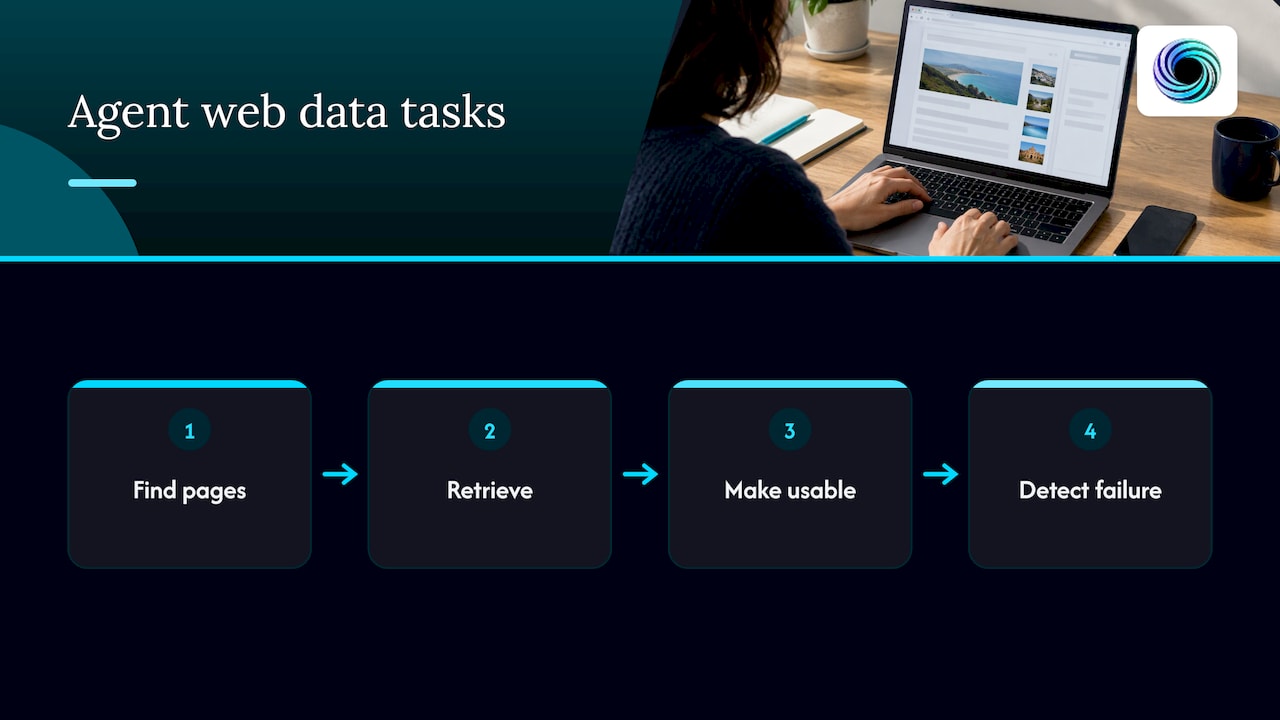
The practical reading for a developer: do not hand an agent a browser and hope. Give it narrow tools with predictable outputs. Every extra layer of guessing (which selector, which redirect, did the page load) becomes a model call, a cost and a chance for a confident wrong answer.
The five primitives, and what each is for
A useful way to think about agent web access is one tool per question the agent asks.
| Question the agent asks | Primitive | What comes back |
|---|---|---|
| Where might the answer be? | Search | Ranked leads with URLs |
| What does this page say? | Fetch | The page cleaned to Markdown |
| What are the specific fields? | Extract | JSON shaped by a prompt or schema |
| What else lives on this site? | Traverse | Pages found by following links outward from a start URL |
| What is the shape of this domain? | Map | The domain's URL graph, including sitemaps |
Keeping these separate matters for cost and for debugging. A search result is a lead, not evidence. A title or snippet can be stale, or attached to a URL that now redirects. The reliable flow is: search, pick authoritative sources, fetch each, record the final URL after redirects, extract the passage and its date, then cite the page itself, not the results page.
For a deeper walk through the design, see our guide to web data primitives for AI agents, and for the search step specifically, web search tools for autonomous agents. If your search step returns result pages, structured SERP data explains what a parsed result should contain.
HTTP first, browser as escalation
The most common agent mistake is reaching for a headless browser by default. Browsers cost more CPU, memory and wall time, and when a model drives them, every observation and action can add another model call. Plain HTTP retrieval is faster and cheaper, and it is the right first attempt for most pages.
A browser earns its place when a page needs client-side JavaScript to render, or a login must happen first. Even then, a good pattern is to use the browser only for the login step, then continue with HTTP. We cover that in Playwright for login, then HTTP, and the decision as a short list in our headless vs HTTP checklist.
Gyrence's Fetch routes by content type, so the agent asks for a URL and gets normalized output without choosing a retrieval strategy per page.
Failure modes are part of the data
Most scraping stacks fail quietly. A 200 response with a consent wall, an empty body from a script-rendered page, a redirect to a login screen: each looks like success until the agent summarizes nothing and sounds sure about it.
Gyrence returns a typed, discriminated-union response on every call, failure cases included. In practice that means your agent branches on a field instead of guessing:
ok: content and metadata, ready to use.- A typed failure: the agent can retry, switch primitive, or report that the source was unavailable.
This is what source-traceable work needs. For compliance and financial research, "we could not retrieve this" is a legitimate, auditable result. A fabricated summary is not. Store the final URL, the retrieval time and the response type with every extracted fact, and your output can be traced back to the page.
For a longer pre-flight list, use the AI agent web browsing checklist. If you also care about how agents show up in your own traffic logs, this piece on AI agents visiting your website is the other side of the same picture.
Extraction without a second bill
Turning a page into fields is where many bills grow. Gyrence's Extract uses LLM-guided, schema-aware extraction: you pass a prompt or a JSON schema and get typed JSON back. There is no separate AI extraction charge, so the model step does not appear as a second line item.
A schema also keeps the agent honest. If a field is not on the page, a schema-guided result can say so, which beats a plausible invention. Define required and optional fields deliberately, and treat missing required fields as a failure to handle, not a value to fill.
Keeping the bill predictable
Surprise bills usually come from three gaps: nobody knows what an operation costs, nobody knows what happens at zero balance, and nobody sees usage until the invoice. A billing guide from UsageRail lays out the fix for credit-based APIs: publish per-operation credit costs, settle zero-balance behavior, and show usage through a usage page, projections, threshold alerts, a hard stop or cap, and usage exposed in the API so code can react.
When you evaluate any web data API, run your own numbers:
- List the operations one agent task needs (for example one search, five fetches, three extractions).
- Multiply by the credit cost of each.
- Multiply by tasks per day, and add a loop-failure margin: agents retry.
- Set a spending cap below the figure you would be unhappy to see.
Our guide to turning vendor credits into per-request costs walks through this arithmetic in detail.
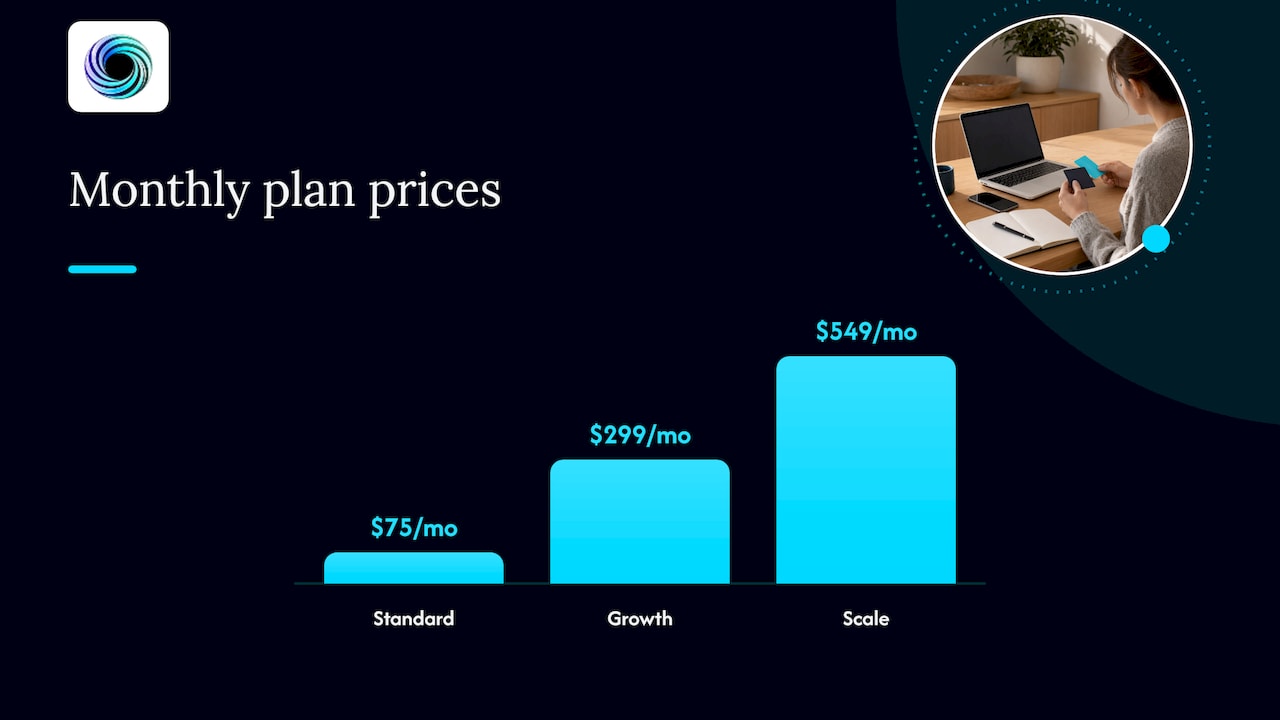
Gyrence bills in credits with predictable cost per call and spending caps. Published plans are Standard at $75 per month, Growth at $299 per month and Scale at $549 per month, alongside Free, Founders and Pay-As-You-Go options.
Connecting to LangChain, LlamaIndex or an MCP client
There are two routes. The first is a direct API call wrapped as a tool in LangChain, LlamaIndex or your own loop. The second is MCP: the hosted Gyrence MCP endpoint exposes the primitives to any MCP-capable client, so the agent discovers the tools and their typed schemas without custom glue.
Whichever route you take, give the agent one tool per primitive rather than one do-everything tool. Narrow tools make the model's choice easier and your logs readable. Step-by-step setup is in connecting a web scraping API to an AI agent, and replayable tests for MCP discovery are in agent search APIs. To build a full loop, follow the web research agent guide.
Perspective
Web data is a storm. Pages change, block, redirect and lie by omission, and an agent built on a tool that hides that will pass the weather on as fact.
We built Gyrence so the failure is the first-class result. Five primitives, each doing one job, each returning a typed answer whether it worked or not. When a fetch fails, your agent knows. When a page drifts, WebDoppler can watch it and send a webhook alert.
We also think the bill is part of the design. Credits per call, spending caps and no separate AI extraction charge mean a runaway loop hits a ceiling you chose. Your bill should be as legible as your response types.
Glen
Where to start
Start on the Free plan and wire one primitive into one agent task. Add Extract once Fetch returns clean Markdown, then set a spending cap before you scale the loop. If you need to know when a source page changes, WebDoppler monitors pages and sends webhook alerts. Plans and credit details are on the pricing page.
FAQ
Can an AI agent do web scraping?
Yes, but the reliable way is through tools rather than free-form browsing. The agent calls search, fetch and extract primitives and receives typed results. That keeps each step cheap, testable and traceable to a source URL.
When should an agent use a browser instead of plain HTTP?
Only when a page needs JavaScript to render or an interaction such as a login is required. Try HTTP first, since it is faster and cheaper. A common pattern is a browser for the login step, then HTTP for everything after.
How do I keep a scraping API bill from surprising me?
Know each operation's credit cost, estimate calls per task including retries, and set a hard spending cap. Also look for a usage view and usage exposed through the API so your code can slow down before the cap is reached.
How does MCP fit in?
The Model Context Protocol is one of the ways agents get access to tools, as the Knight-Georgetown Institute's overview describes. With a hosted MCP endpoint, a compatible client lists the available web tools and calls them directly, with no wrapper code.
Sources
- Mechanisms for agentic access, Knight-Georgetown Institute
- Usage-Based Pricing: Models and Real API Examples, UsageRail
- AI Agents Are Already Visiting Your Website, Krastor